Hash Buster is a Python tool for generating Rainbow Tables and cracking hashes using Rainbow Tables. It supports the following hash algorithms: md5, sha1, sha224, sha256, sha384, sha512.
Find my Rainbow Tables list here - https://mega.nz/folder/ys8VyY5T#kZsRbSZCL9WS4T3GEoPo6g
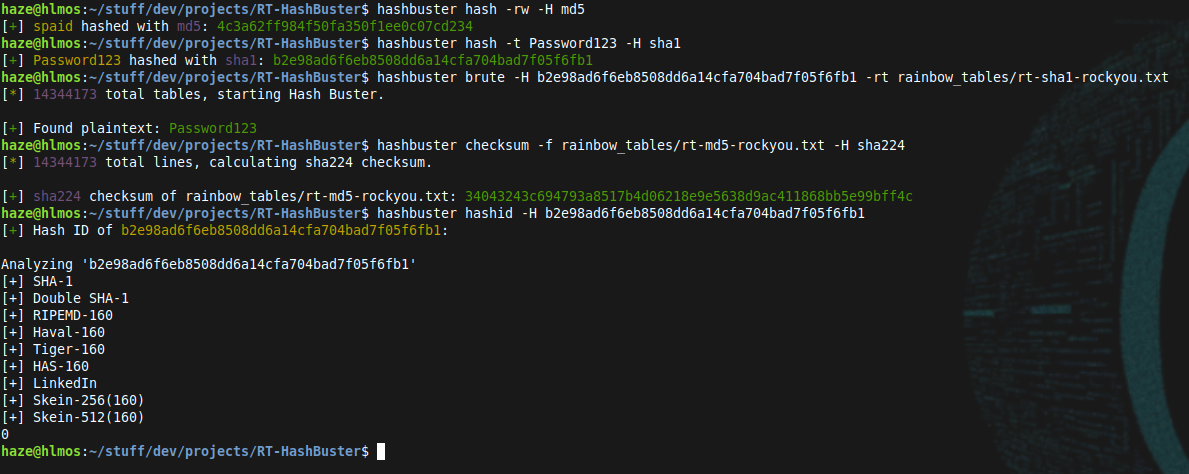
Run the install script to install Hash Buster.
chmod +x install.sh
./install.sh
After installation, run hashbuster to use the program.
Hash Buster can be used in a few modes: build, brute, chechsum, hashid and hash
In build mode, Hash Buster generates a Rainbow Table from a given wordlist and a hash algorithm, and saves it to an output file. To use build mode, run the following command:
hashbuster build -o [output_file] -w [wordlist_file] -H [hash_algorithm] [-v]

    [output_file]: The name of the output file for the generated Rainbow Table.
    [wordlist_file]: The name of the wordlist file to generate the Rainbow Table from.
    [hash_algorithm]: The hash algorithm to use for generating the Rainbow Table.
    -v: (Optional) Enable verbose output.
In brute mode, Hash Buster searches a Rainbow Table for a given hash and outputs the corresponding plaintext. To use brute mode, run the following command:
hashbuster brute -rt [rainbow_table_file] -H [hash] [-v]

    [rainbow_table_file]: The name of the Rainbow Table file to search.
    [hash]: The hash to search for.
    -v: (Optional) Enable verbose output.
In checksum mode, Hash Buster will calculate the checksum of a chosen file. To use checksum mode, run the following command:
hashbuster checksum -f [file] -H [hash_algorithm]

    [file]: File path to calculate checksum
    [hash_algorithm]: The hash algorithm to use for calculating the checksum
In hashid mode, Hash Buster will use HashID to identify a hash. To use hashid mode, run the following command:
hashbuster hashid -H [hash]

    [hash]: The hash to identify
In hash mode, Hash Buster will hash a string. To use hash mode, run the following command:
hashbuster hash [-rw] [-t TEXT] -H [hash_algorithm]

    [rw]: (Optional) Random Word
    [t]: (Optional) Text
    [hash_algoritm]: The hash algorithm to use for the hashing operation
Here is an example usage of Hash Buster in build mode:
hashbuster build -o my_table.rt -w my_wordlist.txt -H sha256
This command generates a Rainbow Table from the file my_wordlist.txt using the sha256 hash algorithm, and saves it to the file my_table.rt.
And here is an example usage of Hash Buster in brute mode:
hashbuster brute -rt my_table.rt -H 5f4dcc3b5aa765d61d8327deb882cf99
This command searches the Rainbow Table in the file my_table.rt for the hash 5f4dcc3b5aa765d61d8327deb882cf99 and outputs the corresponding plaintext, if found. Dependencies
Hash Buster requires the following Python modules to be installed:
argparse
colorama
hashlib
hashid
Hash Buster is licensed under the MIT License. See the LICENSE file for details.