DevTools for React Three Fiber HTML Textures


Right-click any mesh → Inspect Texture → Edit HTML in real-time
InspectableR3F brings browser DevTools-like inspection to React Three Fiber meshes with HTML textures.
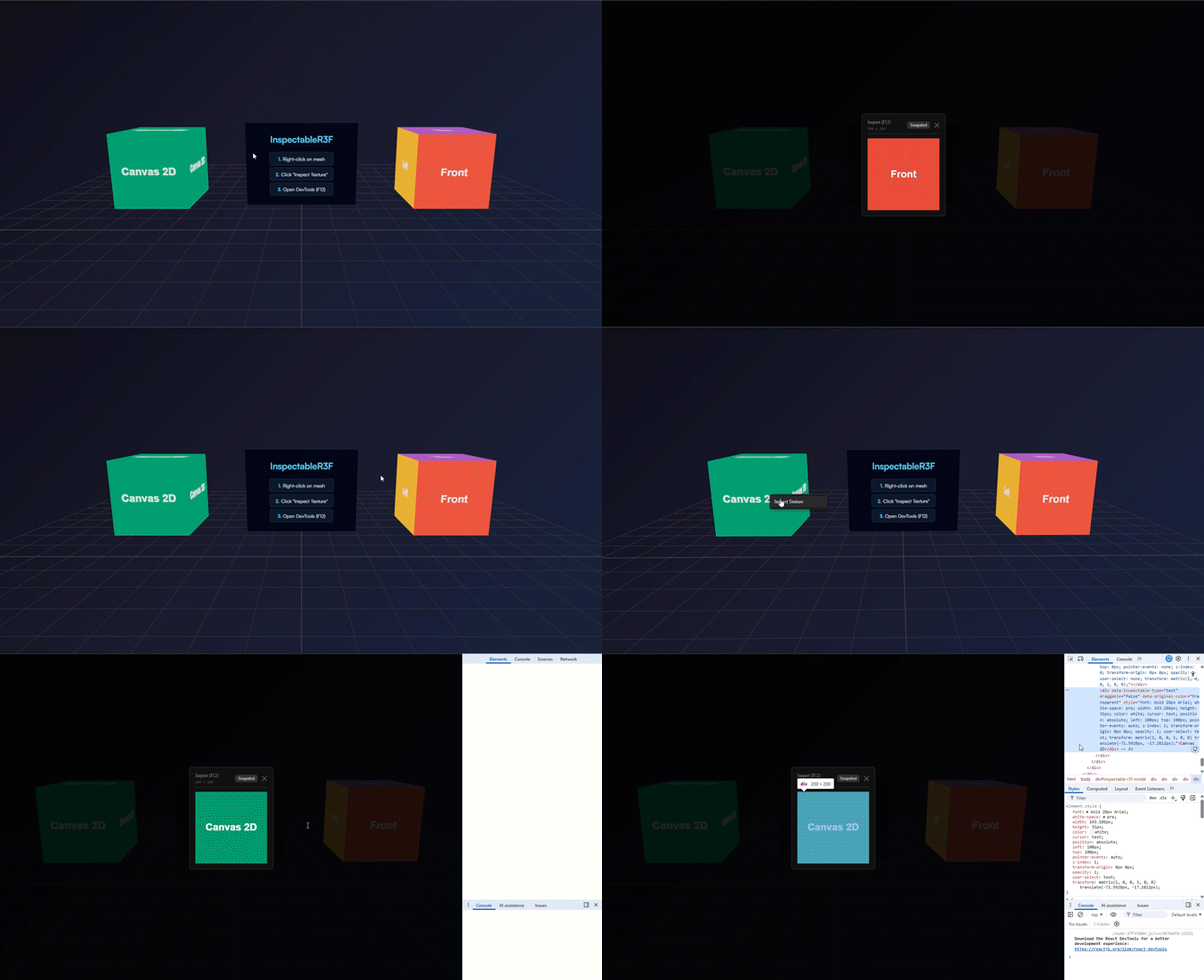
- Right-click to Inspect – Familiar DevTools-style context menu
- DOM Inspection – View and edit HTML textures in real-time
- Live Sync – DOM changes instantly update 3D textures (html2canvas only)
- Snapshot Export – Save textures as PNG (with CORS-safety)
- Multi-Material Support – Works with complex meshes
- Zero Config – Just add
<Inspectable />to your scene - Production Safe – Auto-disabled in production builds
npm install inspectable-r3fPeer Dependencies:
{
  "@react-three/fiber": ">=8.0.0",
  "react": ">=18.0.0",
  "react-dom": ">=18.0.0",
  "three": ">=0.150.0"
}import { Canvas } from '@react-three/fiber';
import { Inspectable } from 'inspectable-r3f';
function App() {
return (
<Canvas>
{/* Add once anywhere in your Canvas */}
<Inspectable />
{/* Your scene components */}
<YourMeshes />
</Canvas>
);
}Replace direct html2canvas imports with the InspectableR3F wrapper for automatic tracking:
// ❌ Before
import html2canvas from 'html2canvas';

// ✅ After
import { html2canvas } from 'inspectable-r3f';- Right-click any mesh with an HTML texture
- Select "Inspect Texture"
- Edit HTML with DevTools (F12) and watch changes reflect in real-time on the 3D mesh (currently works only if using html2canvas)
import { useEffect, useRef } from 'react';
import { createRoot } from 'react-dom/client';
import { html2canvas } from 'inspectable-r3f'; // Use wrapper
import * as THREE from 'three';

function HtmlTexturePlane() {
  const meshRef = useRef<THREE.Mesh>(null);

  useEffect(() => {
    const container = document.createElement('div');
    container.style.position = 'absolute';
    container.style.left = '-9999px';
    container.style.width = '512px';
    container.style.height = '512px';
    document.body.appendChild(container);

    const root = createRoot(container);
    root.render(
      <div style={{ padding: 40, background: '#0f172a', color: 'white' }}>
        <h1>Inspectable HTML</h1>
        <p>Right-click to inspect!</p>
      </div>
    );

    setTimeout(async () => {
      const canvas = await html2canvas(container, { width: 512, height: 512 });
      const texture = new THREE.CanvasTexture(canvas);
      texture.needsUpdate = true;

      if (meshRef.current) {
        (meshRef.current.material as THREE.MeshBasicMaterial).map = texture;
      }
    }, 100);

    return () => root.unmount();
  }, []);

  return (
    <mesh ref={meshRef}>
      <planeGeometry args={[4, 4]} />
      <meshBasicMaterial />
    </mesh>
  );
}function Canvas2DBox() {
const meshRef = useRef<THREE.Mesh>(null);
useEffect(() => {
const canvas = document.createElement('canvas');
canvas.width = 512;
canvas.height = 512;
const ctx = canvas.getContext('2d')!;
// Draw using Canvas 2D API
ctx.fillStyle = '#059669';
ctx.fillRect(0, 0, 512, 512);
ctx.fillStyle = 'white';
ctx.font = 'bold 48px Arial';
ctx.textAlign = 'center';
ctx.fillText('Select Me!', 256, 256);
const texture = new THREE.CanvasTexture(canvas);
if (meshRef.current) {
(meshRef.current.material as THREE.MeshBasicMaterial).map = texture;
}
}, []);
return (
<mesh ref={meshRef}>
<boxGeometry args={[2, 2, 2]} />
<meshBasicMaterial />
</mesh>
);
}For complex scenarios where automatic detection doesn't work:
function ComplexMesh() {
  const meshRef = useRef<THREE.Mesh>(null);

  useEffect(() => {
    const container = document.createElement('div');
    container.innerHTML = '<h1>Custom Content</h1>';
    // ... create texture ...

    if (meshRef.current) {
      // Manually associate the DOM element
      meshRef.current.userData.inspectableContainer = container;
    }
  }, []);

  return <mesh ref={meshRef}>{/* ... */}</mesh>;
}The main component that enables inspection globally.
| Prop | Type | Default | Description |
|---|---|---|---|
enableCanvas2DPatch |
boolean |
true |
Enable Canvas 2D API patching for text selection. Disable if conflicts with third-party canvas libraries occur. |
<Inspectable enableCanvas2DPatch={true} />Drop-in replacement for the standard html2canvas function. Automatically registers canvases for inspection.
element: HTMLElement– The DOM element to captureoptions?: Html2CanvasOptions– Standard html2canvas options
Promise<HTMLCanvasElement> – The rendered canvas
const canvas = await html2canvas(divElement, {
  width: 512,
  height: 512,
  scale: 2,
  backgroundColor: null
});InspectableR3F uses several strategies to associate meshes with DOM content:
- Registry Tracking: Canvases created via the
html2canvas()wrapper are automatically tracked - Canvas 2D Patching: Canvas 2D API methods are monkey-patched to create a "ghost DOM" layer
- UserData Override: Manual association via
mesh.userData.inspectableContainer
When you use Canvas 2D methods like fillText(), InspectableR3F:
- Creates invisible DOM elements positioned at the exact canvas coordinates
- Tracks transform state (translate, rotate, scale)
- Makes text selectable while keeping it visually hidden
- Allows DevTools inspection of the ghost elements
When you edit HTML in the inspector:
- A
MutationObserverwatches for DOM changes - Changes trigger a re-capture via
html2canvas - The texture is automatically updated on the mesh
- No manual refresh needed!
If you're using third-party canvas libraries that conflict:
<Inspectable enableCanvas2DPatch={false} />This disables the ghost DOM system but keeps inspection working for html2canvas-based textures.
InspectableR3F is automatically disabled in production (NODE_ENV === 'production'). No manual configuration needed.
Cause: The mesh doesn't have a tracked texture.
Solution:
- Use the
html2canvaswrapper frominspectable-r3f - Enable Canvas 2D patching with
enableCanvas2DPatch={true} - Manually set
mesh.userData.inspectableContainer
Cause: Cross-origin images block toDataURL().
Solution: Use CORS-enabled images or proxy them through your server.
Cause: Canvas 2D patching is disabled.
Solution: Ensure <Inspectable enableCanvas2DPatch={true} />
Cause: Canvas 2D patching adds overhead to drawing calls.
Solution:
- Only enable InspectableR3F in development
- Disable patching for specific scenes:
enableCanvas2DPatch={false}
Contributions are welcome! Please follow these guidelines:
- Fork the repository
- Create a branch:
git checkout -b feature/amazing-feature - Commit changes:
git commit -m 'Add amazing feature' - Push:
git push origin feature/amazing-feature - Open a Pull Request
# Clone the repo
git clone https://github.com/IrfanulM/InspectableR3F.git
cd InspectableR3F

# Install dependencies
npm install

# Start playground
npm run dev

# Build package
npm run build --workspace=inspectable-r3fMIT © Irfanul Majumder
See LICENSE for details.
- Built with React Three Fiber
- Powered by html2canvas
- Inspired by browser DevTools