AI-powered professor insights from RateMyProfessor reviews. No more scrolling through hundreds of student comments - get comprehensive analysis in seconds.
🔗 Live Demo: https://prof-rater-beta.vercel.app/
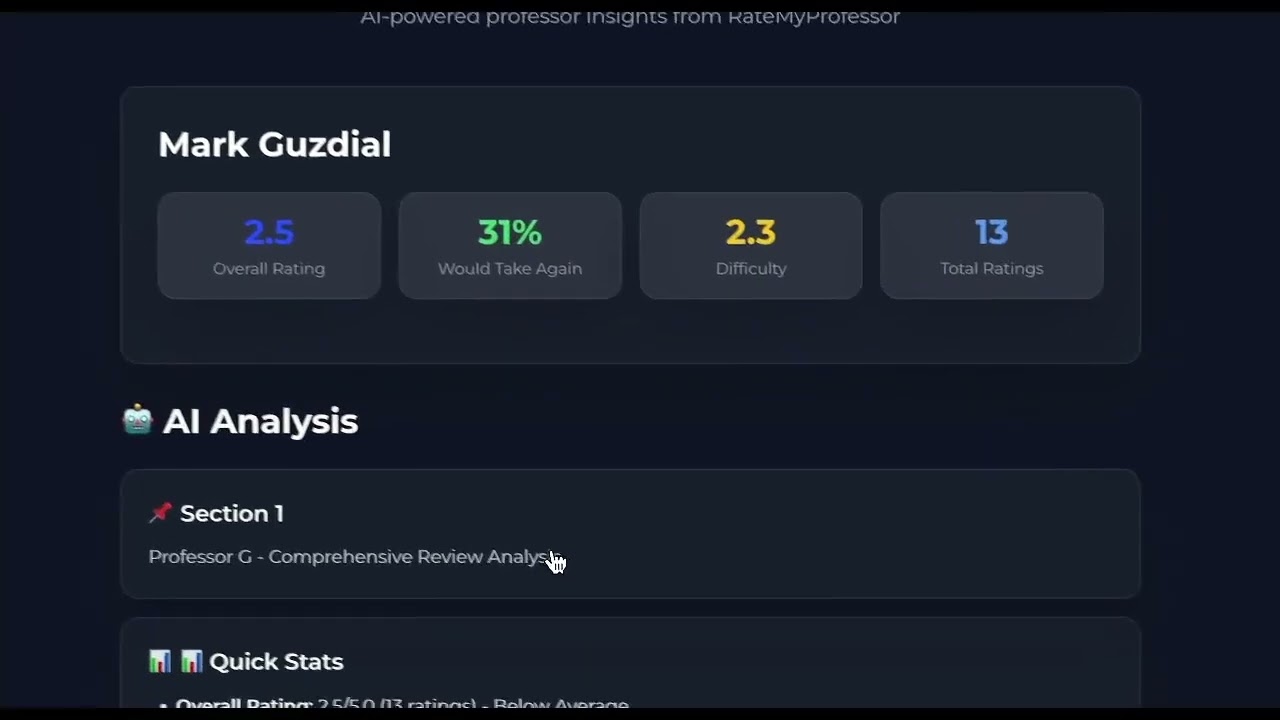
Click the image above to watch a 30-second demo

Enter any professor name and university to get an AI-generated analysis of their teaching style, difficulty level, grading patterns, and student feedback. The app scrapes RateMyProfessor reviews and uses Claude AI to synthesize insights from dozens of student comments.
ProfRater uses a worker/polling architecture to handle long-running scraping tasks without hitting serverless timeout limits:
- Frontend (Next.js on Vercel) creates a job and returns a job ID instantly
- Redis queue (Upstash) stores job status and manages the processing pipeline
- Worker server (Node.js on Render) picks up jobs and runs the scraper with no timeout constraints
- Frontend polls Redis every 1.5 seconds for job updates and displays results when complete
This architecture allows scraping to take as long as needed (typically 30-60 seconds) while keeping the user interface responsive with live status updates.
Uses Stagehand (AI-powered browser automation) running on Browserbase cloud browsers to:
- Navigate directly to professor search results via URL construction (more reliable than clicking dropdowns)
- Extract ratings, difficulty scores, courses, review comments, and student tags
- Handle missing data gracefully since not all professors have complete information
- Scrape ~20-30 reviews per professor (first page load)
Scraped data gets sent to Claude Sonnet 4 which analyzes:
- Teaching style and approach
- Workload and difficulty assessment
- Grading patterns and flexibility
- Student sentiment and common themes
- Best fit for different types of students
Results are formatted with markdown and parsed into clean sections with glassmorphism UI cards for easy reading.
Frontend: Next.js 14 (App Router), TypeScript, Tailwind CSS, Montserrat font, glassmorphism design
Backend Worker: Node.js, Express, TypeScript, deployed on Render
Job Queue: Redis (Upstash) for job state management and result storage
Scraping: Stagehand + Browserbase for cloud browser automation
AI: Claude Sonnet 4 (Anthropic API)
Infrastructure:
- Vercel (frontend hosting + API routes)
- Render (worker server with no execution time limits)
- Upstash Redis (serverless Redis for job queue)
- Browserbase (managed browser sessions for scraping)
- Dark Theme with glassmorphism aesthetic and blue accent (#2D5BFF)
- Montserrat Font for modern, clean typography
- AI Analysis Sections - Parsed into separate glass cards with emoji headers:
- 📊 Quick Stats
- 📚 Teaching Style
- ⚡ Workload & Difficulty
- ✅ Grading Style
- 🎯 Best For
- Collapsible Reviews - Hidden by default, expandable to show all reviews
- Enhanced Markdown - Proper indentation, styled lists, bold text highlighting
- Responsive Design - Works on desktop and mobile
User Request
    ↓
Next.js API (/api/start-scrape)
    ↓
Create Job in Redis
    ↓
Call Worker Server (POST /run-job)
    ↓
Worker: Scrape → Analyze → Store Results in Redis
    ↓
Frontend: Poll /api/check-job every 1.5s
    ↓
Display Results with Sectioned UI
- Node.js 18+
- Redis instance (local or Upstash)
- API keys for Anthropic, Browserbase, OpenAI
cd backend
npm install

# Create .env file
cat > .env << EOF
REDIS_URL=your_redis_connection_string
ANTHROPIC_API_KEY=your_anthropic_key
BROWSERBASE_API_KEY=your_browserbase_key
BROWSERBASE_PROJECT_ID=your_project_id
OPENAI_API_KEY=your_openai_key
PORT=3001
EOF

# Build and run worker
npm run build:local
npm run workercd profrater-next
npm install
# Create .env.local file
cat > .env.local << EOF
REDIS_URL=your_redis_connection_string
WORKER_URL=http://localhost:3001
NEXT_PUBLIC_APP_URL=http://localhost:3000
EOF
# Run dev server
npm run dev- Connect GitHub repo to Render
- Set Root Directory:
backend - Build Command:
npm install && npm run build:local - Start Command:
npm start - Add environment variables (REDIS_URL, API keys, PORT=3001)
- Import GitHub repo
- Set Root Directory:
profrater-next - Framework: Next.js (auto-detected)
- Add environment variables (REDIS_URL, WORKER_URL, NEXT_PUBLIC_APP_URL)
- Create Redis database at upstash.com
- Copy connection string (starts with
redis://) - Use same REDIS_URL in both worker and frontend
Why worker/polling architecture? Originally built as a monolithic Vercel deployment, but scraping takes 60+ seconds while Vercel's free tier times out at 10 seconds. The worker/polling pattern (used by Netflix, Stripe, etc.) solves this by offloading long tasks to a dedicated server while keeping the frontend responsive.
Vercel deployment gotcha:
If you have a vercel.json file at your repo root, it overrides ALL dashboard settings. Delete legacy config files when restructuring your app.
Scraper reliability:
Direct URL construction (/search/professors?q=${name}) is more reliable than AI-powered clicking through UI elements. Stagehand's .act() can fail silently, so critical navigation should use Playwright's .goto().
UI parsing for better readability:
Splitting AI-generated markdown by section headers (##) and rendering each in its own glassmorphism card dramatically improves readability compared to a wall of text.
- No result caching - repeated queries for same professor use fresh API calls
- Limited to first ~20-30 reviews per professor (doesn't click "Load More")
- Browserbase free tier credits are limited
- No professor comparison feature yet
- Add Redis caching to reduce API costs on repeated queries
- Professor comparison mode (side-by-side analysis)
- Course-specific filtering
- Historical data tracking (how ratings change over time)
- Email notifications when scraping completes
Open to contributions! Feel free to open issues or submit PRs.