Skip to content

Performing analysis on customer demographics data by first doing some transformation with azure databricks and after analysis with powerBI

Notifications You must be signed in to change notification settings

JakhongirK/Customers_Demographics


Folders and files

NameName
Last commit message
Last commit date

Latest commit


History

13 Commits


Repository files navigation

Case-Study-Sales_CustomerDemographics

Aim

To perform analytics on Sales and Customer Demographics data using Azure Databricks and PowerBI

Problem Statement

We will dig deeper into some of the Databricks features for this project. As for transformation spark is the most popular tools in big data. This is due to the years of experience and expertise put into training, acceptance, tooling, standard development, and re-engineering. So, in many circumstances, employing these excellent spark tools to access data may answer many analytical queries.

This big data project will look at capabilities to run analytical queries on massive datasets. We will use the dataset in a SQL database for this project, and we'll need to ingest and modify the data. We'll use sales and Customer demographics data to perform analysis and answer the following questions:

  • Total Purchase based on YearlyIncome and Education

  • Numbers of cars Owned based on YearlyIncome

  • Total Purchase based on CommuteDistance and Occupation

  • Technologies used to work in project

    • Azure SQL Database
    • Azure Databricks
    • Azure Data Factory
    • PowerBI

    Data Source Description

    In this project, we will be using Customer test, Individual test tables from this database.

          Customer: This table contain all customer data related information.

          Individual: This table contain all Individual data information.
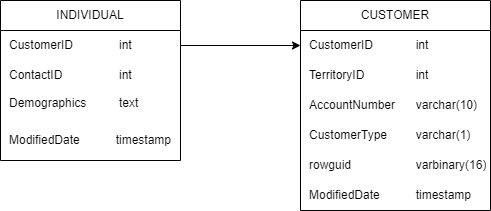
    tables drawio

          Cust_Ind: This is the final table after joining and performing transformations on above tables.
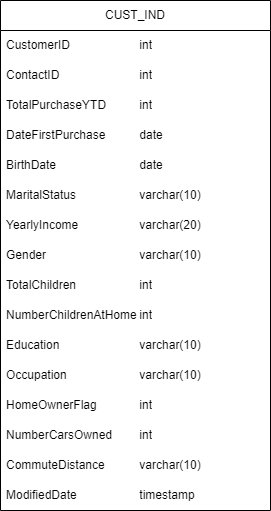
    finaltable

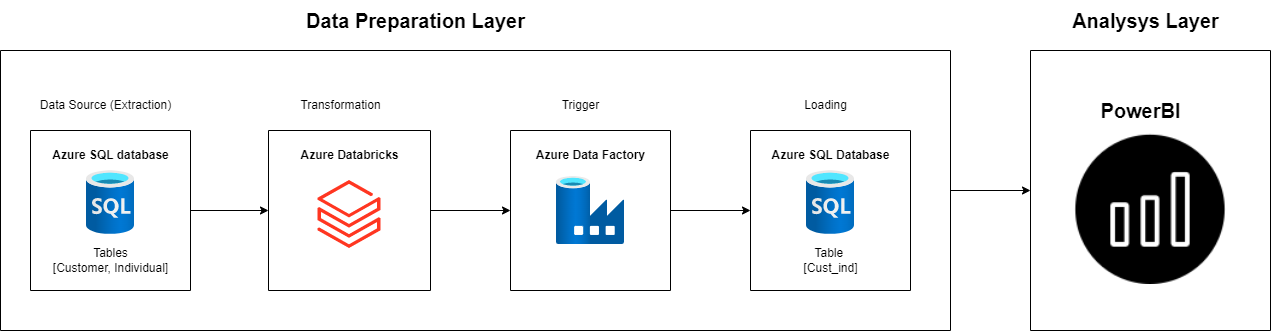
    Project Architecture

    Customer_demographics_project_architecture

    Steps performed to achive the task

    • Create tables in Azure SQL database.

    • Load data in Azure SQL Database.

    • Connect tables in databricks and create dataframes.

    • Join both the dataframes in databricks.

    • Perform transformation and cleaning in databricks using pyspark.

    • Load the data back in new table in SQL database.

    • Connect data with PowerBI.

    • Perform analytics on Sales and Customer demographics data Using PowerBI.

    About

    Performing analysis on customer demographics data by first doing some transformation with azure databricks and after analysis with powerBI

    Resources

    Stars

    Watchers

    Forks

    Releases

    No releases published

    Packages

    No packages published

    Languages

    • Jupyter Notebook 63.2%
    • Python 36.8%