Windows real-time behavioral ransomware detection and response for defenders who need deterministic, low-latency decisions on high-volume endpoint telemetry.


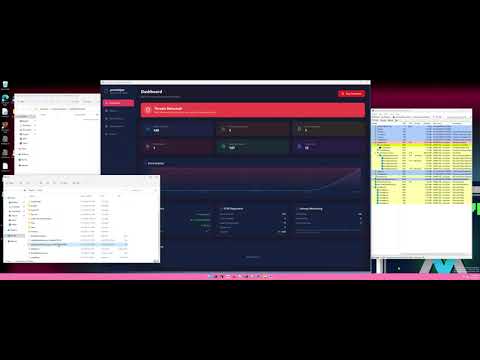
Ransomware defense is not only a classification problem. It is a timing problem where detection quality and response latency must hold under noisy, bursty endpoint telemetry, because delayed confidence often means delayed containment.
procSniper is a Go-based Windows defensive system that combines rule correlation and compact machine learning for inline decisioning. The runtime ingests kernel ETW process and file activity, correlates Windows Security log signals for privilege and API abuse patterns, and continuously accumulates per-process behavioral state. Instead of relying on heavyweight generative pipelines for first-line response, procSniper uses a fixed 14-feature vector and ONNX inference to keep decision paths predictable, auditable, and operationally bounded.
The detection architecture is mode-aware. In rules_only, threat scoring and rule indicators drive alerts and response policy. In hybrid, rule-path alerts remain active while ML inference is added after feature-gate conditions are met. In ml_only, rule indicators continue to accumulate as ML features, but rule-based fallback alerts are intentionally disabled, making ML the sole decision path once gate and threshold requirements are satisfied.
The current recommended model line (v2) is a 2-class ONNX model (benign, ransomware) with repository-tracked threshold guidance (0.08) and quality artifacts in ml-2/models/model_metadata.json and ml-2/models/procsniper_rf_ml2_v2_quality_report.md. Reported validation and test results show high ransomware recall with bounded benign false-positive rate under the project evaluation setup, but these numbers are evaluation-context results rather than universal guarantees; deployment outcomes still depend on dataset representativeness, threshold calibration, and attacker adaptation.
For defenders, this translates into practical host-level disruption capability with explicit tradeoff controls: real-time behavioral monitoring, configurable rules_only/hybrid/ml_only operation, canary-backed response actions, and clear operational boundaries around low-and-slow campaigns, network-only visibility gaps, and kernel- or firmware-level threats outside current userland scope.

hybrid mode exists for teams that want ML augmentation without giving up deterministic rule-path alerts.
| Mode | Primary decision path | Rule fallback behavior | Typical use |
|---|---|---|---|
rules_only |
Rule indicators and threat scoring | Not applicable | Baseline deterministic deployment |
hybrid |
Rules plus ML inference after gate passes | Rule alerts still emit when ML does not decide | Balanced rollout and analyst visibility |
ml_only |
ML is sole decision-maker after gate passes | No rule-based fallback alerts | Research-tuned ML-first operation |
Important behavior:
- With
--mland no explicit mode, CLI defaults toml_only. - Without
--ml, mode falls back to configured mode, otherwiserules_only. hybridandml_onlyrequire--ml <model_path>.


Pipeline stages:
- Kernel ETW stream captures process and file activity in near real time.
- Security log consumer correlates suspicious privilege/API patterns (for example backup API abuse workflows).
- Rule indicators accumulate threat context (velocity, entropy, extension behavior, privilege abuse, canary compromise).
- Feature extraction builds a fixed 14-dimensional vector per process.
- ML gate checks minimum non-zero feature count (
--ml-min-indicators) before inference. - ONNX inference evaluates malicious probability and class label.
- Mode-aware decisioning emits alerts and response actions (
terminate,suspend,alert_only) based on category and policy.
Canary role:
- Canary compromise remains a high-confidence signal and can trigger immediate response depending on
--canary-responseor config settings.
Feature contract:
- Runtime and model use a fixed 14-feature vector.
- Feature ordering matches the model training contract.
| Index | Feature | Runtime intent |
|---|---|---|
| 0 | velocity |
Recent file operation rate (ops/min) |
| 1 | file_count |
Cumulative file operations for process lifetime |
| 2 | txt_file_count |
Text-file targeting intensity |
| 3 | directory_count |
Directory traversal breadth |
| 4 | file_delete_count |
Delete activity often paired with encryption workflows |
| 5 | is_signed |
Reserved in current runtime (0 in v1/v2 path) |
| 6 | extension_match |
Presence of known ransomware extension behavior |
| 7 | extension_entropy |
Entropy of extension distribution across touched files |
| 8 | shadow_copy_delete |
Shadow copy deletion behavior signal |
| 9 | browser_credential_access |
Browser credential access signal |
| 10 | browser_history_access |
Browser history access signal |
| 11 | ssh_key_access |
SSH key path access signal |
| 12 | lsass_access |
LSASS access behavior signal |
| 13 | system_info_queries |
System reconnaissance command signal |
ONNX runtime behavior:
- Inference backend supports both 2-class and 3-class model outputs.
- Session initialization probes 3-class output and falls back to 2-class when needed.
- Runtime prediction payload remains shape-stable for downstream consumers, with stealer probability
0for 2-class models.
Recommended model for current ops examples:
models/procsniper_rf_ml2_v2.onnx
| Mode | Rule indicator accumulation | ML inference | Rule alert emission |
|---|---|---|---|
rules_only |
Yes | No | Yes (ThreatMedium and above) |
hybrid |
Yes | Yes, after gate passes | Yes, including fallback when ML does not decide |
ml_only |
Yes (as ML feature source) | Yes, after gate passes | No rule-based fallback alerts |
| ML label | Category | Decision score | Auto-response policy |
|---|---|---|---|
ransomware |
RANSOMWARE |
100 | terminate-eligible |
stealer |
STEALER |
30 | alert-only |
benign |
none | 0 | no ML decision alert |
| Family | ml_only |
hybrid |
|---|---|---|
conti |
detected but not terminated | terminated |
lockbit |
terminated | terminated |
lockbit 5 |
detected but not terminated | terminated |
Canary response policy controls:
terminatesuspendalert_only
- Windows 10/11
- Administrator privileges for full protect-mode coverage
[onnxruntime.dll](model/onnxruntime.dll)available in a runtime lookup location- Go 1.22+ for source builds
- No Sysmon dependency for core runtime telemetry path
[onnxruntime.dll](model/onnxruntime.dll)is the native ONNX Runtime library used by procSniper's ML backend to load and run ONNX models.- It is required for
protect --ml ...andml-test. If missing, model initialization fails.
How to use it:
- Easiest path: use a model in the same folder as the DLL.
.\procSniper.exe protect `
  --ml model/procsniper_rf_ml2_v2.onnx `
  --detection-mode hybrid `
  --ml-confidence 0.08 `
--ml-min-indicators 3- If your model is elsewhere (for example
models/...), placeonnxruntime.dllin any loader lookup location:
- same directory as
procSniper.exe(orbuild/bin/procSniper-gui.exe) - same directory as the model passed via
--ml - current working directory as
onnxruntime.dll - any directory listed in
PATH
Quick verification:
.\procSniper.exe ml-test --model model/procsniper_rf_ml2_v2.onnxgo build -tags "!gui" .Rules-only:
.\procSniper.exe protectHybrid (rules plus ML):
.\procSniper.exe protect `
  --ml models/procsniper_rf_ml2_v2.onnx `
  --detection-mode hybrid `
  --ml-confidence 0.07 `
  --ml-min-indicators 3 `
  --canary-response suspend
ML-only:
.\procSniper.exe protect `
  --ml models/procsniper_rf_ml2_v2.onnx `
  --detection-mode ml_only `
  --ml-confidence 0.07 `
  --ml-min-indicators 3
Core commands:
.\procSniper.exe config
.\procSniper.exe ml-test --model models/procsniper_rf_ml2_v2.onnx
.\procSniper.exe versionBuild GUI:
wails build -tags guiRun GUI in development mode:
wails dev -tags guiFor full GUI/CLI setup details, see docs/BUILD.md.
| Flag | Purpose | Default |
|---|---|---|
--ml PATH |
Load ONNX model and enable ML integration | disabled |
--ml-confidence FLOAT |
Malicious probability threshold for ML decisions | 0.75 |
--ml-min-indicators N |
Minimum non-zero features before ML gate fires | 4 |
--detection-mode MODE |
rules_only, hybrid, ml_only |
auto-resolved |
--canary-response ACT |
terminate, suspend, alert_only |
config value or terminate |
Threshold note:
- The v2 quality artifacts recommend
0.08; set this explicitly when usingprocsniper_rf_ml2_v2.

procSniper forwards all alerts to a remote syslog server in RFC 5424 format, enabling native integration with Wazuh and other SIEMs.
Enable syslog forwarding in config/ransomware_extensions.json:
"alert_settings": {
    "send_syslog": true,
    "syslog_server": "192.168.1.100",
    "syslog_port": 514,
    "syslog_protocol": "udp",
    "syslog_facility": 20,
    "syslog_tag": "procSniper",
    "verbose_logging": true
}| Setting | Default | Description |
|---|---|---|
send_syslog |
false |
Enable/disable syslog forwarding |
syslog_server |
"" |
Syslog server IP or hostname |
syslog_port |
514 |
Syslog destination port |
syslog_protocol |
"udp" |
Transport protocol (udp or tcp) |
syslog_facility |
20 |
RFC 5424 facility code (20 = Local4) |
syslog_tag |
"procSniper" |
APP-NAME in syslog header |
Add the following decoder to /var/ossec/etc/decoders/procsniper_decoder.xml:
Add custom rules to /var/ossec/etc/rules/procsniper_rules.xml:
On the Windows agent running procSniper, add the syslog listener to /var/ossec/etc/ossec.conf (or configure Wazuh manager to receive syslog directly):
<ossec_config>
  <remote>
    <connection>syslog</connection>
    <port>514</port>
    <protocol>udp</protocol>
  </remote>
</ossec_config>
Restart the Wazuh manager after adding decoders and rules:
systemctl restart wazuh-manager- Low-and-slow campaigns can delay signal accumulation and ML gate readiness.
- This architecture focuses on host behavior and does not provide dedicated network IDS coverage.
- Kernel-mode, boot-level, and firmware-resident threats are outside current userland scope.
- Model quality depends on dataset representativeness, environment drift, and threshold maintenance.
- Some optional integration-quality workflows rely on datasets that are not bundled in this repository by default.
procSniper is a defensive security tool intended for authorized systems, research labs, and controlled exercises.
Do not use this project for unauthorized monitoring, unauthorized response actions, or illegal activity.
High-impact contribution areas:
- ML quality validation and reproducibility hardening
- False-positive reduction and threshold calibration
- Hybrid-mode explainability and observability improvements
- Runtime performance and telemetry pipeline efficiency
- Additional safe testing and replay tooling for defender workflows