



A powerful AI-powered music discovery application that helps you find your next favorite songs and create personalized Spotify playlists. Built with Next.js, TypeScript, and integrated with Spotify's API for seamless playlist creation.


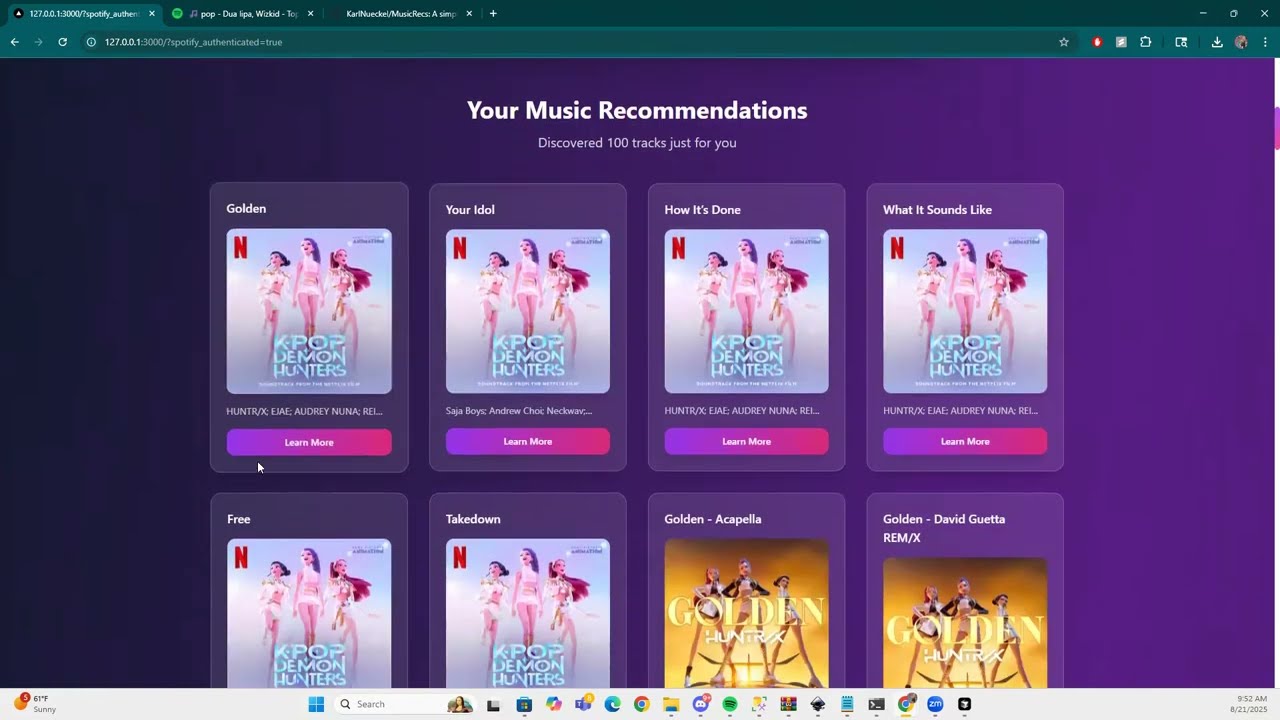
- 120,000+ high-quality tracks in the database
- Semantic search based on genres, moods, artists, and descriptions
- Smart filtering by popularity and genre quality
- Real-time recommendations as you type
- Seamless authentication with Spotify OAuth
- Automatic playlist creation with 25 and 100-track options
- Direct links to created playlists on Spotify
- User-friendly interface with authentication status
- Lightning-fast search using optimized JSON database
- No external API calls for recommendations (reduces latency)
- Efficient data structure for instant results
- Responsive design for all devices
- Beautiful gradient design with purple/pink theme
- Interactive track cards with album artwork
- Modal details for each track
- Loading animations and smooth transitions
- Error handling with user-friendly messages
- Total Tracks: 120,000+
- Genres: 50+ different genres
- Popularity Range: 0-100 (filtered for quality)
- Data Sources: Multiple high-quality CSV exports
- Search Speed: Near-instant results
- Next.js 13 - React framework with API routes
- TypeScript - Type-safe development
- Tailwind CSS - Utility-first styling
- React Hooks - State management
- React Modal - Interactive components
- Next.js API Routes - Serverless functions
- Spotify Web API - Music data and playlist creation
- JSON Database - Fast in-memory search
- Cookie-based Auth - Secure session management
- Python - Data processing and cleaning
- Pandas - CSV manipulation and analysis
- JSON Export - Optimized data structure
- Deduplication - Clean, unique dataset
- Node.js 18+
- npm or yarn
- Spotify Developer Account
git clone https://github.com/yourusername/music-discovery-app.git
cd music-discovery-appnpm install📋 Detailed instructions available in the API Keys Setup Guide below
Quick steps:
- Go to Spotify Developer Dashboard
- Create a new app with redirect URI:
http://127.0.0.1:3000/api/spotify-callback - Copy your Client ID and Client Secret
- Copy the example file:
cp .env.example .env.local - Edit
.env.localwith your Spotify credentials:SPOTIFY_CLIENT_ID=your_spotify_client_id_here SPOTIFY_CLIENT_SECRET=your_spotify_client_secret_here
npm run devVisit http://localhost:3000 to start discovering music!
🎉 That's it! The app includes a sample database with 5,000 tracks, so you can start discovering music immediately without any additional setup.
The Music Discovery App requires Spotify API credentials to create playlists. Here's how to get them:
- Go to Spotify Developer Dashboard
- Log in with your Spotify account (or create one if you don't have it)
- Accept the Developer Terms of Service
- Click "Create App" in the Spotify Developer Dashboard
- Fill in the required information:
- App name:
Music Discovery App(or any name you prefer) - App description:
AI-powered music discovery and playlist creation - Website:
http://localhost:3000(for development) - Redirect URI:
http://127.0.0.1:3000/api/spotify-callback - API/SDKs: Select "Web API"
- App name:
- Click "Save"
- After creating the app, you'll see your Client ID and Client Secret
- Click "Show Client Secret" to reveal it
- Copy both values - you'll need them for the environment variables
- Copy the
.env.examplefile to.env.local:cp .env.example .env.local
- Open
.env.localand replace the placeholder values:SPOTIFY_CLIENT_ID=your_actual_client_id_here SPOTIFY_CLIENT_SECRET=your_actual_client_secret_here
- Start the development server:
npm run dev - Visit
http://localhost:3000 - Click "Connect to Spotify" - you should be redirected to Spotify for authorization
- After authorization, you should see "Connected to Spotify" in the UI
The app works perfectly with just Spotify API keys, but you can optionally add:
- Get from: OpenAI Platform
- Add to
.env.local:OPENAI_API_KEY=your_openai_key_here
- Get from: Cohere Platform
- Add to
.env.local:COHERE_API_KEY=your_cohere_key_here
- Only needed if you want to use Weaviate for advanced search
- Add to
.env.local:WEAVIATE_CLUSTER_URL=your_weaviate_url_here WEAVIATE_API_KEY=your_weaviate_key_here
⚠️ Never commit your.env.localfile to version control- ✅ The
.env.examplefile is safe to commit (contains no real keys) - 🔒 Keep your API keys secure and don't share them publicly
- 🔄 If you accidentally expose your keys, regenerate them in the Spotify Dashboard
- Enter a genre, mood, or artist in the search field
- Add your favorite songs for personalized recommendations
- Optionally exclude certain artists
- Click "Discover Music" to get recommendations
- Click "Connect to Spotify" to authorize the app
- Grant permissions for playlist creation
- Your authentication status will be displayed
- Generate music recommendations first
- Click "Generate Playlists on Spotify"
- Choose to create 25-track and 100-track playlists
- Get direct links to your new playlists
├── pages/
│   ├── api/                    # API routes
│   │   ├── create-playlists.ts # Spotify playlist creation
│   │   ├── fast-recommendations.ts # Music search
│   │   ├── spotify-auth.ts     # OAuth authentication
│   │   └── spotify-callback.ts # OAuth callback
│   ├── _app.tsx               # App wrapper
│   └── index.tsx              # Main page
├── components/
│   └── ui/                    # Reusable UI components
├── data-pipeline/
│   ├── exports/               # CSV data files
│   ├── tracks_database.json   # Optimized database
│   └── *.py                   # Data processing scripts
├── styles/
│   └── globals.css            # Global styles
└── types.ts                   # TypeScript definitions
The application includes a comprehensive data pipeline for processing and optimizing music data:
- Multiple CSV exports with track information
- Spotify track metadata
- Genre and popularity data
- Combine all CSV files from exports directory
- Deduplicate tracks based on Spotify IDs
- Filter for quality (popularity, genre presence)
- Optimize for fast JSON-based search
- Export to
tracks_database.json
cd data-pipeline
python create_fast_csv_database.pyThe repository includes a sample database with 5,000 high-quality tracks for immediate testing:
- File:
data-pipeline/tracks_database_sample.json - Size: ~2MB (much smaller than full database)
- Tracks: 5,000 popular tracks across various genres
- Purpose: Allows users to test the app immediately without generating data
The app will automatically use the sample database if the full database isn't available. Users can:
- Test immediately with the sample database
- Generate more data using the Spotify CSV generator
- Create their own full database when ready
If you want to generate your own dataset, the repository includes a Spotify CSV generator:
📋 See Spotify CSV Generator README for detailed instructions
Quick setup:
cd data-pipeline
# Install dependencies
pip install spotipy python-dotenv pandas

# Copy environment file
cp env.example .env
# Edit .env with your Spotify API credentials

# Generate 10k tracks
TARGET_TRACKS=10000 python fetch_spotify_10k_min.py

# Generate 100k tracks (10 files)
for i in {1..10}; do TARGET_TRACKS=10000 python fetch_spotify_10k_min.py; doneThe large dataset of 120,000+ tracks was generated using a custom Spotify CSV generator. This process involved:
- 10,000 tracks per run using the Spotify Web API
- Multiple markets (US, GB, CA, AU, DE, FR, BR, JP, SE, MX, NL, IT, ES, PL, KR)
- Diverse search queries across different themes, genres, and time periods
- Deduplication across runs using persistent tracking of seen track IDs
- Genre enrichment by fetching artist genres in batches
- Popularity filtering to ensure high-quality tracks
- Comprehensive metadata including album art, release dates, and ISRC codes
- Randomized queries to maximize diversity and avoid API rate limits
- Setup: Configure Spotify API credentials
- Batch runs: Execute multiple 10k-track collection runs
- Deduplication: Automatic removal of duplicate tracks across runs
- Enrichment: Fetch additional artist and genre data
- Export: Generate timestamped CSV files with full metadata
The final dataset represents a diverse collection of high-quality tracks across multiple genres, decades, and regions, providing users with a rich foundation for music discovery.
- Modify
tailwind.config.jsfor theme changes - Update
styles/globals.cssfor custom styles - Edit component styles in
components/ui/
- Add new CSV files to
data-pipeline/exports/ - Run the data pipeline to update the database
- Customize filtering criteria in processing scripts
- Extend API routes in
pages/api/ - Add new UI components in
components/ - Modify search logic in
fast-recommendations.ts
Spotify Authentication Fails
- Check your
.env.localfile has correct credentials - Verify redirect URI matches your Spotify app settings
- Clear browser cookies and try again
No Recommendations Generated
- Ensure
tracks_database.jsonexists indata-pipeline/ - Check the search query isn't too specific
- Verify the data pipeline has been run
Playlist Creation Fails
- Check Spotify API rate limits
- Verify user is properly authenticated
- Check browser console for error details
Enable detailed logging by checking the browser console (F12) for:
- Authentication status
- API response details
- Error messages
Contributions are welcome! Here's how you can help:
- Fork the repository
- Create a feature branch (
git checkout -b feature/amazing-feature) - Commit your changes (
git commit -m 'Add amazing feature') - Push to the branch (
git push origin feature/amazing-feature) - Open a Pull Request
# Install dependencies
npm install

# Run in development mode
npm run dev

# Build for production
npm run build

# Start production server
npm startThis project is licensed under the MIT License - see the LICENSE file for details.
- BookRecs Repository - This project was forked from and inspired by the original BookRecs repository by the Weaviate team. Their excellent work on vector search and recommendation systems provided the foundation for this music discovery application.
- Spotify for their excellent API and music data
- Next.js team for the amazing framework
- Tailwind CSS for the utility-first styling
- The open-source community for inspiration and tools
If you encounter any issues or have questions:
- Check the troubleshooting section
- Review the browser console for error messages
- Open an issue on GitHub with detailed information
- Check the Spotify API documentation
Happy Music Discovery! 🎵✨
Built with ❤️ using Next.js, TypeScript, and the Spotify API