Task Management System
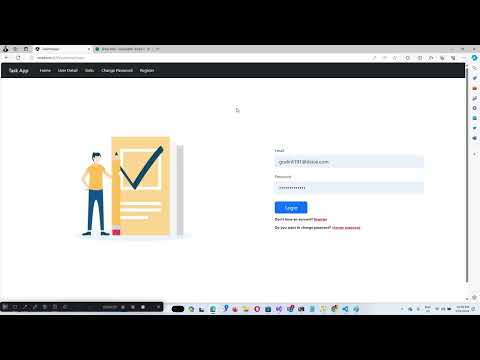
Creating a comprehensive web application for managing task details. The application requiring robust backend support from ASP.NET CORE WEB API , user-friendly frontend built with Angular.
The objective is to develop a secure and efficient web application that facilitates the management of task details. The system will feature a dual interface for administrators and users, ensuring secure access and personalized interactions for each user category. Administrators will have the ability to input and manage users, while user will have access to their task details, with the flexibility to update specific parts of their tasks.
- Admin and user Login: Separate login mechanisms for admins and users, with security measures in place to handle authentication and authorization effectively.
- user Management: Admins can manage user detils.
- Automatic Email Notification: Upon adding an user, the system automatically sends an email with a temporary password, which the user can later change.
- Task Updates: User can update their tasks details like title,description,isComplete or not ,due date.
- Admins can toggle the active/inactive status of user profiles, restricting login access to active users only.
- User releted task management.
- More features...
This project is built using a variety of technologies and patterns to ensure scalability, maintainability, and security. Below is a list of the key technologies and architectural approaches used:
- ASP.NET Core Web API: Serves as the backend framework, providing a robust set of features for building secure and scalable web APIs.
- Angular: Utilized for the frontend development to create a dynamic and responsive user interface.
- SQL Server: The database system of choice, ensuring reliable data storage and management.
- Entity Framework Core: An object-database mapper that enables .NET developers to work with a database using .NET objects, simplifying data access and manipulation.
- Clean Architecture: Ensures that the application is organized in such a way that it's easy to maintain and extend over time, with a clear separation of concerns.
- Repository Patterns: Abstracts the data layer, making the application more maintainable and testable by separating business logic from data access logic.
- CQRS using MassTransit: Implements the Command Query Responsibility Segregation (CQRS) pattern to separate read and update operations for more scalable and maintainable code, with MassTransit facilitating lightweight message-based architecture.
- Angular Auth Guard: Used to protect routes in the Angular application, ensuring that users are authenticated and authorized to access certain pages.
- Token Interceptor: Implements token-based authentication in Angular to securely communicate with the backend API.
- Role-Based Authentication: Enhances security by ensuring users can only access features and data appropriate to their role within the application. This is implemented through the backend ASP.NET Core Web API and integrated with Angular's routing and services to enforce role-based access control (RBAC).
- Lazy Loading in Angular: Improves the performance of the Angular application by splitting it into multiple bundles. These bundles are loaded on demand rather than at the initial load of the application, significantly reducing the initial load time and improving user experience.
- .NET Core SDK (Version 8.0.0)
- Entity Framework Core (Version 8.0.0)
- Any other dependencies
1). Clone the repository:
git clone https://github.com/Kasunjith-Bimal/TaskManagement.git
2). Navigate to the project directory:
cd TaskManagement
3). Navigate API Project
cd API
4). Navigate TaskManager.API Folder
open TaskManager.API.sln
5). Right Click Solution File.
Clean and Rebuild Project
To set up and update the database:
1). change connection string in appsettings.json:
"ConnectionStrings": {
  "DefaultConnection": "Server={{severName}};Database={{databaseName}};Trusted_Connection=True;Encrypt=False;"
},
2). Change seed data before Add migration (no nead to change) :
** Change seed data before Add migration **
Edit TaskManagerDbContext.cs class inside data
protected override void OnModelCreating(ModelBuilder builder)
{
    base.OnModelCreating(builder);

    var adminRoleId = Guid.NewGuid().ToString();
    // Seed roles
    builder.Entity<IdentityRole>().HasData(
        new IdentityRole { Id = adminRoleId, Name = "Admin", NormalizedName = "ADMIN" },
        new IdentityRole { Id = Guid.NewGuid().ToString(), Name = "User", NormalizedName = "USER" }
    );

    var adminUserId = Guid.NewGuid().ToString();

    var adminUser = new UserDetail
    {
        Id = adminUserId,
        UserName = "kasunysoft@gmail.com",
        NormalizedUserName = "KASUNYSOFT@GMAIL.COM",
        Email = "kasunysoft@gmail.com",
        NormalizedEmail = "KASUNYSOFT@GMAIL.COM",
        EmailConfirmed = false,
        SecurityStamp = Guid.NewGuid().ToString("D"),
        JoinDate = new DateTime(),
        FullName ="Mirahampe Patisthana Gedara Kasunjith Bimal Lakshitha",
        PhoneNumber = "0716063159",
        IsFirstLogin = true,
        IsActive = true,
    };

    var hasher = new PasswordHasher<UserDetail>();
    adminUser.PasswordHash = hasher.HashPassword(adminUser, "KasunJith123@");

    builder.Entity<UserDetail>().HasData(adminUser);

    // Assign the Admin user to the Admin role
    builder.Entity<IdentityUserRole<string>>().HasData(new IdentityUserRole<string>
    {
        RoleId = adminRoleId,
        UserId = adminUserId
    });
}
if not change TaskManagerDbContext.cs you can log system using (admin user)
Email : kasunysoft@gmail.com
Password : KasunJith123@
3). get package manager console for TaskManager.Infrastructure class library:
Add a Migration:
Add-Migration {{migrationName}}
Replace MigrationName with a descriptive name for your migration.
Update the Database:
update-database
4). change appsetting json
"JWT": {
 "ValidAudience": "{your api base url}",
 "ValidIssuer": "{your api base url}",
 "Secret": "ByYM000OLlMQG6VVVp1OH7Xzyr7gHuw1qvUC5dcGt3SNM"
 },
Run Web API application
- Install [Node.js] which includes [Node Package Manager][npm]
Install the Angular CLI globally:
npm install -g @angular/cli
export const environment = {
    baseUrl:"{{Your API Base Url}}/"
};
# Clone Angular repo
git clone https://github.com/Kasunjith-Bimal/TaskManagement.git

# Navigate to project directory
cd TaskManagement
cd UI
# Install dependencies
npm install

# Build and run local dev server
# Note: Initial build will take some time
ng serve