A single Cloudflare Worker that serves a setup UI and live SVG badges for your GitHub README.

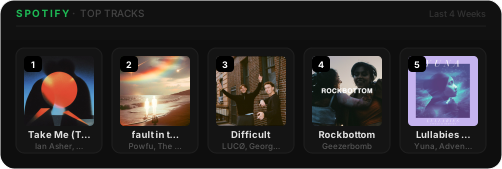

| Badge | Embed URL |
|---|---|
| Now Playing | https://your-worker.workers.dev/now-playing.svg |
| Top Artists | https://your-worker.workers.dev/top-artists.svg?range=short_term&count=8 |
| Top Tracks | https://your-worker.workers.dev/top-tracks.svg?range=mid_term&count=5 |
Range options: short_term (4 weeks) · mid_term (6 months) · long_term (all time)
Count: 1–10
npm install
npx wrangler loginGo to developer.spotify.com/dashboard, create an app, and add https://your-worker.workers.dev/callback as a Redirect URI.
npx wrangler secret put SPOTIFY_CLIENT_ID
npx wrangler secret put SPOTIFY_CLIENT_SECRETnpx wrangler deployVisit https://your-worker.workers.dev/auth, authorize with Spotify, then follow the on-screen instructions to add SPOTIFY_REFRESH_TOKEN and redeploy.
Go to https://your-worker.workers.dev to configure and copy your embed snippets.
npm run dev
# Visit http://localhost:8787
Add a .dev.vars file for local secrets:
SPOTIFY_CLIENT_ID=your_client_id
SPOTIFY_CLIENT_SECRET=your_client_secret
SPOTIFY_REFRESH_TOKEN=your_refresh_token