-
Notifications
You must be signed in to change notification settings - Fork 1
Interesting Finds
LastContinue edited this page Oct 20, 2018
·
8 revisions
- If you're using
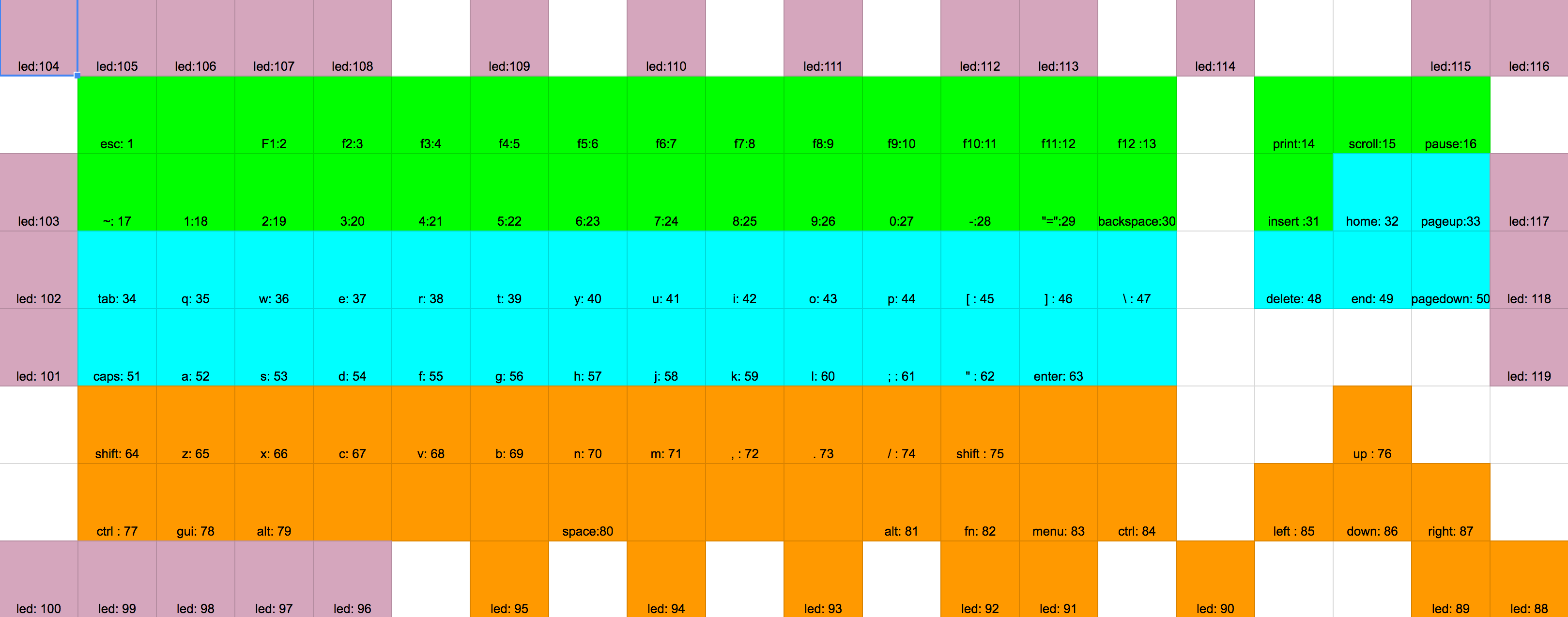
capslockasctrl, because of the size of the key and the fact it's un-stablized, it can wear into the anodization on the board. I don't see this as a quality control issue, just something to be aware of. Might be worth putting some vinyl or adhesive backed felt on the board around where thecapslockkey hits the plate - You can set what key lights up for capslock or scroll lock via this line . This is useful if you have capslock and l_ctrl swapped and you want l_ctrl to light up when you toggle. The scancode is mapped above this line. You need to know the physical location of the LEDs (id) to use the scancode See LED Map.
255means "not used". I have not tried to see if this is possible at a keymap level. - When removing all of the switches from the board, the supplied tool can become hard to use due to fatique. There's a way to wedge it inbetween the jaws of a pair of Tongue-and-groove pliers (you know, the ones that start with "channel" and end in....something or other 😉 ) and that makes re-switching a board much easier. Will get a picture of this sooner than later. I might even see if I can find a 3d printed tool for this.
- Even though the LED's are RGB, there seems to be only a few recognizable colors it can do. I tried making some pale blues, and they just ended up looking white (although switches and keycaps will probably play a huge part in this)
- When using the GUI (or QMK for that matter) make sure that the key you are using to toggle layers
MO(1), etc, is marked astrnson the target layer. Without this, you will get "locked" into the target layer and you will get annoyed.