A Spring Boot project to recreate the Northwind database that was originally created by Microsoft and used as the basis for their tutorials in a variety of database products for decades.
The Northwind database is an excellent tutorial schema for a small-business ERP, with customers, orders, inventory, purchasing, suppliers, shipping, employees, and single-entry accounting.
This is the simple database released for Access 95-2003.
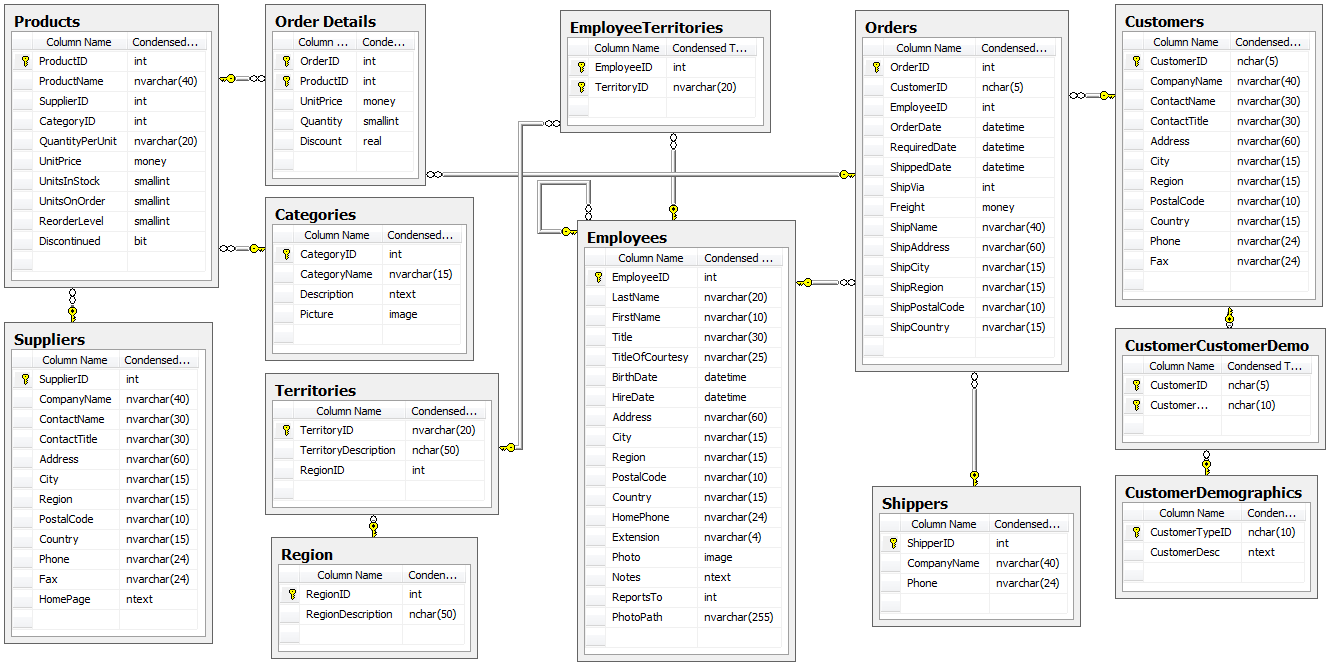
Microsoft has gradually enhanced Northwind (and recently deprecated it, although it is quite forward-compatible).
For this project we will use a schema quite different to the earlier versions that was released with Office 2007.

The application is built with Java and uses Maven for its dependency management.
The following frameworks and libraries are used.
Microsoft provided a dataset of 17 tables for the newer schema consisting of
| No | Table | Records |
|---|---|---|
| 1 | Employees | 9 |
| 2 | Customers | 29 |
| 3 | Suppliers | 10 |
| 4 | Shippers | 3 |
| 5 | Products | 45 |
| 6 | Orders | 48 |
| 7 | Order Details | 58 |
| 8 | Order Details Status | 4 |
| 9 | Order Status | 4 |
| 10 | Order Tax Status | 2 |
| 11 | Inventory Transactions | 102 |
| 12 | Inventory Transaction Types | 4 |
| 13 | Purchase Orders | 28 |
| 14 | Purchase Order Details | 55 |
| 15 | Invoices | 35 |
| 16 | Privileges | 1 |
| 17 | Employee Privileges | 1 |
In this project I use Dalers - MyWind SQL data script that he converted from the 2010 access database.
For demo purposes, I've decided to use an embedded database called H2. You could easily change the database-platform & datasource to your preferred SQL database from with the application.properties file.
H2 database has an embedded GUI console for browsing the contents of a database and running SQL queries. I've enabled it with this spring.h2.console.enabled=true entry in the application.properties file and you can access this GUI from your browser at http://localhost:8080/h2-console/
From the schema you can see that the entity's Employees, Customers,Suppliers, Shippers have the following attributes in common. Company, Lastname, Firstname, E-mail Address, Job Title, Business, Home and Mobile Phone, Fax Number, Address, City, State/Province, ZIP/Postal Code, Country, Web Page and Notes. Sadly, relational databases don't have a straightforward way to map class hierarchies onto database tables but thank God for Spring, JPA Specification to be precise.
I have used the MappedSuperclass strategy to share common attributes and methods via a new entity called Contact as a parent class. This Entity is given the @MappedSuperclass annotation instead of the @Entity while the Employees, Customers,Suppliers, Shippers entities become subclasses extending it.
In this strategy inheritance is only evident in the class but not the entity model so Contact is not persisted to the database.
All 17 tables have been created as Java classes with the @Entity and @Table(name ="table_name") annotations as well as those with relationships given the @ManyToOne or @OneToMany annotations. Spring Data JPA (Hibernate) builds the tables at start up. I've made sure that the created schema matches the SQL data script.
This script then populates the tables. The two entries below in the application.properties file ensure that
- database schema (entity tables) are always being recreated at startup and
- the data.sql file in the classpath with the table data is ran after the automatic schema-generation.
spring.jpa.hibernate.ddl-auto = create-drop
spring.jpa.defer-datasource-initialization = true
As I intend to build a UI for this project and have a Restful API exposed to more easily share this excellent tutorial schema, I use the springdoc-openapi java library to automate the generation of API documentation. This ensures the API documentation is informative, readable and most importantly that it simultaneously describes every change I make. The library works by examining the application at runtime to infer API semantics based on spring configurations, class structure and various annotations that I have used. The library is added as project dependency and the two entries below in the application.properties file ensure that
- you can access a JSON/YAML version of the documentation at http://localhost:8080/api/documentation and
- an HTML format at http://localhost:8080/api/documentation.html
springdoc.api-docs.path=/api/documentation
springdoc.swagger-ui.path=/api/documentation.html
Dalers - MyWind - SQL version of the 2010 Microsoft Access Database