Welcome to the GitHub repository of Kyle Malice's portfolio website. This project is a showcase of Kyle's skills and projects, built with React, JavaScript, CSS, and minimal HTML. The website is structured into four main pages: Home, About, Projects, and Contact.
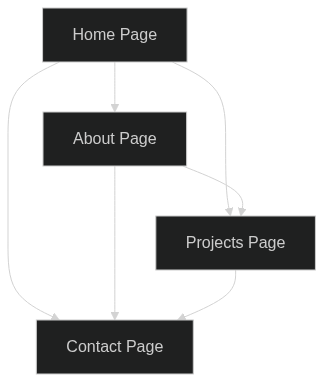
The website consists of four main pages:
-
Home Page: The website's landing page welcomes visitors and briefly introduces Kyle.
-
About Page: This page provides more detailed information about Kyle, his skills, experiences, and interests.
-
Projects Page: Here, you can find a showcase of Kyle's projects. Each project is presented with a brief description and relevant technologies used.
-
Contact Page: This page provides a way for visitors to get in touch with Kyle via email.
Here is a diagram that represents the flow of the website:
The website uses React, a popular JavaScript library for building user interfaces, particularly single-page applications. React's component-based architecture allows for reusability and separation of concerns, making the codebase easier to maintain and understand.
JavaScript is used for handling dynamic content and interactivity on the website. CSS is used for styling and layout, ensuring the website is visually appealing and responsive across different devices and screen sizes.
To get a local copy up and running, follow these steps:
-
Clone the repository
Open your terminal and use the
git clonecommand to copy the repository to your local machine. Replaceyour-directorywith the path where you want to clone the project.git clone https://github.com/your-username/kyle-malice-portfolio.git your-directory
-
Install the dependencies
Navigate into the cloned directory and install the necessary dependencies. This project uses npm (Node Package Manager) to manage dependencies.
cd your-directory npm install -
Start the development server
Once the dependencies are installed, you can start the development server by running:
npm start
This command starts the development server on http://localhost:3000. Open this URL in your browser to view the project.
Remember to replace your-username and your-directory with your GitHub username and the directory where you want to clone the project, respectively.
This guide assumes that the user has Node.js and npm installed on their machine. If not, they will need to install these before they can run the project.