This project demonstrates how to send SMS using a SIM800L GSM module connected to an Arduino Uno.

✔️ Checks signal strength before sending SMS
✔️ Re-connects if the network is unavailable
✔️ Sets SMS Center Number (SMSC) automatically
✔️ Enables SMS delivery reports
✔️ Prints debug logs to help troubleshoot
- Arduino Uno
- SIM800L GSM Module
- SIM Card (with SMS credit)
- External Power Supply (4.2V, 2A)
- Jumper Wires
- Antenna for SIM800L
- Resistors (1KΩ & 2KΩ for voltage divider)
| SIM800L Pin | Arduino Uno Pin |
|---|---|
| VCC (4.2V) | External 4.2V Power Supply (2A) |
| GND | GND |
| TX | Pin 10 (RX) |
| RX | Pin 11 (TX) via a voltage divider |
| RST (Optional) | Arduino Reset Pin |
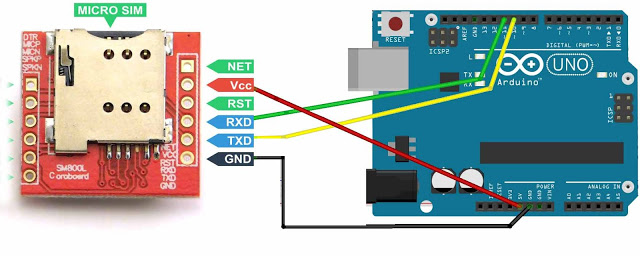
📌 Important Notes
- Use a 4.2V, 2A power supply (Arduino 5V is not enough).
- If using a 5V Arduino, step down TX voltage using a voltage divider (1KΩ & 2KΩ resistors).
- Ensure the antenna is connected properly.
- The SIM card must be activated with SMS balance.
✅ Detailed setup guide
✅ Wiring diagram
✅ Complete Arduino Code
✅ Troubleshooting & Debugging Guide
✅ Helpful images & resources
- Add this README to your GitHub repo.
- Upload wiring images to GitHub and replace links.
- Test and improve SMS sending features.
Let me know if you need more improvements! 🚀
Upload this code to your Arduino Uno:
#include <SoftwareSerial.h>

// Define SoftwareSerial pins for SIM800L
SoftwareSerial sim800l(10, 11); // RX, TX