this is a lite easy to use virtual keyboard project for anyone to use
I made this for this year's recruitment for RobEn AAST club
I recommend that you setup a virtual environment using anaconda or python venv
conda create -n env_name python=3.6activate the environment using the following command
conda activate env_nameyou should clone the repository if you haven't already using the following command or just by installing the project directly
git clone https://github.com/UndeadZed/virtual_Keyboardinstall the requirements from the requirements.txt file by typing the following command in the terminal
pip install -r requirements.txtnow we're done with the setup you can now use the virtual keyboard by typing this command in the terminal
python keyboard.py
A button is selected when the point number 8 is in the same location which is shown by the button getting visibly darker but in order to register a button press you should connect your thumb with your index finger basically connecting point 8 with point 4 which would make this gesture for obvious reasons

it is also worth noting that this works as a real keyboard so you have to write in something in order for you to use
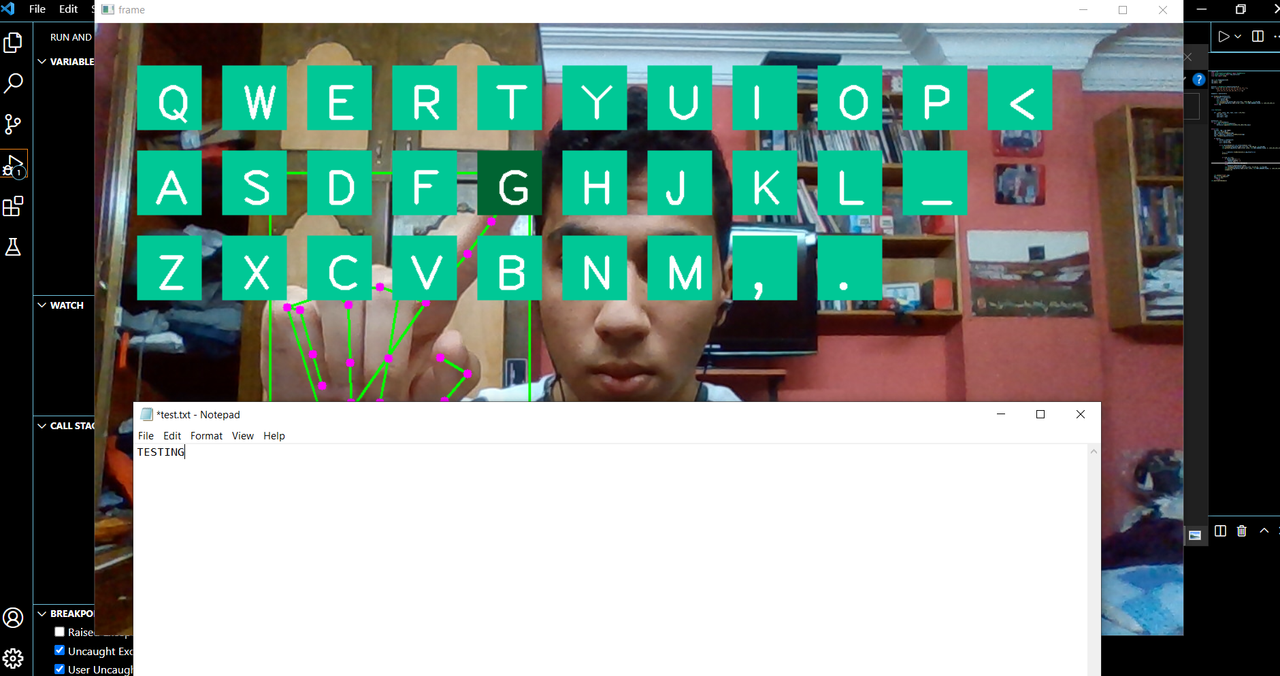
all of the hand tracking was thanks to the google Mediapipe library
also you should check the CV Zone github repo.
and support Murtaza Hassan since I basically made my version of his project