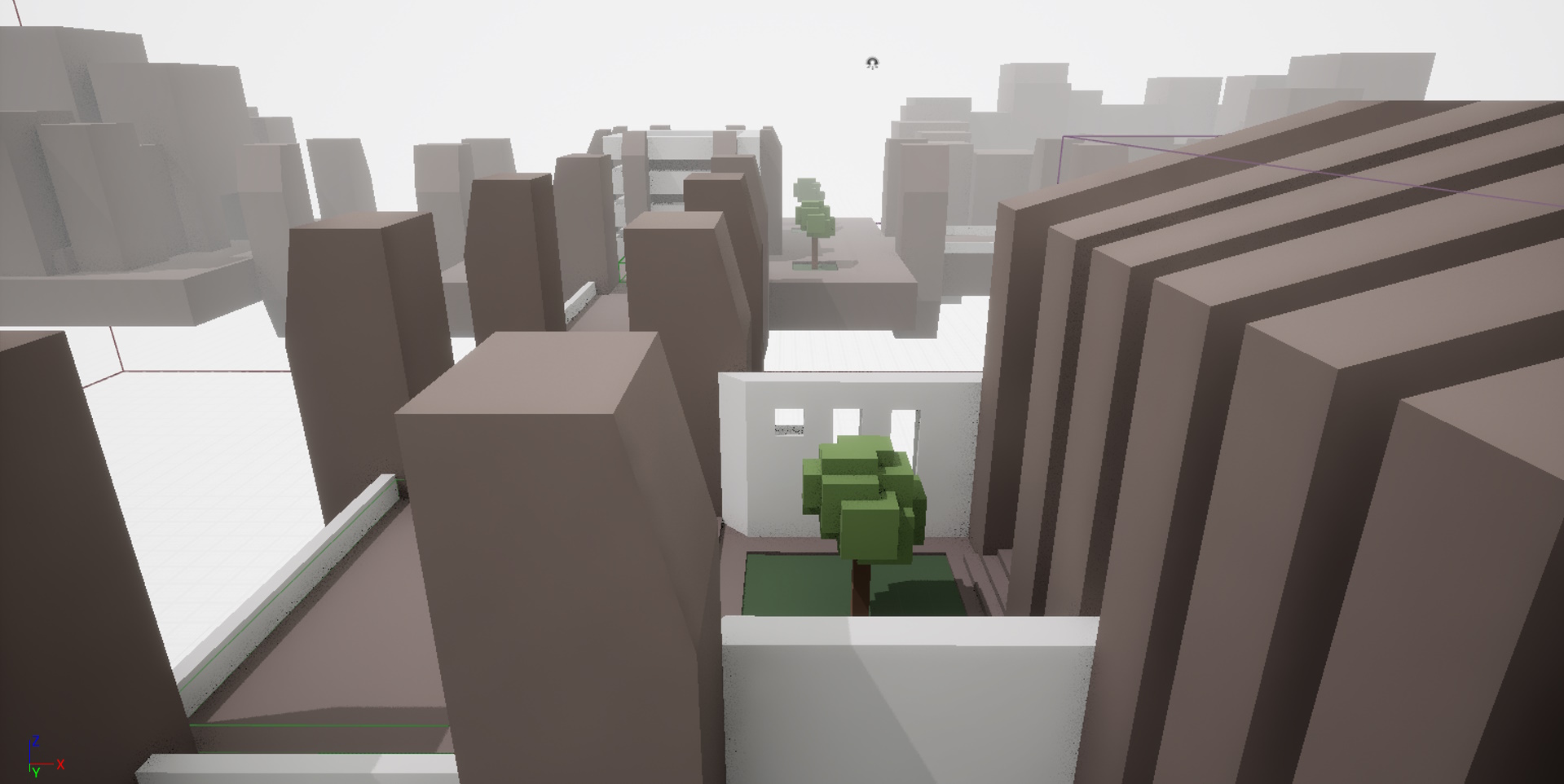
This project was created as a base for anyone wanting to explore audio implementation in Unreal. It includes no audio itself, but it does include a number of elements that require specific attention from game audio implementers. I currently use it in labs for my CMP407: Audio Programming module at Abertay University.
Developed in Unreal 5.4.3
Note that the 'puzzles' are not particularly challenging. This will hopefully change in future, see the ToDo list.
As it is intended as a base for audio implementation, the project includes the following features:
- Different surfaces to walk on/in (concrete, grass, water)
- Different shapes and sizes of enclosed spaces (with expectations of their own acoustic characteristics, i.e. reverb)
- Unreal's default third-person model, for timeline-based footstep triggering
- A small variety of buttons and event triggers
- A small pool of water for experimenting with underwater audio effects
As it's a third-person game, most materials make use of a masking shader that will cut out geometry around the player character so that the player has a clearer view of the level.
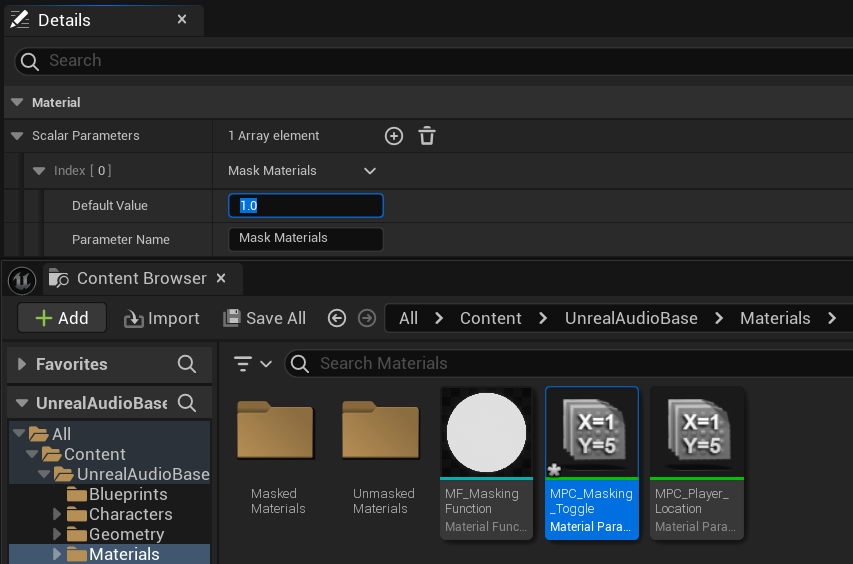
This makes it a little difficult to edit the level/geometry in the editor, so it is disabled (0.0) by default. It can be enabled (1.0) via the MPC_Masking_Toggle Material Parameter Collection:
Locations for where to find and set the various audio events are listed in the table below.
Where Location is set to Content: this indicates the event is set on an asset from your Content Browser. Double-click the asset to edit it, then set the sound via the listed Components Pane and Details Pane values.
Where Location is set to Outliner: this indicates the event is set from an object in the scene. Select that object in the Outliner, and set the sound via its Details Pane.
| Event | Location | Where to set |
|---|---|---|
| Player Footstep | Content: AbertayUnrealBase → Characters → Mannequins → Animations → Quinn → MF_Run_Fwd | For triggering sounds from an animation timeline, see this video |
| Player Landed | Content: AbertayUnrealBase → ThirdPerson → Blueprints → BP_ThirdPersonCharacter | Components Pane: Variables → LandedSound Details Pane: Default Value → Landed Sound |
| Player Water Splash | Outliner: ThirdPersonMap → Areas → Garden → GardenPondTrigger | Details Pane: Default → Sound |
| Regular Button Press | Content: AbertayUnrealBase → Blueprints → BP_IndividualButton | Components Pane: Variables → PressSound Details Pane: Default Value → Press Sound |
| Regular Button Reset | Content: AbertayUnrealBase → Blueprints → BP_IndividualButton | Components Pane: Variables → ResetSound Details Pane: Default Value → Reset Sound |
| Puzzle Button Press (Garden) | Outliner: ThirdPersonMap → Areas → Garden → Buttons → GardenPuzzleButton | Details Pane: Sounds → Press Sound |
| Puzzle Button Release (Garden) | Outliner: ThirdPersonMap → Areas → Garden → Buttons → GardenPuzzleButton | Details Pane: Sounds → Release Sound |
| Puzzle Solved (Garden) | Outliner: ThirdPersonMap → Areas → Garden → Buttons → GardenPuzzleButton | Details Pane: Sounds → Puzzle Solved |
| Puzzle Failed (Garden) | Outliner: ThirdPersonMap → Areas → Garden → Buttons → GardenPuzzleButton | Details Pane: Sounds → Puzzle Failed |
| Puzzle Button Press (Cathedral) | Outliner: ThirdPersonMap → Areas → Cathedral → Buttons → CathedralPuzzleButton | Details Pane: Sounds → Press Sound |
| Puzzle Button Release (Cathedral) | Outliner: ThirdPersonMap → Areas → Cathedral → Buttons → CathedralPuzzleButton | Details Pane: Sounds → Release Sound |
| Puzzle Solved (Cathedral) | Outliner: ThirdPersonMap → Areas → Cathedral → Buttons → CathedralPuzzleButton | Details Pane: Sounds → Puzzle Solved |
| Puzzle Failed (Cathedral) | Outliner: ThirdPersonMap → Areas → Cathedral → Buttons → CathedralPuzzleButton | Details Pane: Sounds → Puzzle Failed |
| Centre Towers Lower | Outliner: ThirdPersonMap → Areas → Garden → Buttons → GardenPuzzleButton | Details Pane: Sounds → Centre Towers Sound |
| Centre Internal Wall Lowers | Outliner: ThirdPersonMap → Areas → Cathedral → Buttons → CathedralPuzzleButton | Details Pane: Sounds → Centre Wall Sound |
| Centre Rings Rotate | Outliner: ThirdPersonMap → Areas → Centre → CentreRing1 (2, 3, 4) | Details Pane: Default → Rotating Sound |
| Ascend/Game End | Outliner: ThirdPersonMap → Areas → Centre → EndTrigger | Details Pane: Default → End Sound |