Easy Device Integration (EDI) is a Windows application developed in C# that synchronizes game events with interactive sex toys. Running as a standalone program, it can be controlled through a REST API from any game. Its modular and simple architecture makes it a powerful, flexible, and easy-to-integrate tool for any game.
EDI operates as an independent service that:
- Runs as a Windows application separate from your game
- Exposes a REST API for complete control of device playback and settings
- Handles all device communication, funscripts and synchronization
- Can be integrated with any game engine or framework that supports HTTP requests
- Compatible with Buttplug.io, Lovense, OSR (including UDP), eStim via mp3 file, Handy, AutoBlow, and more.
- SOLID architecture decoupled from the game engine.
- Simple HTTP API control (
Play,Stop,Pause, etc.). - Expandable galleries synced to a single video.
- Multi-device, multi-axis support, and customizable variants.
- Smooth and synchronized funscript playback within your game.
- Multi-channel support for independent playback streams.
- Game-specific configuration support.
This section describes how EDI handles different types of galleries, which represent key game moments that trigger device actions.
- Gallery: main type. Plays immediately with
Play, used for primary or long scenes. - Reaction: short events or quick responses (e.g., clicks, hits). Plays instantly and then EDI resyncs with the previous gallery.
- Filler: plays when no other gallery is active, simulating background or passive motion.
All types support the loop property as true or false.
- Galleries are defined using a
Definition.csvfile, chapters in OFS, or can be auto-generated asdefinition_auto.csvbased on filenames. - Auto-generation can be enabled in the config file (
EdiConfig.json). - Supported types:
gallery,reaction,filler. - If no type or loop is specified, EDI assumes
gallerywithloop = true. - You can also define gallery types using tags in the file name to avoid editing the CSV manually.
filler_3[filler].funscript→ typefiller, looptruegolpe_critico[reaction][nonLoop].funscript→ typereaction, loopfalsego_home[filler][nonLoop]→ chapter of typefiller, loopfalse
Tags can be placed in any order and override default behavior.
Variants allow for different versions of the same gallery to accommodate different devices, connection types, or gameplay preferences:
vibrator: Optimized for vibration-based deviceslinear: For linear motion devicessimple: Basic motion patterns, lower resource usagedetailed: Complex patterns with fine-grained control
easy: Gentler patterns for casual playhard: More intense patterns for experienced userspenis: For devices targeting penile stimulationanal: For devices targeting anal stimulation
Variants can be defined in two ways:
- In the filename:
enemy_attack2.intense.funscript - In the containing folder:
intense/enemy_attack2.funscript
Multiple variants can be combined:
enemy_attack2.anal-vibrator.funscript→ variant for buttplug vibration devicesenemy_attack2.easy-lineal.funscript→ easy variant for Stroker
This flexible variant system allows you to:
- Optimize performance based on connection type
- Balance detail vs response time
- Provide different intensity levels for player preferences
- Target specific body parts and device types
EDI allows full use of multi-axis or multi-motor devices via naming conventions in funscript files.
- Axes are declared in the filename:
.linear,.twist,.roll,.vibrate, etc. - EDI auto-detects and applies these axes for compatible devices like OSR.
ataque_fuerte.intense.linear.funscript→ variantintense, axislinearataque_fuerte.intense.twist.funscript→ axistwist
EDI now supports multiple independent playback channels, allowing different device groups to operate independently:
- Configure channels in
EdiConfig.json:UseChannels": true, "Channels": ["player1", "player2"] - Assign devices to specific channels
- Each channel works as an independent EDI playback: gallery, filler, reaction
- Control independently via API endpoints with channel parameter
- Default behavior (no channel specified) affects all channels
EDI groups all galleries into bundles for efficient loading into devices like Handy and AutoBlow.
- Bundles reduce latency by grouping related galleries.
- Defined in
BundleDefinition.csvunderC:\Users\{User}\AppData\Local\Edi - The
defaultbundle contains all galleries not explicitly grouped. - When a gallery from another bundle is needed, EDI uploads that bundle dynamically.
- A gallery can be in multiple bundles (useful for
fillerorreaction). - If a bundle exceeds 1MB, split it into smaller ones.
Example:
-Intro
intro1
intro2

-Missions
attack1
attack2
reaction_click
GalleryPath: folder path containing funscripts.GenerateDefinitionFromChapters:trueto generateDefinition.csvfrom chapters.GenerateChaptersFromDefinition: generates chapters fromDefinition.csv.
This section controls auto-repeat and timing between galleries. All values are in milliseconds.
MinRepeatDuration: minimum time before a command is resent to the device (e.g., Handy) during loop (increases bundle size).RepeatDuration: extra duration to offset lag between commands (increases bundle size).SpacerDuration: pause between one gallery ending and the next starting (does NOT increase bundle size).
- Toggle active gallery types:
Filler,Gallery,Reactive ExecuteOnReady: launches the game when EDI is ready.UseHttps,UseLogs: debugging and security options.
- Devices are configured individually by name.
- You can assign a
Variant, and defineMinandMaxintensity.
EDI uses a layered configuration system to manage settings at different levels:
EdiConfig.json: Main configuration file for game-specific settings- Gallery and device settings
- Channel configuration
- Game selection
- AI features configuration (Beta)
UserConfig.json: User-specific preferences (located in AppData)- Personal device settings (keys, ports, ranges, Selected Games)
- Interface preferences (e.g., "Always on top" window setting)
This API lets your game control playback, intensity, and device settings using simple HTTP commands. All endpoints accept both POST and GET requests.
-
POST /Edi/Play/{name}?seek=0: plays a gallery by name, optionally from a specific point (milliseconds) -
POST /Edi/Pause?untilResume=true: pauses device output. WithuntilResume=true, ignores all play commands until Resume in Sync with last received play event -
POST /Edi/Resume?AtCurrentTime=false: resumes from pause. WithAtCurrentTime=true, syncs to current video time. -
POST /Edi/Intensity/{max}(0–100%): sets global intensity across devices.
Channels can be specified for any Playback endpoint in two ways:
- Query string parameter:
?Channels=player1or?Channels=player1,player2 - HTTP header:
Channels: player1orChannels: player1,player2 - (no channel specified) affects all channels
GET /Devices: lists connected devices.POST /Devices/{deviceName}/Variant/{variantName}: assigns a variant to a device. UsingNonestops that device.POST /Devices/{deviceName}/Range/{min}-{max}: sets device intensity range. If both values are 0, the device is stopped.POST /Devices/{deviceName}/Channel/{channelName}: assigns a device to a specific channel.
GET /Edi/Definitions: returns all available galleries.GET/POST /Edi/Assets: upload or list funscripts and audio files.
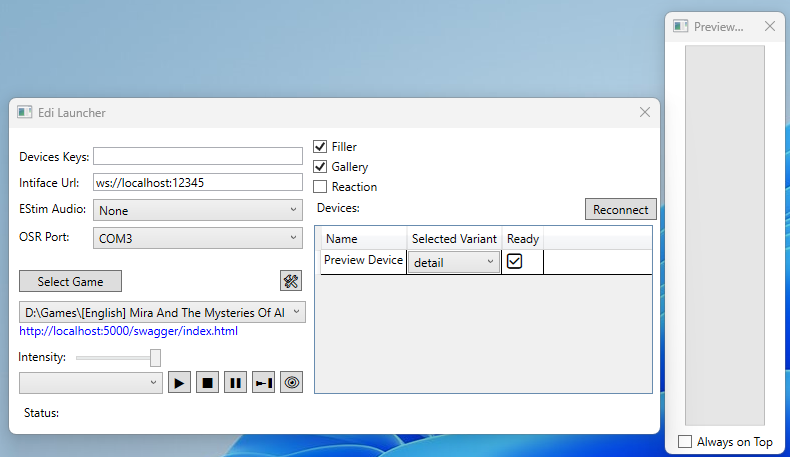
EDI includes a user-friendly GUI to manage essential functions easily.
- Select Game by EdiConfig.json or Definitions.csv.
- Select connected devices and assign variants.
- Toggle active gallery types: Gallery, Filler, Reaction.
- Adjust intensity with slider.
- Manual playback controls.
- Live preview of device response, useful for testing without hardware.
- Link to API Swagger for testing and debugging.
All interaction with devices in EDI is handled through pre-written galleries. When a command is sent to a device, it's almost always the name of a gallery, such as sex_scene_mari-1 , final_boss_fight-3 , or filler-5 . Each device implementation within EDI knows how to retrieve and play that gallery.
Raw device commands like vibrate or linear movement are isolated inside the device implementation. The game never needs to issue low-level commands—just the gallery name.
This architecture makes the control layer entirely independent from the game itself. For example, one can add a full set of galleries in a FullGalleries.mp3 file to support an eStim device without touching the integration or modifying any code.
he same principle allows adding future devices (e.g., a brainwave stimulator) by simply preparing galleries and placing files in the folder—no code changes needed.
EDI also solves common funscript playback issues like overly persistent strokes or inconsistent behavior across devices. Since devices all use the same unified player, improvements benefit all integrations automatically.
Limitation: EDI cannot play dynamic content. Everything must be pre-scripted. However, this can be worked around by preparing multiple gallery variants with varying intensities, such as:
- Lori_Attack-level-1
- Lori_Attack-level-2
- Lori_Attack-level-3