IAP Game Unity Developer Guide
< 참고 >
본 문서는 원스토어 인앱 SDK v16(API v4)에 대한 가이드 문서입니다. 최신 원스토어 인앱 SDK v17(API v5)에 대한 가이드 문서는 원스토어 개발자센터에서 제공되고 있습니다.
최신 인앱 SDK v17 가이드 문서 링크 : https://dev.onestore.co.kr/devpoc/reference/view/IAP_v17
해당 내용은 Unity3D 환경의 안드로이드 앱에서 IAP SDK 적용을 돕기 위한 설명서이다.
Unity 관련 기본 라이브러리(unity_adaptor)와 테스트앱은 다운로드 페이지에서 받을 수 있다.
Unity 관련 모든 라이브러리와 테스트앱은 소스와 프로젝트도 함께 제공하며, 필요에 따라서 개발사에서 수정하여 사용해야 한다.
- unity_adaptor : Unity에 IAP를 적용하기 위한 라이브러리의 프로젝트
- unity_sample : unity_adaptor를 적용하여 구현한 Unity 어플리케이션 프로젝트
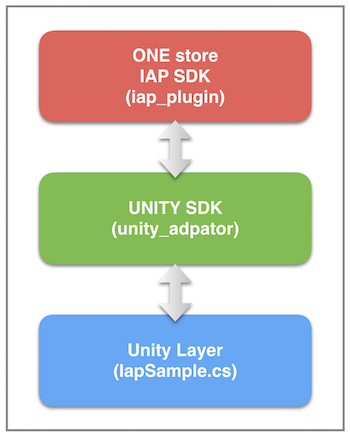
인앱결제를 위해 제공하는 라이브러리(iap_plugin)를 그대로 사용한다. 이를 Unity3D 레이어에서 사용할 수 있도록, 추가라이브러리(unity_adaptor)를 만들었으며, 이는 스크립트파일(IapSample.cs)에서 직접 사용한다.
| 제공파일 | 설명 | 비고 |
|---|---|---|
| libs/iap_plugin_[버전]_[빌드날짜].jar | IAP 라이브러리 | |
| libs/unity_adaptor_[버전]_[빌드날짜].jar | Unity3D Adaptor 라이브러리 | |
| src/IapSample.cs | 요청과 콜백이 구현된 예시 파일 | |
| src/AndroidManifest.xml | meta-data와 기본 Activity가 선언된 파일 | |
| src/Response.cs | json형태의 결과를 파싱하는 경우 사용 | |
| src/Error.cs | json형태의 결과를 파싱하는 경우 사용 | |
| src/Response.cs | json형태의 결과를 파싱하는 경우 사용 |
아래의 설명은 _unity_sample_프로젝트와 _IapSample.cs_를 바탕으로 한다.
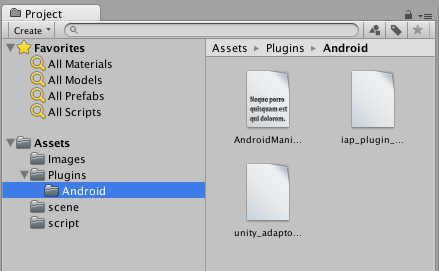
AndroidManifest.xml과 라이브러리를 /Assets/Plugins/Android 에 위치시킨다
	//-----------------
	// Initialize
	//-----------------
	unityPlayerClass = new AndroidJavaClass ("com.unity3d.player.UnityPlayer");
	currentActivity = unityPlayerClass.GetStatic<AndroidJavaObject> ("currentActivity");

	if (currentActivity != null) {
		// RequestAdapter를 초기화
		// ---------------------------------
		// 함수 parameter 정리
		// ---------------------------------
		// (1) 콜백을 받을 클래스 이름
		// (2) Activity Context
		// (3) debug 여부
		iapRequestAdapter = new AndroidJavaObject("com.onestore.iap.unity.RequestAdapter", "IapSample", currentActivity, false); //Release
		//iapRequestAdapter = new AndroidJavaObject("com.onestore.iap.unity.RequestAdapter", "IapSample", currentActivity, true); //Debug
	}
_iapRequestAdapter_를 이용하여 요청을 하며, 콜백은 공통으로 받는다.
	//------------------------------------------------
	//
	// Command - Request
	//
	//------------------------------------------------
	public void RequestPurchaseHistory()
	{
		// ---------------------------------
		// 함수 parameter 정리
		// ---------------------------------
		// (0) 메소드이름 : 구매내역 조회
		// ---------------------------------
		// (1) 필요시에는 UI 노출
		// (2) appId
		// (3) productIds
		// ----------------------------------
		string[] productIds = {"0910024112"};
		iapRequestAdapter.Call ("requestPurchaseHistory", false, "OA00679020", productIds);
		//iapRequestAdapter.Call ("requestPurchaseHistory", true, "OA00679020", productIds); // UI노출 없이 Background로만 진행
	}

	public void RequestProductInfo()
	{
		// ---------------------------------
		// 함수 parameter 정리
		// ---------------------------------
		// (0) 메소드이름 : 상품정보 조회
		// ---------------------------------
		// (1) 필요시에는 UI 노출
		// (2) appId
		// ----------------------------------
		iapRequestAdapter.Call ("requestProductInfo", false, "OA00679020");
		//iapRequestAdapter.Call ("requestProductInfo", true, "OA00679020"); // UI노출 없이 Background로만 진행
	}

	public void RequestCheckPurchasability()
	{
		// ---------------------------------
		// 함수 parameter 정리
		// ---------------------------------
		// (0) 메소드이름 : 구매가능여부 조회
		// ---------------------------------
		// (1) 필요시에는 UI 노출
		// (2) appId
		// (3) productIds
		// ----------------------------------
		string[] productIds = {"0910024112"};
		iapRequestAdapter.Call ("requestCheckPurchasability", false, "OA00679020", productIds);
		//iapRequestAdapter.Call ("requestCheckPurchasability", true, "OA00679020", productIds); // UI노출 없이 Background로만 진행
	}

	public void RequestSubtractPoints()
	{
		// ---------------------------------
		// 함수 parameter 정리
		// ---------------------------------
		// (0) 메소드이름 : 상품 속성변경 요청
		// ---------------------------------
		// (1) 필요시에는 UI 노출
		// (2) action(아이템차감)
		// (3) appId
		// (4) productIds
		// ----------------------------------
		string[] productIds = {"0910024112"};
		iapRequestAdapter.Call ("requestChangeProductProperties", false, "subtract_points", "OA00679020", productIds);
		//iapRequestAdapter.Call ("requestChangeProductProperties", true, "subtract_points", "OA00679020", productIds); // UI노출 없이 Background로만 진행
	}

	public void RequestCancelSubscription()
	{
		// ---------------------------------
		// 함수 parameter 정리
		// ---------------------------------
		// (0) 메소드이름 : 상품 속성변경 요청
		// ---------------------------------
		// (1) 필요시에는 UI 노출
		// (2) action(자동결제 취소)
		// (3) appId
		// (4) productIds
		// ----------------------------------
		string[] productIds = {"0910042744"};
		iapRequestAdapter.Call ("requestChangeProductProperties", false, "cancel_subscription", "OA00697454", productIds);
		//iapRequestAdapter.Call ("requestChangeProductProperties", true, "cancel_subscription", "OA00697454", productIds); // UI노출 없이 Background로만 진행
	}


	//------------------------------------------------
	//
	// Command - Callback
	//
	//------------------------------------------------
	public void CommandResponse(string response)
	{
		Debug.Log ("[UNITY] CommandResponse >>> " + response);
		// Parsing Json string to "Reponse" class
		Response data = JsonUtility.FromJson<Response> (response);
	}

	public void CommandError(string message)
	{
		Debug.Log ("[UNITY] CommandError >>> " + message);
		// Parsing Json string to "Error" class
		Error data = JsonUtility.FromJson<Error> (message);
	}
	//------------------------------------------------
	//
	// Payment - Request
	//
	//------------------------------------------------
	public void RequestPaymenet()
	{
		// ---------------------------------
		// 함수 parameter 정리
		// ---------------------------------
		// (0) 메소드이름 : 구매요청
		// ---------------------------------
		// (1) appId
		// (2) productId
		// (3) proudtName
		// (4) tId
		// (5) bpInfo
                // (6) gameuserId  프로모션 중복 참여 방지 기능 (16.04 추가)사용시 주석 처리된 부분 사용
                // (7) promotionApplicable 프로모션 중복 참여 방지 기능 (16.04 추가)사용시 주석 처리된 부분 사용
		// ----------------------------------
		iapRequestAdapter.Call ("requestPayment", "OA00679020", "0910024112", "UNITY결제", "TID_0123", "BPINFO_0123");
          //iapRequestAdapter.Call ("requestPayment", "OA00679020", "0910024112", "UNITY결제", "TID_0123"     ,"BPINFO_0123", "", false);
	}


	//------------------------------------------------
	//
	// Payment - Callback
	//
	//------------------------------------------------
	public void PaymentResponse(string response)
	{
		Debug.Log ("[UNITY] PaymentResponse >>> " + response);
		// Parsing Json string to "Reponse" class
		Response data = JsonUtility.FromJson<Response> (response);
		// Try ReceiptVerification
		iapRequestAdapter.Call ("verifyReceipt", "OA00679020", data.result.txid, data.result.receipt);
	}

	public void PaymentError(string message)
	{
		Debug.Log ("[UNITY] PaymentError >>> " + message);
		// Parsing Json string to "Error" class
		Error data = JsonUtility.FromJson<Error> (message);
	}
	//------------------------------------------------
	//
	// 전자영수증검증 - Request
	//
	//------------------------------------------------
	public void VerifyReceipt()
	{
		// ---------------------------------
		// 함수 parameter 정리
		// ---------------------------------
		// (0) 메소드이름 : 구매요청
		// ---------------------------------
		// (1) appId
		// (2) txId
		// (3) signData
		// ----------------------------------
		iapRequestAdapter.Call ("verifyReceipt", appId, txId, signData);
	}


	//------------------------------------------------
	//
	// 전자영수증검증 - Callback
	//
	//------------------------------------------------
	public void ReceiptVerificationResponse(string result)
	{
		Debug.Log ("[UNITY] ReceiptVerificationResponse >>> " + result);
		// Parsing Json string to "VerifyReceipt" class
		VerifyReceipt data = JsonUtility.FromJson<VerifyReceipt> (result);
	}

	public void ReceiptVerificationError(string message)
	{
		Debug.Log ("[UNITY] ReceiptVerificationError >>> " + message);
		// Parsing Json string to "Error" class
		Error data = JsonUtility.FromJson<Error> (message);
	}
iapRequestAdapter.Call ("exit");
Unity레이어로 전달되는 모든 결과는 json 형태의 string으로 전달 된다.
또한, 결과의 파싱을 돕기 위해, 파싱 결과가 될 수 있는 데이터 클래스도 C#파일로 제공한다.
- Response.cs : 요청(쿼리, 결제)결과를 파싱한 결과를 담을 데이터 클래스
- VerifyReceipt.cs : 전자영수증 검증 결과를 담을 데이터 클래스
- Error.cs : 에러에 대한 결과를 담을 데이터 클래스
unity_sample 에서 파싱하는 방법은 Unity 버전5이상에서 제공하는 JsonUtility 클래스를 사용한다.
이하 버전의 경우, 기존에 사용하던 Json Parser 를 이용하여 파싱 할 수 있도록 한다.
성공 결과의 경우, 인앱SDK로부터 전달되는 결과와 동일하며, 요청 및 응답 예시을 통해 확인 가능하다.
{
	"api_version":"4",
	"identifier":"1477984099815",
	"method":"purchase",
	"result":
		{
			"code":"0000",
			"message":"요청이 성공했습니다.",
			"count":1,
			"txid":"TSTOREXXXX_..",
			"receipt":"......."
		}
}
에러의 경우, 아래의 값을 키로 사용하며, 선택적으로 전달한다.
- requestId : 요청식별자
- errorCode : 요청에 대한 에러코드
- errorMessage : 에러에 대한 결과 메시지
경우에 따라서, 전달 되지 않는 값도 있으니 주의하라.
{
	"requestId":"",
	"errorCode":"-1001",
	"errorMessage":"Service has not allowed."
}
개발사의 환경에 따라, unity_adaptor 라이브러리를 수정해야 할 필요가 있다.
이 경우, 프로젝트를 수정하여, unity_adaptor 라이브러리를 만들 수 있다.
├── build.gradle
├── gradle
│   └── wrapper
│       └── gradle-wrapper.jar
├── gradlew
├── gradlew.bat
├── library
│   ├── build.gradle
│   ├── libs
│   │   ├── classes.jar
│   │   └── iap_plugin_[버전]_[빌드날짜].jar
│   ├── proguard-rules.pro
│   └── src
│       └── main
│           ├── AndroidManifest.xml
│           ├── java
│           │   └── com
│           │       └── onestore
│           │           └── iap
│           │               └── unity
│           │                   ├── AbsCallbackAdapter.java
│           │                   ├── MainActivity.java
│           │                   ├── MessageMaker.java
│           │                   ├── ReceiptVerificationCallbackAdapter.java
│           │                   ├── RequestAdapter.java
│           │                   └── RequestCallbackAdapter.java
│           └── res
│               └── values
│                   └── strings.xml
└── settings.gradle
| 파일 | 설명 | 비고 |
|---|---|---|
| RequestCallbackAdapter.java | Unity레이어로 부터 요청을 받고, 콜백 메서드 정의한다. |
프로젝트에서 아래 명령어를 통해, gradle 빌드를 수행한다.
./gradlew buildUnityAdaptorJar
결과물은 아래 경로에 있다.
unity_adaptor/library/build/outputs/aar/unity_adaptor_[버전]_[빌드날짜].jar