
One place to talk to all your AI agents.
Claude Code, Codex, Hermes, and OpenClaw in a single native macOS app — local or over SSH.
agent-hub.tools · Claude Code GUI · Download · Contributing





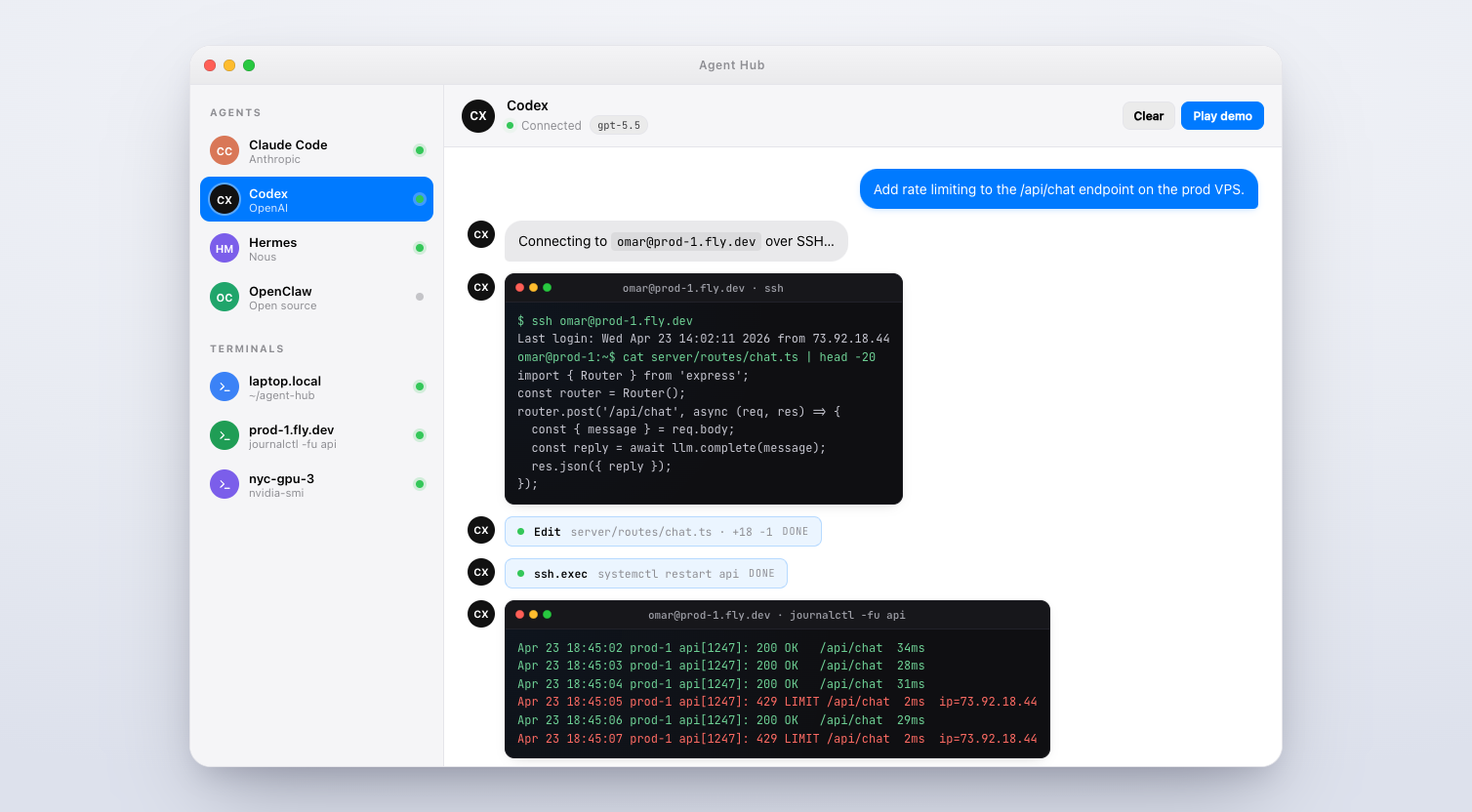
Agent Hub is an open-source native macOS app that unifies the AI agent CLIs you already use — Claude Code (Anthropic), Codex (OpenAI), Hermes (Nous Research), and OpenClaw — into one calm, keyboard-first chat window.
Point it at your laptop and it spawns the agent CLI locally. Point it at omar@prod-1.fly.dev and it runs over SSH. Same UI, same thread history, same slash commands, same permission model. The terminal version of these agents is great; Agent Hub is what you reach for when you want multiple parallel threads, visual tool-approval with diffs, image paste, and a sidebar of remote hosts.
- Real CLIs under the hood. Agent Hub wraps the official
claude,codex,hermes, andopenclawbinaries. Every feature the CLI has —CLAUDE.md, MCP servers, memory files, slash commands — works identically. - Claude Desktop & Codex Desktop, pinned inside. If you have Anthropic's Claude.app or OpenAI's Codex.app installed, Agent Hub pins them visually inside its content area via macOS Accessibility APIs. They follow Agent Hub's window: minimize together, restore together. The sidebar stays usable so you can switch between desktop apps and CLI threads with one click.
- Local or SSH, per thread. Switch a thread's target host in one click. Your Mac is the front-end; the agent runs wherever you tell it to.
- Granular permissions. Per-agent
ask,acceptEdits, orbypassPermissions. The approval dialog shows the exact tool call and arguments before anything runs. - Slash commands, fuzzy-found.
/plan,/review,/compact,/memory,/cost— every command registered by every provider, keyboard-searchable. - Paste images, drop files. Screenshots from the clipboard and files from Finder go straight into the thread.
- Hot-swap models per thread.
claude-opus-4.7→claude-sonnet-4.6→gpt-5.5without restarting. - Any OpenAI-compatible endpoint. llama.cpp, vLLM, Groq, Together — use the
openai-compatprovider. - Zero telemetry. No analytics. Your conversations go only to whichever provider that thread is configured for.
| Agent | Provider | Local | SSH | Notes |
|---|---|---|---|---|
| Claude Code | Anthropic | ✓ | ✓ | Uses your claude CLI session. claude-opus-4.7, sonnet-4.6, haiku-4.5. |
| Codex | OpenAI | ✓ | ✓ | gpt-5.5 with effort levels. |
| Claude Desktop | Anthropic | ✓ | Native Mac app pinned inside Agent Hub's content area. Glued to window minimize/restore. | |
| Codex Desktop | OpenAI | ✓ | Native Mac app pinned inside Agent Hub's content area. Glued to window minimize/restore. | |
| Hermes | Nous Research | ✓ | ✓ | Long-horizon research with tool use. |
| OpenClaw | Open source | ✓ | ✓ | Desktop automation (click, type, file ops). |
| Terminal | Local/SSH | ✓ | ✓ | Full PTY-backed xterm tab. |
openai-compat |
Any | ✓ | ✓ | Point at llama.cpp, vLLM, Groq, etc. |
Grab the latest .dmg from GitHub Releases. Requires macOS 11+ on Apple Silicon. ~183 MB.
git clone https://github.com/Potarix/agent-hub.git
cd agent-hub
npm install
npm start
Convenience launcher (detached, closes terminal):
./launch.sh
# or
npm run start-bg
Create an unsigned local DMG/ZIP build:
CSC_IDENTITY_AUTO_DISCOVERY=false npm run dist:macRelease signing, notarization, and in-app update publishing are documented in RELEASE.md.
Agent Hub doesn't re-implement any agent — it spawns the real CLIs. Install the ones you want:
npm install -g @anthropic-ai/claude-code   # Claude Code (Anthropic)
npm install -g @openai/codex               # Codex (OpenAI)
Then claude login / codex login, or drop an API key into Agent Hub's provider settings.
Optional desktop apps. If you'd rather use Anthropic's Claude.app or OpenAI's Codex.app, install them and Agent Hub will pin them inside its window automatically. First launch will prompt for System Settings → Privacy & Security → Accessibility access (required to position the app's window).
- Claude Desktop: claude.ai/download
- Codex Desktop: chatgpt.com/codex
New thread: ⌘N, then pick a provider and a target host (local or any SSH host you've configured).
Slash commands: type / in the composer. Fuzzy-search to narrow.
Tool approvals: when an agent wants to run a tool, a dialog shows the exact call. ⌘↵ approves, ⌘⌫ denies. Per-agent profiles let you auto-approve safe edits.
Switch models: /model in any thread, or click the model pill in the header.
Per-agent permission modes:
ask— prompt for every tool call.acceptEdits— auto-approve safe in-repo edits (Read, Write, Edit).bypassPermissions— never ask. Use sparingly.
┌──────────────────┐        ┌─────────────────────┐
│ Agent Hub (UI)   │ stdio  │ claude / codex /    │
│ native macOS app │ ─────► │ hermes / openclaw   │
└──────────────────┘ pty    │  (real CLIs)        │
        │                   └─────────────────────┘
        │ ssh
        ▼
┌──────────────────┐
│ any VPS you own  │  ← agent runs HERE, not on your laptop
└──────────────────┘
For each thread, Agent Hub spawns the provider's CLI (locally via node-pty, or remotely via ssh), captures stdout/stderr, parses tool calls and model events, and renders them as a native chat UI. Your messages go into the CLI's stdin. Nothing is proxied, nothing is rewritten, nothing is logged.
Does it work on Windows or Linux? Today it's macOS-only (Apple Silicon). Intel and universal builds are supported by electron-builder but not yet shipped.
Does Agent Hub store my API keys? No. Keys live in the OS keychain on the machine where the CLI runs — locally on your Mac, or on the remote host in SSH mode.
Does it send any data to a server? No. Zero telemetry. Conversations go only to whichever provider that thread is configured for.
Can I use my own models? Yes. Any OpenAI-compatible endpoint works via the openai-compat provider.
Can I add a new provider? One file in providers/ — see CONTRIBUTING.md. providers/openai-compat.js is a good starting point.
Why Electron? Agent Hub is mostly plumbing around real CLIs — the perf-sensitive work (model inference, shell commands) happens in the CLI processes, not the UI. Electron gets us native-feel on macOS fastest.
Pull requests welcome. See CONTRIBUTING.md for the full guide. If you're adding a new provider, look at providers/openai-compat.js first — it's the cleanest template.
Found a bug? Open an issue.
Security issue? Please email omar.dadabhoy@gmail.com instead of opening a public issue. Details in SECURITY.md.
- Website: agent-hub.tools
- Claude Code GUI page: agent-hub.tools/claude-code-gui
- Claude Code docs: docs.claude.com/en/docs/claude-code
- Codex docs: developers.openai.com/codex
MIT © Omar Dadabhoy / Potarix
Made for the terminal-folk.