
The Bowie Library is for the Robot Missions introductory robot platform, Bowie.
More information about our robot platform at the Robot Missions Website ➞
Compatible with the Robot Missions Brain Board, using either a Teensy 3.6 for full functionality, or a Teensy 3.2.
The Bowie Library defines the basic functions for the default modules on the robot. This includes:
- BowieArm
- Controls both arm servos attached to the robot's base
- BowieComms
- Handles Serial communications to various interfaces (for example, Xbee or an external Arduino) using the API
- BowieCurrentSensor
- Reads the current sensor, and can set thresholds for timeouts to occur if current is over drawing
- BowieDrive
- Controls the motor driver for the 4 DC motors in the drive system (each side controlled independently)
- BowieHopper
- Controls the hopper pivot servo as well as the lid servo
- BowieLights
- Controls the super bright LEDs on the front and back of the robot
- BowieLogger
- Handles data logging at 1Hz for the micro SD card (if using a Teensy 3.6)
- BowieScoop
- Controls the end effector servo for the scoop attached to the arm of the robot
When Bowie is applied to a mission, for example, Mission #1: Shoreline Cleanup, a separate library can be created to refer to the core libraries. This means all the behaviours are separate to the core modules, this way the modules can be used for different missions.
To see the basic usage of each module, see the /examples folder. See this page to learn how to install libraries.
You will need to have these libraries installed:
- Streaming
- PromulgateBig
- Xbee
- SD
- TimeLib
- Servo Included with Arduino
- SPI Included with Arduino
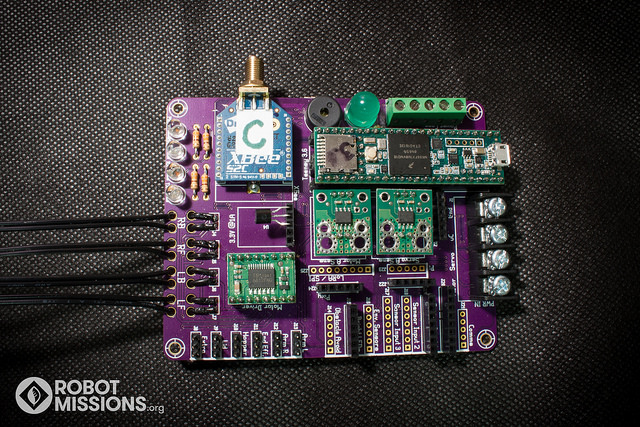
The setup for Teensy 3.6 uses the full functionality of the brain board. Solder all of the headers on to the teensy, except for the column in the middle. Make sure the male and female pins in the middle rows line up.
The setup for Teensy 3.2 is a bit different. To get access to all of the servo pins and more of the GPIO, you have to solder a ribbon header out.
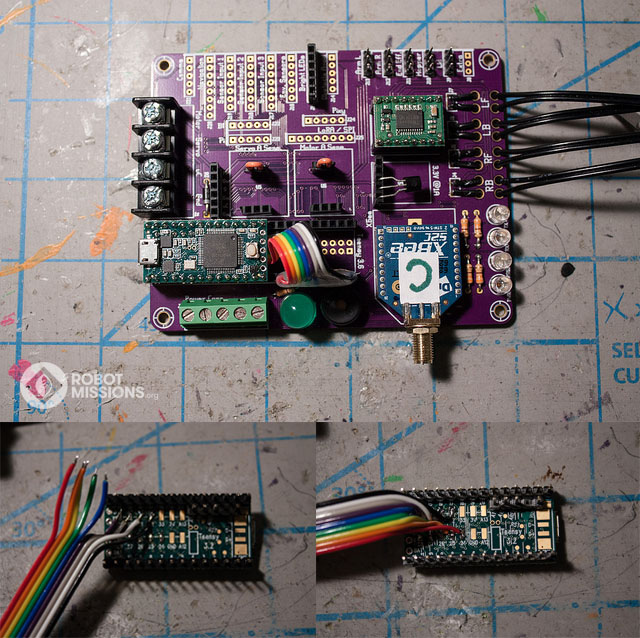
Following the above image:
| Wire colour in image | Teensy 3.2 Pin | Bottom Row Header Pin |
|---|---|---|
| Black | 32 | 24 |
| White | 31 | 23 |
| Grey | 30 | 22 |
| Purple | 29 | 21 |
| Blue | 28 | 20 |
| Green | 27 | 19 |
| Yellow | 26 | 18 |
| Orange | 25 | 17 |
| Red | 24 | 16 |
Messages are composed of this payload:
| Action Specifier | Command | Key | , | Value | , | Command | Key | , | Value | Delimeter |
|---|---|---|---|---|---|---|---|---|---|---|
| char | char | uint8_t | , | uint16_t | , | char | uint8_t | , | uint16_t | char |
Valid action specifiers:
'$', '^', '#'
Valid delimeters:
'!', '?', ';'
Example payloads:
Empty message
^00,0,00,0!
Both motors, full speed, forward direction
#L1,255,R1,255!
There is an existing API used with Bowie Shoreline, which you may want to follow / extend to add in your own functionality. (See here for details link coming soon)
Several of the modules have callbacks that can be implemented in your sketch or external library. This table shows each method and describes when it is called.
| Module class | Callback method | Parameters | When it gets called |
|---|---|---|---|
| BowieArm | servoInterruptCallback(int key, int val) | key for the servo type, val for the position |
During moveArm, whenever the position is being incremented |
| BowieComms | commsTimeoutCallback() | When the communications times out - if it hasn't received any messages within a set amount of time | |
| BowieComms | controllerAddedCallback() | When a new controller (operator interface on Xbee connection type) is added | |
| BowieComms | controllerRemovedCallback() | When a controller (operator interface on Xbee connection type) is removed | |
| BowieComms | receivedActionCallback(Msg m) | Msg message |
When a message is received from the communication interface |
| BowieCurrentSensor | waitingToCoolDown(bool first) | first is true when this is the first time it's called. false each time after that |
During the wait time when the current sensor is cooling down. At this point, it's exceeded the over-current threshold |
| BowieCurrentSensor | reactivateAfterCoolDown() | After the cool down period, this is called to reactivate the motors / servos / lights that caused the shutdown | |
| BowieCurrentSensor | overCurrentThreshold(bool first) | first is true when this is the first time it's called. false each time after that |
Called when the current drawn is above the set threshold |
| BowieHopper | servoInterruptCallback(int key, int val) | key for the servo type, val for the position |
During moveHopper or moveLid, whenever the position is being incremented |
| BowieScoop | servoInterruptCallback(int key, int val) | key for the servo type, val for the position |
During moveEnd, whenever the position is being incremented |
There are two methods to develop your own module:
- Have the code run on the main brain board, and all connections to the main brain board
- Have the code run on an external microcontroller (like an Arduino), and have it interface to the main brain board via Serial with our API, and receive power from the barrier block or screw terminals on the main brain board
When you contribute a module, it will be helpful if you create a Github repository and include the following:
- Application (what task it performs, for what problem)
- Photos & dimensions
- Installation (slide on to arm, mount to base, etc)
- Code
- Design files
- Electronics schematics
The more information you can document will assist in the process of having more people replicate your module.
Code is released under the MIT license.
Found a bug? Looking for a feature? Let us know by opening an Issue report. Further questions can be posted to our forum.
🤖✌️🌎
Robot Missions - Helping the planet with robots