

A production-ready React wrapper around Mozilla's pdf.js that provides a "drop-in" PDF viewer with a fully-featured toolbar, find bar, and automatic state persistence.
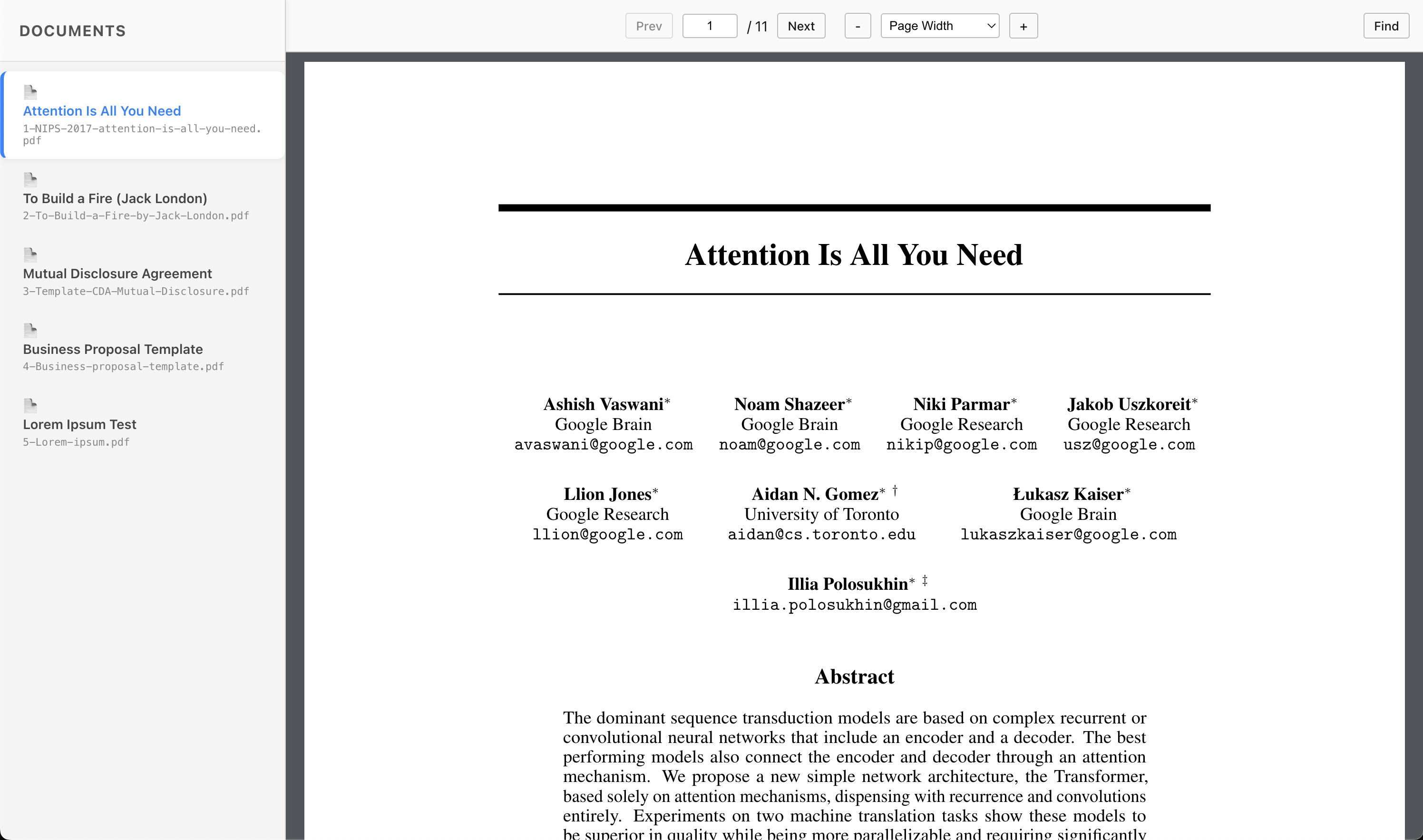
- Batteries Included: Full toolbar, page navigation, zoom, and rotation out of the box.
- State Persistence: Automatically saves and restores scroll position (precise ratio), zoom level, and rotation for each document.
- Find Bar:
Ctrl+F/Cmd+Fsupport with highlighting, match case, and whole word options. - Feature Flags: Easily opt-out of specific features (e.g., disable rotation or the toolbar) via props.
- Simple API: Just pass a
File,Blob, or URL string. - TypeScript: First-class type definitions included.
# npm
npm install custom-react-pdf-viewer

# pnpm
pnpm add custom-react-pdf-viewer

# yarn
yarn add custom-react-pdf-viewer
Note: This package requires
reactandreact-dom(>=18) as peer dependencies.
If you just want to render a PDF without worrying about state or persistence, simply import the component and pass it a file.
Note:* The viewer is designed to fill 100% of the width and height of its parent container. Ensure the parent element has a defined height (e.g., 100vh, 500px, or flex: 1).
import { CustomPdfViewer } from "custom-react-pdf-viewer";
import "custom-react-pdf-viewer/style.css"; // Don't forget the styles!

function SimpleViewer({ fileBlob }) {
  return (
    <div style={{ height: "100vh" }}>
      <CustomPdfViewer
        file={fileBlob}
        fileName="my-document.pdf"
      />
    </div>
  );
}To automatically remember zoom levels and scroll positions when users switch between documents, you need two things:
- Wrap your app with the
<PdfStoreProvider>. - Give your viewer a unique
viewerId.
// src/main.tsx
import { PdfStoreProvider } from "custom-react-pdf-viewer";

<PdfStoreProvider>
  <App />
</PdfStoreProvider>// src/App.tsx
import { CustomPdfViewer } from "custom-react-pdf-viewer";
function App() {
// ... file loading logic ...
return (
<CustomPdfViewer
file={file}
fileName="sample.pdf"
// 1. Required: Unique ID for this UI slot (e.g. "main-viewer", "sidebar")
viewerId="main-pdf-viewer"
// 2. Recommended: Unique ID for the document content
sessionKey="doc-123"
/>
);
}Result: If a user zooms to 150%, switches to another document, and returns to "doc-123", the viewer will automatically restore the zoom level and exact scroll position.
By default, the PdfStoreProvider uses in-memory storage, meaning state is lost on refresh.
To persist state across browser restarts, pass LocalStorageStore to the provider.
import { PdfStoreProvider, LocalStorageStore } from "custom-react-pdf-viewer";

<PdfStoreProvider store={new LocalStorageStore()}>
  <App />
</PdfStoreProvider>
The component usage (viewerId, sessionKey) remains exactly the same as in Level 2.
| Prop | Type | Description |
|---|---|---|
file |
Blob | File | string | null |
Required. The source of the PDF. |
fileName |
string |
Optional. The name to display in the toolbar. |
viewerId |
string |
Required for persistence. Unique identifier for this viewer instance. |
sessionKey |
string |
Optional. Ensures state is restored only for the correct document. |
disabledFeatures |
string[] |
Optional. Features to hide: "toolbar", "find", "zoom", "pagination". |
isLoading |
boolean |
Optional. Force the loading spinner state. |
<CustomPdfViewer
  file={file}
  disabledFeatures={['rotation', 'find']}
/>:root {
/* Toolbar & Backgrounds */
--custom-pdf-toolbar-bg: #f9f9fa;
--custom-pdf-toolbar-border-color: #b8b8b8;
--custom-pdf-viewer-bg: #f1f5f9;
--custom-pdf-main-color: #181819;
/* Accent Colors */
--custom-pdf-accent-color: #0a84ff;
--custom-pdf-button-hover-color: #ddd;
}Apache-2.0 © Roland Arnold