





Antes De Instalar El Bot Quieres Usarlo?. Usalo Aqui!

Clonar CuriosityBot Aqui
- Cambiar Los Numeros De Los Owner aqui
- Puede Cambiar A La Última Versión De Baileys Editando El package.json aqui

Comandos Para Instalar CuriosityBot Forma Automatica Por Termux.
termux-setup-storageapt update -y && yes | apt upgrade && pkg install -y bash wget mpv && wget -O - https://raw.githubusercontent.com/AzamiJs/CuriosityBot-MD/master/curiosity.sh | bash
Escribe Estos Comandos Uno Por Uno
termux-setup-storageapt-get update -y && apt-get upgrade -ypkg install -y git nodejs ffmpeg imagemagick && pkg install yarngit clone https://github.com/AzamiJs/CuriosityBot-MD && cd CuriosityBot-MD && yarn install && npm installlsnpm updatenpm startEscribe Estos Comandos Uno Por Uno
> cd
> cd CuriosityBot-MD
> npm start𝙴𝚂𝙲𝚁𝙸𝙱𝙴 𝙴𝚂𝚃𝙾𝚂 𝙲𝙾𝙼𝙰𝙽𝙳𝙾𝚂 𝚄𝙽𝙾 𝙿𝙾𝚁 𝚄𝙽𝙾:
> cd CuriosityBot-MD
> rm -rf sessions
> npm startNote Comandos para actualizar CuriosityBot-MD de forma automática
grep -q 'bash\|wget' <(dpkg -l) || apt install -y bash wget && wget -O - https://raw.githubusercontent.com/AzamiJs/CuriosityBot-MD/master/update.sh | bashPara que no pierda su progreso en CuriosityBot, estos comandos realizarán un respaldo de su database.json y se agregará a la versión más reciente.
Warning Estos comandos solo funcionan para TERMUX, REPLIT, LINUX
Este Comando Deve Ir En La Carpeta CuriosityBot-MD
> npm i -g pm2 && pm2 start index.js && pm2 save && pm2 logs

Integra CuriosityBot-MD en un servicio de alojamiento 24/7 online

-
Pagina Oficial De Vortexus:
Vortexuscloud -
Crear cuenta en la Dashboard:
Dashboard -
Dashboard:
Dash -
Panel:
Aquí -
Contacto:
Aquí -
Canal de WhatsApp:
Aquí -
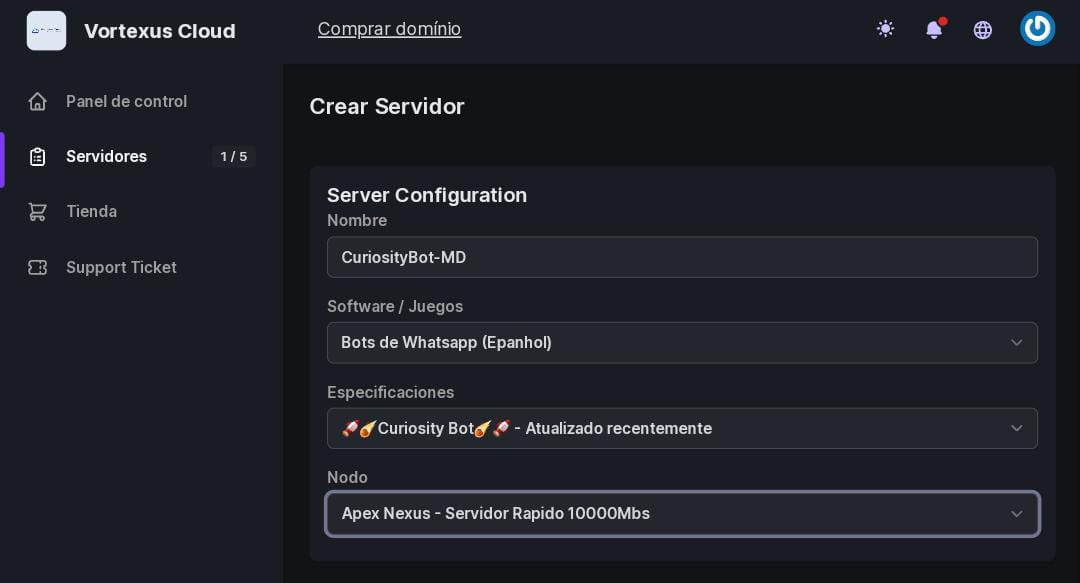
Configuración
Ajustes del Servidor - CuriosityBot-MD
para usuarios del heroku

| BuildPack | LINK |
|---|---|
| FFMPEG | click |
| IMAGEMAGICK | click |

 |
 |
|---|---|
| Bochilgaming | Nurutomo |
| games-wabot | wabot-q |