One stop platform for convenient and efficient purchasing and selling of pre-loved hall items, promoting sustainability by extending the lifespan of goods and decluttering homes.
- Login Details for Accounts
User: chicken
Password: 12345678

User: alibaba
Password: 12345678
- Go to a folder where you want the repository to be in
- Clone the repository
git clone https://github.com/natisaver/NTU-Marketplace.git
In Windows CMD, ensure you are in the folder of your repository
- Run
python –m venv myenv - Run
myenv\Scripts\activate - Run
pip install -r requirements.txt
In Windows CMD, ensure you are in the root folder of your repository
- Run
myenv\Scripts\activate - Run
cd backend - Run
python manage.py migrate(if running for first time) - Run
python manage.py runserver
In Windows CMD, ensure you are in the root folder of your repository
- Run
cd frontend - Run
npm install(if running for first time) - Run
npm start
In Windows CMD, ensure you are in the root folder of your repository
- Run
myenv\Scripts\activate - Run
cd backend - Run
python manage.py test
In Windows CMD, ensure you are in the backend folder of your repository
- In console #1, run your local server using
python manage.py runserver - In console #2, start locust server using
locust -f locustfile.py --host=http://localhost:5000 - Open web browser and go to
http://localhost:8089/ - Enter
number of usersandhatch rate(e.g. 100, 10) - Start load testing by clicking
Start swarming
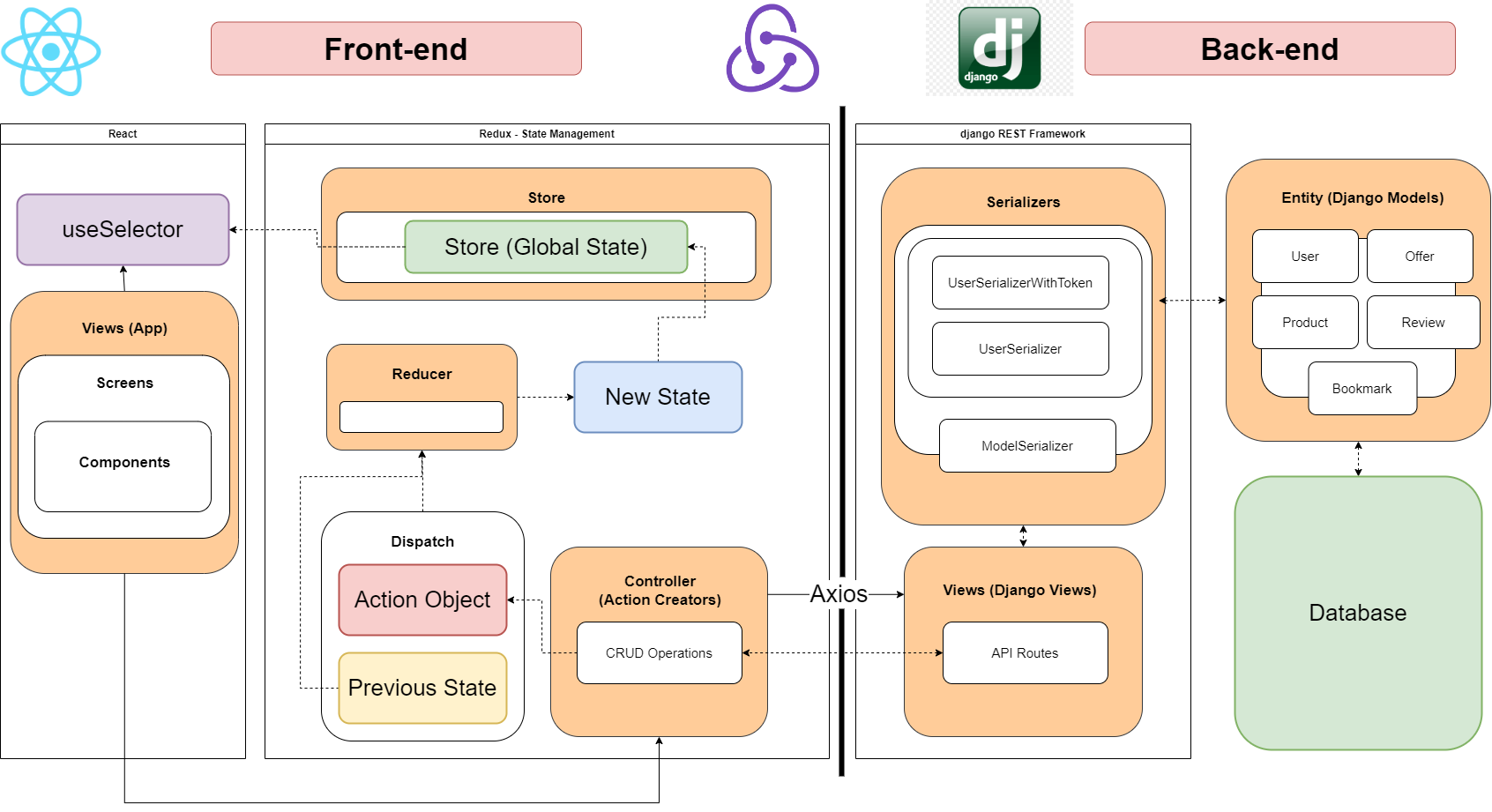
Utilises Django Rest Framework for the Backend, and React, Redux (state managment) for Frontend.
-
As requests pour in, they are routed by django through specific API routes. Data is queried from the database and represented using the Django model entities, before being repackaged by serializers into a readable format such as JSON for processing. The view acts as an interface between the front and backend.
-
In React, these screens/components are able to call CRUD operations by calling various actions that then interact with our API using axios. Depending on the results, different actions are dispatched, resulting in different global states. These states are kept in the store, which can be accessed by future screens and components. We often use an action creator of {type: RESET} to clear state after an execution of specific actions, to ensure "loading" and "success" are returned to False.
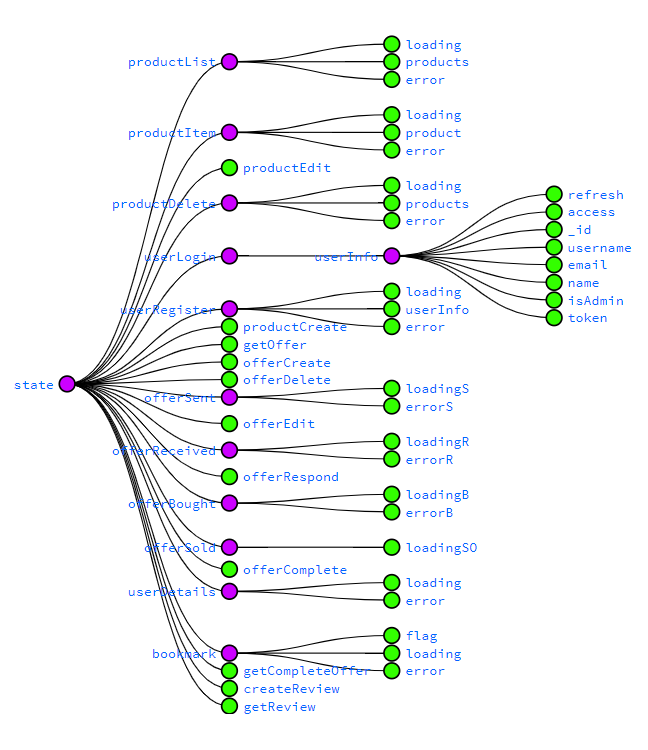
Used in our Redux State Tree. Download Redux Dev Tools, F12
- Restricts the instantiation of a class to a singular instance and also provides easy access to that instance (UseSelector).
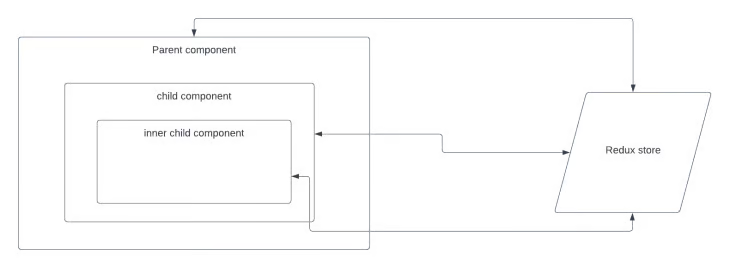
With the Provider Pattern, we can make data available to multiple components.
- Rather than passing that data down each layer through props (prop drilling), we can wrap all components in a Provider.
- This ensures Loose Coupling, where state data is independent of the components.
Added decorators, adds new functionality to API View class without modifying its original structure. Here this ensures only post requests are allowed, and the user must be authenticated.
@api_view(['POST'])
@permission_classes([IsAuthenticated])
def editProduct(request):
    p = Product.objects.get(_id=int(request.POST.get('pid')))
    print(request.data)
    p.name=request.POST.get('name')
    p.price=float(request.POST.get('price'))
    p.condition=True if request.POST.get('condition') == "true" else False
    p.tags=request.POST.get('tags')
    p.description=request.POST.get('description')
    p.delivery=True if request.POST.get('delivery') == "true" else False
    p.notes=request.POST.get('notes')
    p.pickupLocations=request.POST.get('pickupLocations')
    print("image", request.FILES.get('image'))
    if (request.FILES.get('image') != None):
        print("pass condition")
        p.image = request.FILES.get('image')
    print(request.data)
    p.save()
    serializer = ProductSerializer(p, many=False)
    return Response(serializer.data)
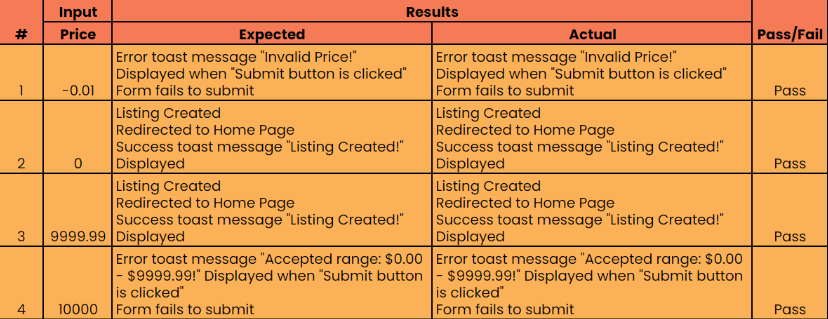
| Lower Boundary | -0.01 | 0.00 | 1.00 |
|---|---|---|---|
| Upper Boundary | 9999.98 | 9999.99 | 10000.00 |
- Price range valid equivalence class: ($0.00 <= x <= $9999.99)
- Valid boundary values: {0.00, 9999.99}
- Invalid boundary values: {-0.01, 10000.00}
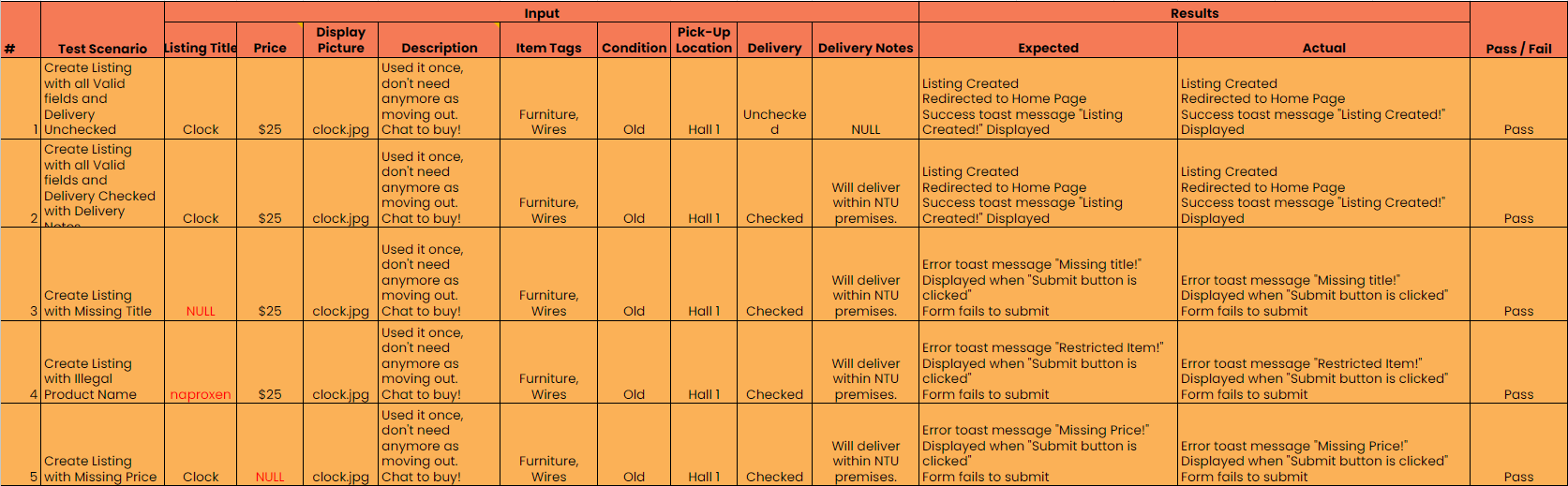
Set one column as invalid, and all columns as valid for each test case
- Here the Listing Title is "Naproxen" which is a restricted item, preventing item creation
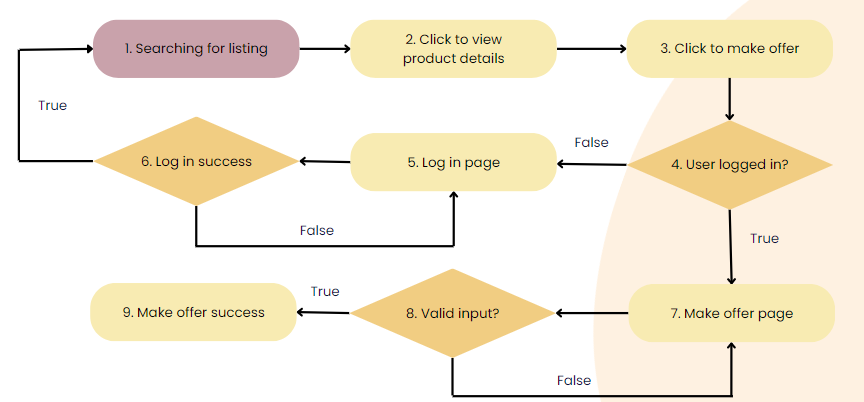
Cyclomatic Complexity Value = Number of Decision Points + 1 = 3 + 1 = 4
- Generate 4 Test Cases to ensure coverage of the process.
- The following is the make offer process:
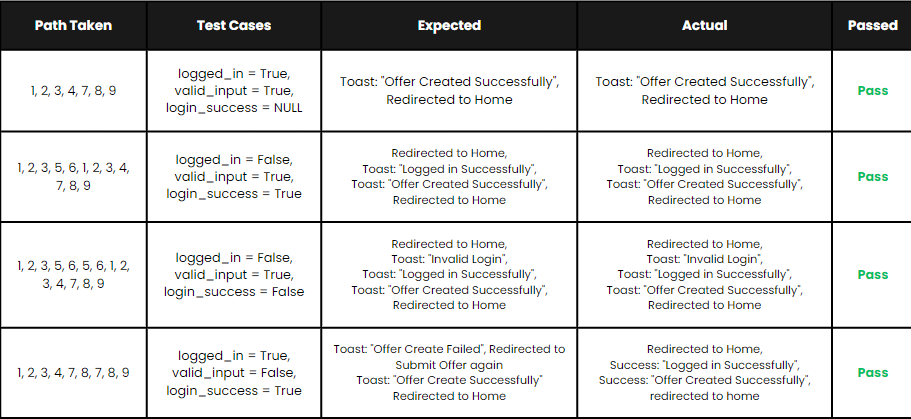
Using Locust with the following parameters:
| Param | Value |
|---|---|
| Users | 1000 |
| Hatch Rate | 10 requests per second |
| Wait | 1 to 5 |
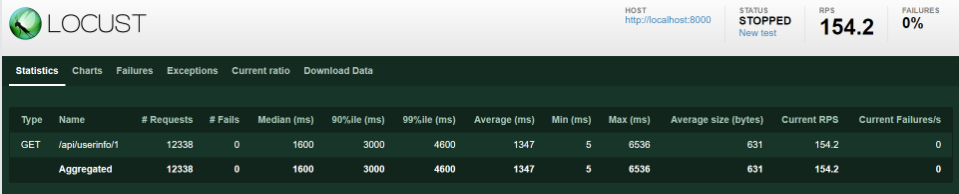
- This was tested on our get userInfo route, which retrieves user details if they are logged in:
from locust import HttpUser, between, task

class MyUser(HttpUser):
    wait_time = between(1, 5)

    @task
    def get_user_info(self):
        user_id = 1 # or any other valid user id
        self.client.get(f'/api/userinfo/{user_id}')
- Results:
| Param | Value |
|---|---|
| Final RPS | 154.2 (0% Failures) |