Home

MCPainter is a simple plugin that allows the players to import 2d and 3d graphics into the minecraft. It is capable to load images from the web, and construct images using blocks. So basically it automatically creates pixel art of you favorite graphics (or maybe your own photo?). Regarding 3d features, the plugin allows you to create one of the minecraft blocks (or items), and to create a statue of a player (finally no more long hours spent on creating and maintaining the hall of fame!). Since almost all the features can lag the server the admins can configure the maximum size of the image that the player can draw (see: Permissions).
To install the plugin simply follow those steps:
To install the plugin simply follow those steps:
- to enable blocks logging and blocks access control download BlocksHub (since 1.0RC-3)
- download MCPainter
- copy the MCPainter.jar file into plugins directory
- copy the minecraft_1.7.yml file into plugins/MCPainter/data directory.
- copy the minecraft_1.7_blocks.yml file into plugins/MCPainter/data directory.
- copy the minecraft_1.7_statues.yml file into plugins/MCPainter/data directory.
- copy the content of palette directory into plugins/MCPainter/palette firectory.
- copy the 1.7.4.jar file into the plugins/MCPainter/mods directory.
- restart your server (reload should also work)
Check GitHub GitHub
You probably did not install MCPainter correctly. You need to get the full minecraft resource file (the game file). To get this file follow those simple steps:
For 1.0 RC1 :
- download and start the original minecraft launcher
- login and let the game download resources for minecraft 1.6.x (if you did not do that earlier)
- goto to your minecraft folder
- on Linux go to ~/.minecraft/
- on Windows go to %appdata%.minecraft
- on MaxOs go to "~/Library/Application Support/minecraft
- go to versions/1.6.4
- locate the 1.6.4.jar file (or other 1.6.x.jar if you are running a different version)
- copy the file into /plugins/MCPainter/mods (or any other mods folder you have set up in the config file)
The admin can configure what blocks can by used by the plugin to draw the images (see: Configuration and Palettes). When the plugin starts it goes over all the defined blocks and calculates its mean color. This color is then used to decide witch block should by used to draw a certain pixel of the image. To calculate the mean color the plugin uses the default minecraft blocks texture files, but if your server requires a texture pack you can specify other files for it to use (including HD textures).
MCPainter has support for blocks that are available in mod packs. You can simply use blocks from the mods as "color blocks" for the block palette. You can also draw blocks (and mobs) from those mods if you have a file that contains drawing instructions for those blocks.
Tired of simple minecraft blocks? or you want to design your own block statue? the block you need is not available in MCPainter? or you are using a mod that's not yet supported? Now you can design custom blocks and statues by yourself! All you need to do is provide drawing instructions for MCPainter. Check the mods and new blocks section for more information.
Since version 1.0-RC3 server owners can define custom palettes that users can chose to use when drawing models.
For details check here
The plugin allows users to draw images directly from the web in to the minecraft world or to the map. Before drawing the image it can by resized and cropped.
Minecraft blocks in Minecraft, why not? By using this feature you can draw practically any block that exists in the vanila minecraft. You can use those blocks for decoration, or you can build a larger version of you home.
Tired of creating statues of yourself? statues in the hall of fame? constantly redoing theme when players decide to change their skin? This plugin will do this for you. With one simple command you can draw a statue of yourself or any other player.
Want to add a giant chicken to your sanctuary? Now you can do this using one command! MCPainter allows you to draw statues of mobs that are available in the game.
New awsome feature! MCPainter allows you to render absolutely any 3D model you can imagine! Want a giant statue of liberty? a space ship? or mayby a whole? Now you can achieve it in 3 simple steps! Get a model you want to render (create it, download it, buy it!), upload it to the server and render it! A 3d voxel based model will by build on your map. MCPainter supports Wavefront OBJ 3d model files and a wide range of texture files.
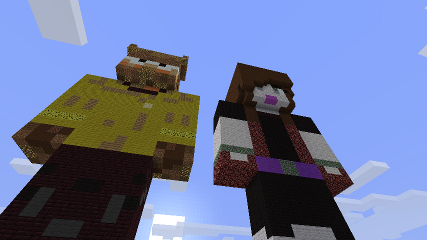
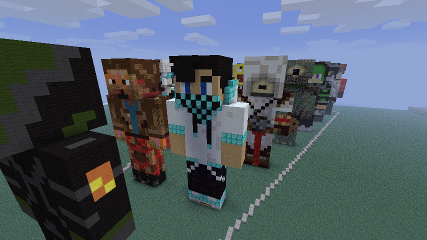


Mods and blocks page, Drawing instructions
Check Block Placer & Lags for more info.
Optional dependencies:
- WorldEdit - Used to provide access to: region selection and editing session (WorldEdit's //Undo and //Redo commands).
- Vault - Used to provide access for permissions and economy,
- BlocksHub - block login and blocks access control
This plugin uses MCStats to gather statistics. It gathers only the standard stats gathered for most of MCStat's enabled plugins (for example: OS, Java version, CPU, country, plugin and server version). For details what exactly is gathered click on the graph below. To disable the stats you need to disable stats gathering for MCStats (set opt-out to true in plugins/PluginMetrics/config.yml). This disables all the stats gathering for all plugins that use the default MCStats.
Thank you for using this plugin.

#Donate Programmer: "an organism that turns caffeine and pizza into software".
If you like you can buy me a pizza ;)
