Advanced inspector attributes for Unity

Library distributed as git package (How to install package from git URL)
Git URL: https://github.com/Shady9595/Shady-Inspector.git
ShadyInspector has built-in samples at Tools/Shady Inspector/Samples menu.

Shows non-serialized property in the inspector.

private float _field;

[ShowInInspector]
private bool _myToggle;

[ShowInInspector]
public float ReadOnlyProperty => _field;

[ShowInInspector]
public float EditableProperty
{
    get => _field;
    set => _field = value;
}Shady Inspector by default shows a polymorphic type picker for [SerializeReference] and [ShowInInspector]. It can be hidden with a [HideReferencePicker] attribute.

[SerializeReference]
public MyReferenceClass clazz1 = new MyReferenceClass();

[SerializeReference, HideReferencePicker]
public MyReferenceClass clazz2 = new MyReferenceClass();

[ShowInInspector, HideReferencePicker]
public MyReferenceClass Clazz3 { get; set; } = new MyReferenceClass();

[Serializable]
public class MyReferenceClass
{
    public int inner;
}Changes property order in the inspector.

public float first;

[PropertyOrder(0)]
public float second;Makes property non-editable in the inspector.

[ReadOnly]
public Vector3 vec;Invokes callback on property modification.
[OnValueChanged(nameof(OnMaterialChanged))]
public Material mat;

private void OnMaterialChanged()
{
    Debug.Log("Material changed!");
}Hides the default Script property in the inspector.
[HideMonoScript]
public class NewBehaviour : MonoBehaviour
{
}Shady Inspector has some builtin validators such as missing reference and type mismatch error. Additionally you can mark out your code with validation attributes or even write own validators.
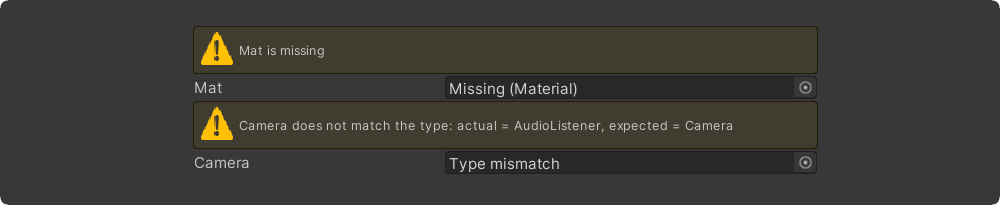
[Required]
public Material material;

[Required(FixAction = nameof(FixTarget), FixActionName = "Assign self")]
public Transform target;

private void FixTarget()
{
    target = GetComponent<Transform>();
}
[ValidateInput(nameof(ValidateTexture))]
public Texture tex;

private ShadyValidationResult ValidateTexture()
{
    if (tex == null) return ShadyValidationResult.Error("Tex is null");
    if (!tex.isReadable) return ShadyValidationResult.Warning("Tex must be readable");
    return ShadyValidationResult.Valid;
}
[Title("InfoBox Message Types")]
[InfoBox("Default info box")]
public int a;

[InfoBox("None info box", ShadyMessageType.None)]
public int b;

[InfoBox("Warning info box", ShadyMessageType.Warning)]
public int c;

[InfoBox("Error info box", ShadyMessageType.Error)]
public int d;

[InfoBox("$" + nameof(DynamicInfo), visibleIf: nameof(VisibleInEditMode))]
public Vector3 vec;

private string DynamicInfo => "Dynamic info box: " + DateTime.Now.ToLongTimeString();

private bool VisibleInEditMode => !Application.isPlaying;
[AssetsOnly]
public GameObject obj;
[SceneObjectsOnly]
public GameObject obj;
[Dropdown(nameof(intValues))]
public int numberDropdown = 123;

[Dropdown(nameof(GetVectorValues))]
public Vector3 vectorDropdown;

private int[] intValues = {1, 2, 3, 4, 5};

private IEnumerable<ShadyDropdownItem<Vector3>> GetVectorValues()
{
    return new ShadyDropdownList<Vector3>
    {
        {"Zero", Vector3.zero},
        {"One/Forward", Vector3.forward},
        {"One/Backward", Vector3.back},
    };
}
[Scene] public string scene;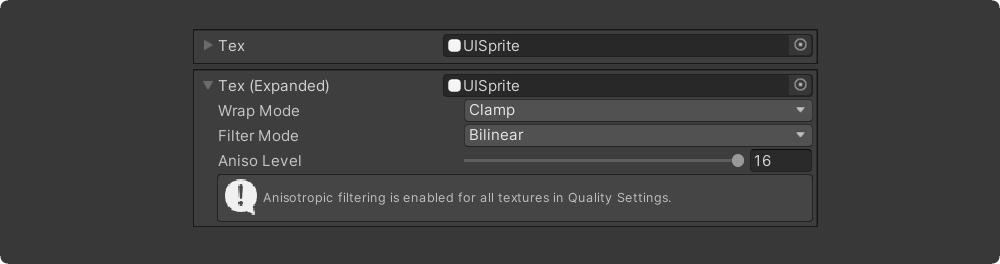
[InlineEditor]
public Material mat;
[DisplayAsString]
public string[] collection = {"hello", "world"};
[Unit(UnitAttribute.Meter)]
public float lengthInMeters;

[Unit("My custom Unit")]
public float freeTextUnit;
[LabelWidth(270f)]
[PreviewMesh(100, 100)]
public GameObject meshCustomLengthAndWidth;

[LabelWidth(200f)]
[PreviewMesh(200, 160, false)]
public GameObject meshNoFoldoutNoMesh;

[LabelWidth(200f)]
[PreviewMesh(200, 160, false)]
public GameObject meshNoFoldoutWithMesh;
[Title("My Title")]
public string val;

[Title("$" + nameof(_myTitleField))]
public Rect rect;

[Title("$" + nameof(MyTitleProperty))]
public Vector3 vec;

[Title("Button Title")]
[Button]
public void MyButton()
{
}

private string _myTitleField = "Serialized Title";

private string MyTitleProperty => DateTime.Now.ToLongTimeString();
[Title("Wide Vector")]
[HideLabel]
public Vector3 vector;

[Title("Wide String")]
[HideLabel]
public string str;
[LabelText("Custom Label")]
public int val;

[LabelText("$" + nameof(DynamicLabel))]
public Vector3 vec;

public string DynamicLabel => DateTime.Now.ToShortTimeString();
public int defaultWidth;

[LabelWidth(40)]
public int thin;

[LabelWidth(300)]
public int customInspectorVeryLongPropertyName;
[GUIColor(0.8f, 1.0f, 0.6f)]
public Vector3 vec;

[GUIColor(0.6f, 0.9f, 1.0f)]
[Button]
public void BlueButton() { }

[GUIColor(1.0f, 0.6f, 0.6f)]
[Button]
public void RedButton() { }
[Title("Custom Indent")]
[Indent]
public int a;

[Indent(2)]
public int b;

[Indent(3)]
public int c;

[Indent(4)]
public int d;
[Space, PropertyOrder(0)]
public Vector3 vecField;

[ShowInInspector, PropertyOrder(1)]
[PropertySpace(SpaceBefore = 10, SpaceAfter = 30)]
public Rect RectProperty { get; set; }

[PropertyOrder(2)]
public bool b;
[PropertyTooltip("This is tooltip")]
public Rect rect;

[PropertyTooltip("$" + nameof(DynamicTooltip))]
public Vector3 vec;

public string DynamicTooltip => DateTime.Now.ToShortTimeString();
public MinMax rangeFoldout;

[InlineProperty(LabelWidth = 40)]
public MinMax rangeInline;

[Serializable]
public class MinMax
{
    public int min;
    public int max;
}
[ListDrawerSettings(Draggable = true,
                    HideAddButton = false,
                    HideRemoveButton = false,
                    AlwaysExpanded = false)]
public List<Material> list;

[ListDrawerSettings(Draggable = false, AlwaysExpanded = true)]
public Vector3[] vectors;
[TableList(Draggable = true,
           HideAddButton = false,
           HideRemoveButton = false,
           AlwaysExpanded = false)]
public List<TableItem> table;

[Serializable]
public class TableItem
{
    [Required]
    public Texture icon;
    public string description;

    [Group("Combined"), LabelWidth(16)]
    public string A, B, C;

    [Button, Group("Actions")]
    public void Test1() { }

    [Button, Group("Actions")]
    public void Test2() { }
}
public Material material;
public bool toggle;
public SomeEnum someEnum;

[ShowIf(nameof(material), null)]
public Vector3 showWhenMaterialIsNull;

[ShowIf(nameof(toggle))]
public Vector3 showWhenToggleIsTrue;

[ShowIf(nameof(toggle), false)]
public Vector3 showWhenToggleIsFalse;

[ShowIf(nameof(someEnum), SomeEnum.Two)]
public Vector3 showWhenSomeEnumIsTwo;

public enum SomeEnum { One, Two, Three }public bool visible;
[HideIf(nameof(visible))]
public float val;public bool visible;
[EnableIf(nameof(visible))]
public float val;public bool visible;
[DisableIf(nameof(visible))]
public float val;[HideInPlayMode] [ShowInPlayMode][DisableInPlayMode] [EnableInPlayMode][HideInEditMode] [ShowInEditMode][DisableInEditMode] [EnableInEditMode]
[Button("Click me!")]
private void Button() => Debug.Log("Button clicked!");

[Button(ButtonSizes.Large)]
private void ButtonWithParameters(Vector3 vec, string str = "default value")
{
    Debug.Log($"Button with parameters: {vec} {str}");
}
[EnumToggleButtons] public SomeEnum someEnum;
[EnumToggleButtons] public SomeFlags someFlags;

public enum SomeEnum { One, Two, Three }

[Flags] public enum SomeFlags
{
    A = 1 << 0,
    B = 1 << 1,
    C = 1 << 2,
    AB = A | B,
    BC = B | C,
}
[ShowDrawerChain]
[Indent]
[PropertySpace]
[Title("Custom Title")]
[GUIColor(1.0f, 0.8f, 0.8f)]
public Vector3 vec;Properties can be grouped in the inspector using the Group attribute.
[Group("one")] public float a;
[Group("one")] public float b;

[Group("two")] public float c;
[Group("two")] public float d;

public float e;
If you have a lot of properties and group attributes take up too much space, then you can combine multiple properties at once using the GroupNext attribute.
[GroupNext("one")]
public float a;
public float b;

[GroupNext("two")]
public float c;
public float d;

[UnGroupNext]
public float e;
[DeclareBoxGroup("box", Title = "My Box")]
public class BoxGroupSample : ScriptableObject
{
    [Group("box")] public int a;
    [Group("box")] public bool b;
}
[DeclareFoldoutGroup("foldout", Title = "$" + nameof(DynamicTitle))]
public class FoldoutGroupSample : ScriptableObject
{
    [Group("foldout")] public int a;
    [Group("foldout")] public bool b;

    public string DynamicTitle => "My Foldout";
}
[DeclareToggleGroup("toggle", Title = "$" + nameof(DynamicTitle))]
public class ToggleGroupSample : ScriptableObject
{
    [Group("toggle")] public bool enabled;
    [Group("toggle")] public int a;
    [Group("toggle")] public bool b;

    public string DynamicTitle => "My Toggle";
}
[DeclareTabGroup("tabs")]
public class TabGroupSample : ScriptableObject
{
    [Group("tabs"), Tab("One")] public int a;
    [Group("tabs"), Tab("Two")] public float b;
    [Group("tabs"), Tab("Three")] public bool c;
}
[DeclareHorizontalGroup("vars")]
public class HorizontalGroupSample : ScriptableObject
{
    [Group("vars")] public int a;
    [Group("vars")] public int b;
    [Group("vars")] public int c;
}
[DeclareHorizontalGroup("horizontal")]
[DeclareVerticalGroup("horizontal/vars")]
[DeclareVerticalGroup("horizontal/buttons")]
public class VerticalGroupSample : ScriptableObject
{
    [Group("horizontal/vars")] public float a;
    [Group("horizontal/vars")] public float b;

    [Button, Group("horizontal/buttons")]
    public void ButtonA() { }

    [Button, Group("horizontal/buttons")]
    public void ButtonB() { }
}