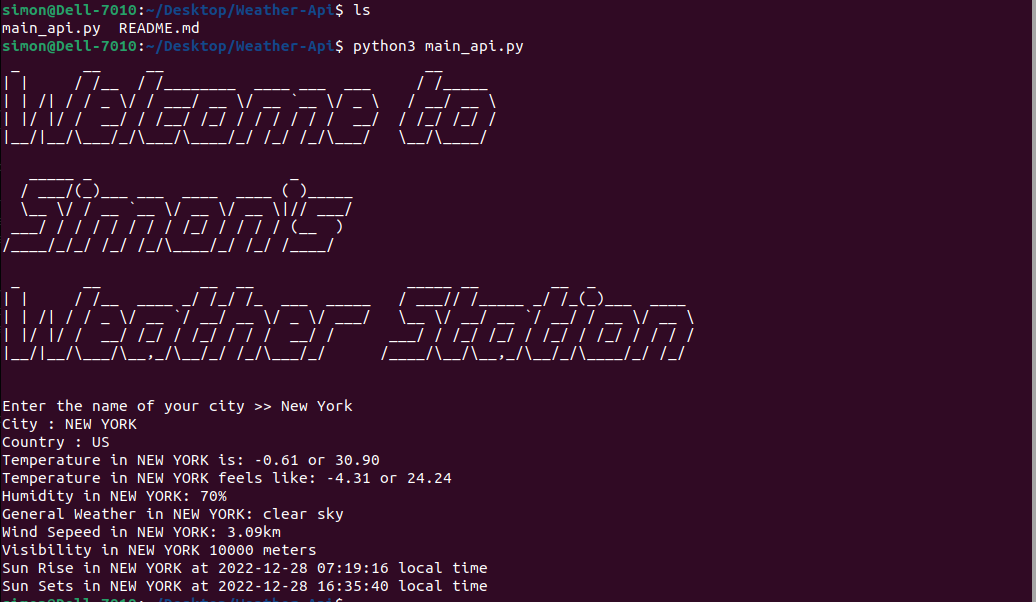
A weather station is a group of sensors used to measure atmospheric conditions in order to understand the local environment and weather.
- You can either fork or download the project folder or code to your device.
Open the terminal or shell and type this code: git clone https://github.com/SimonRammala/Weather-Api.git
On GitHub.com, navigate to the octocat/Spoon-Knife repository.
In the top-right corner of the page, click Fork. Fork button
Select an owner for the forked repository. Create a new fork page with owner dropdown emphasized
By default, forks are named the same as their upstream repositories. You can change the name of the fork to distinguish it further. Create a new fork       page with repository name field emphasized
Optionally, add a description of your fork. Create a new fork page with description field emphasized
Choose whether to copy only the default branch or all branches to the new fork. For many forking scenarios, such as contributing to open-source             projects, you only need to copy the default branch. By default, only the default branch is copied. Option to copy only the default branch
Click Create fork. Emphasized create fork button
- Open the folder with any texteditor of your choice or you can open the folder using the shell/terminal
- Make sure that your device has python installed on it as this is a python project.
- Once in the folder open the main_api.py file, this is where the code is located
- Run the file main_api.py and complet the following questions to get the information of the weather where you are located.
- Text editor(vs code), any python interpriter of your choice or a working shell/terminal
- An account with 'Open Weather map'.https://openweathermap.org/
- You will need your api keys from 'Open Weather map'
- You will need to replace the word "Api_keys" with your api keys from 'Open Weather map'