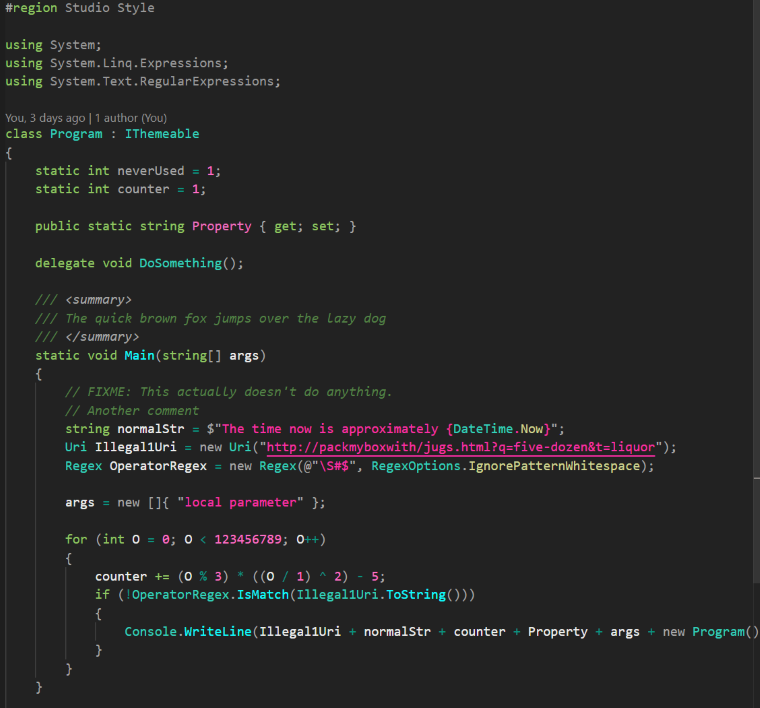
A dark VS Code theme that balances beauty with usability.
Carefully crafted to highlight what truly matters using vibrant, saturated colors, while gently dimming less important elements — bringing order to your code, and peace to your eyes.

Approved by Yoda, it is.
- In VSCode, go to Extensions / Search for "Yoda Theme" / Install
- Install from the Visual Studio Code Marketplace
- If you don't get full color syntax highlighting, make sure you have Semantic Highlighting set to configuredByTheme, or enabled.
- OmniSharp Semantic Highlitning should not be needed.
- If nested braces are different colors depending on depth, you might have enabled Bracket Pair Colorization in your settings.
Great support:
- C#
- HTML
- Razor / CSHTML
Working fine:
-
C
-
C++
-
CSS
-
Bash
-
Python
-
GO
-
Powershell
-
Perl
-
Markdown
-
JSON
-
Javascript
-
Java
-
Ruby
-
Rust
-
SQL
-
SCSS
-
Check the test-files for other languages.