“Every problem has a solution - sometimes, you just have to build it yourself.”
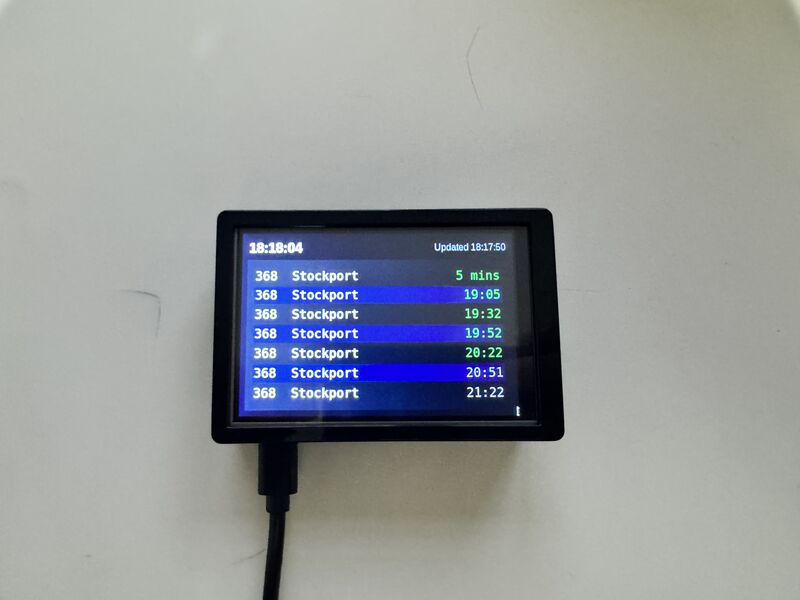
A lightweight Python app that scrapes live bus times from the Bee Network website and displays them in a clean Tkinter UI.
Built to run on a Raspberry Pi 5 with a 3.5″ touchscreen, giving you a dedicated live bus tracker.
Every morning I wake up at 6 AM to catch the bus for work at 7 AM.
But the Bee Network app is slow - by the time it loads, the bus might already be gone.
So, I built my own solution:
- 🚍 Scrapes live times from Bee Network (no public API)
- 🟢 Green = arriving soon
- ⚪ Grey = scheduled
- 🧠 Runs automatically on a Raspberry Pi 5 with a mini screen
Now I have a dedicated device showing exactly when my bus is coming; no phone, no waiting, no stress.
git clone https://github.com/yourusername/bus-tracker.git
cd bus-trackerpython3 -m venv venv
source venv/bin/activatepip install -r requirements.txtMake sure the folder is a package:
touch bus_tracker/__init__.pyRun from root:
python -m bus_tracker.main- Use Raspberry Pi 5 or similar
- Add heatsinks + fan for 24/7 use
- Install 3.5″ touchscreen drivers
- Optionally autostart with
systemd
Example service file:
# /etc/systemd/system/bus-tracker.service
[Unit]
Description=Bus Tracker
After=network-online.target

[Service]
User=pi
WorkingDirectory=/home/pi/bus-tracker
Environment="DISPLAY=:0"
ExecStart=/home/pi/bus-tracker/venv/bin/python -m bus_tracker.main
Restart=on-failure

[Install]
WantedBy=graphical.target
sudo systemctl daemon-reload
sudo systemctl enable --now bus-tracker- Python 3
- Tkinter (UI)
- Requests / BeautifulSoup (Scraping)
- Raspberry Pi OS
🟢 Green = arriving soon
⚪ Grey = timetabled
MIT License