
Self-hosted TLS & PKI hub for infrastructure admins — certificate monitoring with expiry alerts, CCADB-backed root program trust matrix, and a PKI toolbox (decoder, CSR, chain validator, diff).
- Endpoint tracking — three endpoint types cover most fleets:
- Host — standard
host:portTLS endpoint - SAML — IdP/SP metadata endpoint with parsed metadata and document history
- Manual — a certificate uploaded directly (no live scanning)
- Host — standard
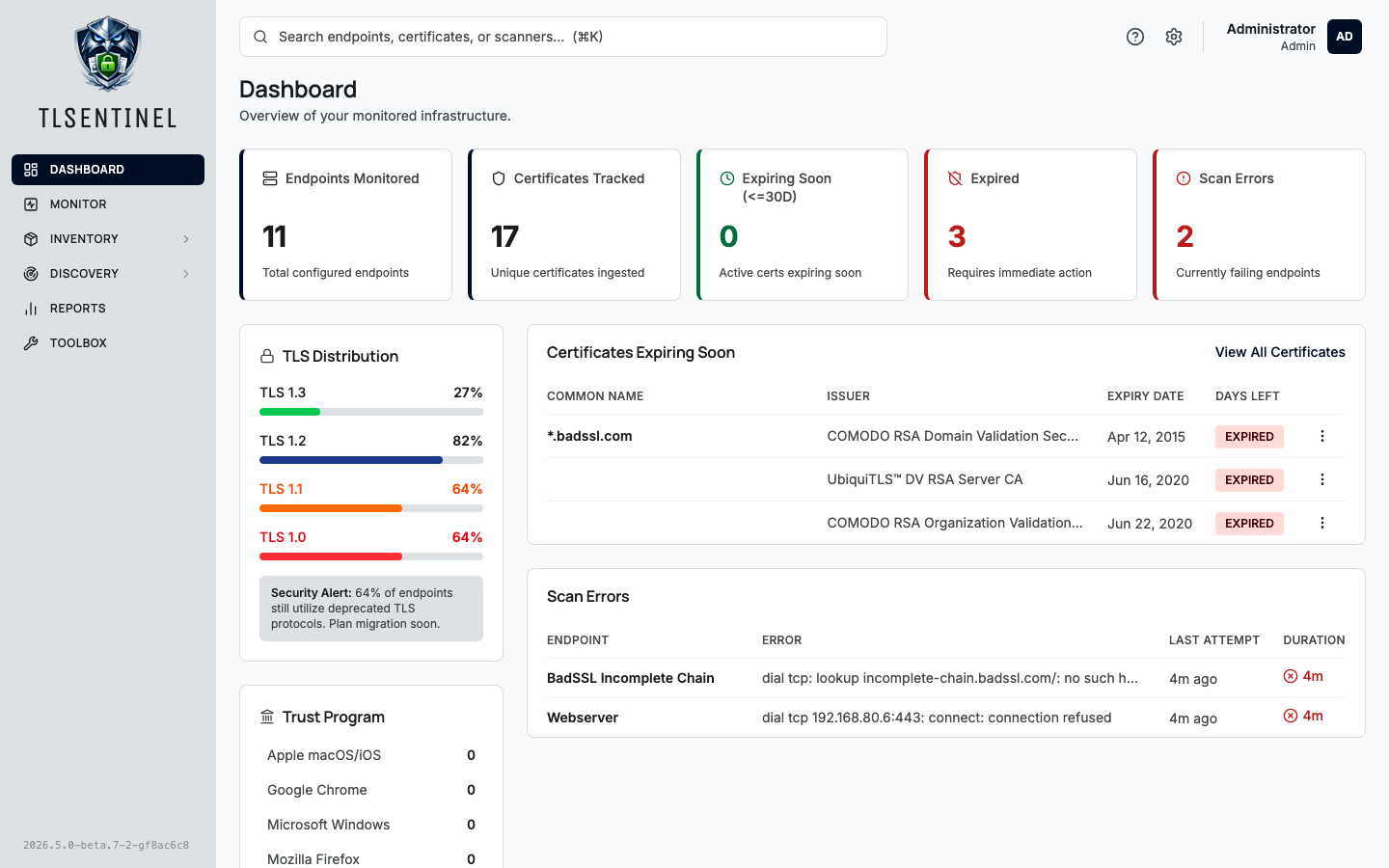
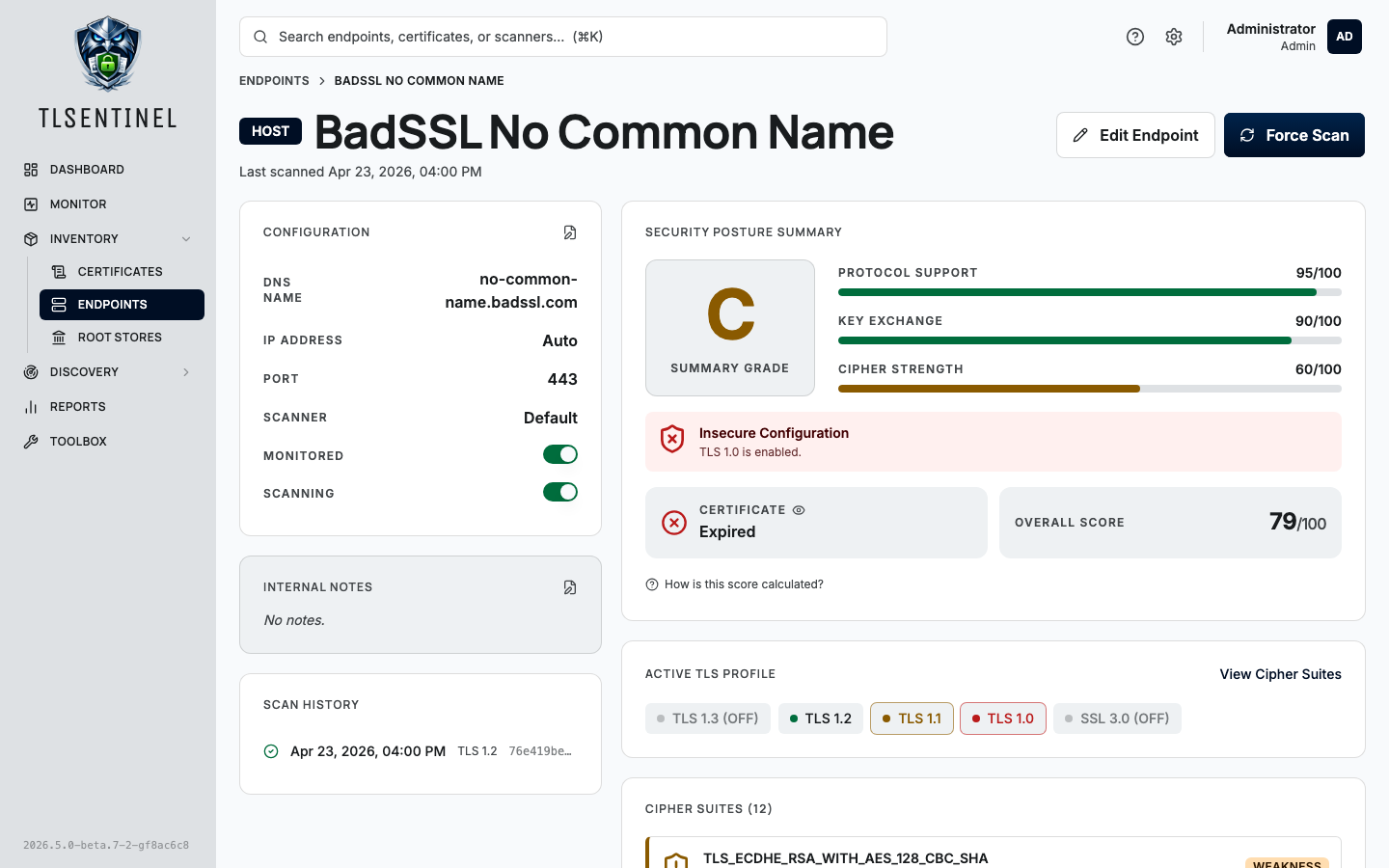
- TLS profile scanning with SSL Labs-style grading. Scanners enumerate supported TLS versions (including SSL 3.0) and cipher suites on every cycle. The server computes a letter grade (A+ through F) and component sub-scores for protocol support, key exchange, and cipher strength, following the SSL Labs SSL Server Rating Guide as closely as the probe's inputs allow.
- CCADB-backed trust anchor tracking. A daily refresh pulls the trust
matrix and PEM bundles for the four major root programs (Apple, Chrome,
Microsoft, Mozilla). Ingested certificates are tagged with per-program
membership and a canonical
trust_anchorflag. The chain-of-trust visualization terminates at the first Subject+SKI-equivalent anchor, matching how platform verifiers behave. - Per-program root store browser. Tab between programs, search anchors by common name or organization, click through to the certificate detail page.
- PKI toolbox. In-browser utilities that never transmit data off your machine: certificate and CSR decoders, CSR generator (keys stay local), chain builder/validator, certificate diff, and PEM/DER converter.
- SAML metadata history. Each distinct metadata document observed per SAML endpoint is persisted with a SHA-256 digest so you can diff historical signing certificates and SP/IdP configuration changes.
- Expiry email alerts. Fires at 30, 14, 7, and 1-day thresholds with
per-user opt-in, editable templates, and a dedupe table
(
cert_expiry_alerts) to prevent duplicate sends across restarts. - Per-user ICS calendar feed. A tokenized URL
(
/calendar/u/{token}) exports upcoming expirations to any RFC 5545-compliant calendar client. - Network discovery. Scheduled CIDR or range scans enumerate listening TLS services across ports, queueing discovered hosts into an inbox for review before they become monitored endpoints.
- Tags and categories. Structured
Category:Taglabeling for endpoints, with color-coded categories. - Distributed scanners. Any number of scanner agents register with
the server using hashed tokens (
stx_s_…prefix, SHA-256 backed). Scan interval and concurrency are server-managed and picked up on the next poll tick without restarting the agent. - Auth. Local users with bcrypt-hashed passwords, or OIDC single sign-on against your provider of choice. Admin / operator / viewer roles with permission-based RBAC. Personal API keys with scoped permissions and per-key revocation.
- Audit log. Every state-changing action is recorded with actor,
action, resource, IP, and user-agent.
X-Forwarded-Foris honored only for peers insideTLSENTINEL_TRUSTED_PROXY_CIDRSto prevent source-IP spoofing. - Maintenance scheduler. In-process cron runs the nightly jobs (expiry alerts, purge scan history, purge audit logs, purge stale expiry-alert records, refresh root stores). Each schedule and retention window is editable from Settings → Maintenance, with manual Run-Now for troubleshooting.
- Universal search.
GET /search?q=returns top matches across endpoints, certificates, and scanners. Powers the header command-search dropdown. - In-app documentation. Markdown docs served straight from the web bundle so the same content can be shared with the read-the-docs site.
The recommended deployment is Docker. Both the server and scanner
publish images; docker-compose.yml in this repo orchestrates the
full stack against a bundled Postgres.
git clone https://github.com/tlsentinel/tlsentinel-server.git
cd tlsentinel-server
cp .env.example .env
# edit .env — at minimum set DB credentials, JWT secret, and encryption key
docker compose up -d
Migrations run automatically on startup. The first boot bootstraps an
admin user from TLSENTINEL_ADMIN_USERNAME / TLSENTINEL_ADMIN_PASSWORD
if those are set; subsequent boots ignore them.
Generate the two required secret values with:
openssl rand -base64 32   # TLSENTINEL_JWT_SECRET
openssl rand -base64 32 # TLSENTINEL_ENCRYPTION_KEY| Variable | Default | Description |
|---|---|---|
TLSENTINEL_HOST |
0.0.0.0 |
Bind address. |
TLSENTINEL_PORT |
8080 |
Bind port. |
| Variable | Default | Description |
|---|---|---|
TLSENTINEL_DB_HOST |
localhost |
Postgres host. |
TLSENTINEL_DB_PORT |
5432 |
Postgres port. |
TLSENTINEL_DB_NAME |
tlsentinel |
Database name. |
TLSENTINEL_DB_USERNAME |
(required) | Username. |
TLSENTINEL_DB_PASSWORD |
(required) | Password. |
TLSENTINEL_DB_SSLMODE |
require |
disable, require, verify-ca, or verify-full. |
| Variable | Description |
|---|---|
TLSENTINEL_JWT_SECRET |
Required. JWT signing secret, base64-encoded, must decode to ≥32 bytes. Generate with openssl rand -base64 32. Rotating this value invalidates every outstanding session. |
TLSENTINEL_ENCRYPTION_KEY |
Required. AES-256 key for encrypting SMTP passwords at rest, base64-encoded, must decode to exactly 32 bytes. Generate with openssl rand -base64 32. |
| Variable | Description |
|---|---|
TLSENTINEL_ADMIN_USERNAME |
Optional. Creates an admin user on first startup if not already present. |
TLSENTINEL_ADMIN_PASSWORD |
Optional. Initial password for the bootstrap admin. |
Last-resort env-var path for recovering an admin who lost both their TOTP device and recovery codes (or forgot their password). Distinct from the bootstrap admin vars above — this runs against an existing admin and applies a destructive reset.
TLSENTINEL_BREAKGLASS is the master toggle. Reset flags without it
set are logged and ignored, so an accidentally-baked-in compose value
won't error every restart. Bootstrap refuses to operate on non-admin
accounts or non-local (OIDC) users.
| Variable | Description |
|---|---|
TLSENTINEL_BREAKGLASS |
Master toggle. true to apply the reset on next boot. |
TLSENTINEL_BREAKGLASS_USER |
Username of the admin to recover (the current username, not the seed value above). |
TLSENTINEL_BREAKGLASS_RESET_TOTP |
true to clear TOTP secret + recovery codes (lost-phone case). |
TLSENTINEL_BREAKGLASS_RESET_PASSWORD |
true to reset the password to TLSENTINEL_BREAKGLASS_PASSWORD. |
TLSENTINEL_BREAKGLASS_PASSWORD |
Required iff RESET_PASSWORD=true. The new password. |
Operator runbook:
- Set the env vars above for the recovery you need (TOTP, password, or both).
- Restart the container. Watch for
breakglass executedin the logs and anauth.bootstrap.breakglassrow in the audit log. - Remove all
TLSENTINEL_BREAKGLASS_*vars from your environment. - Restart the container again so the recovery vars are no longer present.
- Log in, immediately rotate the password, and re-enroll TOTP.
All five OIDC_* variables must be set together for SSO to be enabled.
| Variable | Default | Description |
|---|---|---|
TLSENTINEL_OIDC_ISSUER |
Provider discovery URL, e.g. https://login.example.com. |
|
TLSENTINEL_OIDC_CLIENT_ID |
Registered client ID. | |
TLSENTINEL_OIDC_CLIENT_SECRET |
Registered client secret. | |
TLSENTINEL_OIDC_REDIRECT_URL |
Public callback URL, e.g. https://tlsentinel.example.com/auth/oidc/callback. |
|
TLSENTINEL_OIDC_SCOPES |
openid,profile,email |
Comma-separated scopes. |
TLSENTINEL_OIDC_USERNAME_CLAIM |
Claim to match against the local username column. Falls back to preferred_username. |
| Variable | Description |
|---|---|
TLSENTINEL_TRUSTED_PROXY_CIDRS |
Comma-separated CIDRs whose traffic may set X-Forwarded-For. Requests from other sources have XFF ignored and the audit log records the TCP peer IP. Examples: 127.0.0.1/32,::1/128 (sidecar proxy), 172.16.0.0/12 (docker-compose), 10.0.0.0/8 (k8s). Empty means no proxies are trusted. |
| Variable | Default | Description |
|---|---|---|
TLSENTINEL_LOG_LEVEL |
info |
debug, info, warn, or error. |
TLSENTINEL_LOG_FORMAT |
auto |
json, text, or auto (json when stdout is not a TTY). |
cmd/server/              # Entry point
internal/
  app/                   # Startup wiring (DB, scheduler, job registry)
  apikeys/               # Personal API keys — scoped permissions + revocation
  audit/                 # Audit log event store
  auth/                  # JWT middleware, scanner-token / API-key auth, RBAC
  calendar/              # Per-user ICS calendar feed
  certificates/          # Certificate parsing, storage, chain-of-trust
  config/                # Environment-variable parsing
  crypto/                # AES-256 helpers
  db/                    # Bun ORM bindings (one file per resource)
  discovery/             # Network discovery scan jobs + inbox
  endpoints/             # Endpoint CRUD (host / SAML / manual)
  groups/                # Endpoint groupings
  handlers/              # Shared HTTP helpers (response.JSON, etc.)
  jwt/                   # JWT issuance + validation
  logger/                # slog logger wiring
  mail/                  # SMTP sender + MIME composition
  models/                # Shared request/response types
  notifications/         # Certificate expiry alert pipeline
  notificationtemplates/ # Editable alert email templates
  oidc/                  # OIDC / OpenID Connect SSO
  permission/            # RBAC permission constants
  probe/                 # Scanner-facing probe API
  provider/              # Auth provider abstraction
  reports/               # Summary reports
  rootstore/             # CCADB refresh + per-program anchor membership
  routes/                # chi router setup
  scanners/              # Scanner registration + token management
  scheduler/             # In-process cron (netresearch/go-cron)
  search/                # Universal search
  settings/              # Global settings (retention, mail config, jobs)
  tags/                  # Tags + categories
  tlsprofile/            # TLS version/cipher profile + SSL Labs grading
  users/                 # User management
  version/               # Build-time version stamping
migrations/              # PostgreSQL migrations (auto-applied on startup)
web/                     # React + Vite + TypeScript + shadcn/ui frontend
MIT — see LICENSE.