
Apple Silicon GPU/CPU/Memory monitoring CLI — like gpustat, but for Metal.
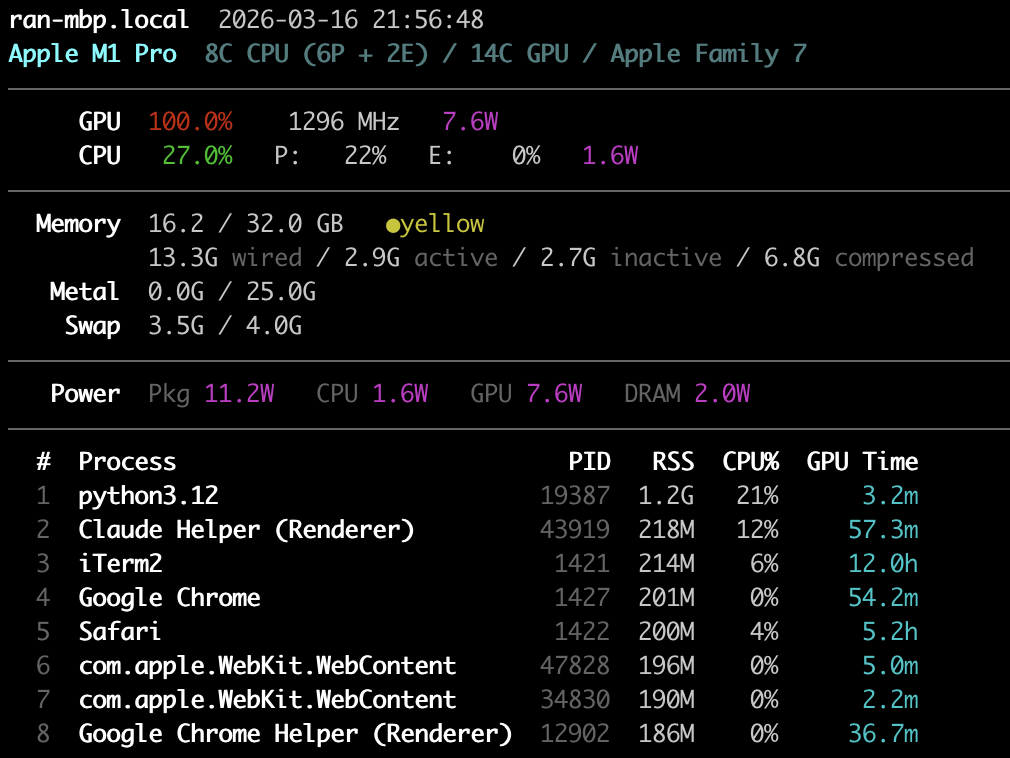
No sudo required. Uses IOReport private API for GPU/power metrics.
pip install metalstatOr with uv:
uv tool install metalstat# One-shot: all metrics + top processes
metalstat -a -p
# Watch mode: refresh every 1s
metalstat -a -i 1
# See all options
metalstat --helpApple Silicon uses Unified Memory Architecture (UMA) — the CPU and GPU share a single pool of RAM. There is no separate VRAM. This is fundamentally different from NVIDIA/CUDA where the GPU has its own dedicated memory (e.g. 24GB VRAM on an RTX 4090) and data must be copied between CPU and GPU over PCIe.
  Memory  15.6 / 32.0 GB   ●green                    ← system memory (shared by CPU + GPU)
          2.7G wired / 12.9G active / ...             ← breakdown by page state
   Metal  0.0G / 25.0G                                ← GPU allocation / recommended max
System memory (15.6 / 32.0 GB) is the total unified memory usage — CPU and
GPU workloads combined. The breakdown shows:
- Wired: Locked by the kernel, cannot be paged out or compressed
- Active: Recently used pages
- Inactive: Not recently accessed, still in RAM, reclaimable
- Compressed: macOS compresses inactive pages in-memory before swapping to disk
Metal GPU allocation (0.0G / 25.0G) shows how much memory is currently
allocated for GPU resources (textures, buffers, ML model weights) vs. the
recommended maximum. This is the closest equivalent to "VRAM used / VRAM total"
on NVIDIA, but with important differences:
| NVIDIA (CUDA) | Apple Silicon (Metal) | |
|---|---|---|
| GPU memory pool | Dedicated VRAM (fixed) | Shared with CPU (unified) |
| "Total" | Physical VRAM size | recommendedMaxWorkingSetSize (~75% of RAM) |
| Hard limit? | Yes — allocation fails at VRAM cap | No — soft limit, but going over causes swap thrashing |
| Zero-copy CPU↔GPU? | No, must cudaMemcpy |
Yes, CPU and GPU see the same physical pages |
The recommended max (~75% of RAM) is not a hardware limit — Metal will let you allocate beyond it. But exceeding it forces the OS to compress or swap out other memory, degrading performance. This is why a 192GB Mac can load LLMs that would need multiple 80GB A100s: the GPU directly accesses main memory with no copy overhead, but you're sharing that memory budget with the rest of the system.
Pressure (●green / ●yellow / ●red) shows system-wide memory pressure:
- Green (>50% free): Healthy, plenty of headroom
- Yellow (25-50% free): Moderate pressure, compression active
- Red (<25% free): Heavy pressure, swapping likely
- macOS on Apple Silicon (M1/M2/M3/M4)
- Python 3.10+
MIT