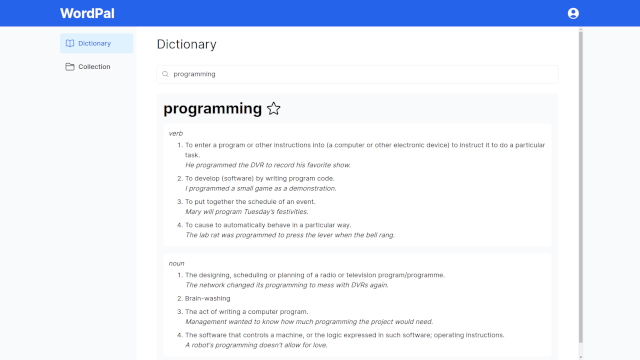
Word Pal is a dictionary application where users search for words and view their definitions and synonyms. When also logged in through Discord, users can save words to their collection, which can further be grouped based on defined categories.
- Next.js
- NextAuth
- Postgres
- Tailwind CSS
- HeadlessUI
This app was built in Next.js using the app router paradigm. A mixture of both client and server React components were used, integrated with server actions for data mutation. Postgres was utlized as a database to store users and their saved words and categories. NextAuth facilitied account creation by using Google and Discord as auth providers. HeadlessUI simplified interface development with components like dialogs and dropdown menus.
- Node.js and npm
- Vercel Postgres Database
- Discord and Google App with OAuth2 Redirect URLs set
-
Clone the repository
git clone https://github.com/aaluzzi/word-pal.git cd word-pal -
Install dependencies
npm install -
Set environment variables
Create a
.envfile to configure Postgres and NextAuth:POSTGRES_URL="" POSTGRES_URL_NON_POOLING="" POSTGRES_PRISMA_URL="" POSTGRES_USER="" POSTGRES_PASSWORD="" POSTGRES_HOST="" POSTGRES_DATABASE="" NEXTAUTH_SECRET="" DISCORD_ID="" DISCORD_SECRET="" GOOGLE_ID="" GOOGLE_SECRET="" -
Set up the Postgres tables
CREATE TABLE Users ( user_id VARCHAR(50) PRIMARY KEY, name VARCHAR(100) NOT NULL ); CREATE TABLE UserWords ( user_id VARCHAR(50), word VARCHAR(100) NOT NULL, category_name VARCHAR(100), PRIMARY KEY (user_id, word), FOREIGN KEY (user_id) REFERENCES Users(user_id) ); CREATE TABLE UserCategories ( user_id VARCHAR(50), category_name VARCHAR(100), PRIMARY KEY (user_id, category_name), FOREIGN KEY (user_id) REFERENCES Users(user_id) ); -
Run the application
npm start