Voice-directed surgical co-pilot for the da Vinci robotic surgery platform. A real-time, hands-free AI agent that gives surgeons instant access to patient data, CT imaging, 3D anatomy, drug safety checks, and operative documentation — all through natural speech, without ever breaking scrub.
Built for: Gemini Live Agent Challenge
Hackathon Category: Live Agents + UI Navigation
Built with: Google ADK · Gemini Live API · Vertex AI · Cloud Run · GCS
Demo: https://vimeo.com/1173959084?fl=ip&fe=ec
Live deployment: https://orion-518946358970.us-central1.run.app/
- Disclaimer
- The Problem Statement
- The Solution
- Architecture
- Agent System
- Gemini & ADK Features Used
- Features
- Tech Stack
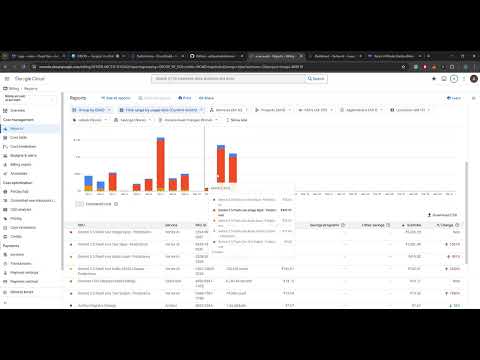
- GCP Backend & Logs Demo (for Hackathon)
- Local Setup
- Assets Setup
- Cloud Deployment & Automation
- Project Structure
- Data Sources
- Key Voice Commands
- Hackathon
This project is designed to demonstrate the capabilities of the Gemini Live API and Google Agent Development Kit (ADK). It may contain clinical inaccuracies and has not been reviewed by medical domain experts.
During robotic surgery, the operating surgeon's hands are locked on instrument controls inside a sterile field for the entire procedure. They cannot type, click, tap, or interact with any computer system. Every piece of critical information — patient labs, CT imaging, drug safety checks, phase checklists — requires them to either break scrub or call out to circulating staff. Both are slow, disruptive, and potentially dangerous at the wrong moment.
Beyond the access problem, five specific, evidence-backed failures compound surgical risk:
| # | Challenge | Metric | Source |
|---|---|---|---|
| 1 | CVS documentation gap — Critical View of Safety is rarely confirmed before bile duct division | Only 23.1% of laparoscopic cholecystectomies have CVS documented | Terho et al. 2021 (PMID 33975802) |
| 2 | WHO Surgical Checklist compliance — life-saving but inconsistently executed under OR pressure | Implementing the checklist reduces mortality by 47% and complications by 36% | Haynes et al. 2009, NEJM (PMID 19144931) |
| 3 | Blood loss estimation error — visual EBL is unreliable, delaying transfusion decisions | Surgeons underestimate by 52–85%; 95% of clinicians are wrong by >25% | PMC7943515 |
| 4 | Operative note delays — critical documentation written days after the procedure from memory | Mean dictation delay of 15.6 days vs. 28 minutes with voice templates | Laflamme et al. (PMC1560865) |
| 5 | Intraoperative drug errors — wrong drug, dose, or timing without real-time cross-checks | 1 in 20 anesthesia administrations has an error; 80% are preventable | Nanji et al. (PMC4681677) |
| Capability | Details |
|---|---|
| Hands-Free Access | Fully voice-activated console — labs, vitals, imaging, anatomy on screen, all accessible under a second |
| Real-time Decision Support | Real-time drug safety cross-check · blood loss threshold alerts at 15/25/40% · complication protocol surfaced instantly |
| Protocol Enforcement | WHO Safety Timeout & phase-specific checklists run on voice command — every item timestamped |
| Situational & Context Awareness | Live surgical video + full screen capture streamed to Gemini — ORION sees the operative field and the external console |
| Anatomical Guidance | Phase-aware danger zone alerts · 3D model with structure isolation · CT landmark navigation |
| Auto-Documentation | Every event logged with a timestamp as it happens · operative report generated instantly at case close |
| Intelligent Routing | One Orchestrator, 9 Agents, 24 Tools — the surgeon just talks, ORION takes care of the rest |
| Hallucination Prevention | Prompt hardening · ADK before/after callbacks for argument enforcement |
ORION is a voice-activated surgical co-pilot that listens to the surgeon continuously throughout the procedure. The surgeon speaks naturally — "ORION, show hemoglobin", "run the timeout", "I have bleeding", "is cefazolin safe?" — and ORION responds in under a second with the right information on the console display and a calm, brief spoken confirmation.
The system watches the live surgical video at 1 fps, giving Gemini real-time OR context. Eight specialist agents handle different domains of surgical need: pre-op briefing, safety timeout, blood loss tracking, drug safety, anatomy guidance, complication protocols, operative documentation, and SBAR handoff — all orchestrated by a root agent that routes intelligently based on intent.
ORION does not give clinical opinions. It surfaces data, enforces protocols, and logs events. The surgeon decides. ORION makes sure they have what they need to decide correctly.

Browser (Surgical Console)
  │  16 kHz PCM audio  +  1 fps JPEG video frames
  │  ◄── 24 kHz PCM audio  +  JSON render_commands
  ▼
FastAPI WebSocket Server (Cloud Run)
  │  LiveRequestQueue  →  ADK Runner  →  Vertex AI Live API
  │                                            │
  │              Gemini 2.5 Flash Native Audio Dialog
  │              ASR · LLM reasoning · Native TTS · Function calling
  ▼
ORION_Orchestrator (root_agent)
  ├── 18 direct tools  (IR · IV · AR · PC · DOC)
  └── 8 specialist sub-agents
        Briefing_Agent · Timeout_Agent · Report_Agent · Complication_Advisor
        EBL_Tracker · Drug_Checker · Anatomy_Spotter · Handoff_Agent

Handles all voice input, applies wake-word filtering, and either calls direct tools or routes to a specialist sub-agent via transfer_to_agent(). Owns 18 direct tools for single-action and parallel multi-action commands.
| Agent | Trigger phrases | Tools |
|---|---|---|
| Briefing_Agent | "brief me", "patient rundown", "case summary" | display_all_patient_data, get_surgical_phase |
| Timeout_Agent | "run the timeout", "WHO checklist", "safety check" | hide_all_overlays, display_all_patient_data, get_surgical_phase, log_event, show_agent_summary |
| Report_Agent | "operative report", "summarize the case", "what did we do" | hide_all_overlays, show_event_log, display_all_patient_data, show_agent_summary |
| Complication_Advisor | "I have bleeding", "air leak", "nerve injury", "we need to convert" | get_complication_protocol, get_surgical_phase, toggle_structure, log_event, capture_surgical_photo, show_agent_summary |
| EBL_Tracker | "blood loss 200 mL", "update EBL", "how much have we lost" | update_ebl, get_ebl_summary, display_patient_data |
| Drug_Checker | "can I give heparin", "is cefazolin safe", "check ketorolac" | check_drug_safety, display_patient_data |
| Anatomy_Spotter | "what's at risk", "danger zone", "anatomy check" | get_anatomy_context, get_surgical_phase, toggle_structure, jump_to_landmark, navigate_ct, rotate_model |
| Handoff_Agent | "prepare handoff", "sign out", "I'm scrubbing out" | show_event_log, display_all_patient_data, get_surgical_phase, log_event, show_agent_summary |
| Category | Tools |
|---|---|
| Patient Data (IR) | display_patient_data, display_all_patient_data, hide_patient_data |
| CT Imaging (IV) | navigate_ct, jump_to_landmark, hide_ct |
| 3D Model (AR) | rotate_model, toggle_structure, hide_3d, reset_3d_view, show_only_ar |
| Phase Checklist (PC) | get_surgical_phase, hide_surgical_checklist |
| Documentation (DOC) | log_event, capture_surgical_photo, show_event_log, hide_event_log |
| Specialist | update_ebl, get_ebl_summary, check_drug_safety, get_anatomy_context, get_complication_protocol, show_agent_summary |
- Barge-in —
StreamingMode.BIDIlets the surgeon interrupt ORION mid-response at any time - Native audio dialog —
response_modalities=['AUDIO'], full speech-in / speech-out with no separate TTS step - Custom voice persona —
PrebuiltVoiceConfig(voice_name='Charon'), ORION has a consistent OR voice - Live video streaming — surgical video frames sent at 1 fps as
image/jpegviasend_realtime(), giving Gemini real-time OR context - Simultaneous multimodal input — 16 kHz PCM audio + JPEG video on the same stream
- Input + output audio transcription —
AudioTranscriptionConfig()on both sides; displayed live in the console - Function calling — 22 tools declared via docstrings; the model selects and calls them autonomously
- Multi-agent hierarchy — root orchestrator + 8 specialist sub-agents using
LlmAgent+sub_agents transfer_to_agent()— LLM-driven dynamic routing at runtime- Parallel tool dispatch — multi-action commands (
"show hemoglobin and open the CT") call multiple tools in one response turn - Before-tool grounding callbacks — argument whitelists validated before every tool call
- After-tool schema validation — every tool response checked for valid
render_commandschema InMemorySessionService— session reconnection support viaget_session()beforecreate_session()LiveRequestQueue— per-connection audio buffer prevents race conditionsaclosing()generator cleanup — guaranteed cleanup ofrun_live()async generator on cancellationFIRST_EXCEPTIONtask pair — allows multi-turn conversations without reconnecting- Zombie session prevention —
live_request_queue.close()always called infinallyblock
- Argument whitelisting — field names, landmark names, phase names, structure names, event types all validated against hardcoded whitelists before any tool executes
- Hallucination prevention — root agent instructed never to state patient data from memory; always calls the tool
- Error recovery —
ValueError/KeyError/TypeErrorcaught mid-stream; session continues and surgeon is notified
| ✅ Feature List | ✅ Feature List |
|---|---|
| Live Agents audio interaction | Barge-in handled naturally |
| Context-aware Native audio dialog | UI Navigation: Visual UI Understanding & Interaction |
| Custom voice persona | Grounding: prompt hardening & before/after tool callback |
| Live video streaming & Screen Share (1fps send_realtime) | Error handling caught mid-stream |
| Multimodal: simultaneous input | Automated deployment |
| Transcription: Input and output audio | ADK Multi-agent & multi-tool orchestration |
| Layer | Technology |
|---|---|
| AI model | Gemini 2.5 Flash Preview Native Audio Dialog (Vertex AI) |
| Agent framework | Google ADK 1.26.0 |
| Backend | FastAPI + Uvicorn (Python 3.11) |
| Transport | WebSocket (bidirectional, binary + JSON) |
| Frontend | Vanilla HTML/CSS/JS — no framework |
| 3D rendering | Three.js r128 |
| Deployment | Google Cloud Run |
| CI/CD | Google Cloud Build (auto-deploy on push to main) |
| Image registry | Google Artifact Registry |
| Assets | Google Cloud Storage |
- Python 3.11+
gcloudCLI authenticated (gcloud auth application-default login)- A Google Cloud project with Vertex AI API enabled
- A GCS bucket with CT slices, 3D model, and surgical videos (see Assets Setup)
git clone https://github.com/adityashukla8/orion.git
cd orionpython -m venv .venv
source .venv/bin/activate # Windows: .venv\Scripts\activate
pip install -e .Or with conda:
conda create -n orion python=3.11
conda activate orion
pip install -e .cp app/.env.template app/.envEdit app/.env:
GOOGLE_GENAI_USE_VERTEXAI=1
GOOGLE_CLOUD_PROJECT=your-gcp-project-id
GOOGLE_CLOUD_LOCATION=us-central1

# Verify current model ID at:
# https://cloud.google.com/vertex-ai/generative-ai/docs/learn/models
DEMO_AGENT_MODEL=gemini-live-2.5-flash-native-audio

GCS_BUCKET=your-gcs-bucket-name
PATIENT_ID=case_demo_001
Never commit
app/.envto source control.
gcloud auth application-default login
gcloud config set project your-gcp-project-idcd app
uvicorn main:app --reload --port 8080Critical: Run
uvicornfrom inside theapp/directory. Running from the project root causesModuleNotFoundErrorfororion_orchestrator.
Navigate to http://localhost:8080/console in your browser.
- Click Connect to start the WebSocket session
- Allow microphone access when prompted
- Say "ORION, brief me on this case" to start
The landing page is at http://localhost:8080.
ORION requires three types of assets uploaded to a GCS bucket.
gs://your-bucket/
├── ct/case_demo_001/
│   ├── 001.png
│   ├── 002.png
│   └── ... (133 slices total)
├── models/
│   └── lung_model.glb
└── video/
    ├── surgical_video.mp4    # Phases: port_placement, inspection
    ├── mmc11.mp4             # Phases: fissure_development, vascular_dissection, bronchial_dissection
    └── mmc12.mp4             # Phases: specimen_extraction, lymph_node_dissection, closure
- Download case LIDC-IDRI-0001 from The Cancer Imaging Archive
- Convert DICOM to PNG:
pip install pydicom Pillow numpy
python assets/convert_ct.py assets/dicom_raw/ assets/ct_slices/
- Upload to GCS:
gsutil -m cp assets/ct_slices/*.png gs://your-bucket/ct/case_demo_001/
Source a lung GLB model (e.g. NIH 3D Print Exchange or Sketchfab).
The model must contain meshes named: lung_right, lung_left, bronchus, tumor, parenchyma, vessels, ribs, pleura.
gsutil cp lung_model.glb gs://your-bucket/models/lung_model.glbSource VATS lobectomy procedure videos (Pexels / Pixabay / open-access surgical archives). Rename to match the filenames above and upload:
gsutil cp surgical_video.mp4 mmc11.mp4 mmc12.mp4 gs://your-bucket/video/gsutil cors set cors.json gs://your-bucketThe cors.json is included in the repository root.
# Build and push Docker image
docker build -t us-central1-docker.pkg.dev/YOUR_PROJECT/orion-repo/orion:latest .
docker push us-central1-docker.pkg.dev/YOUR_PROJECT/orion-repo/orion:latest

# Deploy to Cloud Run
gcloud run deploy orion \
  --image=us-central1-docker.pkg.dev/YOUR_PROJECT/orion-repo/orion:latest \
  --region=us-central1 \
  --platform=managed \
  --allow-unauthenticated \
  --port=8080 \
  --memory=2Gi \
  --cpu=2 \
  --timeout=3600 \
  --set-env-vars="GOOGLE_GENAI_USE_VERTEXAI=1,GOOGLE_CLOUD_PROJECT=YOUR_PROJECT,GOOGLE_CLOUD_LOCATION=us-central1"

# Set secret env vars separately (not in cloudbuild.yaml)
gcloud run services update orion \
  --region=us-central1 \
--update-env-vars="DEMO_AGENT_MODEL=gemini-live-2.5-flash-native-audio,GCS_BUCKET=your-bucket,PATIENT_ID=case_demo_001"Every push to main automatically builds, pushes, and deploys via cloudbuild.yaml.
To set up the trigger:
# Connect your GitHub repository in Cloud Build console, then:
gcloud builds triggers create github \
  --repo-name=orion \
  --repo-owner=adityashukla8 \
  --branch-pattern='^main$' \
  --build-config=cloudbuild.yaml \
  --region=us-central1
The pipeline runs three steps: Docker build → push to Artifact Registry → gcloud run deploy with the commit SHA tag.
DEMO_AGENT_MODEL,GCS_BUCKET, andPATIENT_IDare set directly on the Cloud Run service and intentionally omitted fromcloudbuild.yaml— they survive redeployments without being overwritten or exposed in source control.
orion/
├── app/
│   ├── main.py                        # FastAPI server + WebSocket endpoint
│   ├── .env.template                  # Environment variable template
│   └── orion_orchestrator/
│       ├── __init__.py                # Exports root_agent (ADK requirement)
│       ├── agent.py                   # 9 LlmAgent definitions + grounding callbacks
│       └── tools.py                   # 22 tool functions + patient/drug/protocol data
│   └── static/
│       ├── index.html                 # Surgical console UI (4-panel layout)
│       ├── landing.html               # Public landing page
│       └── js/
│           ├── app.js                 # WebSocket client + event dispatcher
│           ├── ct-viewer.js           # CT PNG slice renderer (canvas)
│           ├── anatomy-3d.js          # Three.js GLB model renderer
│           ├── clinical-panel.js      # Clinical data card overlay
│           ├── checklist-panel.js     # Surgical phase checklist tile
│           └── log-panel.js           # Intraoperative event log tile
├── assets/
│   ├── convert_ct.py                  # DICOM → PNG converter
│   └── dicom_raw/                     # Raw DICOM files (LIDC-IDRI-0001)
├── Dockerfile                         # Container definition (WORKDIR: /app/app)
├── cloudbuild.yaml                    # Cloud Build CI/CD pipeline
├── cors.json                          # GCS CORS configuration
└── pyproject.toml                     # Python package manifest
| Asset | Source | License |
|---|---|---|
| CT imaging | LIDC-IDRI-0001, The Cancer Imaging Archive | CC BY 3.0 |
| 3D anatomy model | NIH 3D Print Exchange / Sketchfab | Per model license |
| Surgical videos | Open-access VATS lobectomy recordings (mmc6, mmc11, mmc12) | Per source license |
| Patient record | Synthetic FHIR-compliant demo data — no real clinical information | N/A |
| Drug database | Hardcoded pharmacology rules — 10 common intraoperative drugs | N/A |
# Pre-op
"ORION, brief me on this case"
"ORION, run the timeout"

# Patient data
"ORION, show hemoglobin"
"ORION, display all patient data"

# CT imaging
"ORION, jump to the tumor"
"ORION, next 5 slices"

# 3D model
"ORION, show the tumor"
"ORION, rotate the model left"

# Blood loss
"ORION, blood loss 200 millilitres"
"ORION, what is the total EBL"

# Drug safety
"ORION, can I give cefazolin"
"ORION, is morphine safe"

# Complications
"ORION, I have bleeding"
"ORION, we need to convert to open"

# Documentation
"ORION, log CVS confirmed"
"ORION, generate the operative report"

# Handoff
"ORION, prepare handoff"
Contest: Gemini Live Agent Challenge Category: Live Agents Submission deadline: March 16, 2026