U Net
The U-Net has two scripts.
One is for creating and training the network, and the other is for importing the weights and evaluating the network accuracy. Additionally, there is a file at Models/weights/forest_fire_unet_254x254_adam_ssim_5.h5 that stores all of the data from the trained model so that it can be imported, and the model is imported and used in app.py.
unet_create_train.py has six functions. They are:
- import_classification_datasets
- import_segmentation_dataset
- create_unet_model
- ssim_loss
- unet_train
- main
This file can either be imported as a module to make use of its functions (as in app.py), or run by itself to train a new set of weights using python3 unet_create_train.py.
The dependencies imported are:
- tensorflow
- sys
The main function starts by defining the input_size and batch_size of the data, imports the dataset for training (can choose either classification or segmentation but the latter is not correctly implemented yet) and create, build, and output an image of the model. It then defines the hyperparameters for training, compiles and calls the unet_train function, saves the weights generated by the train and evaluates the model and shows its metrics.
main will also output information about the available GPUs and a summary of the model.
This function takes two arguments, the image_size a two-element tuple defining the image dimensions and the batch_size for the amount of images it trains with for each batch. For example, in the main function it is passed (254, 254) and 32.
It imports the dataset from directories './No_Fire_Images/Training/', './No_Fire_Images/Test/', './Fire_Images/Training/', and './Fire_Images/Test/'. Each of these contain Fire or No_Fire from the IEEE FLAME Training and Test datasets. These are then shuffled and divided into 80% training, and 20% validation.
The datasets are returned as tf.keras.preprocessing.image.DirectoryIterator objects
This function takes two arguments, the image_size a two-element tuple defining the image dimensions and the batch_size for the amount of images it trains with for each batch. For example, in the main function it is passed (254, 254) and 32.
It imports the dataset from directories './Segmentation/Images' and './Segmentation/Masks'. Each of these are from the IEEE FLAME dataset. These are normalized, shuffled and divided into 80% training, and 20% validation.
The datasets are returned as zipped `tf.keras.preprocessing.image.DirectoryIterator' objects.
These use deprecated functions to import datasets image_datagen.flow_from_directory and should be updated to using tf.keras.utils.image_dataset_from_directory in the future. Here is what the tensorflow website says:
Deprecated: tf.keras.preprocessing.image.ImageDataGenerator is not recommended for new code. Prefer loading images with tf.keras.utils.image_dataset_from_directory and transforming the output tf.data.Dataset with preprocessing layers. For more information, see the tutorials for loading images and augmenting images, as well as the preprocessing layer guide.
This function takes a single argument, which should be a three-element tuple describing the input shape of the image. For example, in the main function it is passed (254, 254, 3).
This function defines the unet neural network model by each layer separately and takes the input of the previous layer in the defined sequence.
The Encoder is defined as:
-
Input with
input_shape -
Conv2D with 32 filters, a 3x3 kernel, uses the
reluactivation function, and usessamepadding after convolution -
MaxPooling2D with a 2x2 pool size and uses
samepadding after convolution -
Conv2D with 64 filters, a 3x3 kernel, uses the
reluactivation function, and usessamepadding after convolution -
MaxPooling2D with a 2x2 pool size and uses
samepadding after convolution -
Conv2D with 128 filters, a 3x3 kernel, uses the
reluactivation function, and usessamepadding after convolution -
MaxPooling2D with a 2x2 pool size and uses
samepadding after convolution
The Decoder is defined as:
-
Conv2D with 128 filters, a 3x3 kernel, uses the
reluactivation function, and usessamepadding after convolution -
UpSampling2D with a 2x2 pool size and uses
samepadding after convolution -
concatenate with concatenating the previous UpSampling2D layer's feature maps and it's corresponding layer in the encoder network
-
Conv2D with 64 filters, a 3x3 kernel, uses the
reluactivation function, and usessamepadding after convolution -
UpSampling2D with a 2x2 pool size and uses
samepadding after convolution -
Cropping2D with cropping 1 neuron from the previous UpSampling2D on each dimension to be able to concatenate in the next layer
-
concatenate with concatenating the previous UpSampling2D layer's feature maps and it's corresponding layer in the encoder network
-
Conv2D with 32 filters, a 3x3 kernel, uses the
reluactivation function, and usessamepadding after convolution -
UpSampling2D with a 2x2 pool size and uses
samepadding after convolution -
concatenate with concatenating the previous UpSampling2D layer's feature maps and it's corresponding layer in the encoder network
-
Conv2D with 3 filters, a 3x3 kernel, uses the
sigmoidactivation function, and usessamepadding after convolution
The function combines the inputs and outputs into a tf.keras.models.Model object then returns the defined model.
NOTE: This model is only setup to work on the classification dataset. The segmentation dataset has not been implemented and the model will need to be changed to work with it. Few things that will need to be changed:
-
image_sizeto (3480, 2160) -
batch_sizeto probably less than 32, depending on the amount of RAM on your system - Delete the cropped layer, not necessary with the above
image_size - The mask data are 1s and 0s so the appropriate change in filters in the output layer is necessary.
Here is an image of the model:
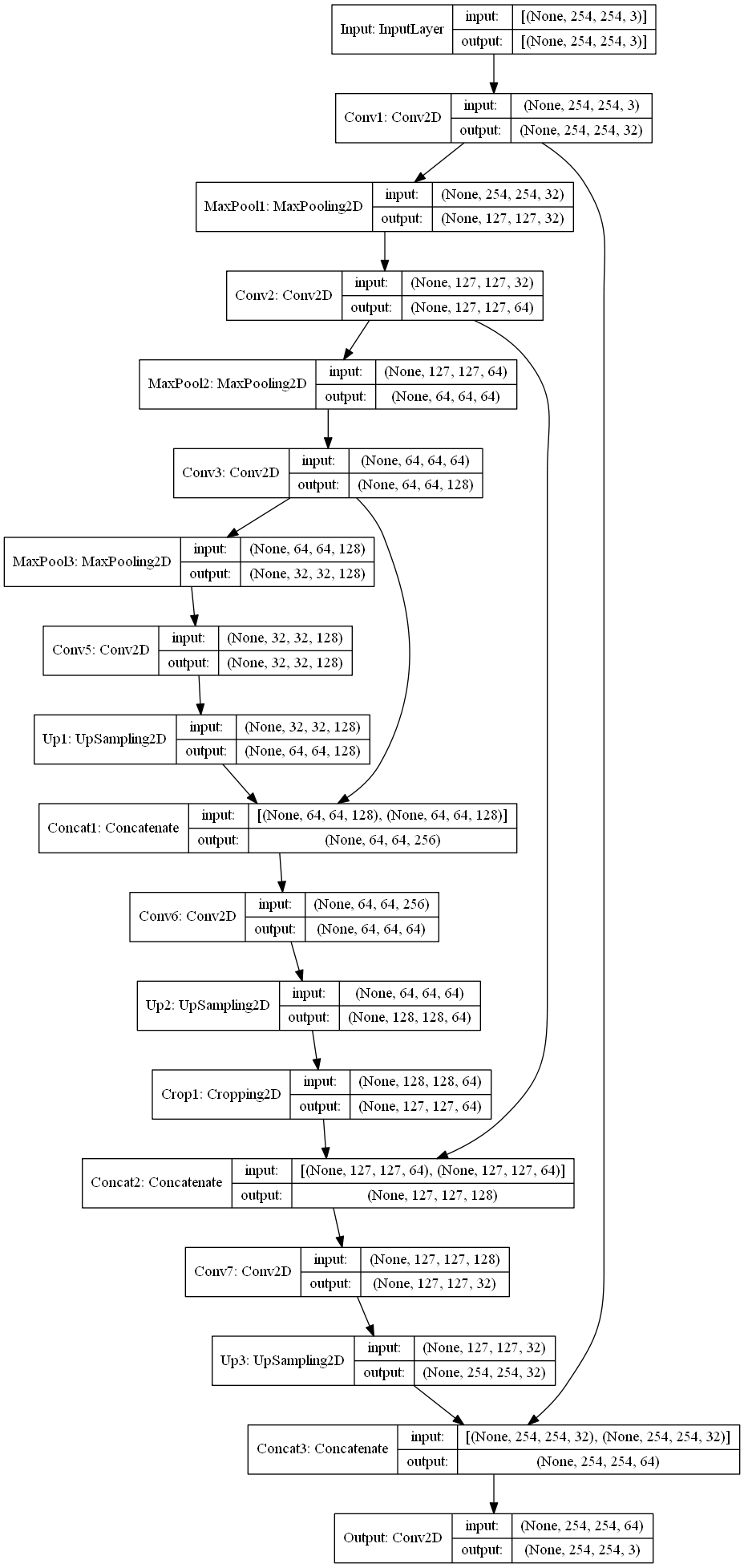
This function takes four arguments: the model, training dataset, validation dataset, and number of epochs.
It then calls the fit method on the model, passing in the two datasets, and trains for defined epochs. This will output information to the terminal about the current progress and accuracy at each epoch.
The function then returns the trained model.
unet_import_evaluate.py has three functions. They are:
- import_unet_model
- unet_evaluate
- main
This file can either be imported as a module to make use of its functions (as in app.py), or run by itself to evaluate the unet using python3 unet_import_evaluate.py.
The dependencies imported are:
- tensorflow
- sys
- cv2
- numpy
- glob
- os
- unet_create_train
The main function starts by calling import_classification_dataset and create_unet_model from unet_create_train.py. Then, the model structure returned by create_unet_model is passed to import_unet_model to load in the weights. It then calls unet_evaluate on the fire/no_fire training, validation, and testing datasets to evaluate the model both for accuracy on unseen data (using the results from the test dataset) and to evaluate the model for overfitting (by comparing that accuracy with the accuracy on the training data). It then extracts the paths of selected test images in the './Local_Testing/Sample Images/Fire/.jpg' and './Local_Testing/Sample Images/No_Fire/.jpg' directory, evaluates the images which creates a reconstruction of that image, checks if the mean squared error of the reconstructed image compared to the original is above the threshold value defined, then either draws a square at the greatest mean squared error pixel if the total error of the image is above that threshold, if not doesn't do anything. This whole process does print out what is going on through the command line.
This function takes two arguments, which should be the model structure returned by create_unet_model, and a string containing the path to the model weights h5 file.
It calls the load_weights method on the model, passing in the path, and returns the pre-trained model.
This function takes two arguments, which should be the model and a dataset to evaluate its performance on.
It calls the unet_evaluate method on the model, passing in the dataset, and this will print the evaluation to the terminal. This function returns nothing.
In app.py, create_unet_model and unet_import_model are used to create the structure and import the weights to prepare the model for use. There is also a function called segmentationPredict which passes the model, the image, and the path to the image and uses the same threshold procedure as in unet_import_evaulate to evaluate whether there is a fire or not in the image and then, if so, draws a box over the largest reconstructed pixel in that image. Then the websites front end is allowed to render the image with the square on it.
This is a file located at Models/weights/forest_fire_unet_254x254_adam_ssim_5.h5, which is the location that unet_create_train.py outputs to, and is imported by import_unet_model in both app.py and unet_import_evaluate.py.