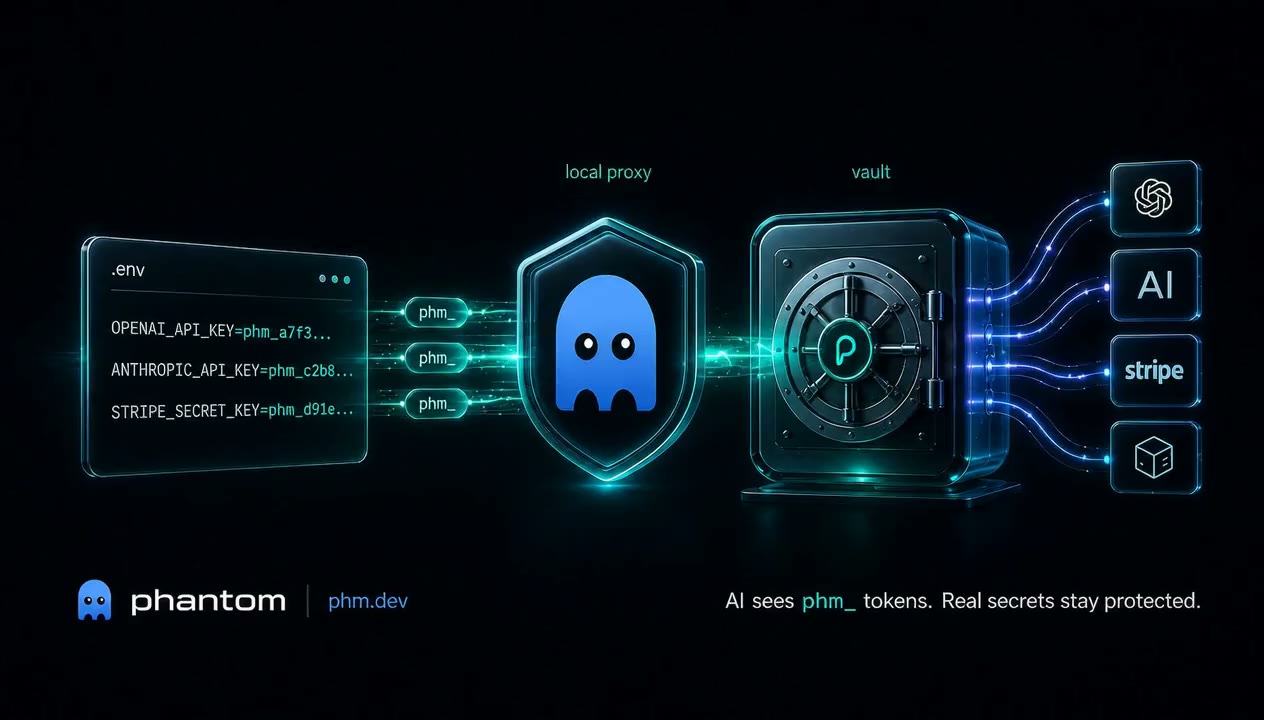
Delegate everything to AI. Without sharing a single key.
Phantom hands every AI tool a worthless phm_ token. The local proxy injects the real key at the network layer. Full access. Zero exposure.




Quick start · Why Phantom? · MCP setup · Docs · phm.dev
▶ Watch the 45-second demo · 🛡 Security model · 💬 Discussions
AI coding agents read your .env files. Once a real API key enters an LLM's context window, it leaks — via prompt injection, session logs, malicious MCP servers, or training data. GitGuardian reports AI-assisted commits leak secrets at 2× the baseline rate.
Every other secrets manager protects keys at rest and in transit. Phantom protects them in context:
- 🔒 Real keys never enter the LLM —
.envcontains onlyphm_tokens; the proxy swaps them at the network edge. - ⚡ 10-second setup —
npx phantom-secrets initand you're protected. No accounts, no DNS, no MITM cert dance. - 🧰 Works with every AI tool — Claude Code, Cursor, Windsurf, Codex, GitHub Copilot. Anything that reads
.env. - 🦀 Open source, local-first, MIT — your secrets live in your OS keychain. The optional cloud sync is end-to-end encrypted; the server only ever sees ciphertext.
Used by developers who don't want to choose between delegating to AI and not pasting their Stripe key into a chat window.
$ npx phantom-secrets init
# Auto-detects .env, .env.local, or .env in subdirectories
# Stores real secrets in OS keychain, rewrites .env with phantom tokens
# Auto-configures Claude Code MCP server if detected

$ phantom exec -- claude
# Proxy running on 127.0.0.1:54321 — AI sees phantom tokens, proxy injects real keysThe same commands work on Windows. npx phantom-secrets init installs via npm as on macOS/Linux.
After phantom start --daemon, the CLI detects your shell and prints the matching env-var syntax. For reference:
PowerShell:
$env:OPENAI_BASE_URL = "http://127.0.0.1:PORT/openai"
$env:PHANTOM_PROXY_PORT = "PORT"
$env:PHANTOM_PROXY_TOKEN = "TOKEN"
cmd.exe:
set OPENAI_BASE_URL=http://127.0.0.1:PORT/openai
set PHANTOM_PROXY_PORT=PORT
set PHANTOM_PROXY_TOKEN=TOKEN
Git Bash / WSL: use the export X=Y syntax from the main quick-start.
Notes:
- If
phantom.exefails to run with "Application Control policy has blocked this file," Windows Smart App Control is honoring the downloaded file's Mark-of-the-Web tag. One-time fix from PowerShell:Get-ChildItem "$env:USERPROFILE\.phantom-secrets\bin\*.exe" | Unblock-File. - The pre-commit hook installed by
phantom initis a#!/bin/shscript. Native git from the command line invokes it via Git for Windows' bundledsh.exe, which is what the official Git for Windows installer ships. GUI clients (GitHub Desktop, some IDE integrations) may run with a stripped-downPATHthat lackssh.exeand silently skip the hook — for these, run commits from a terminal, or usephantom check --stageddirectly. CI is the durable safety net regardless. - Windows-on-ARM64 not yet packaged — x64 only. Tracker: #1.
  .env file (safe to leak)          OS Keychain / Vault
  +--------------------------+      +---------------------+
  | OPENAI_API_KEY=phm_a7f3  | ---> | sk-real-secret-key  |
  | STRIPE_KEY=phm_c9d1...   |      | sk_live_real-key... |
  +--------------------------+      +---------------------+
           |                                 |
           v                                 v
  AI Agent (Claude, Cursor)         Phantom Proxy (127.0.0.1)
  +--------------------------+      +------------------------------+
  | Reads .env               |      | Intercepts HTTP requests     |
  | Sees only phm_ tokens    | ---> | Replaces phm_ with real keys |
  | Makes API calls to proxy |      | Forwards over TLS to real API|
  +--------------------------+      +------------------------------+
phantom initreads.env, stores real secrets in the OS keychain, rewrites.envwithphm_tokensphantom exec -- claudestarts a local reverse proxy, setsOPENAI_BASE_URL=http://127.0.0.1:PORT/openai(and equivalents for other services)- API calls hit the proxy, which replaces phantom tokens with real secrets and forwards over TLS
- When the session ends, the proxy shuts down. Phantom tokens are worthless outside the proxy.
Phantom ships an MCP server so AI coding tools can manage secrets directly -- without ever seeing real values. 24 tools across four categories:
- Vault —
phantom_list_secrets,phantom_status,phantom_init,phantom_add_secret,phantom_remove_secret,phantom_rotate,phantom_copy_secret - Detection + diagnostics —
phantom_doctor,phantom_why,phantom_check,phantom_env - Local-to-cloud —
phantom_wrap,phantom_unwrap,phantom_sync,phantom_cloud_push,phantom_cloud_pull,phantom_cloud_status - Teams —
phantom_team_list,phantom_team_create,phantom_team_members,phantom_team_invite,phantom_team_key_publish,phantom_team_vault_push,phantom_team_vault_pull
Mutating tools require an explicit confirm: true parameter so a prompt-injected agent can't silently mutate state.
$ claude mcp add phantom-secrets-mcp -- npx phantom-secrets-mcpAdd to Cursor Settings > Features > MCP Servers:
- Name:
phantom - Command:
npx phantom-secrets-mcp
Add to ~/.codeium/windsurf/mcp_config.json:
{"phantom": {"command": "npx", "args": ["phantom-secrets-mcp"]}}Add to your MCP configuration:
{"phantom": {"command": "npx", "args": ["phantom-secrets-mcp"]}}Phantom works with any tool that supports the Model Context Protocol.
Sync vaults across machines with end-to-end encryption. The server never sees plaintext.
$ phantom login
# Opens GitHub OAuth (device code flow)

$ phantom cloud push
# Encrypted client-side, uploaded to phm.dev

$ phantom cloud pull   # on another machine
# Downloaded and decrypted locally

$ phantom open
# Opens https://phm.dev/dashboard — read-only view of your projects,
# vault sizes, last sync, plan tier, and team membership.
Cloud sync uses ChaCha20-Poly1305 with a client-side passphrase derived via Argon2id. The server stores only ciphertext.
Multiple developers can share a single E2E-encrypted vault per project. Server only ever stores ciphertext + per-member ciphertext shares.
$ phantom team create "engineering"
# Creates a team; you become the owner.

$ phantom team invite <team_id> <github-username>
# Invites by GitHub login.

$ phantom team key-publish <team_id>
# Registers your X25519 public key on the team.
# (Run once per team; the private key stays in the OS keychain.)

$ phantom team vault-push <team_id>
# Encrypts the current project's vault with a fresh symmetric key,
# wraps that key (X25519 + ChaCha20-Poly1305) for every member that
# has a registered public key, then uploads.

$ phantom team vault-pull <team_id>   # on a teammate's machine
# Pulls, decrypts the per-member share with their private key,
# decrypts the vault, writes secrets locally.
Membership and pending invites are visible in the read-only dashboard at phm.dev/dashboard/team.
| Command | Description |
|---|---|
phantom init |
Import .env secrets into vault, rewrite with phantom tokens |
phantom exec -- <cmd> |
Start proxy and run a command with secret injection |
phantom start / stop |
Manage proxy lifecycle (standalone/daemon mode) |
phantom list |
Show secret names stored in vault (never values) |
phantom add <KEY> <VAL> |
Add a secret to the vault |
phantom remove <KEY> |
Remove a secret from the vault |
phantom reveal <KEY> |
Print a secret value (or --clipboard to copy) |
phantom status |
Show proxy state, vault info, and mapped services |
phantom rotate |
Regenerate all phantom tokens (old ones become invalid) |
phantom doctor |
Check configuration and vault health (--fix to auto-repair) |
phantom check |
Scan for unprotected secrets (pre-commit hook, --staged, --runtime) |
phantom sync |
Push secrets to Vercel / Railway |
phantom pull |
Pull secrets from Vercel / Railway into vault |
phantom setup |
Configure Claude Code MCP server + hooks |
phantom env |
Generate .env.example for team onboarding |
phantom export |
Export vault to encrypted backup file |
phantom import |
Import vault from encrypted backup |
phantom login |
Authenticate with Phantom Cloud via GitHub OAuth |
phantom logout |
Clear cloud credentials |
phantom cloud push |
Push encrypted vault to Phantom Cloud |
phantom cloud pull |
Pull and decrypt vault from Phantom Cloud |
phantom wrap |
Wrap package.json scripts with phantom exec automatically |
phantom unwrap |
Restore original package.json scripts |
phantom watch |
Watch .env files and auto-detect new unprotected secrets |
phantom why <KEY> |
Explain why a key is or is not protected |
phantom copy <KEY> |
Copy a secret to another project's vault |
phantom team list/create/members/invite |
Team vault management |
phantom team key-publish <id> |
Register your X25519 pubkey on a team (once per team) |
phantom team vault-push <id> |
Push current project to shared team vault (E2E encrypted per-member) |
phantom team vault-pull <id> |
Pull team vault into local vault |
phantom open [page] |
Open phm.dev pages in browser (dashboard, billing, team, docs, github, …) |
- Encrypted vault -- OS keychain (macOS Keychain / Secure Enclave, Linux Secret Service) with encrypted file fallback for CI/Docker
- Session-scoped tokens -- 256-bit CSPRNG phantom tokens with
phm_prefix, rotatable on demand - Streaming proxy -- Full SSE/streaming support for OpenAI, Anthropic, and other streaming APIs
- Smart detection -- Heuristic engine distinguishes secrets (
*_KEY,*_TOKEN,sk-*,ghp_*) from config (NODE_ENV,PORT) - Platform sync -- Push/pull secrets to Vercel and Railway
- Pre-commit hook -- Blocks commits containing unprotected secrets
- MCP server -- 24 tools for Claude Code, Cursor, Windsurf, and Codex to manage secrets without seeing values
- Cloud sync -- E2E encrypted zero-knowledge vault sync across machines
- Export/import -- Encrypted backup and restore with passphrase protection
- Response scrubbing -- Prevents secrets from leaking in API responses back to the AI
- Script wrapping --
phantom wrappatches package.json so every npm script runs through the proxy - Watch mode --
phantom watchmonitors .env files for new unprotected secrets - Secret explainer --
phantom why <KEY>explains detection heuristics - Cross-project copy --
phantom copyshares secrets between project vaults - Team vaults -- Shared vaults with role-based access control
- Built-in service routing -- OpenAI, Anthropic, Stripe, Supabase, and custom services via
.phantom.toml
$ npm install -g phantom-secretsOr use directly with npx:
$ npx phantom-secrets init$ claude mcp add phantom-secrets-mcp -- npx phantom-secrets-mcp$ cargo install phantom-secrets5-crate Rust workspace + Next.js cloud backend:
| Crate | Role |
|---|---|
phantom-core |
Config (.phantom.toml), .env parsing/rewriting, token generation, auth, cloud client |
phantom-vault |
VaultBackend trait: OS keychain + encrypted file fallback, ChaCha20-Poly1305 crypto |
phantom-proxy |
HTTP reverse proxy on 127.0.0.1 with SSE/streaming, token replacement, TLS forwarding |
phantom-cli |
clap-based CLI binary, 27 commands |
phantom-mcp |
MCP server binary (rmcp SDK), stdio transport, 24 tools |
apps/web -- Next.js backend at phm.dev for cloud vault sync, GitHub OAuth, and Stripe billing.
npm packages: phantom-secrets (CLI), phantom-secrets-mcp (MCP server).
103 tests across all crates, zero clippy warnings.
- Secrets never on disk in your project directory -- real values live only in the OS keychain or encrypted vault
- ChaCha20-Poly1305 encryption for file vault and cloud sync, Argon2id key derivation
- Zero-knowledge cloud -- server stores only ciphertext; encryption key never leaves the client
- 256-bit CSPRNG tokens --
phm_prefix ensures they never collide with real API key formats - Proxy binds 127.0.0.1 only -- never exposed to the network
- Secrets zeroized from memory after injection via the
zeroizecrate - Allowlist model -- proxy only injects secrets for explicitly configured service patterns
See SECURITY.md for the full threat model.
| Free | Pro | Enterprise | |
|---|---|---|---|
| Local vaults | Unlimited | Unlimited | Unlimited |
| Cloud vaults | 1 | Unlimited | Unlimited |
| MCP server | Yes | Yes | Yes |
| Cloud sync | Yes | Yes | Yes |
| Team features | -- | -- | Yes |
| Price | $0 | $8/mo | Contact us |
- phm.dev -- Cloud dashboard and account management
- Getting Started Guide
- Security Model
- Troubleshooting
- Contributing
We love PRs. Start with CONTRIBUTING.md, pick a good first issue, or open a discussion to talk through an idea. Be excellent to each other — see CODE_OF_CONDUCT.md.
If Phantom saves you from leaking a key — or even just from worrying about it — please star the repo ⭐. It's the single biggest signal we use to know what to build next.
MIT — see LICENSE.