
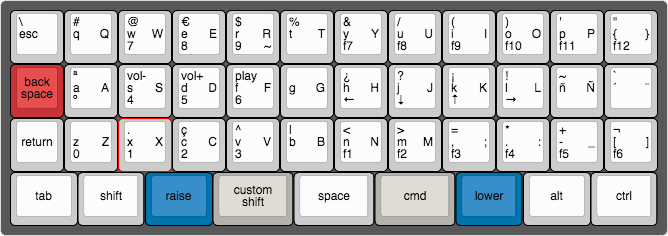
- Clone the TMK repo http://github.com/tmk/tmk_keyboard
- Install dfu-programmer application with brew and the necessary c compilation libraries.
- Copy the custom keymap file to /keyboard/planck/keymaps/keymap_barreiros.c.
- Inside /keyboard/planck/ folder run "make KEYMAP="barreiros" dfu"
- Smile.
- Clone the TMK repo http://github.com/tmk/tmk_keyboard
- Install dfu-programmer application with brew and the necessary c compilation libraries.
- Duplicate /keyboards/planck/keymaps/basic folder
- Copy the custom keymap file to /keyboard/planck/keymaps/barreiros/keymap.c.
- Inside the repository root folder run make planck:barreiros:dfu
- Smile.
For Linux OS we should select the English US International with dead keys layout.