
Upgrade your Claude Code status bar from plain text to a visual progress bar


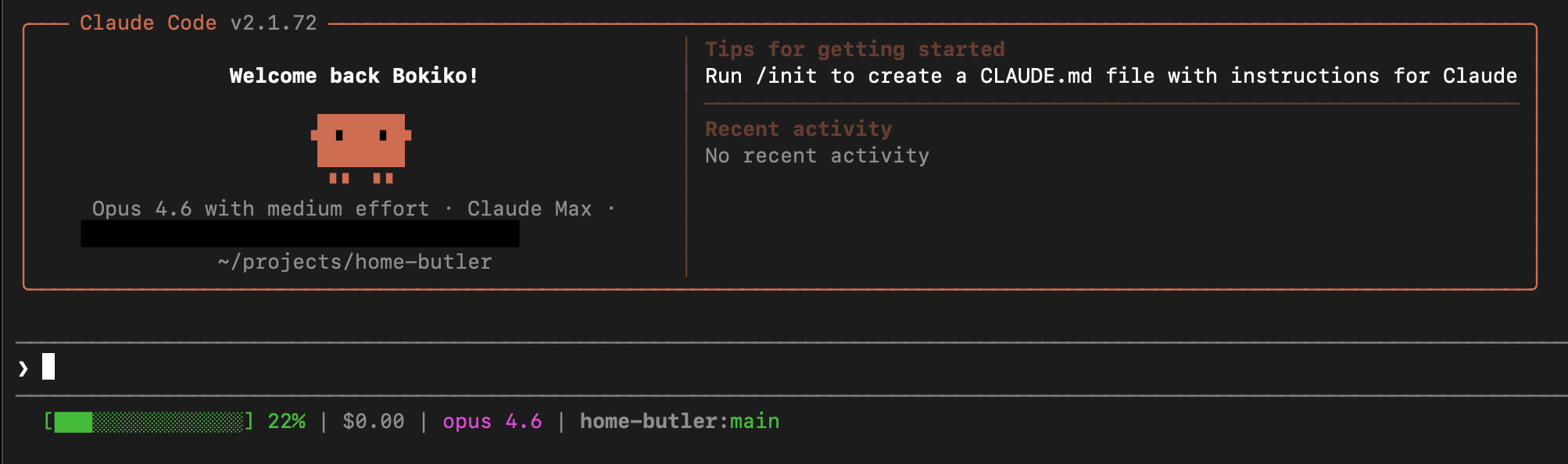
Claude Code shows a plain text statusline at the bottom of your terminal:
83.9k 41%
This addon replaces it with a visual progress bar with model, git, and cost info:
[██████░░░░░░░░░] 41% | Sonnet | main | $0.03
One script, one settings entry. No extra dependencies. No jq required.
BEFORE (default):
  83.9k 41%

AFTER (this addon):
  [██████░░░░░░░░░] 41% | Sonnet | main | $0.03
The bar changes color as your context fills up:
| Context Used | Color | What It Looks Like |
|---|---|---|
| Under 60% | Green | [█████░░░░░░░░░] 34% | Sonnet | main | $0.02 |
| 60% - 79% | Yellow | [█████████░░░░░░] 65% | Opus | main U:2 | $0.15 |
| 80%+ | Red | ⚠ [████████████░░░] 85% | Opus | main | $0.89 |
When running as a sub-agent, the agent name appears in parentheses:
[██████░░░░░░░░░] 72% | Opus (debug-agent) | feat/auth | $0.19
Open your terminal and paste this:
mkdir -p ~/.claude/scripts
curl -o ~/.claude/scripts/status.sh \
  "https://raw.githubusercontent.com/bokiko/claude-statusline/main/scripts/claude-statusline.sh"
chmod +x ~/.claude/scripts/status.shOpen the file ~/.claude/settings.json in any text editor.
If the file already exists, add the statusLine section inside the top-level { }:
{
  "statusLine": {
    "type": "command",
    "command": "$HOME/.claude/scripts/status.sh"
  }
}
If the file doesn't exist yet, create it with exactly the content above.
Close and reopen Claude Code. The new statusline appears immediately.
That's it. You're done.
git clone https://github.com/bokiko/claude-statusline.git
cd claude-statusline
bash install.sh
The installer copies the script and tells you what to add to settings.json.
|
|
|
|
Reduce Claude Code context usage by 90% with on-demand memory retrieval.
The statusline's context percentage becomes even more useful when paired with BloxCue — you'll see exactly how much context you're saving in real time. As BloxCue keeps your context lean, the progress bar stays green longer.
You can customize the script by editing ~/.claude/scripts/status.sh:
| Variable | Default | What It Does |
|---|---|---|
bar_width |
15 |
How many characters wide the progress bar is |
| Yellow threshold | 60 |
Context % where bar turns yellow (search for -ge 60) |
| Red threshold | 80 |
Context % where bar turns red with ⚠ (search for -ge 80) |
claude-statusline/
├── scripts/
│   └── claude-statusline.sh   # The statusline script
├── install.sh                  # One-command installer
├── LICENSE                     # MIT
└── README.md
Claude Code pipes JSON to the statusline command via stdin. The script reads:
| JSON field | What it shows |
|---|---|
context_window.used_percentage |
Progress bar + percentage |
model.display_name |
Model name (Sonnet / Opus / Haiku) |
agent.name |
Sub-agent name (if running inside an agent) |
workspace.current_dir |
Used for git status |
cost.total_cost_usd |
Session cost in USD |
Parsed using pure bash (grep/sed) — no jq needed.
| Requirement | Why |
|---|---|
| Claude Code CLI | This is an addon for Claude Code |
| Bash 4+ | Uses bash-specific features for the progress bar |
git |
Shows branch and file status (optional — works without it) |
| Problem | Fix |
|---|---|
| Statusline doesn't appear | Make sure ~/.claude/settings.json has the statusLine section and restart Claude Code |
Shows 0% always |
Make sure the script is executable: chmod +x ~/.claude/scripts/status.sh |
| No git info showing | Make sure you're in a git repository |
| No model name showing | Requires Claude Code v2.0+ (the model.display_name field) |
| Permission denied | Run chmod +x ~/.claude/scripts/status.sh |
MIT — see LICENSE for details.
Made by @bokiko