
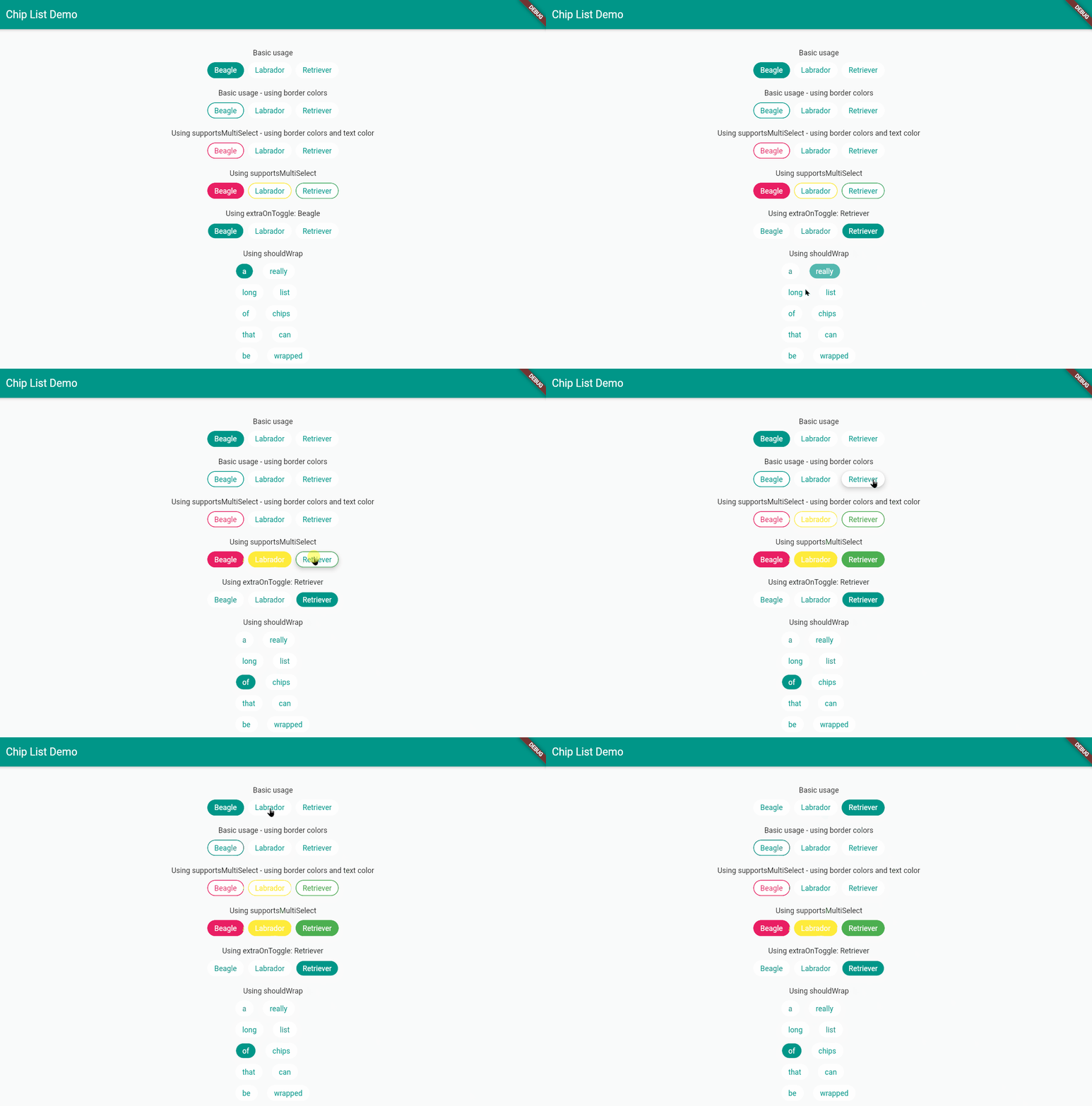
Creates a list of ChoiceChips. Also allows for selecting multiple chips at once and allows use in sync with other widgets. This package is intended to solve all your woes with regards to Chips.
Well, maybe not all, but if you would like to request a feature, fire away !
See /example/main.dart for an example on how to use the state of the list for updating the state of other widgets, and other fancy properties.
Depend on it! Add this to your pubspec.yaml
chip_list: ^3.0.0Import it!
import 'package:chip_list/chip_list.dart';Profit. 😉
ChipList(
            listOfChipNames: name-of-the-chips-in-order-of-being-built,
            activeBgColorList: [],
            inactiveBgColorList: [],
            activeTextColorList: [],
            inactiveTextColorList: [],
            activeBorderColorList: [],
            inactiveBorderColorList: [],
            listOfChipIndicesCurrentlySelected: [],
          ),
If you want to wrap the ChipList, then set shouldWrap to true.
You can then use all the properties of a typical Wrap widget to further customize appearance.
If you want to have full control of the parameters specified above over each and every single chip, you can do so by setting the color within the activeBgColorList, inactiveBgColorList,
activeTextColorList and inactiveTextColorList respectively, wherever appropriate.
Use a single color if you want it to be used for all chips. Otherwise, the length of the list must be equal to the length of listOfChipNames.
Note that if you don't, then the package has defaults as specified in the documentation. (You can hover over the property in your IDE to see more 🙂).
Whether you choose to let the axis to Axis.vertical or Axis.horizontal, you can set the spacing by tweaking widgetSpacing.
showCheckmarklets you enable or disable checkmarks in chipscheckmarkColorlets you set the color of the checkmark if it's enabled
The flutter_lints package might suggest that you make listOfChipIndicesCurrentlySeclected a constant.
PLEASE DO NOT DO SO.
The widget will not respond to user interaction, seemingly without any reason.
The whole point of the API being designed like this is so that you have direct access to the currently selected indices, without the need for any state management and such.
That list will be updated as the user interacts with the widget. It is intended to be used in case you would like to incorporate the contents for any logic.
For an example, look at the section title "using extraOnToggle" in the provided example. The index is used to display the currently selected indice's label elsewhere in the UI.
/example/main.dart:
class HomePage extends StatefulWidget {
  HomePage({Key? key}) : super(key: key);

  @override
  State<HomePage> createState() => _HomePageState();
}

class _HomePageState extends State<HomePage> {
  final List<String> _dogeNames = [
    'Beagle',
    'Labrador',
    'Retriever',
  ];

  int _currentIndex = 0;

  @override
  Widget build(BuildContext context) {
    return Scaffold(
      appBar: AppBar(
        title: const Text('Chip List Demo'),
      ),
      body: Column(
        mainAxisAlignment: MainAxisAlignment.center,
        children: [
          // Basic usage
          const Text('Basic usage'),
          const SizedBox(
            height: 10,
          ),
          ChipList(
            listOfChipNames: _dogeNames,
            activeBgColorList: [Theme.of(context).primaryColor],
            inactiveBgColorList: [Colors.white],
            activeTextColorList: [Colors.white],
            inactiveTextColorList: [Theme.of(context).primaryColor],
            listOfChipIndicesCurrentlySeclected: [0],
            borderColorList: [Theme.of(context).primaryColor],
          ),

          // Using [supportsMultiSelect]
          const SizedBox(
            height: 20,
          ),
          const Text('Using supportsMultiSelect'),
          const SizedBox(
            height: 10,
          ),
          ChipList(
            listOfChipNames: _dogeNames,
            supportsMultiSelect: true,
            activeBgColorList: [Colors.pink, Colors.yellow, Colors.green],
            inactiveBgColorList: [Colors.white],
            activeTextColorList: [Colors.white],
            inactiveTextColorList: [Theme.of(context).primaryColor],
            listOfChipIndicesCurrentlySeclected: [0],
            borderColorList: [Colors.pink, Colors.yellow, Colors.green],
          ),

          // Using [extraOnToggle]
          const SizedBox(
            height: 20,
          ),
          Text('Using extraOnToggle: ${_dogeNames[_currentIndex]}'),
          const SizedBox(
            height: 10,
          ),
          ChipList(
            listOfChipNames: _dogeNames,
            activeBgColorList: [Theme.of(context).primaryColor],
            inactiveBgColorList: [Colors.white],
            activeTextColorList: [Colors.white],
            inactiveTextColorList: [Theme.of(context).primaryColor],
            listOfChipIndicesCurrentlySeclected: [_currentIndex],
            extraOnToggle: (val) {
              _currentIndex = val;
              setState(() {});
            },
          ),

          // Using [shouldWrap]
          const SizedBox(
            height: 20,
          ),
          const Text('Using shouldWrap'),
          const SizedBox(
            height: 10,
          ),
          SizedBox(
            width: 150,
            child: ChipList(
              listOfChipNames: const [
                'a',
                'really',
                'long',
                'list',
                'of',
                'chips',
                'that',
                'can',
                'be',
                'wrapped',
              ],
              activeBgColorList: [Theme.of(context).primaryColor],
              inactiveBgColorList: const [
                Colors.white,
              ],
              activeTextColorList: [Colors.white],
              inactiveTextColorList: [Theme.of(context).primaryColor],
              listOfChipIndicesCurrentlySeclected: [0],
              shouldWrap: true,
              runSpacing: 10,
              spacing: 10,
            ),
          ),
        ],
      ),
    );
  }
}
Found an issue ? Please let me know ! Feel like creating a PR? Yes please! All contributions are welcome :)