Reploom is an intelligent email response system built with React (Vite) + LangGraph that generates high-quality email drafts using AI agents. With Gmail integration, human-in-the-loop workflows, and workspace-based brand voice management, Reploom helps teams respond faster while maintaining quality and control.
🔒 Safety First: Reploom never auto-sends emails. All drafts require human review and approval. See SAFETY.md for complete safety and security documentation.
- Gmail Integration: Automated inbox scanning, email summarization, priority detection, and draft generation
- Multi-Agent Architecture: LangGraph-powered agent crews with workspace-specific configurations
- Human-in-the-Loop: Draft-only mode with confidence gates and review UI for safe, controlled responses
- Calendar Management: Smart scheduling, conflict detection, and meeting optimization
- Document Intelligence: PDF/text upload with RAG-powered context retrieval and sharing
- Fine-Grained Authorization: Auth0 FGA integration for workspace and tool-level access control
- Secure API Access: Auth0 Token Vault for credential-free tool calling
- User Management: Complete authentication with profile retrieval and workspace organization
Want to see Reploom in action without setting up Gmail integration? Follow this quick demo walkthrough:
- Node.js 18+ and npm
- Python 3.11+
- Docker and Docker Compose
git clone https://github.com/but-noah/Reploom.git
cd Reploomcd backend
cp .env.example .env
# Edit .env and add minimal config (OpenAI key optional for demo)
make up # Start postgres, redis, qdrant
make migrate # Initialize database schema
make seed # Seed demo data with sample draftsThe seed script will create:
- A demo workspace with tone_level=3 and blocklist
- 4 sample draft reviews with fake customer emails (no PII)
- Ready-to-review drafts in various states (pending, approved)
cd ../frontend
cp .env.example .env
npm install
npm run dev-
Inbox: Navigate to http://localhost:5173/inbox
- See the draft review queue with 4 sample drafts
- Filter by status (pending, approved) and intent (support, cs, other)
- Click on any draft to review
-
Review: Click on a draft to see:
- Original customer message context
- AI-generated draft response (HTML formatted)
- Intent classification and confidence score
- Approve/Reject/Request Edit actions
-
Analytics: Visit http://localhost:5173/analytics
- View intent distribution (support, customer success, executive)
- See review rates (approved %, rejected %, editing %)
- Check First Response Time (FRT) metrics with SLA tracking
-
Settings: Go to http://localhost:5173/settings
- Adjust tone level (1=very formal, 5=very casual)
- Update blocklist phrases (e.g., "free trial", "limited time offer")
- Configure approval threshold
- No PII: All demo data uses synthetic customer emails
- Real UI: Full-featured interface showing the complete review workflow
- Working Analytics: Metrics calculated from demo data
- Configurable Settings: Edit workspace preferences in real-time
To connect real Gmail and generate live drafts:
- Follow the Gmail Integration setup below
- Configure Auth0 Token Vault for secure API access
- Connect your Gmail account and start drafting!
- Node.js 18+ and npm/bun
- Python 3.12+
- Docker and Docker Compose
- Auth0 account (sign up)
- OpenAI API key (get one)
git clone https://github.com/but-noah/Reploom.git
cd Reploomcd backend
cp .env.example .env
# Edit .env and add your Auth0 credentials and OpenAI API key
uv sync
docker compose up -d
source .venv/bin/activate
python -m app.core.fga_init# Terminal 1: FastAPI backend
fastapi dev app/main.py
# Terminal 2: LangGraph server
langgraph dev --port 54367 --allow-blocking
# Terminal 3: React frontend
cd frontend
cp .env.example .env
npm install && npm run devOpen http://localhost:5173 and start managing your emails with AI!
For a streamlined development experience, use the new one-command setup with Docker Compose and Make:
cd backend
make up          # Start postgres, redis, and qdrant with health checks
make migrate     # Initialize database schema
make dev # Show dev server commandmake up # Start all services (postgres, redis, qdrant)
make down # Stop all services
make psql # Connect to PostgreSQL database
make migrate # Run database migrations
make seed # Seed database with demo data (4 sample drafts, workspace settings)
make logs # Show logs from all services
make status # Show status of all services
make restart # Restart all services
make clean # Stop services and remove volumes (deletes data!)
make help # Show all available commandsThe docker-compose stack includes:
- PostgreSQL (pgvector): Main database with vector extension on port 5432
- Redis: Cache and session storage on port 6379
- Qdrant: Vector database for semantic search on ports 6333 (HTTP) and 6334 (gRPC)
All services include health checks and named volumes for data persistence.
Verify all services are running:
curl http://localhost:8000/healthzExpected response:
{
  "status": "healthy",
  "services": {
    "postgres": "healthy",
    "redis": "configured",
    "qdrant": "healthy"
  }
}┌─────────────────────────────────────────────────────────────┐
│ React Frontend (Vite) │
│ http://localhost:5173 │
└────────────────────────┬────────────────────────────────────┘
│ HTTP/REST
┌────────────────────────┴────────────────────────────────────┐
│ FastAPI Backend Server │
│ http://localhost:8000 │
│ ┌──────────────┐ ┌──────────────┐ ┌──────────────┐ │
│ │ Auth0 FGA │ │ Auth Routes │ │ API Routes │ │
│ │ Authorization│ │ & Session │ │ (Agents) │ │
│ └──────────────┘ └──────────────┘ └──────────────┘ │
└────────────────────────┬────────────────────────────────────┘
│
┌────────────────────────┴────────────────────────────────────┐
│ LangGraph Agent Server │
│ http://localhost:54367 │
│ ┌──────────────┐ ┌──────────────┐ ┌──────────────┐ │
│ │ Email Agent │ │ Calendar Agt │ │ RAG Agent │ │
│ │ (Gmail) │ │ (GCal) │ │ (Qdrant) │ │
│ └──────────────┘ └──────────────┘ └──────────────┘ │
└───────┬─────────────────────┬────────────────┬─────────────┘
│ │ │
┌───────┴────────┐ ┌────────┴──────┐ ┌────┴─────┐
│ Auth0 Token │ │ PostgreSQL │ │ Qdrant │
│ Vault │ │ Database │ │ Vector │
│ (OAuth Broker) │ │ + Redis │ │ DB │
└────────────────┘ └───────────────┘ └──────────┘
- User Authentication: Frontend → Auth0 → Backend (JWT verification)
- Agent Request: Frontend → FastAPI → LangGraph Server
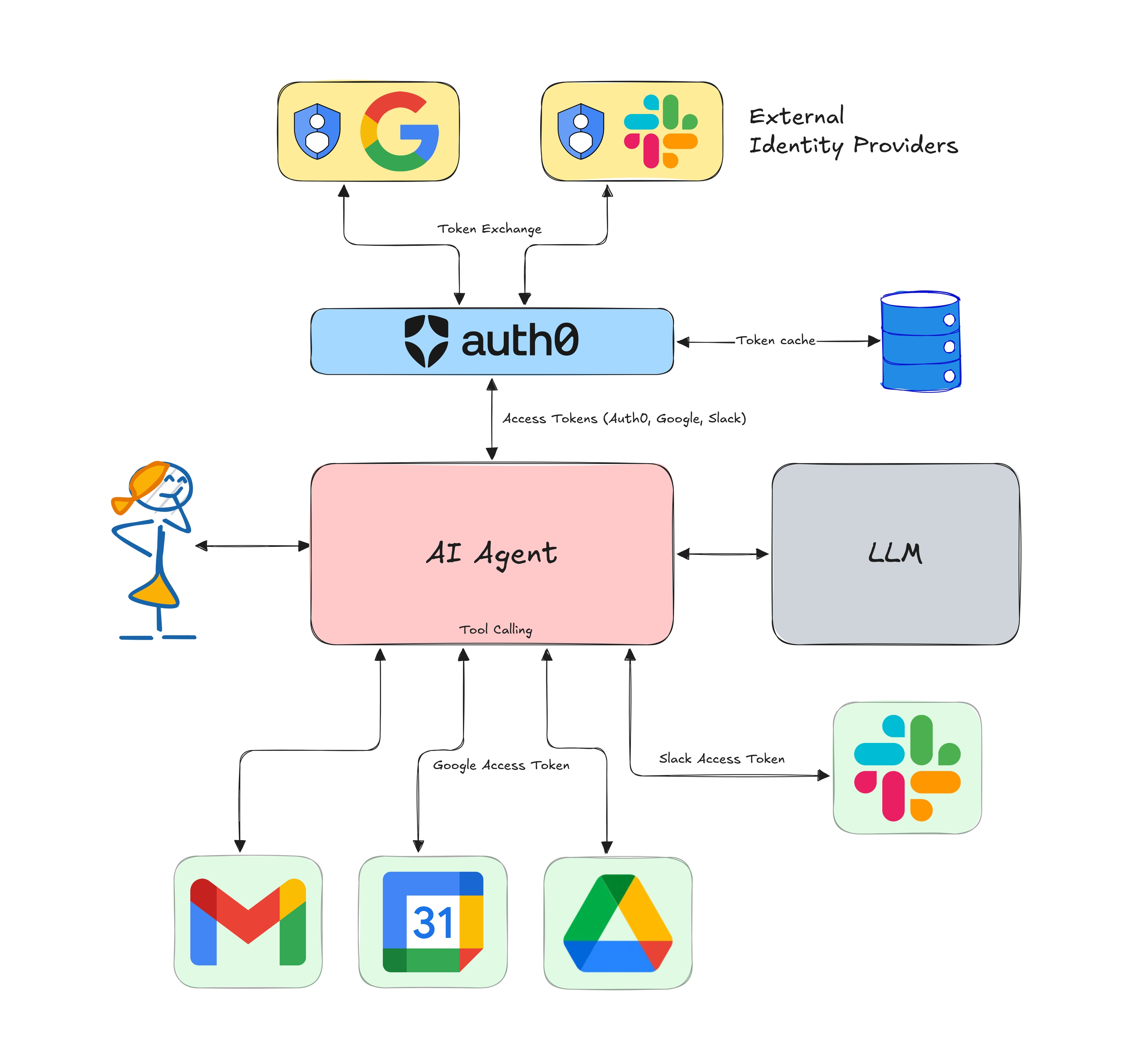
- Tool Execution: Agent → Auth0 Token Vault → External APIs (Gmail, Calendar)
- Authorization: Every action checked via Auth0 FGA policies
- Context Retrieval: Agents query Qdrant for relevant documents
Reploom leverages Auth0's modern identity platform for secure AI agent operations:
- Token Vault: Secure credential storage and scoped access token brokerage (learn more)
- Federated Token Exchange: Agents call tools via Auth0 without direct credential access
- Fine-Grained Authorization (FGA): Policy-based access control for workspaces, agents, and tools
- OAuth 2.0 & OIDC: Industry-standard authentication protocols
Reploom/
├── backend/              # FastAPI + LangGraph Python backend
│   ├── app/
│   │   ├── agents/      # LangGraph agent definitions
│   │   ├── api/         # FastAPI route handlers
│   │   ├── core/        # Config, auth, database
│   │   └── tools/       # Agent tools (Gmail, Calendar, etc.)
│   ├── docker-compose.yml
│   └── pyproject.toml
├── frontend/            # React + Vite SPA
│   ├── src/
│   │   ├── components/  # UI components
│   │   ├── hooks/       # React hooks
│   │   └── lib/         # Utilities
│   └── package.json
└── public/              # Static assets
See backend/.env.example for all configuration options including:
- Auth0 credentials (domain, client ID/secret)
- OpenAI API key
- Database URLs (PostgreSQL, Redis, Qdrant)
- FGA store configuration
See frontend/.env.example for frontend configuration (API host).
Reploom uses Auth0 Token Vault to securely access Gmail on behalf of users without storing provider refresh tokens in the application database. This approach provides better security and compliance.
The Gmail integration allows authenticated users to:
- List Gmail labels (
GET /api/me/gmail/labels) - Access Gmail data with proper scopes
- Maintain secure token management through Auth0
Security Benefits:
- ✅ No provider refresh tokens stored in your database
- ✅ Tokens obtained on-demand via Auth0's federated token exchange
- ✅ Automatic token rotation handled by Auth0
- ✅ Scoped access with minimal permissions (gmail.readonly, gmail.modify, gmail.compose)
- ✅ Comprehensive logging with PII redaction
- Go to Auth0 Dashboard → Authentication → Social
- Enable Google connection
- Configure OAuth scopes:
openid profile email https://www.googleapis.com/auth/gmail.readonly https://www.googleapis.com/auth/gmail.modify https://www.googleapis.com/auth/gmail.compose - Note your Google Client ID and Secret (from Google Cloud Console)
- Go to Auth0 Dashboard → Applications → Create Application
- Select Machine to Machine Applications
- Name it "Reploom Token Exchange API"
- Authorize it for Auth0 Management API with scope:
read:users - Copy the Client ID and Client Secret (these are
AUTH0_CUSTOM_API_CLIENT_IDandAUTH0_CUSTOM_API_CLIENT_SECRET)
Add to your backend/.env:
# Auth0 Token Vault Configuration
AUTH0_CUSTOM_API_CLIENT_ID='your-m2m-client-id'
AUTH0_CUSTOM_API_CLIENT_SECRET='your-m2m-client-secret'
AUTH0_AUDIENCE='https://your-tenant.auth0.com/api/v2/'

# Gmail API Scopes (space-separated)
GMAIL_SCOPES='https://www.googleapis.com/auth/gmail.readonly https://www.googleapis.com/auth/gmail.modify https://www.googleapis.com/auth/gmail.compose'# Start the backend
cd backend
fastapi dev app/main.py
# In another terminal, authenticate
curl http://localhost:8000/api/auth/loginLog in with a Google account and grant the requested Gmail permissions.
# After authentication, call the labels endpoint
curl http://localhost:8000/api/me/gmail/labels \
  -H "Cookie: auth0_session=..." \
  --cookie-jar cookies.txt --cookie cookies.txt
Expected response:
{
  "labels": [
    {
      "id": "INBOX",
      "name": "INBOX",
      "type": "system",
      "messageListVisibility": "show",
      "labelListVisibility": "labelShow"
    },
    {
      "id": "SENT",
      "name": "SENT",
      "type": "system"
    }
  ],
  "scope": [
    "https://www.googleapis.com/auth/gmail.readonly",
    "https://www.googleapis.com/auth/gmail.modify",
    "https://www.googleapis.com/auth/gmail.compose"
  ],
  "user": {
    "sub": "google-oauth2|123456",
    "email": "user@example.com",
    "name": "John Doe"
  }
}The Gmail integration provides detailed error messages:
| Status Code | Error | Description |
|---|---|---|
| 401 | invalid_grant |
User's Google authorization expired or revoked. Reconnect Gmail. |
| 403 | insufficient_scope |
User didn't grant required Gmail permissions. Re-authenticate. |
| 429 | rate_limit_exceeded |
Gmail API quota exhausted. Wait and retry. |
| 500 | token_exchange_error |
Auth0 configuration issue. Check logs. |
| 503 | service_unavailable |
Gmail API temporarily down. Retry later. |
| 504 | timeout |
Request took too long. Retry. |
- No Token Logging: Access tokens are never logged or exposed in API responses
- Redacted Logs: User identifiers are truncated in logs (e.g.,
auth0|123...) - Minimal Scopes: Only request the scopes your application actually needs
- Token Lifetime: Tokens are short-lived and obtained on-demand
- Error Messages: User-friendly messages don't leak sensitive information
User Request
     ↓
FastAPI (/api/me/gmail/labels)
     ↓
Token Exchange Helper (token_exchange.py)
     ↓
Auth0 Token Vault (OAuth Token Exchange)
     ↓
Google OAuth2 (Access Token)
     ↓
Gmail API (users.labels.list)
     ↓
Response to User
To add more Google services:
- Add required scopes to
GMAIL_SCOPESin.env - Re-authenticate users to grant new permissions
- Use the same
get_google_access_token()helper - Create new route handlers in
app/api/routes/
Example for Google Calendar:
# In your route handler
from app.auth.token_exchange import get_google_access_token

access_token = await get_google_access_token(
    user_sub=user["sub"],
    scopes=["https://www.googleapis.com/auth/calendar.readonly"]
)

# Use token with Google Calendar APIIssue: Token exchange service is not configured
Solution: Verify all required environment variables are set:
AUTH0_DOMAINAUTH0_CUSTOM_API_CLIENT_IDAUTH0_CUSTOM_API_CLIENT_SECRETAUTH0_AUDIENCE
Issue: User has not granted required Gmail permissions
Solution: User needs to:
- Log out from Reploom
- Log in again with Google
- Grant all requested Gmail permissions on the consent screen
Issue: Grant is invalid or expired
Solution: User's Google connection expired. They need to reconnect their Google account via Auth0.
Reploom supports creating Gmail draft replies that properly thread within existing conversations. Drafts include correct MIME formatting with In-Reply-To and References headers to ensure proper Gmail threading.
- Proper Threading: Drafts appear in the same Gmail thread as the original message
- RFC-Compliant MIME: In-Reply-To and References headers for email client compatibility
- Subject Continuity: Auto-adds "Re:" prefix if missing
- HTML Content: Full HTML email body support with UTF-8 encoding
- Idempotent: Prevents duplicate drafts for the same reply context
- Strong Error Handling: Rate limits, invalid headers, and missing messages handled gracefully
POST /api/me/gmail/threads/{thread_id}/draft
Create a draft reply within an existing Gmail thread.
{
  "reply_to_msg_id": "msg_abc123",
  "subject": null,
  "body_html": "<p>Thanks for your email! I'll get back to you soon.</p>"
}
Parameters:
reply_to_msg_id(required): Gmail message ID being replied tosubject(optional): Email subject. If null, auto-generated with "Re:" prefix from original messagebody_html(required): HTML content of the reply
{
  "draft_id": "r-1234567890",
  "message_id": "msg_xyz789",
  "thread_id": "thread_abc123",
  "subject": "Re: Original Subject",
  "created_at": "2025-01-15T10:30:00Z",
  "is_duplicate": false
}
Fields:
draft_id: Gmail draft ID (use to update or delete draft)message_id: Gmail message IDthread_id: Thread ID (matches request)subject: Final subject used (with "Re:" prefix)created_at: UTC timestamp when draft was createdis_duplicate: True if this was a duplicate request (idempotent response)
curl -X POST http://localhost:8000/api/me/gmail/threads/thread_abc123/draft \
  -H "Content-Type: application/json" \
  -H "Cookie: auth0_session=..." \
  -d '{
    "reply_to_msg_id": "msg_def456",
    "subject": null,
    "body_html": "<p>Thanks for reaching out!</p><p>Best regards,<br>The Team</p>"
}'curl -X POST http://localhost:8000/api/me/gmail/threads/thread_abc123/draft \
-H "Content-Type: application/json" \
-H "Cookie: auth0_session=..." \
-d '{
"reply_to_msg_id": "msg_def456",
"subject": "Quick Follow-up",
"body_html": "<p>Just following up on our previous conversation.</p>"
}'Note: The subject will automatically become "Re: Quick Follow-up" to maintain proper threading.
- Fetch Original Message: Retrieves the message being replied to and extracts headers
- Build MIME: Creates RFC-compliant MIME message with:
In-Reply-To: Set to original message's Message-IDReferences: Chain of all message IDs in the threadSubject: With "Re:" prefix for continuityContent-Type: text/html; charset=utf-8
- Create Draft: Calls Gmail API with
threadIdto ensure proper threading - Store Reference: Saves draft metadata in database for idempotency
Gmail uses three signals for threading:
- threadId in the API request (most important)
- In-Reply-To header pointing to the Message-ID being replied to
- References header with the complete chain of Message-IDs
Reploom implements all three to ensure drafts appear correctly threaded.
To prevent duplicate drafts when the same request is made multiple times:
- Tracks drafts by
(user_id, thread_id, reply_to_msg_id, content_hash) - If an identical draft request is made, returns the existing draft
- Response includes
is_duplicate: trueto indicate idempotent response
| Status Code | Error | Description |
|---|---|---|
| 400 | invalid_message |
Message missing required headers (e.g., Message-ID) |
| 400 | validation_error |
Missing or invalid request parameters |
| 401 | invalid_grant |
Google authorization expired. Reconnect Gmail. |
| 403 | insufficient_scope |
Missing required Gmail permissions. Re-authenticate. |
| 404 | thread_not_found |
Thread or message doesn't exist |
| 429 | rate_limit_exceeded |
Gmail API quota exhausted. Wait and retry. |
| 500 | draft_creation_error |
Gmail API error creating draft |
| 503 | service_unavailable |
Gmail API temporarily down. Retry later. |
| 504 | timeout |
Request took too long. Retry. |
Here's what the generated MIME looks like:
To: sender@example.com
From: me
Subject: Re: Original Subject
In-Reply-To: <CAFx9sH_OriginalMessageID@mail.gmail.com>
References: <CAFx9sH_FirstMsg@mail.gmail.com> <CAFx9sH_OriginalMessageID@mail.gmail.com>
Content-Type: multipart/alternative; boundary="===============1234567890=="
MIME-Version: 1.0

--===============1234567890==
Content-Type: text/html; charset="utf-8"
MIME-Version: 1.0
Content-Transfer-Encoding: 7bit

<p>Thanks for your email! I'll get back to you soon.</p>
--===============1234567890==--
The draft reply endpoint is designed to work seamlessly with AI agents:
# In your LangGraph agent
from app.integrations.gmail_service import create_reply_draft
from app.auth.token_exchange import get_google_access_token

async def create_ai_reply(thread_id: str, message_id: str, ai_response: str):
    # Get access token
    token = await get_google_access_token(
        user_sub=user["sub"],
        scopes=["https://www.googleapis.com/auth/gmail.compose"]
    )

    # Create draft with AI-generated response
    draft = await create_reply_draft(
        user_token=token,
        thread_id=thread_id,
        reply_to_msg_id=message_id,
        subject=None,  # Auto-generate
        html_body=f"<p>{ai_response}</p>"
    )

return draft["draft_id"]Reploom includes a production-ready LangGraph agent crew for intelligent draft generation with policy enforcement, workspace-level configuration, and resumable workflows.
- Intent Classification: Automatically categorizes emails (support, customer service, executive, other)
- Workspace Settings: Tone and blocklist configuration per workspace
- Policy Enforcement: Real-time blocklist checking before draft creation
- Persistent Checkpointer: PostgreSQL-backed state for resumable workflows
- PII Redaction: Automatic redaction of sensitive data in logs
- Human-in-the-Loop: Thread-based resumption for review and approval
┌─────────────┐
│  Classifier │  → Detect intent (support/cs/exec/other) + confidence
└──────┬──────┘
       │
┌──────┴─────────┐
│ ContextBuilder │  → Retrieve workspace context (stub)
└──────┬─────────┘
       │
┌──────┴──────┐
│   Drafter   │  → Generate HTML draft with tone control
└──────┬──────┘
       │
┌──────┴───────┐
│ PolicyGuard  │  → Check blocklist, fail fast on violations
└──────┬───────┘
       │
   (halt/continue)
Configure per-workspace settings in the database:
INSERT INTO workspace_settings (workspace_id, tone_level, blocklist_json, approval_threshold)
VALUES (
  'ws-acme-corp',
  'friendly',
  '["free trial", "money back guarantee", "limited time offer"]'::json,
  0.85
);
Or seed default settings:
cd backend
python -c "from app.core.workspace import seed_workspace_settings; seed_workspace_settings()"Generate a draft with intent classification and policy enforcement.
Request:
curl -X POST http://localhost:8000/api/agents/reploom/run-draft \
  -H "Content-Type: application/json" \
  -H "Cookie: auth0_session=..." \
  -H "x-correlation-id: req-12345" \
  -d '{
    "thread_id": "customer-123",
    "message_excerpt": "I need help resetting my password",
    "workspace_id": "ws-acme-corp"
  }'
Response:
{
  "draft_html": "<p>Hi there! I'd be happy to help you reset your password...</p>",
  "confidence": 0.92,
  "intent": "support",
  "violations": [],
  "thread_id": "customer-123",
  "run_id": "run-abc123"
}
With Policy Violations:
{
  "draft_html": "<p>Get your free trial now...</p>",
  "confidence": 0.88,
  "intent": "cs",
  "violations": ["Blocklisted phrase detected: 'free trial'"],
  "thread_id": "customer-456",
  "run_id": "run-def456"
}Fetch the current state of a draft generation run.
Request:
curl http://localhost:8000/api/agents/reploom/runs/customer-123 \
  -H "Cookie: auth0_session=..." \
  -H "x-correlation-id: req-12345"
Response:
{
  "state": {
    "intent": "support",
    "confidence": 0.92,
    "draft_html": "<p>Hi there!...</p>",
    "violations": [],
    "tone_level": "friendly"
  },
  "status": "completed",
  "thread_id": "customer-123"
}Check agent crew health and configuration.
Response:
{
  "status": "healthy",
  "langgraph_server": "connected",
  "checkpointer": "postgres"
}Reploom supports two checkpointer modes:
PostgreSQL (Production):
# .env
GRAPH_CHECKPOINTER=postgres
DATABASE_URL=postgresql+psycopg://user:pass@localhost:5432/reploom_db
State persists across server restarts, enabling true resumable workflows.
Memory (Development):
# .env
GRAPH_CHECKPOINTER=memory
State is lost on restart. Useful for local development but not for production.
The agent draft flow includes production-ready security features:
- PII Redaction: User emails and IDs are truncated/masked in logs
- Correlation ID: Every request tracked with
x-correlation-idheader - No Auto-Send: Drafts only, no automatic email sending
- Workspace Isolation: Settings and policies scoped to workspace
Run the comprehensive test suite:
cd backend

# Unit tests
pytest tests/unit/test_reploom_crew_stabilized.py -v

# All tests
pytest# 1. User emails: "I need help resetting my password"
# 2. Backend calls: POST /api/agents/reploom/run-draft
{
"message_excerpt": "I need help resetting my password",
"workspace_id": "ws-acme-corp"
}
# 3. Agent workflow:
# - Classifier: intent=support, confidence=0.92
# - ContextBuilder: Fetches relevant KB articles (stub)
# - Drafter: Generates friendly HTML response
# - PolicyGuard: Checks against workspace blocklist
# 4. Response returned:
{
"draft_html": "<p>Hi there! I'd be happy to help...</p>",
"confidence": 0.92,
"intent": "support",
"violations": [],
"thread_id": "thread-abc123",
"run_id": "run-xyz789"
}
# 5. Frontend displays draft for review
# 6. User approves and sends via Gmail draft APIIssue: Using in-memory checkpointer warning
Solution: Install PostgreSQL checkpointer:
pip install langgraph-checkpoint-postgresOr set GRAPH_CHECKPOINTER=memory in .env to suppress the warning.
Issue: Workspace not found, falling back to default
Solution: Seed workspace settings:
python -c "from app.core.workspace import seed_workspace_settings; seed_workspace_settings()"Or create workspace settings manually in the database.
- Auth0 Token Vault Concept - Secure credential management
- Tool Calling in AI Agents - Security best practices
- Build an AI Assistant with LangGraph
- Auth for GenAI Documentation
- Gmail API Drafts Reference - Official Gmail API documentation
# Backend tests
cd backend
pytest

# Frontend tests
cd frontend
npm testThis project uses pre-commit hooks for code quality:
- Python: ruff (linting) + black (formatting)
- TypeScript/JavaScript: eslint + prettier
- Microsoft 365 / Outlook integration
- IMAP/SMTP support for custom email providers
- Advanced sequencing and workflow automation
- Multi-language support
- Mobile app (React Native)
This project is licensed under the MIT License - see the LICENSE file for details.
Built by Juan Cruz Martinez, Deepu K Sasidharan, and contributors.
Rebranded and enhanced by the Reploom team.