


Never move your windows manually again!
WindowPositioner lets you save and restore window positions automatically, optimizing your workflow.
WindowPositioner helps you save window layouts according to your preferences and restore them whenever needed. Perfect for multi-monitor setups or frequently used applications you want always positioned just right.
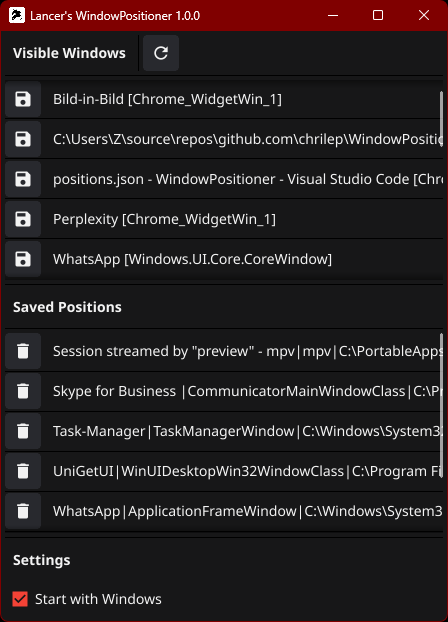
- Save positions of arbitrary windows.
- Positions are stored in a JSON file inside your roaming AppData folder, ideal for user profiles.
- Automatic logging of actions and errors for easy debugging.
- Optional Windows startup to have the app ready immediately after login.
Positions are saved under:
%APPDATA%\Lancer\WindowPositioner\positions.json
Example:
C:\Users\User\AppData\Roaming\Lancer\WindowPositioner\positions.json
The log file is located at:
%LOCALAPPDATA%\Lancer\WindowPositioner\log.txt
Example:
C:\Users\User\AppData\Local\Lancer\WindowPositioner\log.txt
- WindowPositioner exits after some time (under investigation)
Already implemented:
- Save, load, and delete window positions.
- Automatic saving of window positions as desired by the user.
- Run at Windows startup (autostart).
- Clear lists showing all visible windows and saved positions.
Planned enhancements (time and motivation permitting):
- Capture and display window screenshots for better orientation.
- Support for wildcards or regular expressions in window titles (e.g., grouping windows).
- Launch the application.
- Select a visible window from the automatically updated list.
- Save its position via the provided button.
- The position is stored in the JSON file and can be restored at any time.
- Optionally enable autostart for automatic launching with Windows.
1.3 - 29.10.2025
- Fix: App still closed itself silently. Added more error-handling and -logging + heartbeat
1.2 - 07.08.2025
- Fix: The app shutdown after some time seemed to be caused by race conditions or by a memory leak.
- Changed: Added a mutex for the window manager.
- Added: App crashes/panics are logged to the app's logfile.
- Added: More logging to find the cause for shutdown after some time.
- Added: App checks if it is already running. If yes: Show window of first launched app and close the second.
1.1 - 01.08.2025
- Changed: Some minor GUI arrangements.
- Changed: Window centers on screen when opened from tray menu.
- Changed: New icon generated by Perchance Icon Generator
- Added: Info button to see details about a window.
- Added: Exit button.
- Added: Open config file button.
1.0 — 31.07.2025
- Initial release with core functionality.
Got feedback or want to contribute?
Feel free to fork the project on GitHub and submit pull requests with improvements!
If you want, I can also provide a quick guide on compiling or using the app. Just ask!