Enables Direct midi microtonal steps to MIDI mode, pseudo-physics based note frequency -> color consistent map, as well as bonus features like new scales.
- Map the button LED colours on a direct relationship between the continuous spectrum of frequencies of electromagnetic energy in the band of visible light and the pitches of sound in a relationship to continuous frequency spectrum of sound that are 40 octaves (a factor of 240 = 1,099,511,627,776) below the frequencies of visible light.
See: https://www.flutopedia.com/sound_color.htm
Illustration for 12 EDO showing pentatonic for simpliciy:

Notice there are currently some calibration inconsistencies to do with how the color calabration for the board is not yet 100% as of firmware 1.2alpha (hence bunching in green/yellowss and red)
Illustration for 31 EDO

- Enables a new direct microtonal/edoOctave+note steps from layout straight to MIDI note mode by default and switchable on/off from menu. The pitchbend emulation from nearest 12 tone mode can now be disabled from the menu (and is disabled by default), so the real MIDI steps will be sent directly through to your DAW or synth with scala/tun tuning instead, but the internal synth will still also play the correct frequency notes.
- calculate freq of note for internal synth when center c = 60 +/- transpose steps in direct to MIDI mode...
- Additionally black out MIDI notes that go < 0 or > note 127 out of range on the keyboard when in direct mode rather than wrapping round, to show they are unplayable.

- Centre note 60 better when in direct MIDI mode, and transpose will also shift the keys correctly for the direct MIDI mapping
- Physics Colors of Sounds mode is always the default color map now (so also put it at the bottom of the Color change menu to save clicking back through it again anyway)
- Allow extra tuning data for degree 0 frequency hz such as given by ableton microtuning scala files for additional accuracy

Outstanding issues:
- The saturation/intensity could be distributed more to discern shades between adjacent tones a bit more by deliberately scaling the saturation or lightness a little bit further, but for now have just set th colours to be the same level of vividness and saturation
- the led hardware itself i think pushes purples/blues a little off towards each other so could do with some calibration
- Make bosanquet-wilson always the default in various tunings to save time
- Make build script to copy new/modified scales from my scales library in to code from scales folder whenever ran
- Make a scales > modes submenu to organise scales > modes hierarchically
Some extra scales have been added, thus far:
- 31-EDO:
- Chromatic Meantone,
- Chromatic Meantone + 14 (adds undecimal 11th harmonic),
- Lydian mode subet of Chromatic Meantone + 14
I haven't done C++ in years, so may need some optimisation and tidyup
firmware update by Christopher Josephs ( Clotta / Digibitsy )
The HexBoard is a 140-key board designed for techno-musicians, babies, and computer people.
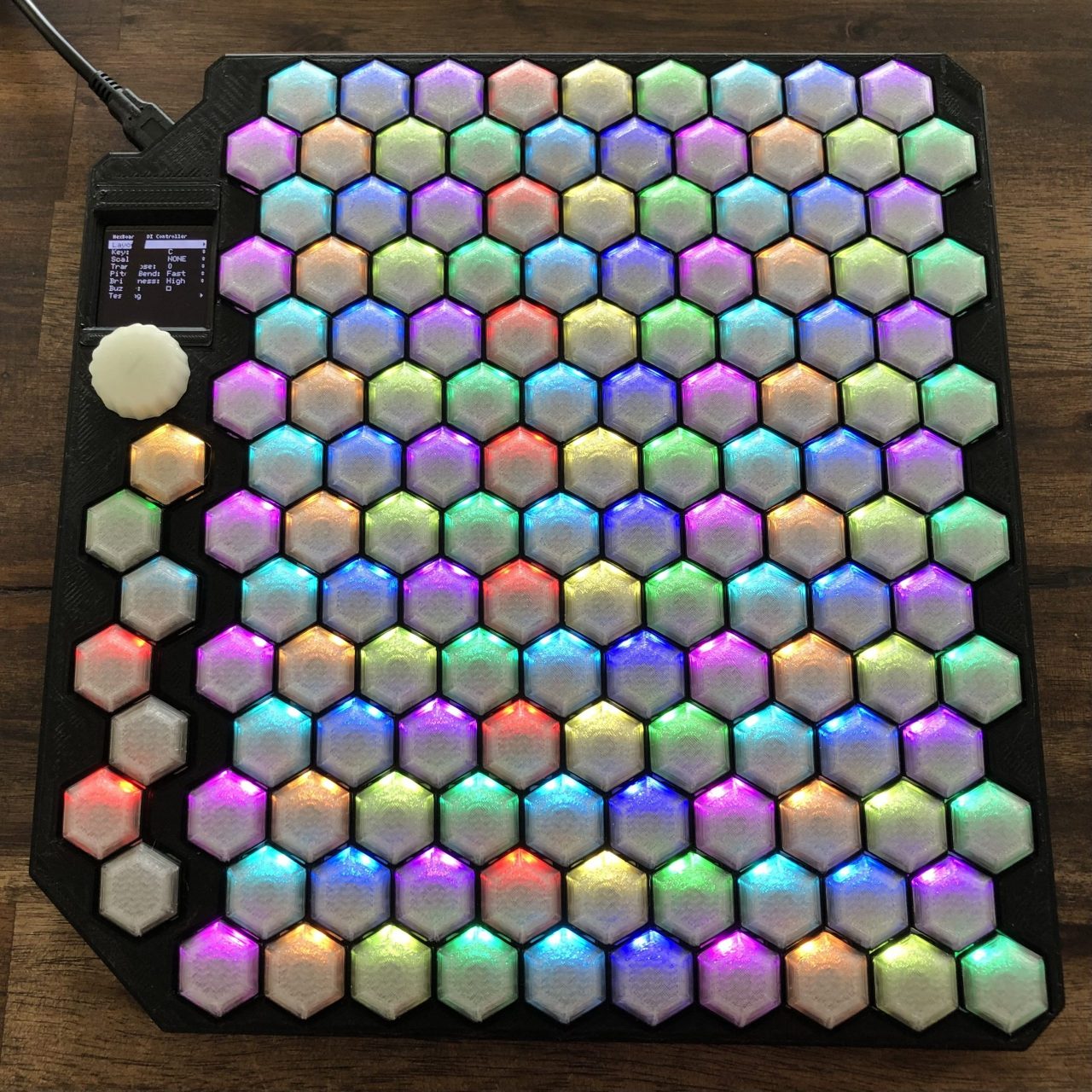
You can order your HexBoard today, or contact Jared if you're interested in assembling it yourself.
- Jared DeCook has been writing music, developing hardware, and performing as Shaping The Silence for over a decade.
- Zach DeCook has been listening to music, breaking hardware, and occasionally writing software since the former discovered his exploitable talents.
- Nicholas Fox has been 'hexperimenting' with the firmware since before receiving a HexBoard in the mail.
- modified Colors of Sounds firmware by Christopher Josephs ( Crimzon Clotta / Digibitsy ) Crimzon Clotta Soundcloud. Kind thanks to the above guys for making an awesome piece of kit and also making the firmware moddable \m/ :)
Before flashing, you may want to note your current firmware version in case you desire to revert. Since Version 0.1.0, the version number for the "Arduino" firmware has been in the Testing menu. The checkbox indicates that the version you have is marked as a 'release' (rather than a nightly build).
- Unplug the HexBoard from your computer, then plug it in while holding the button by the USB port.
- It should appear as a disk in your computer.
- Copy the .uf2 firmware file onto that disk
- The disk should eject, and the HexBoard should automatically reboot into that firmware.