Enterprise-grade FinOps automation toolkit for multi-cloud cost optimization.
- GCP FinOps Guardian – Serverless solution to monitor and receive Google Cloud Platform (GCP) recommendations across your organization or individual projects.
- AWS Resource Cleanup – Automated solution for cleaning up unused Amazon Web Services (AWS) resources across multiple regions with comprehensive monitoring.
Both solutions aim to reduce costs and optimize resource usage in their respective clouds, each leveraging native cloud services for monitoring, notifications, and remediation actions.
A serverless solution that periodically checks for GCP recommendations using Google Cloud's Recommender API and delivers alerts (e.g., Slack notifications) about cost savings and optimization opportunities. Supports both organization-level and project-level scanning with flexible deployment options.
-
Flexible Scanning Scope
- Organization-level scanning for multi-project environments
- Project-level scanning for single projects
- Easily switch between deployment modes
-
Cost & Resource Optimization
- Identifies idle or underutilized resources: VM instances, Cloud SQL instances, IP addresses, disks, and images
- Right-sizing recommendations for VMs, Managed Instance Groups (MIG), and Cloud SQL instances
- Spending patterns for commitment usage and billing optimizations
- 10 different recommender types covering all major cost areas
-
Smart Notifications
- Slack integration with detailed cost impact information
- Configurable minimum cost threshold to reduce noise
- Real-time or scheduled alerts with recommendation details
-
Serverless & Automated
- Python 3.12 runtime with retry logic and exponential backoff
- Cloud Functions triggered by Cloud Scheduler (with Pub/Sub)
- Fully automated checks at configurable frequency
- 512MB memory, 300-second timeout
-
Security & Best Practices
- Optional Secret Manager integration for credentials
- Least-privilege IAM roles
- Structured logging with distributed tracing
- Comprehensive testing (92% code coverage)
-
Modern Architecture
- Factory pattern for dynamic recommender loading
- Type-safe data models
- Dependency injection design
- Easily extensible for new recommender types
-
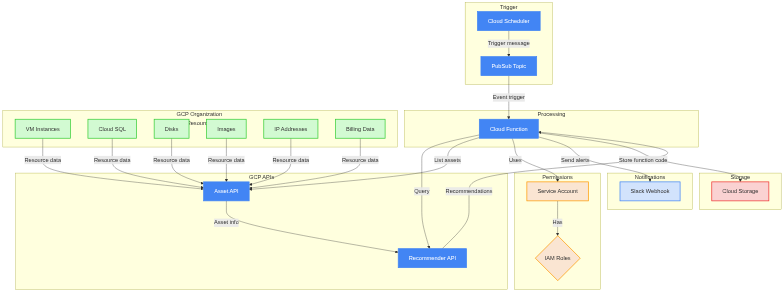
Cloud Function
- Python 3.12 runtime with retry logic
- 512MB memory, 300-second timeout
- Invoked by Pub/Sub messages (scheduled via Cloud Scheduler)
- Factory pattern for dynamic recommender loading
- Structured logging with distributed tracing
-
Cloud Scheduler & Pub/Sub
- Scheduler triggers the Pub/Sub topic on a defined cron schedule
- Pub/Sub event invokes the Cloud Function
- Configurable schedule and timezone
-
Service Account & IAM
- Supports both organization-level and project-level permissions
- Least-privilege IAM roles for recommender access
- Assign necessary roles/recommender.* for each resource type
-
Cloud Storage
- Stores function code (Terraform deploys code to bucket)
- Uniform bucket-level access enabled
-
Secret Manager (Optional)
- Secure storage for Slack webhook URL
- Alternative to environment variable configuration
The system supports 10 recommendation types (all enabled by default, individually configurable):
Idle Resource Detection:
google.compute.instance.IdleResourceRecommender- Idle VM instancesgoogle.compute.disk.IdleResourceRecommender- Idle persistent disksgoogle.compute.image.IdleResourceRecommender- Unused custom imagesgoogle.compute.address.IdleResourceRecommender- Idle static IP addressesgoogle.cloudsql.instance.IdleRecommender- Idle Cloud SQL instances
Right-Sizing Recommendations:
google.compute.instance.MachineTypeRecommender- VM instance right-sizinggoogle.compute.instanceGroupManager.MachineTypeRecommender- MIG machine type optimizationgoogle.cloudsql.instance.OverprovisionedRecommender- Cloud SQL right-sizing
Cost Optimization:
google.compute.commitment.UsageCommitmentRecommender- Usage-based CUD recommendationsgoogle.cloudbilling.commitment.SpendBasedCommitmentRecommender- Spend-based cost savings
Deployment Permissions:
- For Organization-Level Scanning:
roles/resourcemanager.organizationAdmin - For Project-Level Scanning:
roles/owneror equivalent project permissions
Service Account Permissions (automatically assigned by Terraform):
- Core Recommender Roles:
roles/cloudasset.viewer- Asset inventory accessroles/recommender.computeViewer- Compute recommendationsroles/recommender.cloudsqlViewer- Cloud SQL recommendationsroles/recommender.cloudAssetInsightsViewer- Asset insightsroles/recommender.billingAccountCudViewer- Billing CUD recommendationsroles/recommender.ucsViewer- Unattended project recommendationsroles/recommender.projectCudViewer- Project-level CUD recommendationsroles/storage.objectCreator- For storing results
- Additional Roles (optional):
roles/recommender.productSuggestionViewer,roles/recommender.firewallViewer,roles/recommender.iamViewer, etc.
Required APIs (automatically enabled by Terraform):
- Cloud Asset API, Cloud Build API, Cloud Functions API, Cloud Scheduler API, Recommender API, Service Usage API, Cloud Resource Manager API, Secret Manager API (optional)
Required Variables:
GCP_PROJECT="your-project-id"                    # Project where function is deployed
SCAN_SCOPE="project"                             # "organization" or "project" (default: project)
ORGANIZATION_ID="123456789012"                   # Required if SCAN_SCOPE=organization
MIN_COST_THRESHOLD="0"                           # Minimum cost in USD to report (default: 0)
Slack Notification (choose one method):
# Method 1: Direct environment variable (default)
USE_SECRET_MANAGER="false"
SLACK_HOOK_URL="https://hooks.slack.com/services/YOUR/WEBHOOK/URL"

# Method 2: Secret Manager (more secure)
USE_SECRET_MANAGER="true"
SLACK_WEBHOOK_SECRET_NAME="slack-webhook-secret"
Recommender Toggles (all default to true):
IDLE_VM_RECOMMENDER_ENABLED="true"               # VM idle resource detection
IDLE_DISK_RECOMMENDER_ENABLED="true"             # Disk idle resource detection
IDLE_IMAGE_RECOMMENDER_ENABLED="true"            # Image idle resource detection
IDLE_IP_RECOMMENDER_ENABLED="true"               # IP address idle detection
IDLE_SQL_RECOMMENDER_ENABLED="true"              # Cloud SQL idle detection
RIGHTSIZE_VM_RECOMMENDER_ENABLED="true"          # VM right-sizing recommendations
RIGHTSIZE_SQL_RECOMMENDER_ENABLED="true"         # Cloud SQL right-sizing
MIG_RIGHTSIZE_RECOMMENDER_ENABLED="true"         # MIG machine type optimization
COMMITMENT_USE_RECOMMENDER_ENABLED="true"        # CUD usage recommendations
BILLING_USE_RECOMMENDER_ENABLED="true" # Billing optimization recommendationsQuick Start:
- Clone the repository and navigate to gcp-finops directory
- Configure
terraform.tfvars:
For Project-Level Scanning:
gcp_project        = "your-project-id"
gcp_region         = "us-central1"
recommender_bucket = "your-project-recommender"
scan_scope         = "project"
slack_webhook_url  = "https://hooks.slack.com/services/YOUR/WEBHOOK/URL"
job_schedule       = "0 0 * * *"  # Daily at midnight
job_timezone       = "America/New_York"
For Organization-Level Scanning:
gcp_project        = "your-project-id"
gcp_region         = "us-central1"
recommender_bucket = "your-project-recommender"
scan_scope         = "organization"
organization_id    = "123456789012"
slack_webhook_url  = "https://hooks.slack.com/services/YOUR/WEBHOOK/URL"
job_schedule       = "0 0 * * *"
job_timezone = "America/New_York"- Deploy with Terraform:
terraform init
terraform plan
terraform apply
Deployed Resources:
- Service Account with IAM roles (org or project level)
- Cloud Storage bucket for function code
- Cloud Function (Python 3.12) with 512MB memory
- Pub/Sub topic for triggering
- Cloud Scheduler job for automation
- Secret Manager resources (if enabled)
- All required API enablements
Slack messages include:
- GCP Project ID
- Recommendation type
- Recommended action
- Description
- Potential cost impact (with currency)
- Duration of the cost projection
Adding New Recommenders:
- Create a new class extending the base
Recommenderclass - Register in
factory.pyfor dynamic loading - Add Terraform variable in
variables.tf - Add to Cloud Function environment in
main.tf
Testing:
- Comprehensive test suite with 92% coverage
- Run tests:
pytest --cov=localpackage
Contributions welcome! Follow existing patterns and maintain test coverage.
An automated solution designed to identify and remove unused AWS resources across multiple regions. Reduces costs by cleaning up orphaned or unnecessary infrastructure components with enterprise-grade monitoring and security.
-
Multi-Region Resource Cleanup
- Operates across 7 default regions: us-east-1, us-east-2, us-west-1, us-west-2, eu-north-1, eu-central-1, eu-west-1
- Support for all AWS regions with CHECK_ALL_REGIONS flag
- Flexible for multi-region deployments
-
Comprehensive Coverage
- Stops or deletes: EC2 instances, EBS volumes, EKS node groups, RDS instances/clusters
- Removes: Load balancers, Kinesis streams, MSK clusters, OpenSearch domains
- Releases: Elastic IP addresses
- Disables: EC2 detailed monitoring
-
Enterprise Monitoring & Reliability
- CloudWatch alarms for execution failures and throttling
- Dead Letter Queue (DLQ) for failed invocations
- SNS notifications for alarms
- Python 3.12 runtime with retry logic
-
Security Best Practices
- Least-privilege IAM policy (replaced AdministratorAccess)
- Granular permissions for each resource type
- No overly permissive access
-
Scheduled via CloudWatch Events
- Automate daily or weekly cleanup with CRON expressions
- EventBridge integration
-
Email Notifications
- Comprehensive summary via SES
- Fixed sender address (aws@finsec.cloud)
- Detailed deletion/skip/error reports
-
Safety Features
- Dry Run Mode: Evaluate actions without deleting
- Tag-Based Preservation: Skip tagged resources
- Spot Instance Protection: Excludes spot instances
- Concurrent processing with error handling
-
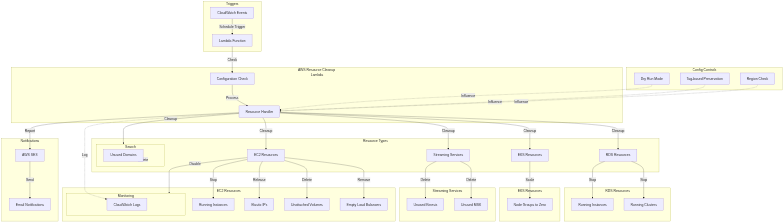
Lambda Function
- Python 3.12 runtime with retry logic
- Modular cleanup logic for each resource type
- Concurrent processing across regions
- Error handling and reporting
-
CloudWatch Events (EventBridge)
- Scheduled trigger (configurable CRON)
- Automated execution at defined frequency
-
CloudWatch Alarms & Monitoring
- Lambda execution failure alarms
- Throttling detection alarms
- SNS notifications for alerts
- Comprehensive CloudWatch Logs
-
Dead Letter Queue (DLQ)
- SQS DLQ for failed Lambda invocations
- Captures failures for investigation
- Prevents lost execution data
-
SES (Simple Email Service)
- Email notifications with aws@finsec.cloud sender
- Detailed reports: deleted, skipped, errors
- Requires verified email identity
-
IAM
- Least-privilege policy with granular permissions
- Resource-specific access controls
- No AdministratorAccess required
- AWS Account with appropriate IAM permissions for Terraform deployment
- Terraform installed (version 1.0+)
- Python 3.12 runtime support in Lambda
- Configured AWS Credentials (e.g., via
~/.aws/credentialsor environment variables) - SES verified email identity for notifications
Environment variables in the Lambda function:
CHECK_ALL_REGIONS="false"                # or "true" to scan all AWS regions
KEEP_TAG_KEY="auto-deletion"             # resources with this key are preserved
DRY_RUN="true"                           # set to "false" for actual deletions
EMAIL_IDENTITY="aws@finsec.cloud"        # SES verified sender email
TO_ADDRESS="notifications@domain.com"    # recipient email address
Default AWS Regions:
- us-east-1 (N. Virginia)
- us-east-2 (Ohio)
- us-west-1 (N. California)
- us-west-2 (Oregon)
- eu-north-1 (Stockholm)
- eu-central-1 (Frankfurt)
- eu-west-1 (Ireland)
EC2 Instances
- Stops running On-Demand instances (spot instances excluded)
- Skips instances with preserve tags
- Disables detailed monitoring if enabled
- Concurrent processing with error handling
Elastic IP Addresses
- Releases unassociated EIPs
- Region-aware cleanup
EBS Volumes
- Deletes unattached volumes
- Preserves EKS-associated volumes
- Supports dry run mode
Load Balancers
- Identifies and removes empty classic load balancers
- Error handling and reporting
RDS (Instances & Clusters)
- Stops running instances and clusters
- Concurrent processing across regions
- Retry logic for API throttling
EKS Node Groups
- Scales node groups to zero
- Preserves cluster configuration
- Concurrent processing
Kinesis Streams
- Deletes unused streams
- Preserves streams with
upsolver_prefix - Consumer deletion enforcement
MSK Clusters
- Removes MSK clusters
- Error handling
OpenSearch Domains
- Deletes unused domains
- Supports dry run mode
Resource Tagging
- Adds CreatedOn tags for auditing
- Tag-based preservation logic
Email report includes:
- Successfully deleted resources (by type and region)
- Skipped resources (preserved by tag or spot instances)
- Resources needing attention
- Failed deletions with error details
- Complete execution summary
- Configure variables in
terraform.tfvars:
function_name     = "aws-resource-cleanup"
check_all_regions = false
keep_tag_key      = { "auto-deletion" = "skip-resource" }
dry_run           = true
email_identity    = "aws@finsec.cloud"
to_address        = "notifications@domain.com"
event_cron = "cron(0 20 * * ? *)" # 8 PM GMT- Run Terraform to deploy:
cd aws-finops
terraform init
terraform plan
terraform apply
Deployed Resources:
- Lambda function (Python 3.12) with least-privilege IAM policy
- CloudWatch Event rule for scheduling
- SQS Dead Letter Queue for failed invocations
- CloudWatch alarms for monitoring
- SNS topic for alarm notifications
- SES email identity verification
CloudWatch Alarms:
- Lambda execution failures
- API throttling detection
- SNS notifications for critical issues
CloudWatch Logs:
- Detailed execution logs for each Lambda run
- Resource cleanup activity
- Error traces and debugging information
Email Reports:
- Daily/scheduled cleanup summaries
- Resource deletion confirmations
- Skip and error notifications
Safety First:
- Always start with
dry_run = trueto verify logs and email reports - Review the email summary before enabling actual deletions
- Test in non-production environments first
Resource Protection:
- Tag critical resources with preserve tag (e.g.,
auto-deletion=skip-resource) - Review tag strategy across your infrastructure
- Document tagged resources in your runbook
Monitoring:
- Monitor CloudWatch Logs for Lambda execution details
- Set up additional CloudWatch alarms based on your SLAs
- Review email notifications regularly
SES Configuration:
- Ensure
<your-email>is verified in SES - Configure SES for production sending limits
- Test email delivery before production use
IAM Security:
- Review the least-privilege IAM policy
- Audit permissions regularly
- Never use AdministratorAccess
- GCP: 10 recommender types using Recommender API for cost-saving suggestions (idle resources, right-sizing for VMs/MIG/SQL, billing optimization, CUD recommendations)
- AWS: Multi-region cleanup of unused resources (EC2, EBS, RDS, EKS, Kinesis, MSK, OpenSearch, EIPs)
- GCP: Python 3.12 runtime, factory pattern for dynamic loading, 92% test coverage
- AWS: Python 3.12 runtime, modular cleanup functions, retry logic with exponential backoff
- GCP: Cloud Functions (512MB, 5min timeout) triggered via Cloud Scheduler with Pub/Sub
- AWS: Lambda function triggered via CloudWatch Events with configurable CRON
- GCP: Slack alerts with cost impact, minimum threshold filtering, structured logging
- AWS: SES email reports with aws@finsec.cloud sender, detailed deletion/skip/error summaries
- GCP: Optional Secret Manager for credentials, least-privilege IAM roles, project or organization-level scanning
- AWS: Least-privilege IAM policy (no AdministratorAccess), CloudWatch alarms, Dead Letter Queue for failures
- GCP: Granular control via environment variables, 10 individual recommender toggles, min cost threshold
- AWS: Dry run mode, tag-based preservation, spot instance protection, concurrent processing with error handling
- GCP: Structured Cloud Logging with distributed tracing, Cloud Monitoring metrics
- AWS: CloudWatch alarms for failures/throttling, SNS notifications, comprehensive logs
- GCP FinOps Guardian: See gcp-finops/README.md for detailed documentation
- AWS Resource Cleanup: See aws-finops/README.md for detailed documentation
GCP:
- GCP Organization or Project access
- Terraform 1.0+
- Python 3.12
- Slack webhook URL
AWS:
- AWS Account with appropriate permissions
- Terraform 1.0+
- Python 3.12
- SES verified email identity
Contributions are welcome! Please:
For GCP FinOps Guardian:
- Follow the factory pattern for new recommenders
- Maintain 80%+ test coverage
- Update documentation (README, TESTING.md)
- Use structured logging with proper metadata
For AWS Resource Cleanup:
- Test thoroughly in dry run mode first
- Follow existing modular function patterns
- Add comprehensive error handling
- Document new resource types in README
Both projects are available under the MIT License. For details, see their respective LICENSE files.
For issues, feature requests, or questions:
- Open a GitHub issue in this repository
- Provide detailed information about your environment
- Include relevant logs (redact sensitive information)
Happy Cloud Optimizing!
