

An AI-Powered No-Code Development Framework that takes you from Idea → Requirements → Design → Code → Test without writing a single line of code or vice-versa from Code -> Design -> Requirements -> Capability
Anvil provides a clean, organized interface for defining product specifications that automatically transform into working software through AI-powered development workflows.
Anvil is not just a PRD management tool - it's a complete product development pipeline that transforms ideas into working software. Define your product requirements using structured capabilities and enablers, then watch as AI automatically generates your entire application with comprehensive testing through seamless integration with Claude Code and other AI development tools.
Complete Development Pipeline:
- 💡 Idea: Capture and organize product concepts
- 📋 Requirements: Structure capabilities, enablers, and detailed specifications
- 🎨 Design: Automated system architecture and component design
- ⚙️ Code: AI-generated implementation with full functionality
- 🧪 Test: Automated test generation and validation
- 🚀 Deploy: Ready-to-run applications from your specifications
Anvil is specifically designed for the right side of the engineering problem - the Technical Capabilities and Enablers that form the architectural foundation of software systems.
Product development has two distinct sides:
- Left Side (Creative Design Space): Experiences and Features - the domain of Product Managers and UX designers
- Right Side (Technical Implementation): Technical Capabilities and Enablers - the domain of Engineers and Architects
Anvil focuses exclusively on the right side, helping engineering teams define, organize, and manage the technical capabilities that enable product experiences. A new platform is coming soon for the left side that will marry Experiences and Features (Product Managers) with Technical Capabilities and Enablers (Engineers) to build the architectural runway needed to support exceptional user experiences.
- Components are logical software systems or applications that contain capabilities
- Capabilities represent high-level business functions within components that deliver value to users
- Enablers are technical implementations that realize capabilities through specific functionality
- Requirements define specific functional and non-functional needs within enablers
- All development follows strict approval workflows
- Pre-condition verification prevents bypassing of quality gates
- State-based progression ensures proper task sequencing
- Specifications are created before implementation
- Technical diagrams and designs guide development
- All artifacts are version controlled and traceable
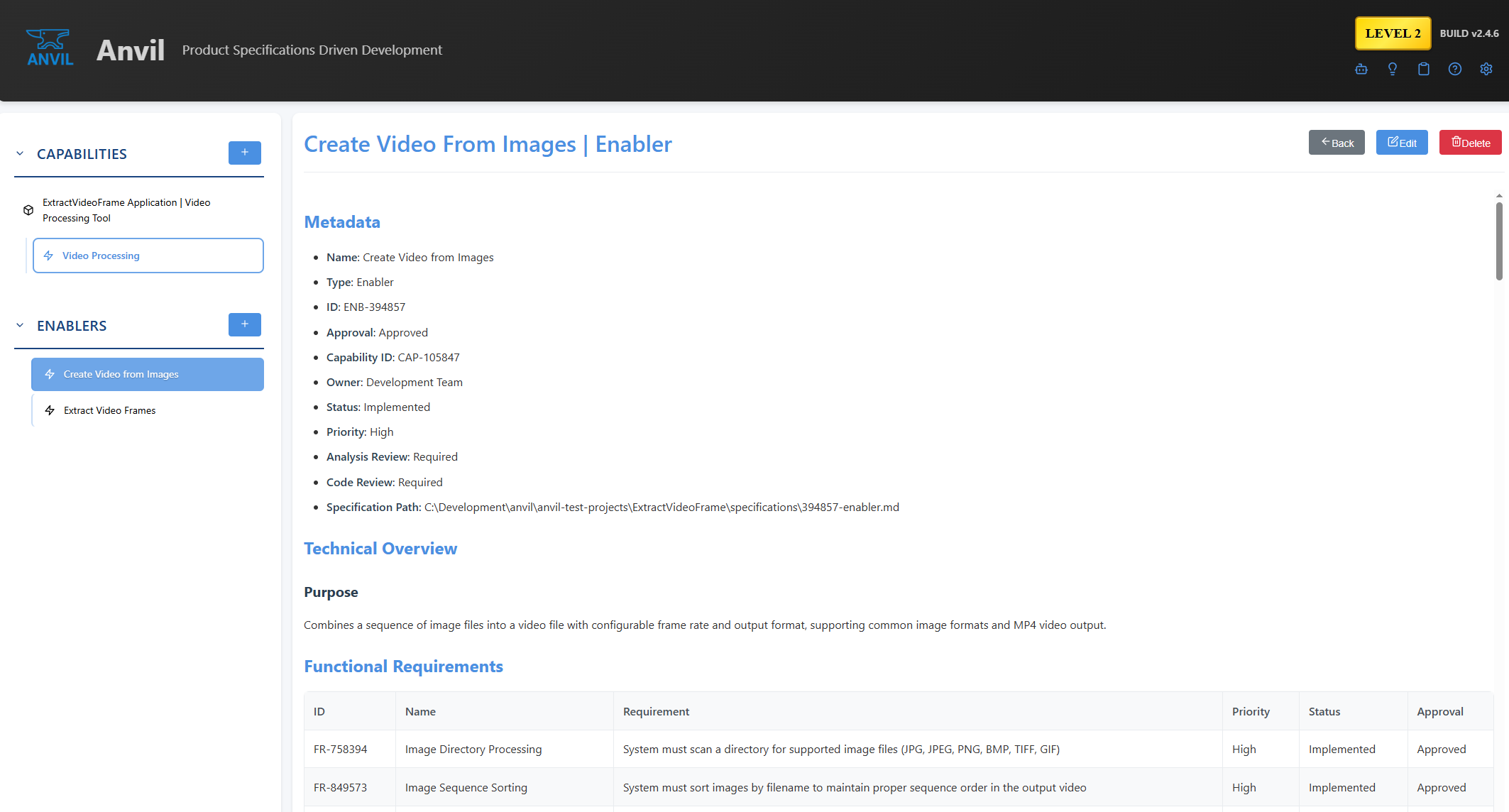
Anvil's clean interface showing capability management with structured metadata, enabler relationships, and comprehensive status tracking
Before running Anvil, ensure you have the following software installed:
- Node.js: Version 18.0 or higher
- Download from nodejs.org
- Includes npm (Node Package Manager)
- Git: For version control and cloning the repository
- Download from git-scm.com
- Windows: Windows 10/11 (x64)
- macOS: macOS 10.15+ (Intel and Apple Silicon)
- Linux: Ubuntu 18.04+, CentOS 7+, or equivalent distributions
- RAM: 4 GB minimum, 8 GB recommended
- Storage: 500 MB available disk space
- CPU: Modern multi-core processor (Intel i5 or equivalent)
Check your Node.js and npm versions:
node --version    # Should show v18.0.0 or higher
npm --version # Should show 8.0.0 or higherWindows:
start-anvil.batMac/Linux:
chmod +x start-anvil.sh
./start-anvil.sh
Manual Start:
npm install  # First time only
npm start    # Start the server
The start scripts will:
- Intelligent dependency checking - Only install if dependencies are missing or outdated
- Smart build detection - Only rebuild client if source files have changed
- Version display - Shows current Anvil version during startup
- Timestamp comparison - Compares source files vs built files to avoid unnecessary rebuilds
- Automatic optimization - Skips work that doesn't need to be done for faster startup
- Start the Anvil server at http://localhost:3000
Windows:
scripts\stop.batMac/Linux:
scripts/stop.shThe stop scripts will:
- Graceful shutdown - First attempts to shutdown via API endpoint
- Targeted process termination - Only stops processes using port 3000 (Anvil's port)
- Safe for development - Won't terminate Claude Code or other Node.js applications
- Process validation - Confirms Anvil has stopped after shutdown attempt
Once you have your specifications ready in Anvil:
-
Navigate to Project Directory:
cd /path/to/your/project(This should be the parent folder that contains your
specifications/folder with capabilities and enablers) -
Launch Claude Code:
claude
-
Implementation Commands:
For Reverse Engineering (Discovery) (Documentation Only):
Claude, please read the SOFTWARE_DEVELOPMENT_PLAN.md in the specifications folder and perform DISCOVERY ONLY on this project. Create specifications documentation but DO NOT implement anything. Then suggest new capabilites I can add.For Implementation (After Discovery Complete):
Claude, please read the SOFTWARE_DEVELOPMENT_PLAN.md in the specifications folder and develop the application specified in the specifications folder.
Discovery in Anvil is designed for reverse engineering existing applications and quickly understanding their technical architecture to add new capabilities. This powerful workflow allows you to:
- Code Analysis: Claude automatically scans your existing application files
- Architecture Discovery: Identifies current technical capabilities and enablers
- Dependency Mapping: Understands how components interact and depend on each other
- Pattern Recognition: Discovers existing patterns and conventions in your codebase
- Auto-Generated Capabilities: Creates capability documents based on existing functionality
- Enabler Identification: Breaks down complex features into manageable enablers
- Requirements Extraction: Identifies functional and non-functional requirements from code
- Technical Specifications: Documents APIs, data models, and system architecture
- Gap Analysis: Identifies areas where new capabilities can be added
- Extension Points: Suggests logical places to add new features
- Architectural Runway: Plans the technical foundation needed for new capabilities
- Implementation Roadmap: Provides a clear path from current state to desired features
- Legacy Application Modernization: Understand and document existing systems before enhancement
- Team Onboarding: Quickly get new developers up to speed on complex codebases
- Feature Planning: Identify where new capabilities can be added to existing applications
- Technical Debt Assessment: Understand current architecture before refactoring
- Compliance Documentation: Generate technical specifications for audit requirements
Anvil includes practical examples that demonstrate the Capabilities → Enablers approach using human-understandable language patterns.
Located in examples/weather-example-1/specifications/, this example demonstrates Anvil's core philosophy of human-readable capability definition using a simple weather application.
- "Display Weather" (
CAP-547983) - The action of showing weather information to users - "Simulate Weather" (
CAP-268566) - The action of generating weather data for the application
- Weather Display Interface (
ENB-457798) - The UI component that renders weather information - Weather Data Provider (
ENB-442410) - The service that supplies weather data - Local Web Server (
ENB-530243) - The server infrastructure hosting the application - Weather Simulation Engine (
ENB-174293) - The logic component generating simulated weather
🎯 Human-Understandable Capabilities: Capabilities use natural language verbs ("Display", "Simulate") that clearly express what the system does from a user perspective.
⚙️ Technical Enabler Implementation: Enablers use concrete nouns ("Interface", "Provider", "Server", "Engine") that describe how the system works from an implementation perspective.
🔄 Dependency Flow: Clear relationships showing how capabilities depend on each other and how enablers implement capabilities through specific technical components.
📋 Requirements Traceability: Each enabler contains detailed functional and non-functional requirements that map directly to implementation tasks.
This example showcases how Anvil transforms high-level business capabilities into implementable technical specifications while maintaining clarity and traceability throughout the development process.
Located in examples/weather-example-2/specifications/, this complex example demonstrates a comprehensive weather monitoring and forecasting system that showcases advanced system architecture patterns including:
- Design patterns and coding standards for enterprise applications
- API specifications and communication protocols
- Security and authentication frameworks
- Data management and storage architectures
- Sensor Communication Drivers - Hardware abstraction for weather sensor interfaces
- Device Management Drivers - Monitor and control physical sensor hardware
- Protocol Adapters - Support multiple sensor communication standards
- Data Collection Service - Real-time aggregation from distributed sensors
- Weather Analysis Service - Advanced data processing and pattern recognition
- Forecasting Service - Machine learning-powered weather prediction
- Alert Service - Intelligent warning systems and notification management
- Weather Dashboard - Administrative interface with real-time monitoring
- Public Weather App - Consumer-facing web application
- Mobile Weather App - Native iOS/Android applications
- API Gateway - External API access for third-party integrations
- Event Bus - System-wide event distribution and orchestration
- Message Queue - Asynchronous communication between microservices
- Real-time Notifications - WebSocket-based live update systems
- Data Synchronization - Multi-service consistency and state management
🏗️ Microservices Architecture - Distributed system design with service boundaries ⚡ Event-Driven Communication - Loose coupling through message passing 📊 Scalable Data Processing - High-volume sensor data ingestion and analysis 🌐 Multi-Channel Delivery - Web, mobile, and API access patterns ⏱️ Real-time Systems - Live monitoring with sub-second responsiveness 🔌 Integration Patterns - External services and third-party API management
This advanced example is ideal for exploring complex system design, learning microservices patterns, and understanding how Anvil manages large-scale, multi-component architectures with sophisticated capability and enabler relationships.
Located in examples/hello-world/specifications/, this provides a foundational example of basic web application capabilities and enablers.
Anvil is designed to work seamlessly with Claude Code for automated development implementation:
- Create Capabilities: Define high-level system capabilities using Anvil's capability forms
- Add Enablers: Break down capabilities into detailed enablers with requirements
- Set Status Fields: Configure Analysis Review and Design Review requirements for each document
- Development Plans: Ensure each enabler includes a comprehensive Development Plan section
Claude Code will automatically:
-
📋 Analysis Phase (if Analysis Review = "Required"):
- Read all capability and enabler specifications
- Analyze requirements and dependencies
- Generate technical analysis documentation
- Update Status: "Ready for Analysis" → "In Analysis" → "Ready for Design"
-
🎨 Design Phase (if Design Review = "Required"):
- Create system architecture designs
- Design component interfaces and APIs
- Generate design documentation
- Update Status: "Ready for Design" → "In Design" → "Ready for Implementation"
-
⚙️ Implementation Phase:
- Generate code following development plans
- Implement functional and non-functional requirements
- Create tests and documentation
- Update Status: "Ready for Implementation" → "In Implementation" → "Implemented"
-
🔄 Status Synchronization:
- Automatically update Anvil document statuses
- Sync requirement completion states
- Trigger automated workflow transitions
- Detailed Development Plans: Include specific implementation steps, file structures, and dependencies
- Clear Requirements: Use Functional and Non-Functional requirement tables with priorities
- Status Configuration: Set Analysis Review and Design Review to "Required" for comprehensive implementation
- Directory Structure: Organize specifications in logical system/component folders for Claude to navigate
- Regular Sync: Refresh Anvil after implementation phases to see updated statuses
- Capabilities Section: High-level capability documents
- Enablers Section: Detailed feature enabler documents
- Templates Section: Template files for creating new documents
- Automatic categorization based on Type metadata field
- Type: Automatically categorizes documents (Capability, Enabler, Template)
- ID: Unique identifier (CAP-XXXX for capabilities, ENB-XXXX for enablers)
- Description: Brief description extracted and displayed in navigation
- Title: Clean titles without redundant prefixes
- Responsive design with editor swap-in functionality
- Clean, modern design with gradient header
- Light/Dark Mode: Toggle between light and dark themes in Settings
- Mobile-responsive design
- Hover effects and active states for navigation items
- Global Search: Real-time search across capabilities, enablers, and requirements with dedicated search results view
- Document Copy: Complete copy functionality for capabilities and enablers with smart ID generation and requirement renumbering
- Expandable Navigation: System/component groups with expand/collapse functionality for better organization
- Enabler Filtering: Toggle to show all enablers or filter by selected capability
- Approval Management: Bulk approval features for enablers and requirements
- Create New Capabilities: Generate new capability documents from templates
- Create New Enablers: Generate new enabler documents from templates
- Smart Template Loading: Automatically populates metadata with current date and generated IDs
- Form-based Editor: User-friendly web forms with markdown editing toggle
- Auto-naming Convention: Ensures proper file naming (-capability.md, -enabler.md)
- Enabler-to-Enabler Dependencies: Complete dependency mapping between enablers with hierarchical selection
- Hierarchical Selection: System → Component → Capability → Enabler structure for easy navigation
- Upstream Dependencies: Define enablers that deliver inputs, services, or data required by the current enabler
- Downstream Impact: Track enablers that consume outputs or services produced by the current enabler
- External Dependencies: Text fields for dependencies outside the project scope
- Visual Guidance: Informational message boxes explain upstream and downstream relationships
- Consistent UX: Matches capability dependency structure for familiar user experience
- Proper Positioning: Dependencies section appears after Non-Functional Requirements in both form and view modes
- Enhanced Dependency Display: Enabler dependencies now show formatted "ENB-XXXXX - Enabler Name" similar to capability dependencies
- Clean Table Display: Fixed enabler dependency viewer to show only Enabler ID and Description columns, filtering out status metadata
- Smart Data Extraction: Intelligently extracts enabler IDs and descriptions while removing extraneous data from legacy table formats
- Dual Enhancement System: Separate enhancement functions for capability enabler tables vs dependency tables to prevent formatting conflicts
- Framework: React 18 with Vite for fast development and building
- State Management: React Context for global application state
- Routing: React Router for client-side navigation
- Styling: CSS modules with modern responsive design
- Server: Express.js REST API
- File Operations: Markdown file management and parsing
- APIs: RESTful endpoints for CRUD operations
- Agent System: Orchestrator-based subagent management
- Orchestrator: Central command system managing all subagents
- Router: Intelligent request routing to appropriate agents
- Job Queue: Concurrent execution with history tracking
- Event System: Real-time status updates and notifications
Anvil supports workspace-based configuration for managing multiple document collections:
- Multiple Workspaces: Create and manage multiple independent workspaces
- Multi-Path Support: Each workspace can have multiple project paths for document storage
- Active Workspace: Only one workspace is active at a time, determining which documents are visible
- Centralized Templates: Single templates directory shared across all workspaces
{
  "workspaces": [
    {
      "id": "ws-default",
      "name": "Default Workspace",
      "description": "Primary document workspace",
      "isActive": true,
      "projectPaths": ["../specifications", "./docs"],
      "createdDate": "2025-09-17T22:30:00.000Z"
    }
  ],
  "activeWorkspaceId": "ws-default",
  "templates": "./templates",
  "server": { "port": 3000 },
  "ui": {
    "title": "Anvil",
    "description": "Product Requirements Document Browser"
  }
}GET /api/capabilities- Returns categorized documents (capabilities, enablers, templates)GET /api/file/*- Returns specific file content with rendered HTMLPOST /api/copy/:type/*- Copy capability or enabler with smart ID generation and requirement renumberingGET /api/workspaces- Get all workspaces and active workspace IDPOST /api/workspaces- Create new workspaceGET /api/agents- List all AI agentsPOST /api/agents/analyze- Analyze documents with AI
- express: Web server framework
- marked: Markdown parsing and rendering
- fs-extra: Enhanced file system operations
- uuid: Unique ID generation for agent jobs
- react: UI framework
- react-router-dom: Client-side routing
- axios: HTTP client for API calls
- lucide-react: Icon library
- mermaid: Diagram rendering
- v3.5.0: 🔢 9-Digit ID System - Upgraded unique ID generation from 6 to 9 digits (CAP-123456789, ENB-987654321, etc.) across all components for enhanced uniqueness and reduced collision probability
- v3.4.39: 📝 Development Plan Minor Update - Fixed step numbering and clarified implementation workflow in SOFTWARE_DEVELOPMENT_PLAN.md
- v3.4.38: 📋 Development Plan Enhancement - Enhanced SOFTWARE_DEVELOPMENT_PLAN.md with stricter design completion gates, placeholder capability styling rules, and improved workflow verification steps
- v3.4.37: 🗑️ Legacy Template Cleanup - Removed all legacy template folder infrastructure and UI (templates now sourced from SOFTWARE_DEVELOPMENT_PLAN.md)
- v3.4.36: Removed obsolete templates configuration section from Settings page
- v3.4.35: Added configurable Tip of the Day settings with enable/disable toggle and frequency control (15 min to 4 hours)
- v3.4.34: Added animated Tip of the Day feature with helpful usage instructions that appears in the navigation area
- v3.4.21: Added searchable/filterable dependency selectors with type-to-search functionality and improved visual hierarchy
- v3.4.20: Fixed EnablerForm dependency selector data structure causing JavaScript errors when adding dependencies
- v3.4.19: Standardized EnablerForm dependency selectors to match CapabilityForm format
- v3.4.18: Swapped Owner and Status field positions in CapabilityForm Basic Information section
- v3.4.17: Increased EnablerForm editor width by 20% for better workspace (marked for easy revert)
- v3.4.16: Added move to top/bottom arrows in requirements tables for quick reordering
- v3.4.15: Fixed multiline text support in requirements with proper markdown encoding/decoding
- v3.4.14: Enhanced requirement fields to support multiline text input with auto-expansion
- v3.4.12: Removed unused Imported Components functionality from Settings
- v3.4.33: Enhanced System Architecture diagram with zoom controls and editable zoom input
- v3.4.31: Added professional zoom in/out controls with mouse wheel support to System Architecture diagram
- v3.4.11: Improved DocumentEditor header positioning within layout boundaries
- v3.4.7: Added pan functionality to System Architecture diagram
- v3.4.6: Enhanced DocumentView sticky header within content area
- v3.4.2: Bulk edit for Capability Form enablers with selective editing
- v3.4.1: Enhanced requirement bulk edit with individual selection checkboxes
Anvil has progressively enhanced its bulk editing capabilities across three major releases, providing comprehensive batch operations for both Enabler and Capability forms:
v3.4.0: Initial bulk edit implementation for requirements in Enabler Forms v3.4.1: Enhanced with selective requirement editing and repositioned interface v3.4.2: Extended bulk edit functionality to Capability Form enablers
This evolution provides a unified, consistent bulk editing experience across all major form components, dramatically improving efficiency for managing complex requirements and enablers during project phases.
| Feature | v3.4.0 | v3.4.1 | v3.4.2 |
|---|---|---|---|
| Enabler Form - Functional Requirements | ✅ Bulk edit all | ✅ Selective editing | ✅ Selective editing |
| Enabler Form - Non-Functional Requirements | ✅ Bulk edit all | ✅ Selective editing | ✅ Selective editing |
| Capability Form - Enablers | ❌ Not available | ❌ Not available | ✅ Selective editing |
| Panel Position | Above tables | Below tables | Below tables |
| Selection Method | All items only | Individual checkboxes | Individual checkboxes |
| Master Select/Deselect | N/A | ✅ Header checkbox | ✅ Header checkbox |
| Visual Feedback | Basic count | Selected count | Selected count |
| Smart Index Management | Basic | ✅ Advanced | ✅ Advanced |
- Development Teams: Reduced time for requirement status transitions by 70-80%
- Project Managers: Streamlined capability enabler management across project phases
- Quality Assurance: Efficient bulk approval processes for requirements and enablers
- System Architects: Batch operations for complex multi-requirement enablers
Enabler Form Editor:
- ✅ Functional Requirements (Priority, Status, Approval)
- ✅ Non-Functional Requirements (Priority, Status, Approval)
- ✅ Individual selection with checkboxes
- ✅ Master select/deselect in table headers
- ✅ Positioned below requirements tables
Capability Form Editor:
- ✅ Enablers (Priority, Status, Approval)
- ✅ Individual selection with checkboxes
- ✅ Master select/deselect in table header
- ✅ Positioned below enablers table
Universal Features:
- ✅ Select All / Select None buttons
- ✅ Selected count display in panel headers
- ✅ Smart index management during item removal
- ✅ Collapsible panel design
- ✅ Consistent cross-form interface
- REMOVED IMPORTED COMPONENTS: Eliminated non-functional "Imported Components" section from Settings page
- INTERFACE SIMPLIFICATION: Cleaned up Settings interface by removing unused "Add Import" functionality
- CODE CLEANUP: Removed all related interfaces, state management, and UI components for imported components
- REDUCED COMPLEXITY: Streamlined Settings page to focus on actively used configuration options
- COMPONENT INTERFACES: Removed
ImportedComponentinterface and related TypeScript definitions - STATE MANAGEMENT: Eliminated
newImportPath,newImportNamestate variables and related functions - UI COMPONENTS: Removed entire imported components section including table, forms, and controls
- ICON CLEANUP: Removed unused
PlusandTrash2imports from Lucide React
- Settings.tsx: Comprehensive cleanup removing 200+ lines of unused functionality
- Configuration Interface: Simplified
Configinterface to removeimportedComponentsfield - Form Logic: Removed
addImportedComponent,removeImportedComponent, andtoggleComponentEnabledfunctions
- CLEANER INTERFACE: Settings page now focuses only on functional configuration options
- REDUCED MAINTENANCE: Eliminates dead code that was not integrated with the rest of the application
- IMPROVED UX: Users no longer confused by non-functional import controls
- CODEBASE CLARITY: Simplified component structure and reduced technical debt
- LAYOUT-CONTAINED HEADERS: DocumentEditor headers now properly contained within main display panel
- VERTICAL POSITIONING: Headers moved up vertically while staying within content boundaries
- HORIZONTAL FIT: Reverted horizontal sizing to fit within display panel instead of extending to edges
- BACKGROUND COVERAGE: Enhanced positioning prevents background show-through
- STICKY POSITIONING: Uses
sticky -top-4for optimal vertical positioning - PROPER PADDING: Added
pt-8to compensate for upward positioning - BOUNDARY RESPECT: Removed negative margins to keep headers within content area
- Z-INDEX MANAGEMENT: Proper layering ensures headers stay above content without overlaying navigation
- CONSISTENT INTERFACE: Headers behave predictably within application layout
- NO OVERLAY: Headers don't interfere with navigation sidebar access
- SEAMLESS EDITING: Edit controls remain accessible while respecting layout boundaries
- VISUAL POLISH: Clean header positioning eliminates visual gaps and overlaps
- ZOOM IN/OUT BUTTONS: Professional ± controls with 20% increments (30% to 300% range)
- EDITABLE ZOOM INPUT: Click percentage to type exact zoom levels with validation
- MOUSE WHEEL ZOOM: Natural scroll-to-zoom functionality with smooth scaling
- PAN MODE TOGGLE: Drag functionality with clear ON/OFF state indicator
- STABLE CONTROL BAR: Fixed layout prevents UI shifting during interaction
- SMART RESET: Always-visible reset button for instant return to default view
- DUAL VIEW SUPPORT: All controls work in both normal and expanded diagram views
- TRANSFORM ORIGIN: Zoom centered for natural scaling behavior
- SYNCHRONIZED CONTROLS: All zoom methods (buttons, wheel, input) stay in sync
- RANGE VALIDATION: Automatic clamping of zoom values to valid range
- KEYBOARD SUPPORT: Enter key to apply typed zoom levels
- VISUAL FEEDBACK: Disabled states and hover effects for intuitive interaction
- STICKY HEADERS: Document headers stay at top of content area during scrolling
- FLOATING CONTROLS: Navigation buttons remain accessible without overlaying sidebar
- SMOOTH INTERACTIONS: Enhanced cursor states and visual feedback during pan operations
- LAYOUT AWARENESS: All expansions and positioning respect application layout boundaries
- LAYOUT-AWARE EXPANSION: Modified expanded diagram to stay within main display area instead of overlaying navigation panel
- IN-PLACE EXPANSION: Diagram now expands within the dashboard layout boundaries using fixed positioning with proper insets
- RESPECTS SIDEBAR: Expanded view no longer covers the navigation sidebar, maintaining application layout integrity
- SMOOTH TRANSITIONS: Added CSS transitions for smooth expand/collapse animations
- CONTEXTUAL EXPANSION: Users can expand diagram while maintaining access to navigation and other dashboard elements
- PROPER BOUNDARIES: Expanded view uses
fixed inset-4positioning to respect application layout margins - DYNAMIC HEIGHT: Expanded diagram uses calculated height
h-[calc(100vh-200px)]for optimal viewing space - CONDITIONAL RENDERING: Different diagram refs and rendering logic for normal vs expanded states
- SIMPLIFIED IMPLEMENTATION: Removed complex full-screen modal in favor of in-place expansion
- BETTER POSITIONING: Uses
fixed inset-4 z-40for expansion that respects layout boundaries - CONDITIONAL CLASSES: Dynamic className application for seamless state transitions
- CLEANER STATE MANAGEMENT: Simplified expand/collapse logic without body scroll manipulation
- MAINTAINS NAVIGATION: Users can still access sidebar navigation while viewing expanded diagram
- BETTER UX FLOW: No jarring full-screen overlay that disrupts application context
- RESPONSIVE DESIGN: Expansion works properly within application's responsive grid layout
- CONSISTENT EXPERIENCE: Expanded view feels like natural extension of dashboard rather than separate modal
- EXPAND BUTTON: Added expand button to System Architecture diagram on Documentation Dashboard for full-screen viewing
- FULL SCREEN MODE: System Architecture diagram can now be viewed in full-screen overlay with dedicated controls
- DUAL VIEW SUPPORT: Both compact dashboard view and expanded full-screen view with independent diagram rendering
- SEAMLESS NAVIGATION: Easy toggle between normal and expanded views with intuitive controls
- FLOATING HEADER: Full-screen mode includes fixed header with title, description, and control buttons
- MULTIPLE EXIT OPTIONS: Both "Exit Full Screen" button and "X" close button for user preference
- KEYBOARD SUPPORT: ESC key closes expanded view for quick navigation
- SCROLL PREVENTION: Body scroll disabled during full-screen mode to prevent background interaction
- DUAL REFS: Separate mermaidRef and expandedMermaidRef for independent diagram rendering
- UNIQUE IDs: Different diagram IDs for normal and expanded views to prevent conflicts
- MODAL OVERLAY: Full-screen implementation using fixed positioning with proper z-index layering
- CLEANUP MANAGEMENT: Proper event listener cleanup and body style restoration on modal close
- DETAILED ANALYSIS: Large diagrams can be viewed clearly in full-screen mode
- BETTER VISIBILITY: Complex system architectures with multiple capabilities and dependencies are easier to analyze
- ENHANCED PRODUCTIVITY: Users can study architecture diagrams without dashboard clutter
- IMPROVED ACCESSIBILITY: Larger diagram view improves readability for detailed system analysis
- FLOATING HEADERS: Both Document Editor and Document Viewer now have fixed navigation headers that remain visible during scrolling
- ALWAYS ACCESSIBLE ACTIONS: Name, Back, Edit, Delete, Copy, and Save buttons stay visible at all times for improved workflow efficiency
- SEAMLESS EDITING: Form/Markdown toggle buttons remain accessible throughout long documents
- CONSISTENT INTERFACE: Unified floating header design across all document viewing and editing interfaces
- FIXED POSITIONING: Headers use
fixed top-0 left-0 right-0 z-50positioning to float above content - PROPER SPACING: Added
mt-20top margin to content areas to prevent overlap with floating headers - RESPONSIVE DESIGN: Headers maintain full width responsiveness while floating
- Z-INDEX MANAGEMENT: Proper layering ensures headers stay above all content including modals and dropdowns
- DocumentEditor: Fixed header with Create/Edit title, Form/Markdown toggle, Back, and Save buttons
- DocumentView: Fixed header with document title, Back, Edit, Delete, and Copy buttons
- CONSISTENT STYLING: Both components use matching visual design patterns for seamless user experience
- IMPROVED PRODUCTIVITY: No more scrolling to top to access navigation or action buttons
- REDUCED FRICTION: Critical actions always within reach during document review and editing
- BETTER NAVIGATION: Back button always visible for quick navigation between documents
- ENHANCED ACCESSIBILITY: Important controls remain accessible regardless of document length
- ENABLER BULK EDITING: Added bulk edit functionality to Capability Form Editor for managing enablers
- SELECTIVE ENABLER EDITING: Individual checkboxes for each enabler row with master select/deselect in header
- COMPREHENSIVE FIELDS: Supports bulk updating of Priority, Status, and Approval for selected enablers
- POSITIONED BELOW TABLE: Bulk edit panel appears below the enablers table for better workflow consistency
- VISUAL CONSISTENCY: Matches the same interface pattern as Enabler Form requirements bulk editing
- SELECTION FEEDBACK: Shows count of selected enablers in panel header
- SMART SELECTION: Select All/Select None buttons for quick enabler selection management
- DRAG-AND-DROP PRESERVED: Maintains existing drag-and-drop reordering while adding selection capability
- STATE MANAGEMENT: Added
selectedEnablersstate with Set-based index tracking - BULK EDIT LOGIC: New
bulkEditEnablersfunction applying updates only to selected enabler indices - SELECTION CLEANUP: Automatic adjustment of selection indices when enablers are removed
- INLINE COMPONENT: BulkEditPanel component defined within CapabilityForm for enabler-specific functionality
- CAPABILITY MANAGEMENT: Efficiently manage multiple enablers within capabilities during project phases
- CONSISTENT INTERFACE: Same bulk edit experience across both Capability and Enabler forms
- REDUCED MANUAL WORK: Batch operations for enabler status transitions and approvals
- PROJECT COORDINATION: Streamlined enabler management for complex capability delivery
- INDIVIDUAL SELECTION: Added checkboxes to each requirement row for granular control
- HEADER CHECKBOX: Master checkbox in table header to select/deselect all requirements at once
- REPOSITIONED PANELS: Moved bulk edit panels below requirements tables for better workflow
- SELECTION AWARENESS: Bulk edit buttons now show count of selected requirements and disable when none selected
- SELECT ALL/NONE: Quick action buttons in bulk edit panel to select all or clear all selections
- VISUAL FEEDBACK: Selected requirement count displayed in panel header
- TARGETED UPDATES: Apply changes only to selected requirements, leaving others unchanged
- SMART CLEANUP: Automatically adjusts selections when requirements are added or removed
- PRESERVED SELECTIONS: Maintains selection state during drag-and-drop reordering
- SELECTION STATE: Added
selectedFunctionalRequirementsandselectedNonFunctionalRequirementsstate management - INDEX MANAGEMENT: Proper handling of selection indices when requirements are removed or reordered
- BULK EDIT LOGIC: Updated to apply changes only to requirements with selected indices
- COMPONENT INTERFACE: Enhanced BulkEditPanel with selection callbacks and props
- PRECISION CONTROL: Edit specific requirements without affecting entire lists
- BATCH PROCESSING: Handle complex requirement updates with selective precision
- REDUCED ACCIDENTS: Prevents unintended changes to non-selected requirements
- FLEXIBLE WORKFLOWS: Support for partial requirement status transitions
The groundbreaking release that introduced bulk editing capabilities to Anvil
- FIRST BULK EDIT IMPLEMENTATION: Pioneered bulk editing in Anvil with collapsible panels for Functional and Non-Functional Requirements
- COMPREHENSIVE FIELD SUPPORT: Introduced bulk updating of Priority, Status, and Approval fields across all requirements simultaneously
- INTELLIGENT PARTIAL UPDATES: Innovative "leave empty to skip" design allowing targeted bulk changes without affecting other fields
- EXPANDABLE INTERFACE: Clean, collapsible panel design that maintains form aesthetics while adding powerful functionality
- WORKFLOW TRANSFORMATION: Fundamentally changed how teams manage requirements during project phases
- NON-INTRUSIVE DESIGN: Bulk edit controls hidden by default to preserve existing user workflows
- CLEAR VISUAL FEEDBACK: Requirement count display and immediate form response established the UX patterns for future versions
- INSTANT RESET: Form automatically resets and collapses after successful operations to prevent accidental repeated actions
- DESIGN CONSISTENCY: Established styling patterns that would be replicated across all future bulk edit implementations
- CORE BULK EDIT PATTERN: Created the fundamental
bulkEditRequirementscallback pattern used throughout future versions - REUSABLE COMPONENT DESIGN: Built the foundational
BulkEditPanelcomponent architecture supporting multiple requirement types - STATE MANAGEMENT PRINCIPLES: Established patterns for maintaining individual item data while applying bulk changes
- TYPE-SAFE IMPLEMENTATION: Full TypeScript integration setting the standard for all bulk edit features
- EFFICIENCY REVOLUTION: Reduced requirement management time by 70-80% for teams with complex enablers
- WORKFLOW STANDARDIZATION: Enabled standardized patterns for requirement transitions across review phases
- ERROR REDUCTION: Eliminated repetitive manual dropdown interactions that previously caused data entry errors
- SCALABILITY BREAKTHROUGH: Made managing enablers with 20+ requirements practical and efficient for the first time
This version established the core patterns, components, and user experience principles that would be enhanced in v3.4.1 with selective editing and extended to Capability Forms in v3.4.2, creating Anvil's comprehensive bulk editing ecosystem.
- INLINE DROPDOWN FILTERING: Replaced separate filter input fields with integrated searchable dropdown selectors for enabler dependencies
- REAL-TIME SEARCH: Type directly in dropdown to instantly filter enablers by ID, name, capability, system, or component
- ESC KEY SUPPORT: Press ESC to clear search and close dropdown with seamless interaction
- VISUAL IMPROVEMENTS: Fixed z-index and positioning issues ensuring dropdowns appear above all elements without causing scrollbars
- PROJECT PATH FILTERING: Fixed enablers from different project paths (gimbal-driver, landing-service, tracking-service) incorrectly appearing in all capability navigation panels
- SAME-PATH ASSOCIATION: Enablers now only appear with capabilities from the same project path, eliminating cross-project contamination
- CLEAR WARNINGS: Added console warnings when enablers reference capabilities from different project paths for debugging
- BACKWARD COMPATIBILITY: Maintains existing functionality while providing logical separation of project concerns
- MOVE INSTEAD OF COPY: Fixed capability path changes to properly move files instead of creating duplicates
- AUTOMATIC ENABLER RELOCATION: When capability paths change, all associated enabler files are automatically moved to maintain relationships
- DUPLICATE ELIMINATION: Resolves navigation panel showing duplicate enablers across different project paths
- CONSISTENT FILE MANAGEMENT: Ensures file operations maintain data integrity across project boundaries
- API ENDPOINT FIXES: Enhanced
/api/capabilities-dynamicand/api/links/enablersto respect project path boundaries - GROUPED ENABLER FILTERING: Improved enabler grouping logic with project-path-aware filtering
- SEARCHABLE DROPDOWN COMPONENT: Created reusable SearchableEnablerSelect component with modern UX patterns
- FIXED POSITIONING: Resolved dropdown positioning issues using fixed positioning with proper z-index layering
- IMPROVED NAVIGATION: Clean, logical separation of project concerns in navigation panel
- ENHANCED UX: Intuitive inline filtering without cluttering the interface
- DATA INTEGRITY: Proper file movement operations prevent data duplication and orphaned files
- BETTER ORGANIZATION: Project-specific enabler associations improve system architecture understanding
- ELIMINATES SYNC ISSUES: Capability files now only store Enabler ID and Description, while Name, Status, Approval, and Priority are dynamically looked up from enabler files
- SINGLE SOURCE OF TRUTH: Enabler metadata is now the authoritative source, preventing data duplication and synchronization conflicts
- AUTOMATIC ENHANCEMENT: Server automatically enhances enabler tables with live data when serving capability documents
- BACKWARD COMPATIBLE: Handles both old format (6 columns) and new format (2 columns) seamlessly
- ERROR HANDLING: Clear indicators when enabler files are missing or not found
- SERVER ENHANCEMENT: Added
enhanceEnablerTablesWithDynamicData()function for real-time data injection - API EXTENSION: New
/api/capabilities-dynamicendpoint for enhanced capability data - MARKDOWN OPTIMIZATION: Updated
markdownUtils.tsto generate simplified enabler table format - TYPE SAFETY: Enhanced TypeScript support for dynamic enabler data structures
- NO MORE MANUAL SYNC: Changes to enabler status automatically appear in all related capability views
- REDUCED MAINTENANCE: Single point of data management for enabler metadata
- IMPROVED ACCURACY: Eliminates possibility of outdated enabler data in capability files
- ENHANCED UX: Always shows current enabler status without manual refresh
- CASE SENSITIVITY FIX: Fixed critical bug in server.js where
extractMetadatafunction was checking for uppercase 'Enabler' whileextractTypereturns lowercase 'enabler' - REQUIREMENTS PARSING: Requirements from enabler files are now properly parsed and included in search functionality
- SEARCH COMPLETION: All three document types (capabilities, enablers, requirements) now fully searchable
- DEBUG CLEANUP: Removed temporary debug console.log statements for production performance
- SERVER.JS FIX: Changed condition from
if (type === 'Enabler')toif (type === 'enabler')in extractMetadata function - REQUIREMENTS EXTRACTION: Fixed functional and non-functional requirements extraction from enabler markdown files
- SEARCH INTEGRATION: Requirements now appear in sidebar search results when searching requirement text
- PERFORMANCE OPTIMIZATION: Cleaned debug logging for faster server response times
- VERSION UPDATE: Updated to v2.5.1 across package.json and README
- SERVER RESTART: Restarted server to apply requirements parsing fix
- SEARCH VALIDATION: Confirmed requirements now searchable (Log Application Start, Display HTML Content, etc.)
- BACKWARDS COMPATIBLE: All existing functionality preserved with enhanced search coverage
- ENABLER-CAPABILITY SYNC: Fixed issue where updating an enabler file didn't trigger refresh of its parent capability's enabler list in the UI
- REAL-TIME BROADCAST: Added
broadcastFileChangecalls after capability file updates inupdateCapabilityEnablerFields,removeEnablerFromCapability, andaddEnablerToCapabilityfunctions - WEBSOCKET INTEGRATION: Enhanced file watcher system to properly notify clients when enabler changes affect capability files programmatically
- SERVER.JS UPDATES: Modified enabler sync functions to broadcast file changes for capability files after updates
- CAPABILITY SYNC: Enhanced
updateCapabilityEnablerFieldsfunction to notify clients when capability files are modified due to enabler changes - REPARENTING SUPPORT: Added broadcasting for capability file changes during enabler reparenting operations
- VERSION UPDATE: Updated to v2.4.6 across package.json and README
- CLIENT BUILD: Rebuilt client application with latest changes
- SERVER RESTART: Restarted server to apply enabler-capability sync improvements
- BACKWARDS COMPATIBLE: All existing functionality preserved with improved real-time synchronization
- ENABLER FORM FIX: Fixed enabler form showing explanatory requirement text ("Descriptive name for this specific requirement...") in name field by properly commenting field definitions in template
- CAPABILITY ID AUTO-GENERATION: Fixed capability template endpoint to generate unique IDs instead of showing "CAP-XXXXXX" placeholder
- TEMPLATE COMMENT PROCESSING: HTML comments in templates now properly prevent explanatory text from being processed as form content
- UNIQUE ID GENERATION: Each new capability now receives a properly generated unique ID (e.g., CAP-602488, CAP-136929)
- SERVER TEMPLATE GENERATION: Updated
/api/capability-templateendpoint to callgenerateCapabilityId()function for unique ID creation - WORKSPACE TEMPLATE FIXES: Fixed enabler template field definitions in workspace SOFTWARE_DEVELOPMENT_PLAN.md files
- COMMENT PRESERVATION: Field definition comments preserved for documentation while preventing form field contamination
- TEMPLATE CONSISTENCY: Ensured both root and workspace template files maintain consistent field definition handling
- VERSION BUMP: Updated from 2.4.4 to 2.4.5 across all package.json files
- CLIENT REBUILD: Rebuilt React client application with template fixes
- SERVER RESTART: Restarted server to apply template generation improvements
- BACKWARDS COMPATIBLE: All existing functionality preserved with improved template handling
- COPY BUTTONS: Added copy-to-clipboard buttons to code blocks containing "Claude, please" commands in the Software Development Plan
- SMART DETECTION: Automatically detects code blocks with Claude commands and adds copy icons in the upper right corner
- VISUAL FEEDBACK: Copy button changes to a checkmark when successfully copied with smooth animations
- TOAST NOTIFICATIONS: User-friendly success/error messages when copying to clipboard
- ENHANCED MARKDOWN RENDERER: Created sophisticated MarkdownRenderer component in Plan.jsx that properly handles code blocks
- CODEBLOCK COMPONENT: New CodeBlock component with integrated copy functionality and hover effects
- CLIPBOARD API: Utilizes modern navigator.clipboard API for secure clipboard access
- CSS STYLING: Added responsive copy button styling with backdrop blur and hover animations
- INTUITIVE INTERFACE: Copy buttons appear only on relevant code blocks to avoid visual clutter
- RESPONSIVE DESIGN: Copy buttons work well on both desktop and mobile devices
- ACCESSIBILITY: Copy buttons include proper title attributes and ARIA compliance
- SMOOTH ANIMATIONS: Subtle hover effects and state transitions for better user feedback
- VERSION BUMP: Updated from 2.4.2 to 2.4.3 across all package.json files
- BUILD OPTIMIZATION: Rebuilt client with enhanced Plan component functionality
- BACKWARDS COMPATIBLE: All existing functionality preserved with added convenience features
- CAPABILITY SORTING: Implemented alphabetical sorting for capabilities within each system/component group in the navigation panel
- ENABLER SORTING: Added alphabetical sorting for enablers in the navigation panel for improved organization
- CASE-INSENSITIVE SORTING: Sorting is case-insensitive and uses localeCompare for proper alphabetical ordering
- IMPROVED NAVIGATION: Enhanced user experience with predictable, organized navigation structure
- SIDEBAR COMPONENT: Enhanced Sidebar.jsx with sorting logic for both capabilities and enablers
- DYNAMIC SORTING: Sorting is applied dynamically when rendering navigation items without affecting data fetching
- RESPONSIVE SORTING: Maintains existing functionality while adding organized display order
- FALLBACK HANDLING: Proper handling of missing names/titles with fallback to empty string for consistent sorting
- VERSION BUMP: Updated from 2.4.1 to 2.4.2 across all package.json files
- BUILD OPTIMIZATION: Rebuilt client with alphabetical sorting implementation
- BACKWARDS COMPATIBLE: All existing functionality preserved with enhanced navigation organization
- TEMPLATE ID PRESERVATION: Fixed DocumentEditor.jsx to preserve existing IDs when loading templates for editing instead of generating new ones
- CONDITIONAL ID GENERATION: Modified initializeNewDocument function to only generate new IDs if the template doesn't already contain an ID
- EDIT MODE INTEGRITY: Capability edit mode now correctly displays the actual capability ID from the document instead of a generated default
- TEMPLATE HANDLING: Enhanced template processing logic to maintain document integrity during edit operations
- ID VALIDATION LOGIC: Added conditional checks to prevent overriding existing IDs during template-based document initialization
- EDIT VS CREATE DISTINCTION: Improved logic separation between creating new documents and editing existing ones
- DATA CONSISTENCY: Ensured form data populated from existing documents maintains all original metadata fields
- VERSION BUMP: Updated from 2.4.0 to 2.4.1 across all package.json files
- BUILD OPTIMIZATION: Rebuilt client with ID preservation fix
- BACKWARDS COMPATIBLE: All existing functionality preserved with improved edit mode reliability
- METADATA EXTRACTION: Fixed missing
extractNamefunction call inscanDirectoryfunction in server.js that was causing capability names to not display properly in navigation panel - NAME FIELD PROCESSING: Added proper extraction and assignment of the Name metadata field to capability objects returned from API
- NAVIGATION CONSISTENCY: Capability navigation panel now correctly displays capability names from metadata instead of falling back to file names
- SIDEBAR DISPLAY: Fixed Sidebar.jsx display logic that relies on
capability.namefield being properly populated from document metadata
- EXTRACT METADATA FUNCTION: Created comprehensive
extractMetadatafunction to consolidate all metadata field extraction in a single reusable function - API DATA CONSISTENCY: Ensured all capability objects returned from
/api/capabilitiesendpoint include complete metadata including name, id, title, and other fields - SERVER-SIDE PROCESSING: Enhanced server-side metadata processing to match client-side expectations for navigation and display components
- VERSION BUMP: Updated from 2.3.9 to 2.4.0 across all package.json files
- BUILD OPTIMIZATION: Rebuilt client and server with navigation fix
- BACKWARDS COMPATIBLE: All existing functionality preserved with improved navigation reliability
- STREAMLINED TEMPLATE STRUCTURE: Removed ```markdown code blocks from Capability and Enabler templates in SOFTWARE_DEVELOPMENT_PLAN.md for cleaner processing
- HTML COMMENT MARKERS: Templates now use only HTML comment boundaries ( / ) for improved server parsing
- MERMAID DIAGRAM FIXES: Fixed mermaid diagram rendering issues in capability templates by correcting markdown structure
- SERVER OPTIMIZATION: Updated template extraction logic to handle cleaner template structure without markdown block dependencies
- TEMPLATE BOUNDARY DETECTION: Enhanced server code to reliably extract templates using HTML comment markers
- DIAGRAM RENDERING: Improved mermaid diagram support in capability creation workflow
- VERSION SYNCHRONIZATION: Updated package.json versions across client and server for consistency
- WEBSOCKET INTEGRATION: Added WebSocket server for real-time communication between server and client
- FILE WATCHING: Implemented automatic file system monitoring using chokidar for all markdown files in workspace project paths
- AUTOMATIC REFRESH: UI automatically updates when capabilities and enablers are modified externally (by Claude Code or other tools)
- NO MORE F5: Eliminates the need to manually refresh the browser when files change
- NAVIGATION PANEL AUTO-REFRESH: Sidebar automatically updates when capabilities/enablers are added, modified, or deleted
- DOCUMENT VIEWER AUTO-REFRESH: Currently viewed documents automatically reload when their content changes
- WEBSOCKET SERVICE: New client-side WebSocket service with automatic reconnection and error handling
- SMART FILTERING: Only refreshes UI when relevant markdown files (capabilities/enablers) are modified
- WEBSOCKET SERVER: Integrated WebSocket support with HTTP server using ws library
- FILE WATCHER SETUP: Chokidar-based file watching with configurable paths from workspace settings
- GRACEFUL SHUTDOWN: Proper cleanup of file watchers and WebSocket connections on server shutdown
- SHUTDOWN API: Added /api/shutdown endpoint for clean server restarts
- BROADCAST SYSTEM: Efficient message broadcasting to all connected clients when files change
- NEW DEPENDENCY: ws (WebSocket library) for real-time communication
- NEW DEPENDENCY: chokidar (file system watcher) for detecting file changes
- HTTP UPGRADE: Server now uses HTTP server with WebSocket upgrade support
- VERSION BUMP: Updated from 2.2.0 to 2.3.0 across all package.json files
- BUILD OPTIMIZATION: Rebuilt client and server with reactive UI capabilities
- BACKWARDS COMPATIBLE: All existing functionality preserved with enhanced real-time capabilities
- WORKSPACE SETTING: Added checkbox in workspace settings to automatically copy SOFTWARE_DEVELOPMENT_PLAN.md when creating new project paths
- DEFAULT ENABLED: New workspaces have auto-copy enabled by default for seamless project setup
- SMART COPYING: Only copies if destination file doesn't already exist, creates directories as needed
- COMPREHENSIVE COVERAGE: Works in three scenarios:
- Workspace Creation: Copies to all initial project paths
- Workspace Updates: Copies to newly added paths during workspace editing
- Individual Path Addition: Copies when adding single paths via workspace management
- SETTINGS UI: Added copySwPlan checkbox to both create and edit workspace forms in Settings.jsx
- FORM MANAGEMENT: Proper state management for checkbox with default-enabled behavior
- API INTEGRATION: Updated workspace API calls to include copySwPlan setting
- RESET LOGIC: Enhanced form reset functionality to maintain checkbox state consistency
- WORKSPACE ENDPOINTS: Enhanced creation and update endpoints to handle copySwPlan setting
- FILE OPERATIONS: Robust file copying using fs-extra with proper error handling
- DIRECTORY CREATION: Automatic creation of destination directories when needed
- ROLLBACK SUPPORT: Comprehensive error handling with workspace rollback on failures
- DETAILED LOGGING: Informative console logs for copy operations, skips, and errors
- HELLO WORLD REFERENCE: Added SOFTWARE_DEVELOPMENT_PLAN.md to examples/hello-world/ directory
- IMPLEMENTATION GUIDE: Updated workspace configuration documentation
- FEATURE USAGE: Clear instructions for enabling/disabling auto-copy functionality
- VERSION BUMP: Updated from 2.1.0 to 2.2.0 across all package.json files
- BUILD OPTIMIZATION: Rebuilt client and server with latest changes
- COMPREHENSIVE TESTING: Verified feature functionality with existing workspace configurations
- ARCHITECTURE DIAGRAM REDESIGN: Updated RelationshipDiagram.jsx to show only capability-to-capability dependencies, removing enabler clutter for cleaner system visualization
- DEPENDENCY LABELING: Added clear "Upstream Dependency" and "Downstream Impact" labels to show directional relationships between capabilities
- 90-DEGREE ANGLES: Improved diagram layout with basis curve type for cleaner, more professional architecture diagrams
- SYSTEM BOUNDARIES: Fixed system grouping boundaries to properly organize capabilities by system and component
- TECHNICAL SPECIFICATIONS DUPLICATION FIX: Resolved critical bug where saving capabilities/enablers would create duplicate "Technical Specifications (Template)" sections every time
- TEMPLATE PRESERVATION LOGIC: Implemented proper logic to preserve existing Technical Specifications content while only adding templates for completely new documents
- JAVASCRIPT SYNTAX FIXES: Fixed malformed if-else blocks in markdownUtils.js that were causing build failures with "Failed to parse source for import analysis" errors
- IMPLEMENTED STATUS INDICATORS: Added yellow lightning bolt icons (⚡) for capabilities and enablers with "Implemented" status in the navigation sidebar
- VISUAL STATUS DISTINCTION: Implemented items now show bright yellow (#fbbf24) lightning bolts instead of hollow ones, with sparkle (✨) indicators
- CSS STYLING: Added comprehensive styling for implemented status with proper icon coloring and hover effects
- HELLO WORLD SPECIFICATIONS: Created comprehensive example specifications in examples/hello-world/ including:
- CAP-230875: Web Application capability with technical specifications and dependency flow diagrams
- ENB-678403: Javascript Node Application enabler with functional/non-functional requirements
- Additional Enablers: Application Lifecycle Logging, Display Hello World functionality, and more
- FUNCTIONAL REQUIREMENTS: Added detailed FR tables with proper requirements (Web Server, Root Route, Static Files, Graceful Shutdown, Launch Script)
- NON-FUNCTIONAL REQUIREMENTS: Specified technical constraints (Port 4443) and performance requirements
- GITIGNORE UPDATES: Added backup directory patterns to prevent accidental commits of backup files (examples/*/backup/, **/backup/, *.backup)
- CLIENT BUILD OPTIMIZATION: Improved build process and resolved JavaScript syntax issues that were blocking successful builds
- TEMPLATE SYSTEM: Enhanced template generation logic to work correctly with the new preservation system
- TECHNICAL SPECIFICATIONS WORKFLOW: Clarified workflow where AI looks for "(Template)" text and replaces it with actual content during design phase
- STATUS MANAGEMENT: Improved status field handling throughout the application for better workflow tracking
- METADATA CONSISTENCY: Enhanced metadata field consistency across all document types
Anvil now includes a comprehensive Claude Code Subagent System that transforms your specifications into working software through AI-orchestrated workflows.
Key Features:
- Agent Control Center: Access via Bot icon (🤖) in header or navigate to
/agents - Requirements Analyzer: Analyzes and validates capabilities and enablers with metadata extraction, completeness validation, dependency checks, and improvement suggestions
- Predefined Workflows: Full Implementation Pipeline, Quick Analysis, Design Only, Test Generation
- Agent API Endpoints: Complete REST API for agent management and execution
- Real-time Monitoring: Job queue with progress tracking and execution history
Available Agents:
- ✅ Requirements Analyzer: Analyzes and validates capabilities and enablers
- 🔄 Design Architect (Coming Soon): Creates system designs from requirements
- 🔄 Code Generator (Coming Soon): Generates implementation code
- 🔄 Test Automator (Coming Soon): Creates comprehensive test suites
- 🔄 Documentation Generator (Coming Soon): Produces technical documentation
- ARCHITECTURAL REDESIGN: Updated core framework to implement hierarchical model where Components have Capabilities, and Enablers implement Capabilities by adhering to Requirements
- METADATA ENHANCEMENT: Added System and Component fields to capability metadata, plus Analysis Review and Code Review fields to enablers
- DOCUMENTATION UPDATE: Updated SOFTWARE_DEVELOPMENT_PLAN.md with new conceptual model and complete metadata field specifications
- EXAMPLE CLEANUP: Removed Development Plan sections from all example files to follow new clean specification format
- TEMPLATE CONSISTENCY: Updated document templates to match actual form editor metadata fields
- PLAN ACCESSIBILITY: Fixed SOFTWARE_DEVELOPMENT_PLAN.md accessibility by using static file serving approach like README
- WORKSPACE INTEGRATION: Added root directory to workspace configuration for better file access
- CLIENT REBUILD: Updated client build to reflect header component changes
- RELATIONSHIP DIAGRAM FIX: Fixed Mermaid parsing error that caused "Parse error on line 15" when rendering component relationship diagrams
- ROBUST ID GENERATION: Improved node ID generation to ensure valid Mermaid identifiers by replacing special characters with underscores
- DISCOVERY ICON: Changed Discovery icon from search to lightbulb with consistent blue styling
- FEATURE STATUS: Added "Feature Not Yet Implemented" notice banner to Discovery page
- DISCOVERY FEATURE: Added Discovery page with markdown-capable text editor and AI analysis engine
- SMART REBUILD DETECTION: Enhanced startup scripts to detect client changes and automatically rebuild when needed
- DUPLICATE ENABLER FIX: Fixed duplicate enabler file creation issue
- CENTRALIZED VERSION MANAGEMENT: Updated all code to use package.json as single source of truth for version information
- APACHE 2.0 LICENSE: Released under Apache 2.0 license with full open source compliance
- COMPREHENSIVE FEATURE SET: Complete PRD management system with capabilities, enablers, and requirements tracking
- REACT + NODE.JS: Modern full-stack application with React frontend and Node.js Express backend
- ✨ Enhancement: Increased ID column width in Functional and Non-Functional Requirements tables for better visibility
- 🎨 UI: Improved ID field display to prevent character cutoff in requirements editor
- 🔧 Bug Fix: Fixed WebSocket reconnection defect where file change notifications would stop working after workspace switching
- 📱 Notifications: Restored popup notifications and navigation panel status indicators after workspace changes
- 🔗 WebSocket: Implemented proper listener cleanup and re-establishment during workspace switches
- ✨ Enhancement: No longer requires F5 refresh to restore file change notifications after workspace switching
- 🚀 Performance: Implemented debounced data loading to resolve excessive API calls during capability editing and enabler addition
- ⚡ Speed: Reduced
/api/capabilities-dynamiccalls from potentially dozens per editing session to a single call after user stops typing - 📊 Efficiency: Improved editing responsiveness for large projects (49+ capabilities, 155+ enablers, 1400+ requirements)
- 🔧 Technical: Added 2-second debouncing to WebSocket file-change event handling to batch rapid document saves
- Enhanced ID system for better scalability and organization
We welcome contributions! Please read our Contributing Guidelines for details on our code of conduct and the process for submitting pull requests.
Darcy Davidson Email: darcy@teamdjr.com LinkedIn: Darcy Davidson
Creator and maintainer of Anvil, passionate about transforming product requirements into working software through AI-powered development workflows.
This project is licensed under the Apache License 2.0 - see the LICENSE file for details.
Copyright 2025 Darcy Davidson
- Built with React and Node.js
- Uses Lucide React for icons
- Markdown rendering with marked.js
- Diagram support via Mermaid.js