
Click me
- Overview
- Live demo: https://ux-sus-web.web.app/index
- Built with
- Key features
- Run locally
- Development process
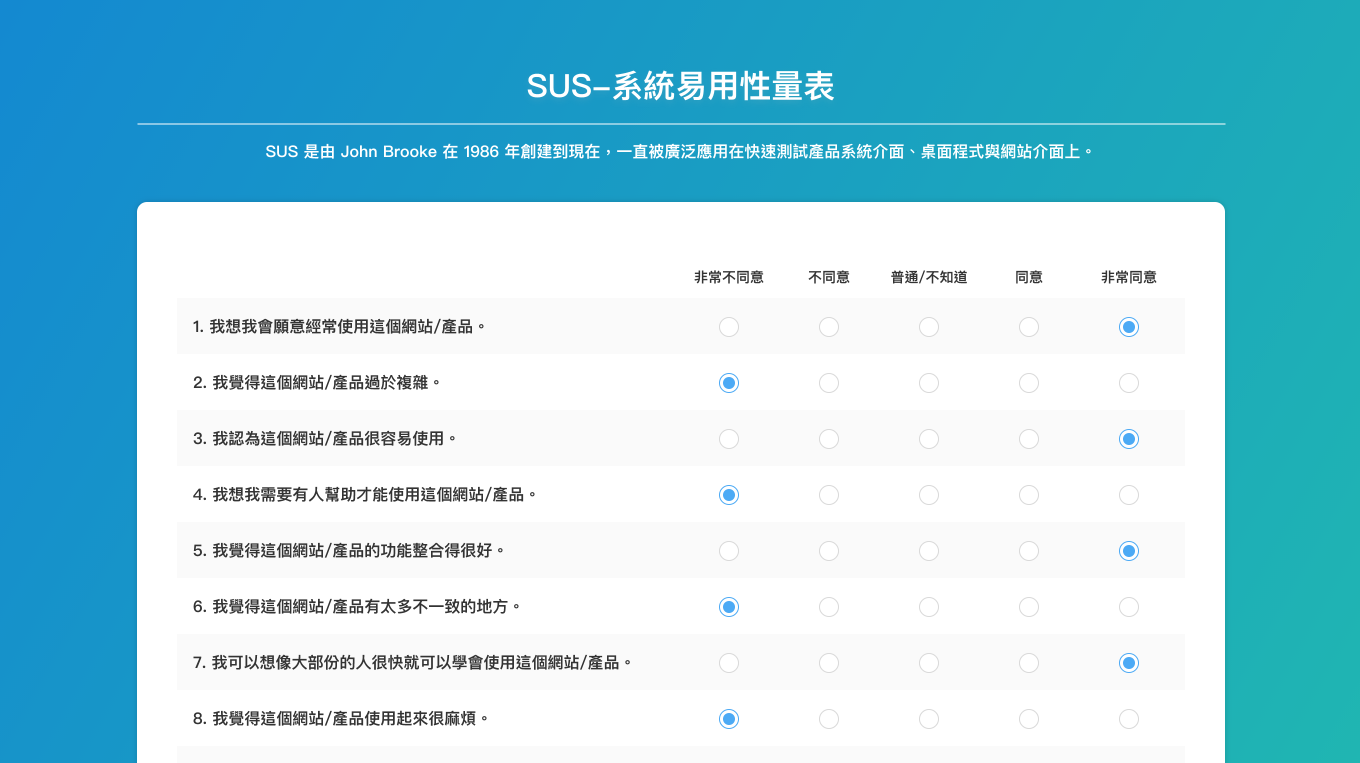
The SUS web application is a full-stack web application that allows UX designers to efficiently measure the usability of projects and services, such as hardware, software, mobile devices, websites, and applications, through the System Usability Scale (SUS).
Live demo: https://ux-sus-web.web.app/index
UI@蔡永霖 2023 | F2E@Dastine 2023
- Vue - Frontend framework for creating reusable components
- Tailwind CSS - Utility-first CSS framework
- PrimeVue - UI library for Vue
- Pinia - Store library for Vue
- Firebase - Open-source relational database management system
Answer the survey based on SUS questions.

View test records with table UI.


Authentication (Tester / Admin)

- Sign up a new user
- Delete test records through the UI button
- Use restful API
- And more...
- Clone this project to your local environment
$ git clone "https://github.com/dastine0308/system-usability-scale.git"- Install required packages
$ npm install- Start development server. By default, server will be listening on
http://localhost:5173
$ npm run dev- Accounts for testing:
# Tester
project:(select project)
password:0000

# Admin
project:(select project)
password:VL905- Type the following command to stop the development server
ctrl + c-
Create a Firebase Project on the Firebase Console
-
Add
.envfile and fill in your Firebase config variables:
VITE_API_KEY = "<apiKey>",
VITE_AUTH_DOMAIN = "<authDomain>",
VITE_PROJECT_ID = "<projectId>",
VITE_STORAGE_BUCKET = "<storageBucket>",
VITE_MESSAGING_SENDER_ID = "<messagingSenderId>",
VITE_APP_ID = "<appId>",
VITE_MEASUREMENT_ID = "<measurementId>"
-
Install the Firebase tools:
npm install -g firebase-toolsand log infirebase login -
Deploy it with
firebase deploy
Details
|-- firebase
|   |__ config.js
|-- public                    # 不進行打包編譯的檔案,資料夾(不會壓縮、不會加 hash 值)e.g., icon
|-- src
|   |-- assets                # 靜態資源相關 e.g., 圖片
|   |   |-- imgs
|   |   |__ style
|   |   |   |-- vendors       # 第三方套件樣式
|   |   |   |__ layout.css
|   |-- components
|   |   |-- form
|   |   |   |-- LoginForm.vue     # 登入表單元件
|   |   |   |__ SurveyForm.vue    # 測試問卷元件
|   |   |-- layout
|   |   |   |-- LayoutHeader.vue  # header模版
|   |   |   |__ LayoutContent.vue # 內容模版
|   |-- plugins               # 共用插件
|   |   |-- api
|   |   |   |__ index.js
|   |   |__ user
|   |       |__ index.js
|   |__ router
|   |   |__ index.js
|   |__ stores                # pinia 全域狀態
|   |   |-- pinia.js
|   |   |__ useUser.js
|   |__ pages
|   |   |-- Index.vue         # 首頁
|   |   |-- MainPage.vue      # 主要頁
|   |   |__ Result.vue        # 結果頁
|   |-- App.vue               # 專案的根元件
|   |__ main.js               # 專案的程式進入點
|-- .env                      # 環境變數
|-- .eslintrc.cjs
|-- .firebaserc
|-- .gitignore
|-- .prettierrc.json
|-- firebase.json             # firebase 設定檔
|-- index.html                # 專業模版, Vue 應用程式會透過這個 HTML 頁面來進行
|-- package.json              # 定義相依的相關套件及應用程式的資訊
|-- postcss.config.js         # postcss 設定檔
|-- tailwind.config.js        # tailwind css 設定檔
|__ vite.config.js            # vite 設定檔