- What are some factors that impact the quality of translation of Google Cloud Translation API?
- Target Language
- Type of Texts
- Number of Times The Text is Translated
- Accuracy of Translation (measured by cosine similarity score between the original text and the translated text)
- The main goal of this project is to test the quality of the Google Cloud Translation API. The quality of translation is measured by the text similarity score between original text and the final text after being translated back and forth.
- Our hypothesis is that the API would have varied performance when translating different languages and content types. Our other hypothesis is that text similarity scores will go down as we increase the number of translations since the original meaning of certain texts will be lost through translation.
| Content Type | Article |
|---|---|
| News Article | Trump Asks to Delay Sexual Assault Trial Following Historic Indictment |
| Scientific Article | How Hard Wired is Human Behavior |
| Philosophical Essay | Introduction to Critique of Pure Reason |
| Speech | Barack Obama's 2008 New Hampshire Primary Speech |
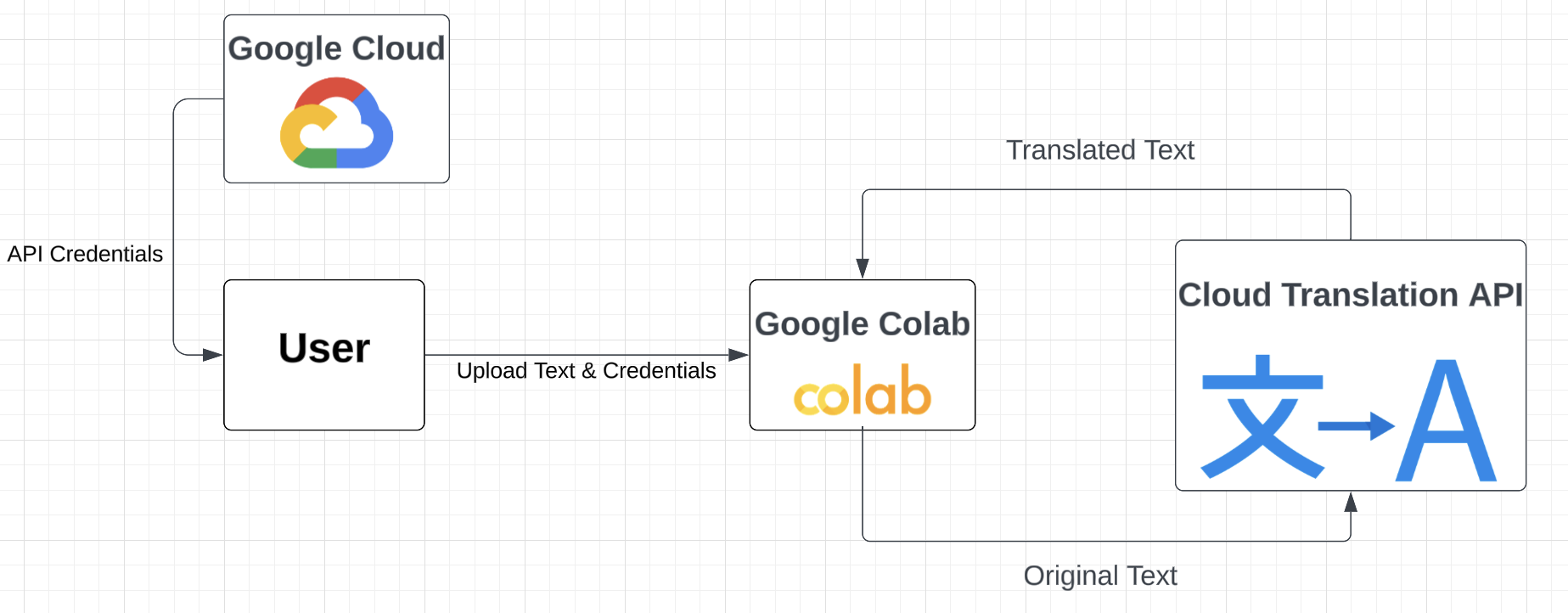
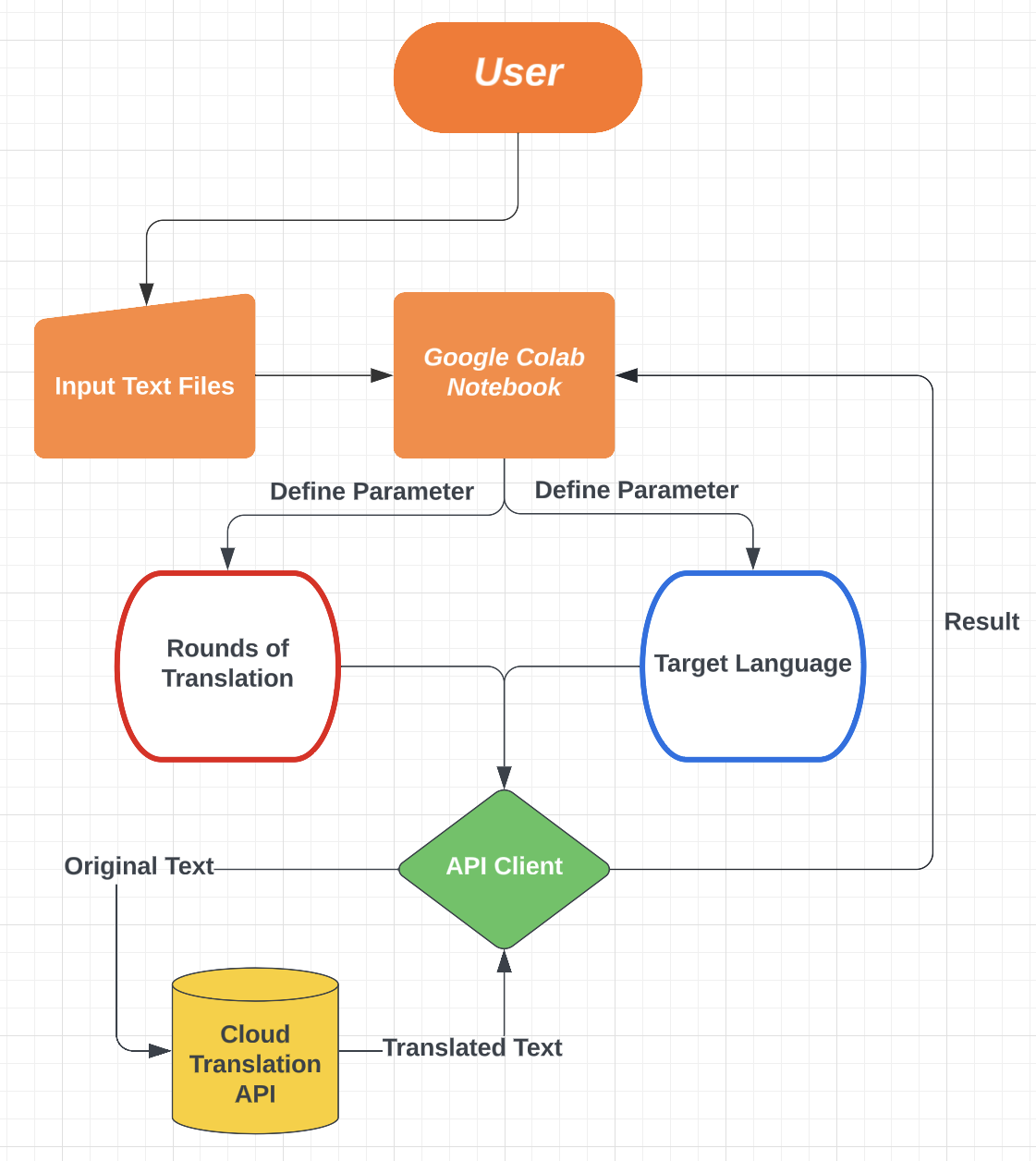
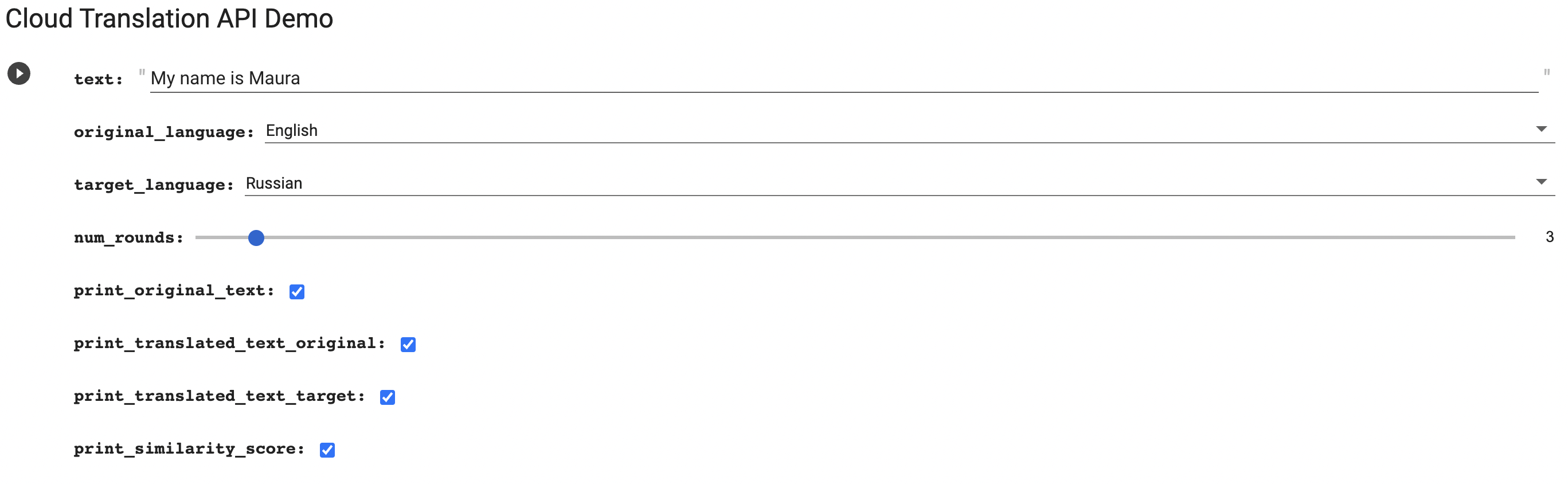
User would first upload or manually type down the input text into the google colab notebook. In the notebook, the user would also define parameters including the target language and number of rounds that the input text will be translated back and forth between the original langauge and the target language. A Google Cloud Translation API would then be initialized and used to translate text and receive translation results. Finally, the results are organized into dataframes and analyzed in the google colab notebook.
- First, manually type down a piece of text and define parameters
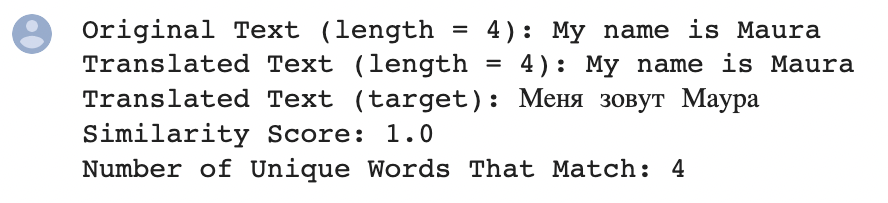
- Based on the parameters defined, the translated text will be printed along with other requested outputs
- Enable Cloud Translation API in your project
- Go to API & Services -> Credentials -> Create Credentails
- Create a service account, grant the account Cloud Translation API Editor role, and use the service account to generate API credentials in json format
- Name the API Credentials "api_credentials.json", upload it using the following code and store it as an environmental variable named "GOOGLE_APPLICATION_CREDENTAILS" using the following code
files.upload()
os.environ["GOOGLE_APPLICATION_CREDENTIALS"] = "api_credentials.json"- Define a function that converts two texts into all lowercase, remove punctuations, and computes the cosine similarity score of two texts
def text_similarity(text1, text2):
  # remove punctuations and make text all lowercase
  text1 = re.sub('[^\w\s]', '', text1).lower()
  text2 = re.sub('[^\w\s]', '', text2).lower()

  vectorizer = TfidfVectorizer()
  vectors = vectorizer.fit_transform([text1, text2])
  similarity = cosine_similarity(vectors)
return similarity[1,0]- Define a function that calls google cloud translation api, translates a text between the original language and the target language for a specified number of rounds, and returns the translated text
# import library and upload api credentials
from google.cloud import translate_v2
files.upload()
os.environ["GOOGLE_APPLICATION_CREDENTIALS"] = "api_credentials.json"

def repeat_translate(text, original_language, target_language, num_rounds):
  translator = translate_v2.Client()
  if (original_language is None):
    original_language = translator.detect_language(text)["language"]

  intermediate_text_original = text
  intermediate_text_target = None
  for round in range(0, num_rounds):
    intermediate_text_target = translator.translate(intermediate_text_original,
                                             target_language = target_language,
                                             model = "nmt")["translatedText"]
    intermediate_text_original = translator.translate(intermediate_text_target,
                                             target_language = original_language,
                                             model = "nmt")["translatedText"]
return [intermediate_text_original, intermediate_text_target]- Each forloop iteration translates a text for a specified number of rounds, compares the original with the the translated text to compute a similarity score, then add the data to the result dataframe
# define variables
filenames = ['philosophical_essay.txt', 'news_article.txt', 'scientific_article.txt', 'speech.txt'] # to be uploaded
var1_text = [open(filename).read().replace('\n', '') for filename in filenames] # to be uploaded
var2_target_language = ["French", "German", "Mandarin", "Russian", "Latin", "Korean", "Japanese", "Arabic"]
var3_num_translations = [1, 2, 5, 10]

# define an empty dataframe to store data
result = pd.DataFrame(columns = ["Original_Language", "Target_Language", "Content_Type", "Num_Rounds", "Similarity_Score"])
original_language = "English"

# translate the input texts for a specified number of rounds
for text_idx in range(0, len(var1_text)):
  text_name = filenames[text_idx].split('.')[0]
  original_text = var1_text[text_idx]
  for target_language in var2_target_language:
    for num_rounds in var3_num_translations:
      translated_text = repeat_translate(original_text, language_map[original_language], language_map[target_language], num_rounds)[0]
      similarity_score = text_similarity(original_text, translated_text)

      # append new row to dataframe
      new_row = [original_language, target_language, text_name, num_rounds, similarity_score]
result.loc[len(result)] = new_row- Result dataframe overview
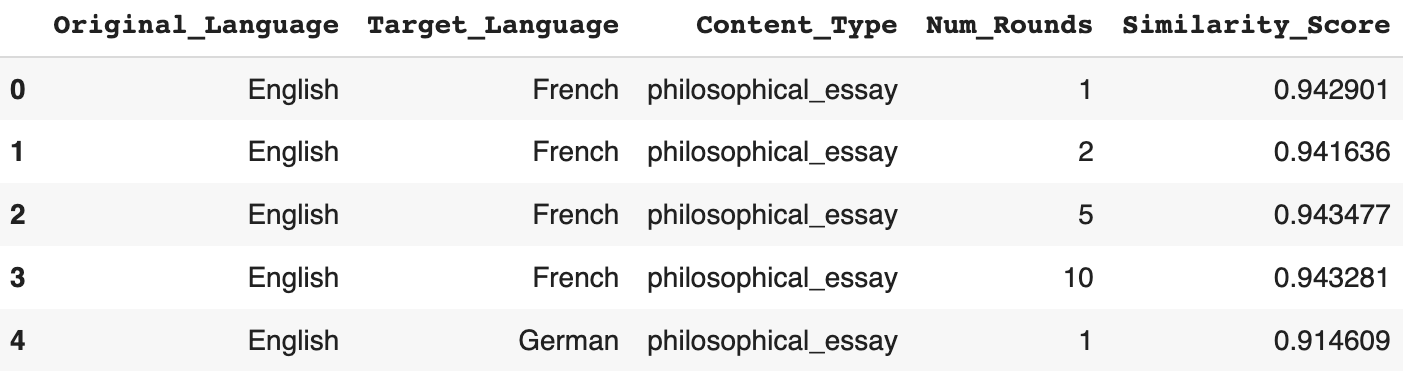
- To visualize the relationship between individual explanatory variables and similarity score, data is grouped by the explanatory variable and then averaged by the response variable.
# reorganized data
result_content = result.groupby("Content_Type").agg(Average_Similarity_Score = ("Similarity_Score", "mean")).sort_values("Average_Similarity_Score").reset_index()

# plot data
result_content.plot("Content_Type", "Average_Similarity_Score", kind = "barh")
display(result_content)
plt.legend([])
plt.xlabel("Type of Text")
plt.ylabel("Target Language")
plt.title("Average Similarity Score for Different Content Types")
plt.xlim(0.75, 1)

for i in range(0, len(result_content)):
score = result_content.loc[i, "Average_Similarity_Score"]
plt.text(score, i, str(round(score, 3)), fontweight = "bold")- The above code generates the following table and plot
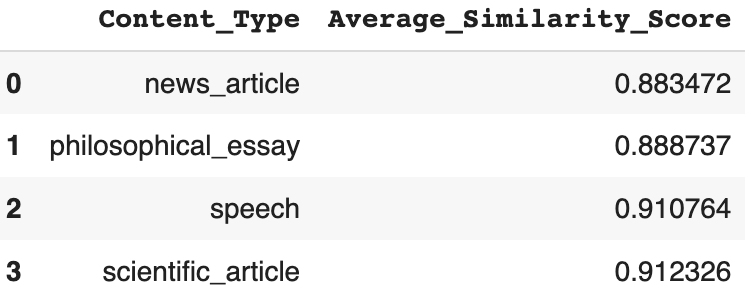
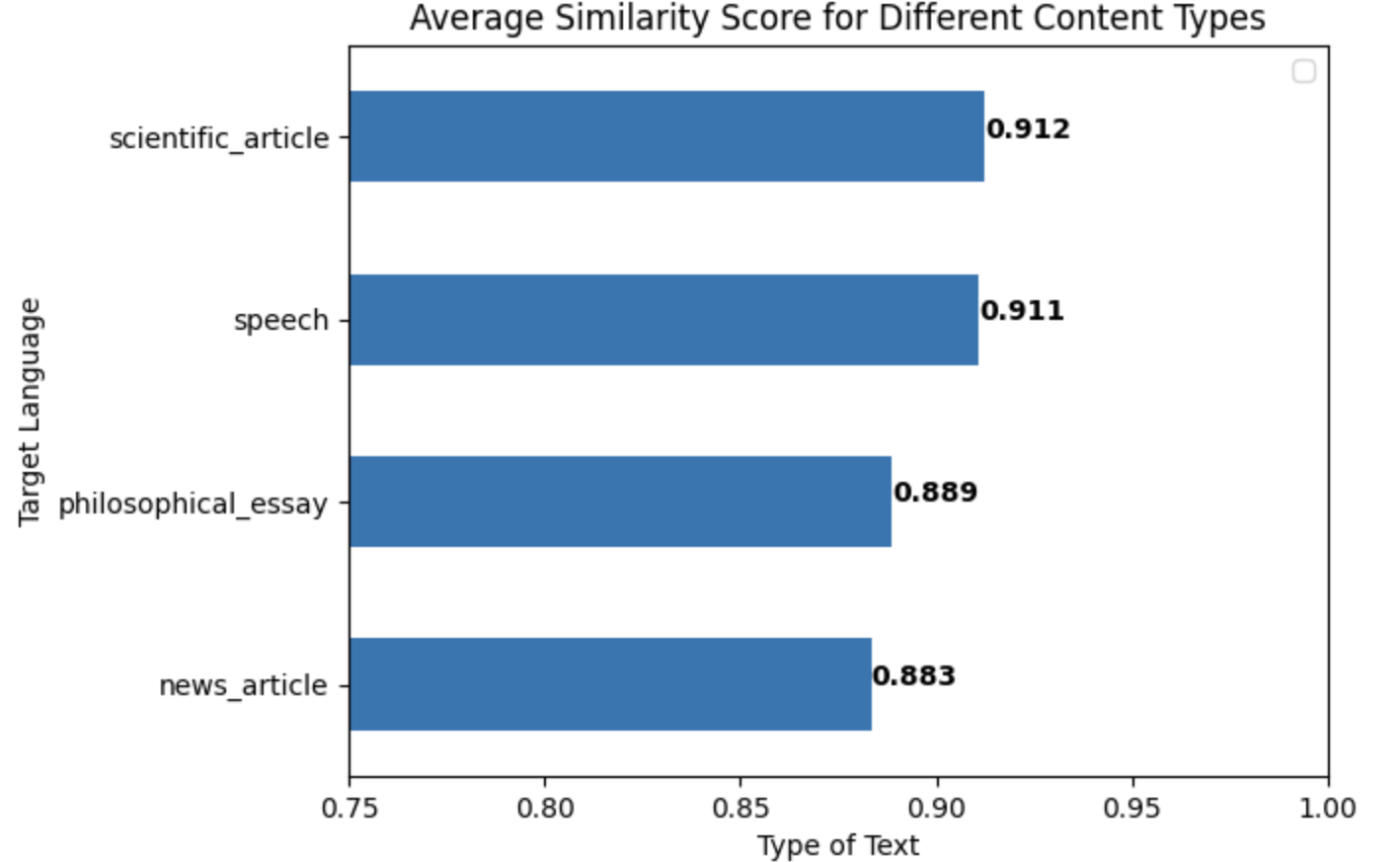
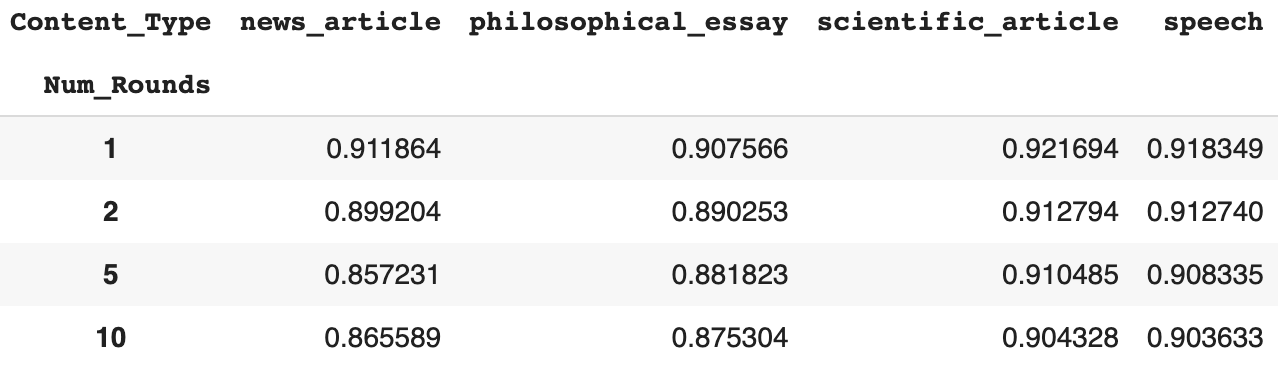
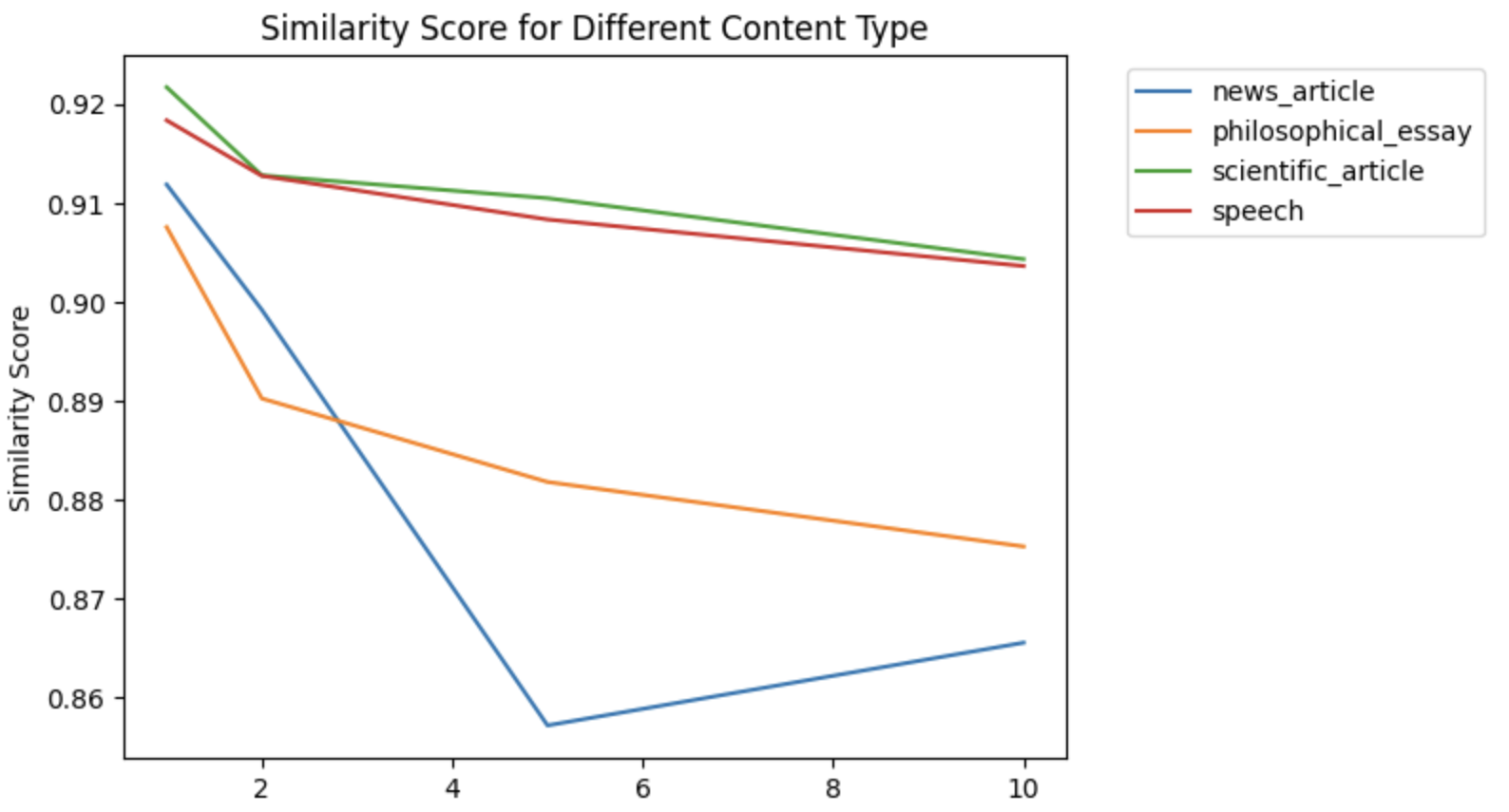
- To visualize how two variables work in tandem to impact similarity score, data is reorganized into tables where the row index represents one variable and the column index represents another variable
result_type_numrounds = pd.pivot_table(result, index = "Content_Type", columns = "Num_Rounds", values = "Similarity_Score").T
display(result_type_numrounds)
for column in result_type_numrounds.columns:
  result_type_numrounds[column].plot()
plt.xlabel("Number of Rounds of Translation")
plt.ylabel("Similarity Score")
plt.title("Similarity Score for Different Content Type")
plt.legend(bbox_to_anchor = (1.05, 1))
plt.show()- The above code generates the following table and plot