Live Demo:
https://deanwagner.github.io/calculator/
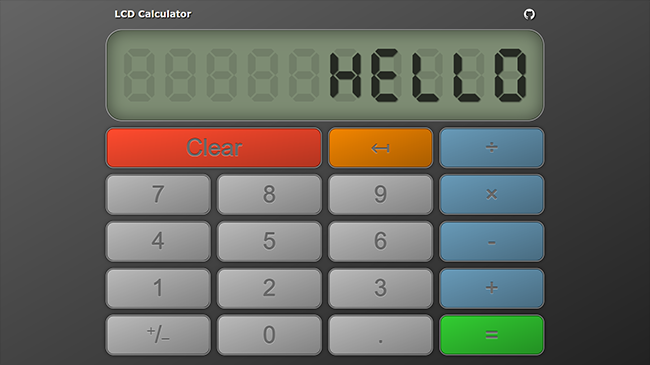
This project was created for the Calculator assignment as part of The Odin Project curriculum. I met all the assignment objectives and then expanded on it with my own concepts to make it more functional and user-friendly.
The most noteworthy aspect of this project is the faux liquid crystal display. Rather than simply displaying the raw i/o I created this display to simulate a real calculator. In the markup just one SVG digit is defined with seven LCD pixels that can be turned on/off individually with JavaScript and CSS. When the page is loaded the single SVG digit is cloned and repeated to create the ten digit display. When data is to be displayed the string is parsed and each character is associated with a corresponding item in the predefined pixel matrix, which dictates which of the individual LCD pixels are to be activated for each character to be displayed.
- None
- Function for each math operator
- Operator function that takes an operator and calls one of previous functions
- Display with button for each digit, operation function, 'clear', and 'equals'
- Functions to populate display
- String multiple operations together (12 + 7 - 5 * 3 = 42)
- Do not evaluate more than one pair of numbers at a time
- Round long decimal numbers to avoid overflow
- 'Clear' button should wipe all existing data
- Error message for divide-by-zero
- (+) Decimal button for floating point numbers
- (+) Different colors for operation and number buttons
- (+) 'Backspace' button for wrong entries
- (+) Keyboard support
- LCD Display utilizing inline SVG images
[+/-]button for positive/negative numbers- Responsive Design
- PWA and A2HS support