Snap to enable MetaMask users interaction with the Tron Blockchain.
Tron is not an EVM compatible network, hence, can't be added to MetaMask directly.
The snap fulfills the following objectives :
- MetaMask users would be able to access Tron dApps without installing different wallets
- Tron Developers would be able to leverage the awesome functionalities of MetaMask while working in Tron ecosystem
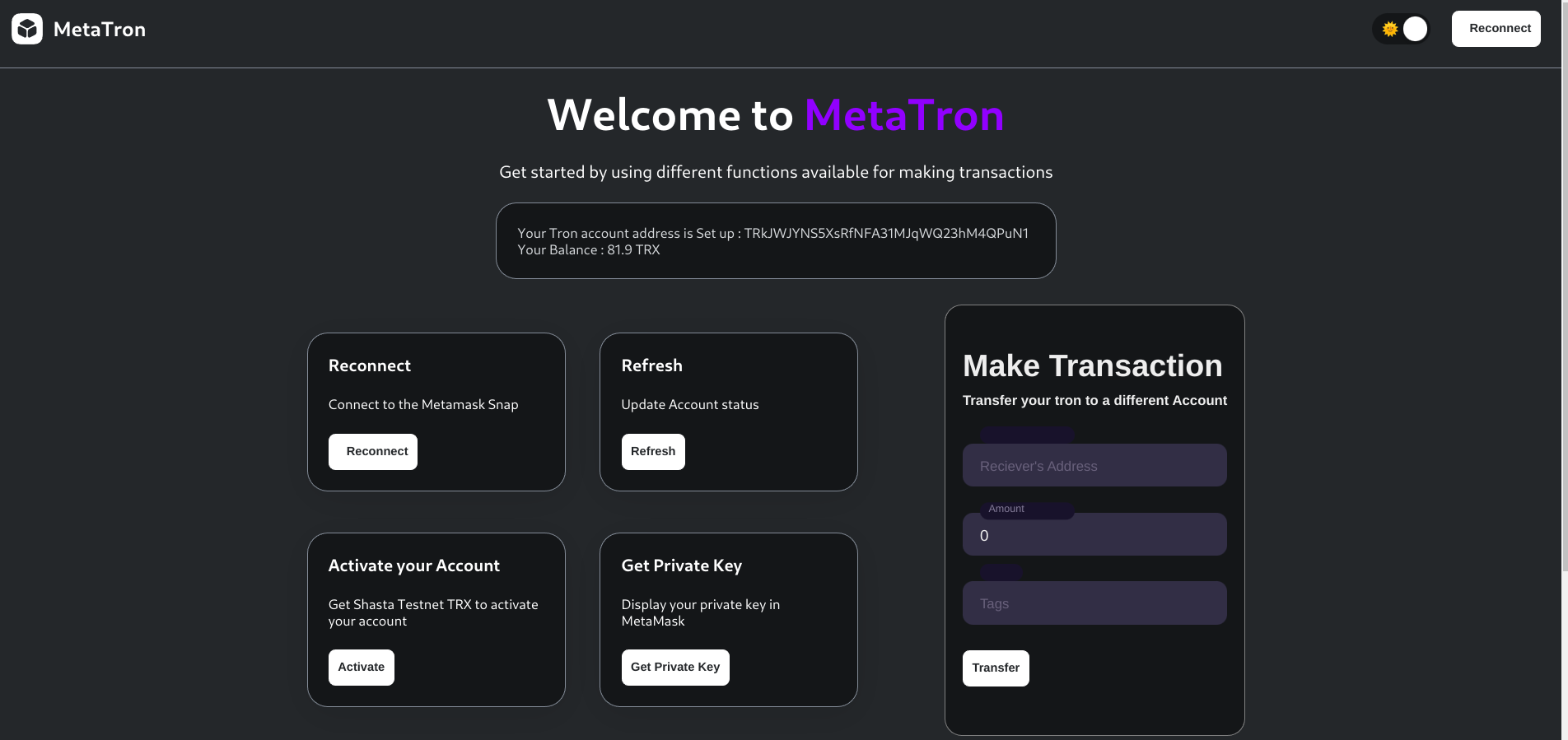
To start the snap
nvm use
yarn
yarn start
The snap will be hosted at https://localhost:8080/.
The frontend of the snap will be hosted at https://localhost:8000/.
Note: All transactions are carried out on the shasta testnet provided by Tron.
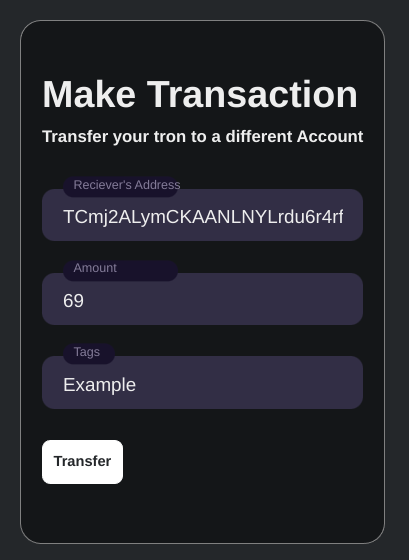
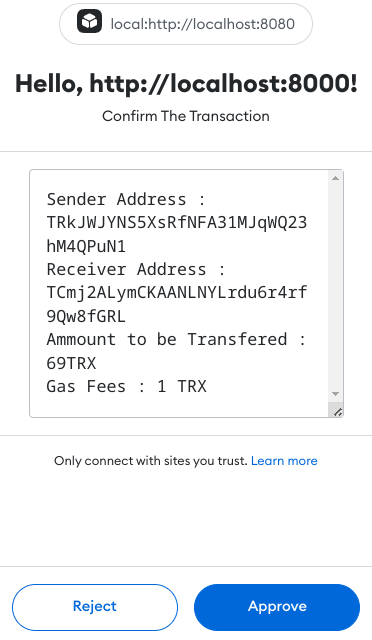
The snap provides the following functionalities to the user:
- Creating a new account
- Showing current balance
- Sending TRX to another account
- View last 5 transactions done by the user

After connecting to the snap, the account status of the user will be displayed.
The account will be displayed at the top if the user already has an account address, otherwise the user can click on Activate to have an account address with 20 test TRX initialized.
The snap exposes the following methods to the dapp:
GetAccountBalance: Get the account balance of the user.ValidateAddress: Check whether the address is valid (i.e if it already exists on the blockchain).Last5Transactions: Get details of the last 5 transactions done by the user.GetUserDetails: Get the Tron address of the userCreateTransaction: Execute a transaction on the Tron Blockchainparams:ToAddress,Amount
GetPrivateKey: Show the private key of Tron Account to the user in MetaMask.
This repository contains GitHub Actions that you may find useful, see .github/workflows and Releasing & Publishing below for more information.
If you clone or create this repository outside the MetaMask GitHub organization, you probably want to run ./scripts/cleanup.sh to remove some files that will not work properly outside the MetaMask GitHub organization.
Note that the action-publish-release.yml workflow contains a step that publishes the frontend of this snap (contained in the public/ directory) to GitHub pages. If you do not want to publish the frontend to GitHub pages, simply remove the step named "Publish to GitHub Pages" in that workflow.
If you don't wish to use any of the existing GitHub actions in this repository, simply delete the .github/workflows directory.
Run yarn test to run the tests once.
Run yarn lint to run the linter, or run yarn lint:fix to run the linter and fix any automatically fixable issues.
The project follows the same release process as the other libraries in the MetaMask organization. The GitHub Actions action-create-release-pr and action-publish-release are used to automate the release process; see those repositories for more information about how they work.
- Choose a release version.
- The release version should be chosen according to SemVer. Analyze the changes to see whether they include any breaking changes, new features, or deprecations, then choose the appropriate SemVer version. See the SemVer specification for more information.
- If this release is backporting changes onto a previous release, then ensure there is a major version branch for that version (e.g.
1.xfor av1backport release).
- The major version branch should be set to the most recent release with that major version. For example, when backporting a
v1.0.2release, you'd want to ensure there was a1.xbranch that was set to thev1.0.1tag.
- Trigger the
workflow_dispatchevent manually for theCreate Release Pull Requestaction to create the release PR.
- For a backport release, the base branch should be the major version branch that you ensured existed in step 2. For a normal release, the base branch should be the main branch for that repository (which should be the default value).
- This should trigger the
action-create-release-prworkflow to create the release PR.
- Update the changelog to move each change entry into the appropriate change category (See here for the full list of change categories, and the correct ordering), and edit them to be more easily understood by users of the package.
- Generally any changes that don't affect consumers of the package (e.g. lockfile changes or development environment changes) are omitted. Exceptions may be made for changes that might be of interest despite not having an effect upon the published package (e.g. major test improvements, security improvements, improved documentation, etc.).
- Try to explain each change in terms that users of the package would understand (e.g. avoid referencing internal variables/concepts).
- Consolidate related changes into one change entry if it makes it easier to explain.
- Run
yarn auto-changelog validate --rcto check that the changelog is correctly formatted.
- Review and QA the release.
- If changes are made to the base branch, the release branch will need to be updated with these changes and review/QA will need to restart again. As such, it's probably best to avoid merging other PRs into the base branch while review is underway.
- Squash & Merge the release.
- This should trigger the
action-publish-releaseworkflow to tag the final release commit and publish the release on GitHub.
- Publish the release on npm.
- Be very careful to use a clean local environment to publish the release, and follow exactly the same steps used during CI.
- Use
npm publish --dry-runto examine the release contents to ensure the correct files are included. Compare to previous releases if necessary (e.g. usinghttps://unpkg.com/browse/[package name]@[package version]/). - Once you are confident the release contents are correct, publish the release using
npm publish.
- Babel is used for transpiling TypeScript to JavaScript, so when building with the CLI,
transpilationModemust be set tolocalOnly(default) orlocalAndDeps. - For the global
wallettype to work, you have to add the following to yourtsconfig.json:{ "files": ["./node_modules/@metamask/snap-types/global.d.ts"] }