🚧 Beta
Image generation for prototyping, built for lazy LLMs and lazy developers. Choose your favorite model, bring your own API key.
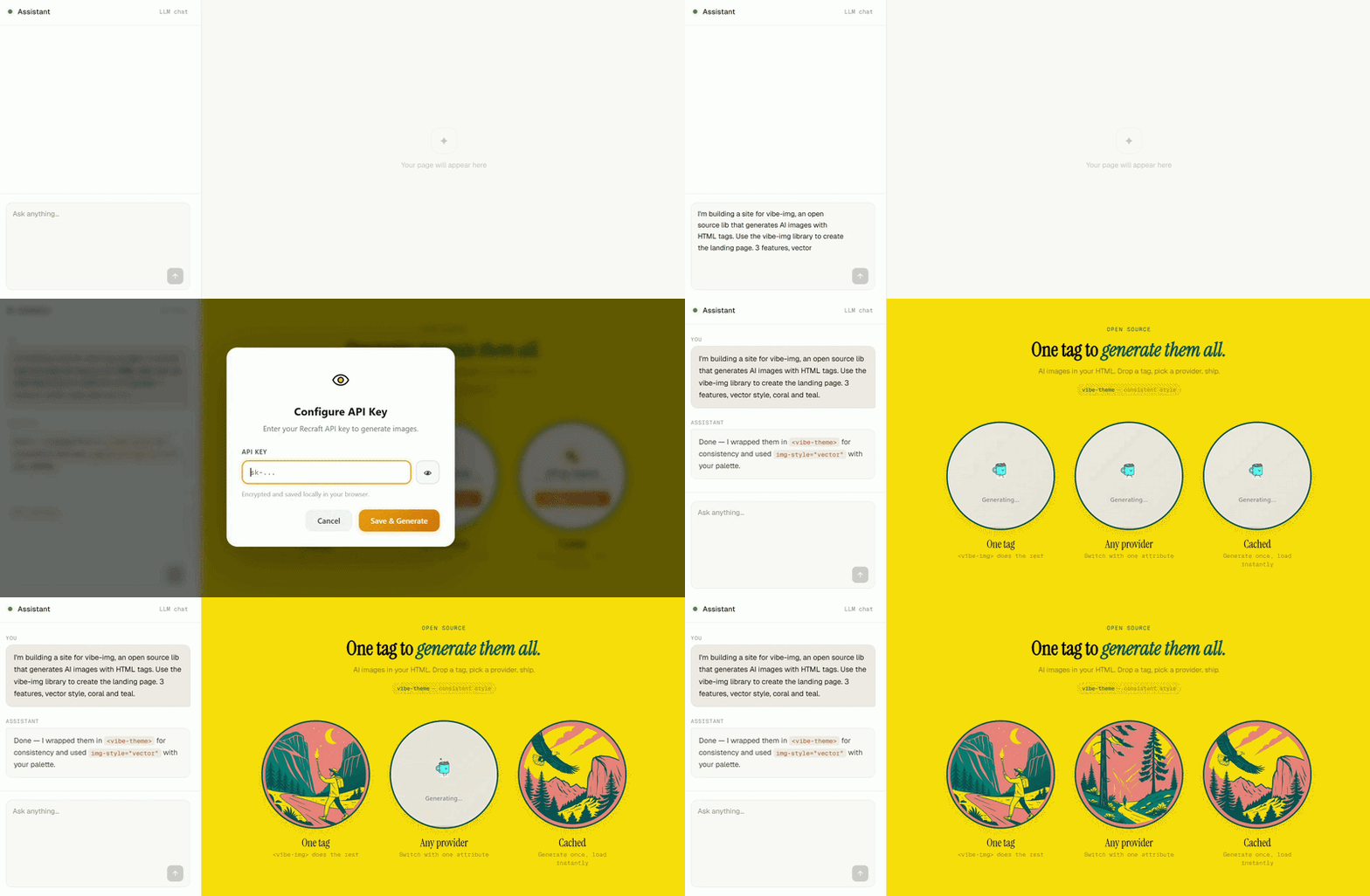
It will include the library:
<script src="https://cdn.jsdelivr.net/npm/vibe-img@1/dist/vibeimg.js"></script>And generate images with a single tag:
<vibe-img
  model="recraft"
  prompt="Miami Beach at sunset">
</vibe-img>
🚧 vibe-img is brand new. Help your LLM get it right — pass the docs: https://www.vibe-img.com/llms.txt
Once the page loads, click the ⋯ button on any image to enter your API key.
That's it — images generate automatically and you're ready to ship.
If you use Claude Code, Cursor, Codex, or other AI coding agents, install the vibe-img skill:
npx skills add devhashfortheweb/vibe-img
Your agent will automatically know how to generate correct <vibe-img> tags.
Some vibe builders suck at image generation and give you zero control. Others don't even let you try. vibe-img tries to fix that.
Your LLM can generate images, maintain visual consistency across a page with <vibe-theme>, chain operations with image references, and switch provider with a single attribute change.
One API, any provider. Write the same tag regardless of provider. Switch from model="openai" to model="recraft" and nothing else changes.
No wasted tokens on refresh. Generated images are cached in the browser and on a CDN. A repeated page load never hits the AI provider.
Share freely. Generated images are cached on a CDN and served from a public URL — no API key needed to view them.
Your keys stay yours. API calls go straight from your browser to the provider — no middleman storing your credentials. See Security for details.
⚠️ Free CDN cache lasts 1 hour — perfect for a vibe session. If your project needs permanent hosting or longer retention, let’s talk about it. I’m happy to build more if there’s enough interest (and to keep the servers running!).
Are you still reading, human? Just ask your LLM to use this library and let it handle the rest.
| Attribute | Values | Default | Description |
|---|---|---|---|
model |
openai, recraft |
— | Required. Provider to use. |
prompt |
string | — | Text prompt. Required for generate, img2img, replace-bg. |
op |
generate, img2img, upscale, remove-bg, replace-bg, vectorize |
generate |
Operation to perform. |
aspect |
square, landscape, portrait, wide, tall |
square |
Output aspect ratio. |
img-style |
See Styles | — | Visual style. |
quality |
draft, standard, hd |
standard |
Generation quality. |
format |
png, webp, jpeg |
(provider default) | Output image format. |
img-ref |
URL or #id |
— | Reference image. Required for img2img, upscale, remove-bg, replace-bg, vectorize. |
seed |
integer | — | Reproducible generation (provider support varies). |
negative-prompt |
string | — | What to avoid in the image (provider support varies). |
params |
JSON string | — | Raw provider params, merged last. Override anything. |
alt |
string | — | Alt text for the generated <img>. |
Note on
modelvsparams.model: Themodelattribute selects the provider (openai, recraft). To override the specific API model within a provider (e.g.recraftv4,gpt-image-1), useparams='{"model":"recraftv4"}'.
⚠️ Always use a closing tag.<vibe-img />does not work — the HTML parser treats custom elements as open tags when self-closed. Always write<vibe-img ...></vibe-img>.
These map to native provider style parameters where available, otherwise they're injected into the prompt automatically.
realistic · natural · vivid · illustration · 3d · pixel · anime · sketch · watercolor · oil-painting · comic · retro · cinematic · vector · minimalist · flat · icon · logo · neon · fantasy · abstract · isometric · kawaii
| Operation | Required attributes | Description |
|---|---|---|
generate |
prompt |
Text to image. |
img2img |
prompt, img-ref |
Edit an image with a prompt. |
upscale |
img-ref |
Increase resolution. |
remove-bg |
img-ref |
Remove background, returns transparent image. |
replace-bg |
prompt, img-ref |
Replace background with prompt. |
vectorize |
img-ref |
Convert to SVG. |
| Operation | openai |
recraft |
|---|---|---|
generate |
✓ | ✓ |
img2img |
✓ | ✓ |
upscale |
— | ✓ |
remove-bg |
— | ✓ |
replace-bg |
✓ | ✓ |
vectorize |
— | ✓ |
Apply a shared style prompt to a group of images. Closest ancestor wins on nesting.
<vibe-theme prompt="warm editorial, soft lighting, muted earth tones">
  <vibe-img model="recraft" prompt="coffee cup"></vibe-img>
  <vibe-img model="recraft" prompt="open notebook"></vibe-img>

  <vibe-theme prompt="dark cinematic, dramatic shadows">
    <vibe-img model="recraft" prompt="whiskey glass"></vibe-img>
  </vibe-theme>
</vibe-theme>
The theme prompt is appended to each child's prompt at generation time. Changing the prompt attribute regenerates affected images automatically.
Use img-ref to chain operations. Pass a URL or point to another <vibe-img> by ID.
<!-- External URL -->
<vibe-img
  model="recraft"
  op="remove-bg"
  img-ref="https://example.com/photo.jpg"
></vibe-img>

<!-- Reference another vibe-img by ID -->
<vibe-img id="source"
  model="recraft"
  prompt="a cat sitting on a windowsill"
></vibe-img>

<vibe-img
  model="recraft"
  op="upscale"
  img-ref="#source"
></vibe-img>
When img-ref="#id" is used, the second element waits for the first to finish before starting. Cache lookups for both happen in parallel, so repeated page loads are instant.
params accepts the original provider API parameters directly — not a vibe-img abstraction. These are merged last and override everything else, so you have full access to whatever the provider supports.
<!-- Recraft: custom brand colors -->
<vibe-img
  model="recraft"
  prompt="company logo"
  params='{"controls":{"colors":[{"rgb":[46,125,50]}]}}'
></vibe-img>

<!-- OpenAI: transparent background -->
<vibe-img
  model="openai"
  prompt="app icon, minimal"
  format="png"
  params='{"background":"transparent"}'
></vibe-img>

<!-- Recraft: use V4 model -->
<vibe-img
  model="recraft"
  prompt="product photo"
  params='{"model":"recraftv4"}'
></vibe-img>

<!-- Recraft: use a provider-specific style via params -->
<vibe-img
  model="recraft"
  prompt="city at night"
  params='{"style":"Neon Calm"}'
></vibe-img>Configure keys programmatically, as an alternative to the built-in modal:
await VibeImg.configure({
  openai:  'sk-...',
  recraft: 'rk-...',
});
Or open the key modal for a specific provider:
VibeImg.openKeyModal('recraft');VibeImg.setup({
corsProxyUrl: 'https://your-proxy.com/proxy?url=',
serverStorageEndpoint: null, // disable remote caching
r2PublicUrl: null,
useServerStorage: false,
requestTimeoutMs: 60_000,
debug: true, // verbose logs for bug reports
});Logs every step — cache lookups, key resolution, HTTP requests, polling. Enable before reproducing an issue and include the output in bug reports.
<script type="module">
  VibeImg.setup({ debug: true });
</script>vibe-img operates in two distinct phases, each with a different security profile:
Generation (prototyping). In this phase, you use an API key in your browser. You are typically on localhost or within your private dev environment. Images are generated and then cached on the CDN.
Sharing (viewing). Once you share the URL or deploy the page, visitors see cached images served directly from the CDN. No API key is present, required, or even requested during this phase. There is simply nothing to steal.
This separation is intentional. The API key only exists while you are prototyping on your own machine. Once the images are cached, the key's job is done.
vibe-img follows the BYOK (Bring Your Own Key) model. Your key never leaves your device except to make a direct request to the AI provider. There is no central server storing user keys, which eliminates "honeypots" or any single point of compromise.
Keys are encrypted with AES-GCM 256-bit via the Web Crypto API and stored in IndexedDB. The encryption key is set to non-extractable. This means even with direct access to IndexedDB, an attacker would only find ciphertext.
Transparency note: AES-GCM requires crypto.subtle, which is only available in secure contexts like HTTPS or localhost. If you run vibe-img over plain HTTP (for example, behind a dev proxy or Burp Suite), keys are stored unencrypted in IndexedDB. This is an intentional fallback for development tools.
In a real-world scenario, XSS is not a viable threat to your API key given how vibe-img is used. While you are prototyping (and the key exists), you are on localhost or a controlled environment where there is no attack surface for third-party scripts. By the time you share the project and an attack surface exists, the key is no longer there.
Generated images are stored on a public CDN so anyone can view shared projects without needing an API key. Image URLs are derived from a SHA-256 hash of every generation parameter:
cdn.vibe-img.com/vibeimg-4479b58ffa14e53da9ec06e3feedcdb802dbca14b5c4a42fba6c093ba31ef5bc.webp
There is no directory listing, no sequential IDs, and no way to enumerate endpoints. Finding a specific image would require knowing the exact combination of prompt, style, model, and every other attribute used to create it.
Some providers, such as OpenAI, do not allow direct requests from a browser. To handle this, vibe-img routes requests through a CORS proxy (api.vibe-img.com/proxy by default). Your API key passes through this proxy in memory only for the duration of the request. It is never written to disk, logged, or stored.
Providers that support browser CORS, like Recraft, bypass this proxy entirely. In those cases, requests go straight from your browser to the provider.
If you prefer not to use the default proxy, you can set up your own or disable it entirely (though this only works with CORS-enabled providers):
// Use your own proxy
VibeImg.setup({ corsProxyUrl: '[https://your-proxy.com/proxy?url=](https://your-proxy.com/proxy?url=)' });

// Or disable it
VibeImg.setup({ corsProxyUrl: null });- Store keys on any server
- Send keys to any endpoint other than the AI provider (or the CORS proxy when required)
- Log, track, or transmit key material
- Hardcode keys in generated HTML — keys are entered at runtime via the built-in modal
git clone https://github.com/user/vibe-img.git
cd vibe-img
npm install
npm run dev       # dev server
npm test          # adapter fixture tests
npm run typecheck
npm run build src/
adapters/ Model adapters (one file per provider)
core/ Execution engine
dom-adapter/ Web component + hooks
storage/ IndexedDB + server cache
utils/ Network, hashing, error handling
Copy src/adapters/_template.ts, fill in the mapping tables and buildRequest(), write at least 5 fixtures, then register in src/adapters/index.ts.
cp src/adapters/_template.ts src/adapters/my-provider.tsFixtures cover request building only. It's still recommended to test your adapter against the real API before submitting.
npm testYour favorite provider isn't here? Don't be sad — read a bit of docs, implement an adapter, and join the vibe-img family. It's less work than it sounds. No one is perfect either — found a bug? Open an issue or send a PR.