An operating system acts as an intermediary between the user of a computer and computer hardware. The purpose of an operating system is to provide an environment in which a user can execute programs conveniently and efficiently.
An operating system is a software that manages computer hardware. The hardware must provide appropriate mechanisms to ensure the correct operation of the computer system and to prevent user programs from interfering with the proper operation of the system.
- An operating system is a program that controls the execution of application programs and acts as an interface between the user of a computer and the computer hardware.
- A more common definition is that the operating system is the one program running at all times on the computer (usually called the kernel), with all else being application programs.
- An operating system is concerned with the allocation of resources and services, such as memory, processors, devices, and information. The operating system correspondingly includes programs to manage these resources, such as a traffic controller, a scheduler, a memory management module, I/O programs, and a file system.
- Convenience: An OS makes a computer more convenient to use.
- Efficiency: An OS allows the computer system resources to be used efficiently.
- Ability to Evolve: An OS should be constructed in such a way as to permit the effective development, testing, and introduction of new system functions at the same time without interfering with service.
- Throughput: An OS should be constructed so that It can give maximum throughput(Number of tasks per unit time).
- Resource Management: When parallel accessing happens in the OS means when multiple users are accessing the system the OS works as Resource Manager, Its responsibility is to provide hardware to the user. It decreases the load in the system.
- Process Management: It includes various tasks like scheduling, termination of the process. OS manages various tasks at a time. Here CPU Scheduling happens means all the tasks would be done by the many algorithms that use for scheduling.
- Storage Management: The file system mechanism used for the management of the storage. NIFS, CFS, CIFS, NFS, etc. are some file systems. All the data stores in various tracks of Hard disks that all managed by the storage manager. It included Hard Disk.
- Memory Management: Refers to the management of primary memory. The operating system has to keep track, how much memory has been used and by whom. It has to decide which process needs memory space and how much. OS also has to allocate and deallocate the memory space.
- Security/Privacy Management: Privacy is also provided by the Operating system by means of passwords so that unauthorized applications can’t access programs or data. For example, Windows uses Kerberos authentication to prevent unauthorized access to data.
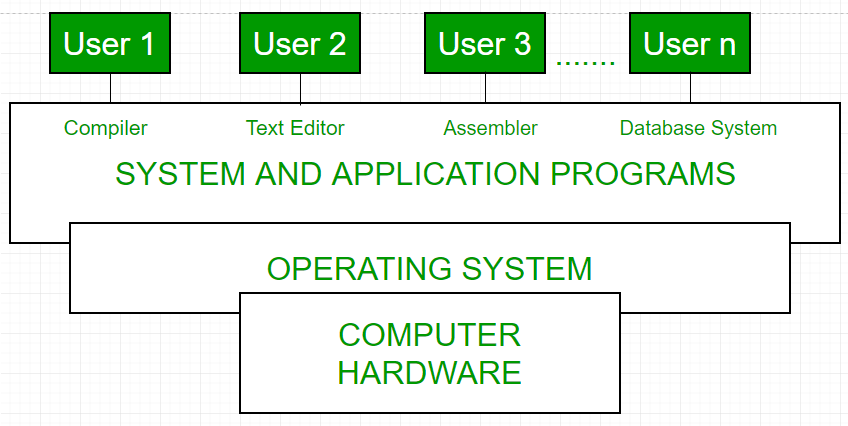
- OS as a platform for Application programs
- Managing Input-Output unit
- Multitasking
- Processor Management
- Context Switching
- Device Management
- Buffering
- Spooling
- Memory management
- Partitioning
- Virtual Memory
- File Management
- Program Execution
- I/O Operations
- Communication
- Process & Thread
- CPU Scheduling
- Process Synchronization
- Deadlock
- Memory Management (+ Virtual Memory)
- File System
- Disk Management, IO Systems