- What is CodeGuardian?
- Features
- Getting Started
- Usage
- Development
- Contributing
- License
- Support
- Contributors
- Demo
Watch the YouTube demo of CodeGuardian in action:
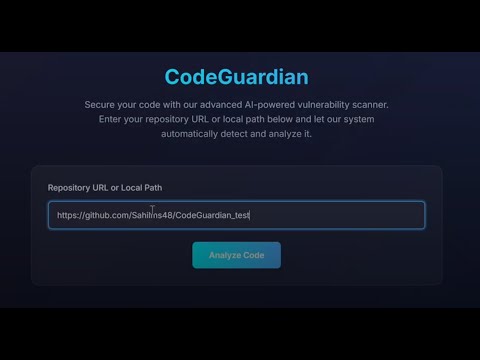
CodeGuardian is a real-time, on-device AI-powered tool designed for comprehensive code security. It eliminates the limitations of traditional cloud-based vulnerability scanners by providing a local, in-depth scan of your codebase. CodeGuardian identifies security vulnerabilities and offers actionable remediation suggestions directly within your development environment.
Built using LM Studio's on-device AI, CodeGuardian ensures developers get instant feedback on their code, reducing the time between vulnerability introduction and remediation. This approach is ideal for industries with stringent data security requirements, such as defense, healthcare, and critical infrastructure, where cloud solutions may not be viable.
Key highlights of CodeGuardian include:
- Offline operation for maximum privacy.
- Periodic synchronization with trusted vulnerability databases like CVE, NVD, and OWASP.
- Optimized for resource-constrained platforms, ideal for mobile and IoT developers.
- Comprehensive Vulnerability Analysis: Scan GitHub or local repositories for security vulnerabilities.
- Interactive Reporting: Generate detailed reports with severity levels and remediation steps.
- AI-Powered Chat: Interact with reports for enhanced analysis.
- User-Friendly Interface: A simple and elegant UI for an intuitive experience.
- Offline First: Operates entirely offline, ensuring data privacy and security.
- Resource Efficiency: Optimized for use on low-resource devices, such as IoT systems.
Ensure you have the following installed on your system:
- Python 3.8+
- pip (Python package installer)
- Django Framework
-
Clone this repository:
git clone https://github.com/dpraj007/CodeGuardian cd CodeGuardian -
Install the required dependencies:
pip install -r requirements.txt
-
Start the development server:
python manage.py runserver
- Open your browser and navigate to:
- Choose between the following options:
- Analyze a GitHub Repository URL.
- Analyze a Local Repository.
- Main Page: Access the tool at http://127.0.0.1:8000.
- View Reports: View or download reports at http://127.0.0.1:4321.
- Chat with Reports: Use the interactive chat feature at http://127.0.0.1:3000.
This project is licensed under the MIT License.
Permission is hereby granted, free of charge, to any person obtaining a copy of this software and associated documentation files (the "Software"), to deal in the Software without restriction, including without limitation the rights to use, copy, modify, merge, publish, distribute, sublicense, and/or sell copies of the Software, and to permit persons to whom the Software is furnished to do so, subject to the following conditions:

The above copyright notice and this permission notice shall be included in all copies or substantial portions of the Software.

THE SOFTWARE IS PROVIDED "AS IS", WITHOUT WARRANTY OF ANY KIND, EXPRESS OR IMPLIED, INCLUDING BUT NOT LIMITED TO THE WARRANTIES OF MERCHANTABILITY, FITNESS FOR A PARTICULAR PURPOSE AND NONINFRINGEMENT. IN NO EVENT SHALL THE AUTHORS OR COPYRIGHT HOLDERS BE LIABLE FOR ANY CLAIM, DAMAGES OR OTHER LIABILITY, WHETHER IN AN ACTION OF CONTRACT, TORT OR OTHERWISE, ARISING FROM, OUT OF OR IN CONNECTION WITH THE SOFTWARE OR THE USE OR OTHER DEALINGS IN THE SOFTWARE.
For any issues, questions, or feedback, please:
- Open an issue on the GitHub repository.
Your feedback helps us improve CodeGuardian!
The following individuals have contributed to the development of CodeGuardian:
-
Dhairyasheel Patil
GitHub: DhairyaPatil -
Sahil Sarnaik
GitHub: SahilSarnaik
We appreciate everyone's efforts in making this project a success!