This repository serves as a template for creating Dockerized data refinement instructions that transform raw user data into normalized (and potentially anonymized) SQLite-compatible databases, so data in Vana can be querying by Vana's Query Engine.
Here is an overview of the data refinement process on Vana.
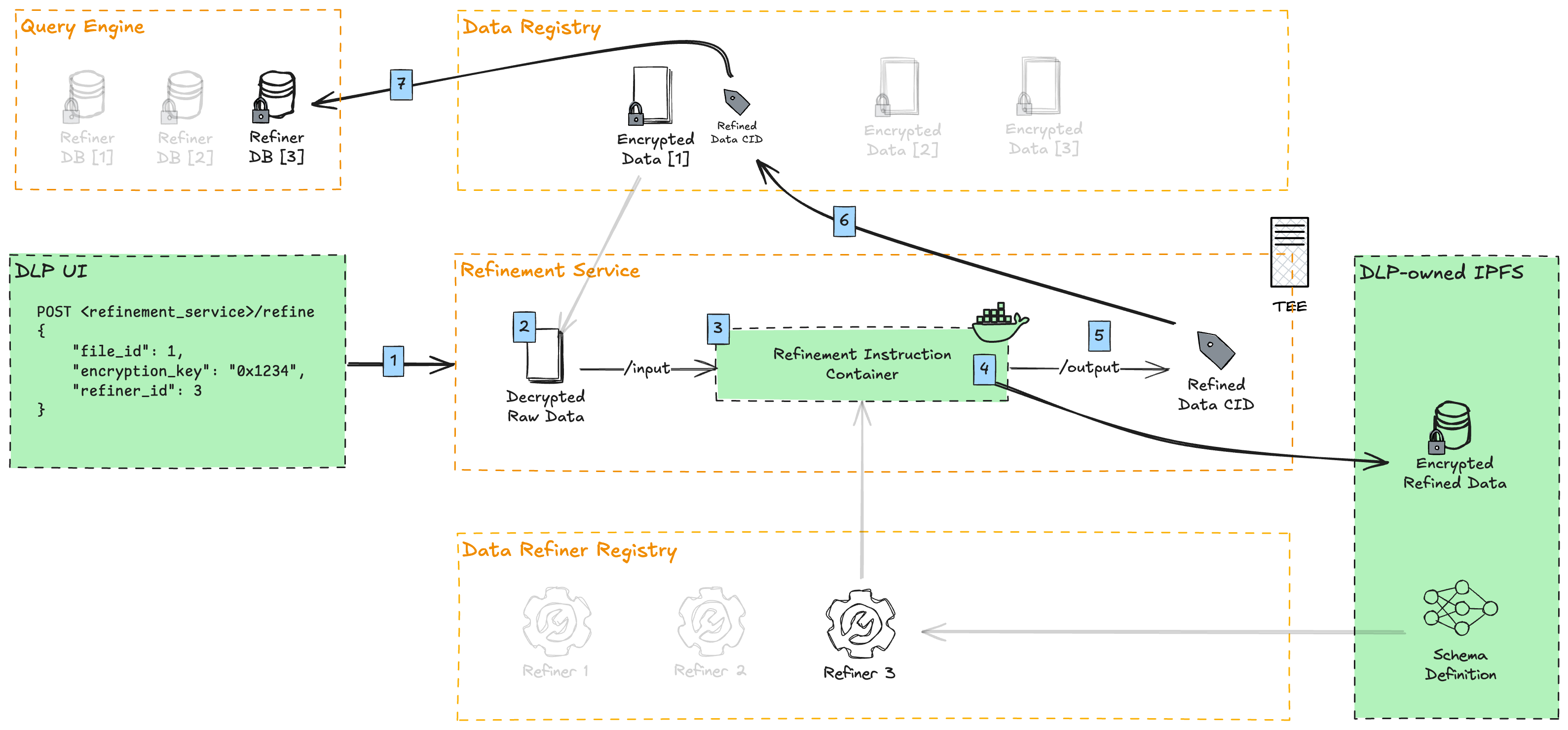
- DLPs upload user-contributed data through their UI, and run proof-of-contribution against it. Afterwards, they call the refinement service to refine this data point.
- The refinement service downloads the file from the Data Registry and decrypts it.
- The refinement container, containing the instructions for data refinement (this repo), is executed
- The decrypted data is mounted to the container's
/inputdirectory - The raw data points are transformed against a normalized SQLite database schema (specifically libSQL, a modern fork of SQLite)
- Optionally, PII (Personally Identifiable Information) is removed or masked
- The refined data is symmetrically encrypted with a derivative of the original file encryption key
- The decrypted data is mounted to the container's
- The encrypted refined data is uploaded and pinned to a DLP-owned IPFS
- The IPFS CID is written to the refinement container's
/outputdirectory - The CID of the file is added as a refinement under the original file in the Data Registry
- Vana's Query Engine indexes that data point, aggregating it with all other data points of a given refiner. This allows SQL queries to run against all data of a particular refiner (schema).
refiner/: Contains the main refinement logicrefine.py: Core refinement implementationconfig.py: Environment variables and settings needed to run your refinement__main__.py: Entry point for the refinement executionmodels/: Pydantic and SQLAlchemy data models (for both unrefined and refined data)transformer/: Data transformation logicutils/: Utility functions for encryption, IPFS upload, etc.
input/: Contains raw data files to be refinedoutput/: Contains refined outputs:schema.json: Database schema definitiondb.libsql: SQLite database filedb.libsql.pgp: Encrypted database file
Dockerfile: Defines the container image for the refinement taskrequirements.txt: Python package dependencies
- Fork this repository
- Modify the config to match your environment, or add a .env file at the root. See below for defaults.
- Update the schemas in
refiner/models/to define your raw and normalized data models - Modify the refinement logic in
refiner/transformer/to match your data structure - If needed, modify
refiner/refiner.pywith your file(s) that need to be refined - Build and test your refinement container
# Local directories where inputs and outputs are found. When running on the refinement service, files will be mounted to the /input and /output directory of the container.
INPUT_DIR=input
OUTPUT_DIR=output

# This key is derived from the user file's original encryption key, automatically injected into the container by the refinement service. When developing locally, any string can be used here for testing.
REFINEMENT_ENCRYPTION_KEY=0x1234

# Required if using https://pinata.cloud (IPFS pinning service)
PINATA_API_KEY=xxx
PINATA_API_SECRET=yyyTo run the refinement locally for testing:
# With Python
pip install --no-cache-dir -r requirements.txt
python -m refiner

# Or with Docker
docker build -t refiner .
docker run \
  --rm \
  --volume $(pwd)/input:/input \
  --volume $(pwd)/output:/output \
  --env PINATA_API_KEY=your_key \
  --env PINATA_API_SECRET=your_secret \
refinerIf you have suggestions for improving this template, please open an issue or submit a pull request.