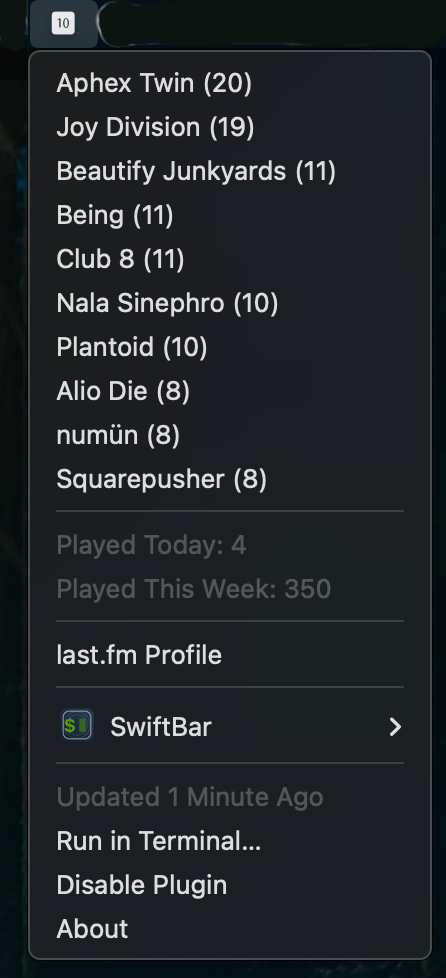
SwiftBar/xbar/bitbar plugin for displaying your week's last.fm scrobbling activity.
Selecting the artist name takes you to the relevant last.fm artist page. You can also navigate directly to your last.fm profile by selecting that menu item.
Only tested in Swiftbar -- if there are any issues in xbar or bitbar, please let me know.
Uses SFSymbols on macOS for the menubar icon. If there is a Windows or Linux bitbar equivalent, you'll probably need to substitute something else.
1.1.2: Initial public release
This Python script is a BitBar/SwiftBar/xbar plugin that displays your top 10 most-played artists from the past week using the Last.fm API.
The script fetches your Last.fm listening data and creates a menu bar display showing:
- Your top 10 artists for the past 7 days with play counts
- Number of tracks played today
- Number of tracks played this week
- A link to your Last.fm profile
lastfmUsername = "joeuser"  # Replace with your Last.fm username
lastfmAPIKey = "aabbccddeeff001115524b000ccebbaa"  # Replace with your API key
Important: Create a Last.fm API key at https://www.last.fm/api/account/create
- Python 3
requestslibrarypickle(standard library)
print ("") # SF Symbol for music icon
print ("---") # BitBar separatorDisplays a music note icon in the macOS menu bar.
my_endpoint = "http://ws.audioscrobbler.com/2.0/?method=user.gettopartists&user={username}&api_key={key}&format=json&period=7day&limit=10"- API Method:
user.gettopartists - Parameters:
period=7day- Gets artists from the past weeklimit=10- Limits results to top 10 artistsformat=json- Returns data in JSON format
for i in range(10):
    print ('{} ({})|href={}'.format(
        artistDict["topartists"]["artist"][i]["name"],
        artistDict["topartists"]["artist"][i]["playcount"],
        artistDict["topartists"]["artist"][i]["url"]
    ))
Outputs each artist in the format: Artist Name (play_count)|href=url
sse = int(time.time())  # Current Unix timestamp
yesterday = sse - 86400  # 24 hours ago (86400 seconds)
lastweek = sse - 604800  # 7 days ago (604800 seconds)
Note: The comment "not y2038 compliant" refers to the Year 2038 problem where 32-bit Unix timestamps will overflow.
Makes two additional API calls:
- Today's tracks: From yesterday's timestamp to now
- This week's tracks: From last week's timestamp to now
Uses the user.getrecenttracks API method with from parameter to filter by date range.
SaveItForLater = {
    "artists": artistDict,
    "playedtoday": daytrax,
    "playedthisweek": weektrax
}

with open('/Users/joeuser/Documents/top10.pickle', 'wb') as f:
    pickle.dump(SaveItForLater, f)
Saves all retrieved data to a pickle file for potential use by other applications (mentioned: TRMNL).
Path to update: /Users/joeuser/Documents/top10.pickle - Change to your desired location.
The script includes basic error handling:
- Exit Code -1: Connection error when retrieving data from Last.fm
- Exit Code -2: JSON parsing error when decoding Last.fm response
The script makes 3 API calls per execution:
- Top artists for the week
- Tracks played today
- Tracks played this week
Configure your BitBar/xbar refresh interval accordingly to avoid hitting Last.fm's rate limits.
The script outputs BitBar-formatted text:
- Lines with
|href=URLbecome clickable menu items ---creates separator lines- First line (with icon) appears in the menu bar
- Store credentials in environment variables or a config file
- Add the config file to
.gitignore - Never commit API keys to version control