Link zur deutschen Beschreibung
- Create a new git repository and copy all the files from this template to it.
- Run
npm installfirst time to install the dependencies(Chioro Standard Library). - To add a new tool edit
extension.js. There is an example tool calledniceFunction. The tools are written in JavaScript. For a detailed description of the sample code refer to the next section. - After the functions are written, run
npm testto run all the tests and make sure everything is working properly.
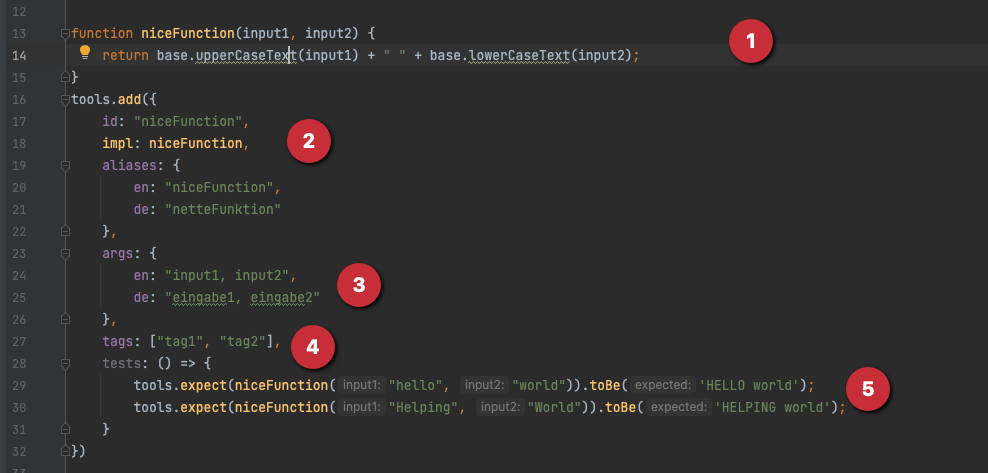
-
Here is the function itself. JavaScript is fully available, tools from the base package can be used with a prefix
base.. In this exampleupperCaseTextandlowerCaseTextfrom the base package are used. Withreturnthe calculated value is returned. -
Following is the information for chioro to manage the function:
idandimplare the name of the function and must match the name in javascriptaliasesare the names of the function in the respective language. These names are displayed in the toolbox. -
argsare the input variables in the respective language. -
tagsany tags can be added. Tags are optional. -
testsany number of tests can be added. Withnpm testthe validity of the function is checked.
- Erstellen Sie ein neues git Repository und kopieren Sie alles aus dieser Vorlage dorthin.
- Führen Sie
npm installeinmalig aus um die Abhängigkeiten zu laden (Basic-Paket) - Um ein neues Werkzeug hinzuzufügen, editieren Sie einfach
extension.js. Es gibt ein Beispielwerkzeug namensniceFunction. Die Werkzeuge sind in JavaScript geschrieben. Eine detaillierte Beschreibung des Beispielcodes finden Sie im nächsten Abschnitt. - Nachdem die Funktionen geschrieben wurden, führen Sie
npm testaus, um alle Tests durchzuführen und sicherzustellen, dass alles richtig funktioniert.
-
Hier steht die Funktion selber. JavaScript steht in vollem Umfang zur Verfügung, Werkzeuge aus dem Basis-Paket können mit einem vorangestellten
base.verwendet werden. In diesem Beispiel werdenupperCaseTextundlowerCaseTextaus dem Basis-Paket verwendet. Mit return wird der berechnete Wert zurückgegeben. -
Es folgen die Informationen für chioro um die Funktion zu verwalten:
idundimplenthalten den Namen der Funktion und müssen dem Namen in Javascript entsprechenaliasessind die Namen der Funktion in der jeweiligen Sprache. Diese Namen werden in der Toolbox angezeigt. -
argssind die Eingabe-Variablen in der jeweiligen Sprache -
tagsbeliebige Tags können hinzugefügt werden. Tags sind optional. -
testsEs können beliebig viele Tests hinzugefügt werden. Mitnpm testwird die Gültigkeit der Funktion überprüft.